1. Увод
Thank you for choosing the SPC 3602N Landline Telephone. This manual provides essential information for setting up, operating, and maintaining your new telephone. Please read it carefully to ensure proper use and to fully utilize all features.

Image 1: The SPC 3602N Landline Telephone, a corded phone with a black finish and large, easy-to-read buttons.
2. Садржај пакета
Молимо вас да проверите садржај пакета након распакивања:
- SPC 3602N Landline Telephone Unit
- Слушалица
- Намотани кабл за слушалицу
- Телефонски кабл (RJ11)
- Кориснички приручник (овај документ)
3. Производ је готовview и карактеристике
The SPC 3602N is designed for simplicity and functionality, offering essential features for reliable communication.
Кључне карактеристике:
- 3 Direct Memory Buttons (M1, M2, M3): For quick dialing of frequently used numbers.
- 10 Indirect Memory Locations: Additional storage for important contacts.
- Функција искључивања звука: Temporarily mutes your microphone during a call.
- "R" Key (Flash Function): Allows access to operator services or call waiting features (network dependent).
- Adjustable Ringer Volume: 3 levels (Low, Medium, High) to suit your environment.
- 3 Ringer Melodies: Choose your preferred ringtone.
- Adjustable Earpiece Volume: 2 levels (High, Low) for comfortable listening.
- Tone Dialing (DTMF): Стандардни метод бирања.
- Line-in-use Indicator: Visual indication when the line is active.
- Mute Indicator: Visual indication when the mute function is active.
- Integrated Directory: For managing stored numbers.
- Разноврстан пласман: Designed for both desktop and wall-mounted use.
- RJ11 Telephone Connection: Standard connection for analog telephone lines.

Слика 2: Крупни план view of the function buttons on the SPC 3602N, including M1, M2, M3, VOL, MENU, MEM, P, R, and RLL keys.

Слика 3: Детаљан view of the large, clearly labeled numeric keypad on the SPC 3602N telephone.
4. Подешавање
4.1 Повезивање телефона
- Повежите слушалицу: Plug one end of the coiled handset cord into the handset and the other end into the handset jack on the side of the telephone base unit.
- Повезивање са телефонском линијом: Plug one end of the telephone line cord (RJ11) into the LINE jack on the back or side of the telephone base unit. Plug the other end into your wall telephone jack.
- Пласман: Place the telephone on a flat, stable surface for desktop use, or use the integrated wall-mount bracket (if applicable) to mount it on a wall. Ensure it is within reach of the telephone line jack.
4.2 Почетни тест
After connecting, lift the handset. You should hear a dial tone, indicating the phone is ready for use.
5. Упутство за употребу
5.1 Позивање
- Подигните слушалицу.
- Сачекајте тон за бирање.
- Позовите жељени телефонски број помоћу тастатуре.
- Once the call is complete, replace the handset to hang up.
5.2 Примање позива
- When the phone rings, lift the handset to answer the call.
- Once the call is complete, replace the handset to hang up.
5.3 Коришћење меморијских функција
The SPC 3602N offers both direct and indirect memory dialing.
Storing Numbers (Direct Memory M1, M2, M3):
- Подигните слушалицу.
- Притисните тастер МЕМ дугме.
- Dial the telephone number you wish to store.
- Притисните тастер МЕМ дугме поново.
- Press the desired direct memory button (M1, M2, или M3) to save the number.
Dialing from Direct Memory:
- Подигните слушалицу.
- Press the desired direct memory button (M1, M2, или M3). Сачувани број ће бити аутоматски биран.
Storing Numbers (Indirect Memory 1-10):
- Подигните слушалицу.
- Притисните тастер МЕМ дугме.
- Dial the telephone number you wish to store.
- Притисните тастер МЕМ дугме поново.
- Press the numeric key (1-0) corresponding to the desired indirect memory location.
Dialing from Indirect Memory:
- Подигните слушалицу.
- Притисните тастер МЕМ дугме.
- Press the numeric key (1-0) corresponding to the desired indirect memory location. The stored number will be dialed automatically.
5.4 Подешавање јачине звука
- Јачина звука у слушалици: Током позива притисните ВОЛ button to cycle between High and Low earpiece volume levels.
- Јачина звона: Use the switch on the side or back of the phone (if present) or the ВОЛ button in standby mode to adjust the ringer volume (Low, Medium, High).
5.5 Функција искључивања звука
- Током позива притисните МУТЕ button (often indicated by a microphone icon). The mute indicator light will illuminate. Your voice will not be transmitted to the other party.
- Притисните тастер МУТЕ button again to resume the conversation. The mute indicator light will turn off.
5.6 Using the "R" Key (Flash)
Тхе R key (Flash) is used to access network services such as call waiting or transferring calls. Its functionality depends on your telephone service provider. Consult your provider for specific instructions on using this feature.
6. Одржавање
To ensure the longevity and optimal performance of your SPC 3602N telephone, follow these maintenance guidelines:
- Чишћење: Wipe the telephone unit and handset with a soft, damp cloth. Do not use abrasive cleaners, solvents, or strong chemicals, as these can damage the surface.
- Избегавајте течности: Keep the telephone away from water and other liquids. If liquid spills on the unit, immediately unplug it from the wall jack and allow it to dry completely before reconnecting.
- Температура и влажност: Чувајте и користите телефон на сувом месту, даље од екстремних температура и високе влажности.
- Управљање кабловима: Ensure that the telephone line cord and handset cord are not tangled or pinched, which could lead to damage.
КСНУМКС. Решавање проблема
If you encounter issues with your telephone, please refer to the following common problems and solutions:
| Проблем | Могући узрок | Решење |
|---|---|---|
| Нема тона за бирање | Телефонски кабл је искључен или неисправан. | Ensure the telephone line cord is securely plugged into both the phone and the wall jack. Try a different wall jack or line cord if available. |
| Не могу да упућујем или примам позиве | Line issue from service provider; phone not connected properly. | Check all connections. If the problem persists, contact your telephone service provider. |
| Ringer does not sound | Ringer volume set to Low or Off. | Adjust the ringer volume to Medium or High using the switch or button. |
| Poor call quality (static, low volume) | Loose connections; interference; earpiece volume too low. | Check handset and line cord connections. Adjust earpiece volume. Move phone away from other electronic devices. |
| Memory dialing not working | Number not stored correctly; incorrect dialing procedure. | Review Section 5.3 for correct storage and dialing procedures. Re-store the number if necessary. |
8. Спецификације
Detailed technical specifications for the SPC 3602N telephone:
| Феатуре | Спецификација |
|---|---|
| Модел | 3602Н |
| Бранд | СПЦ |
| Тип телефона | Цордед |
| Диалер Типе | Једна тастатура |
| Врста везе | RJ11 Analog Line |
| Direct Memory | 3 locations (M1, M2, M3) |
| Indirect Memory | 10 locations (0-9) |
| Ringer Volume Levels | 3 (низак, средњи, висок) |
| Earpiece Volume Levels | 2 (високо, ниско) |
| Димензије (В к Д к Ш) | 81mm (with handset lifted) x 191mm x 137mm |
| Тежина артикла | 0.462 кг (462 грама) |
| Материјал | Кунстстоф (пластика) |
| Боја | Шварц (црни) |
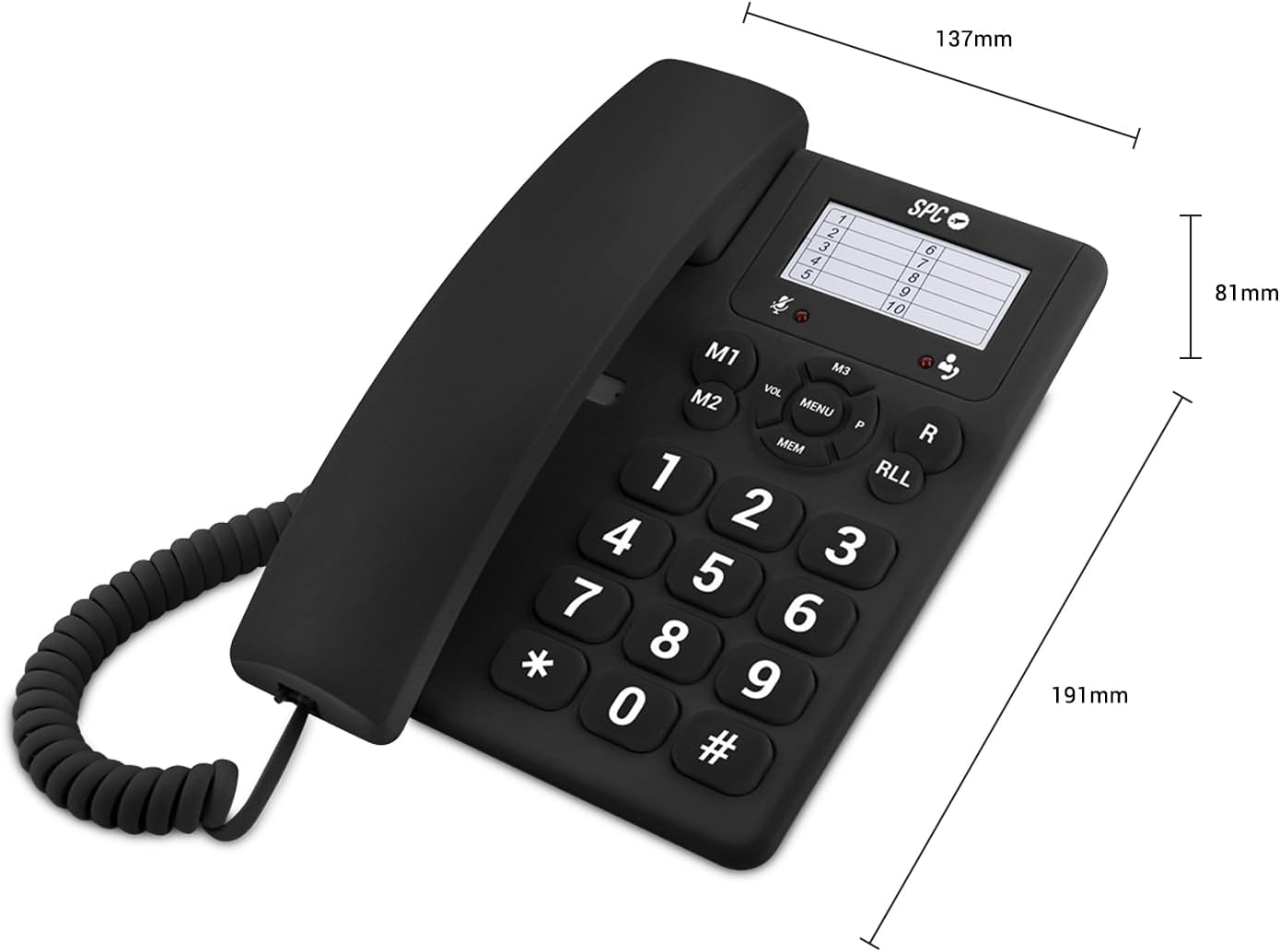
Image 4: The SPC 3602N telephone shown with its key dimensions: 81mm height, 191mm depth, and 137mm width.
9. Гаранција и подршка
Your SPC 3602N Landline Telephone comes with a двогодишња гаранција против фабричких грешака. Молимо вас да сачувате доказ о куповини за потребе гаранције.
For technical support or warranty inquiries, please contact your retailer or the official SPC customer service channels. Refer to the packaging or SPC's official webсајт за контакт информације.


