1. Увод
Thank you for choosing the AVANTEK CW-11 Wireless Doorbell. This manual provides essential information for the proper installation, operation, and maintenance of your new doorbell system. Please read these instructions carefully before use and retain them for future reference.

Image 1.1: AVANTEK CW-11 Wireless Doorbell system, showing the compact transmitter and receiver units.
2. Безбедносне информације
- Не излажите уређај екстремним температурама или директној сунчевој светлости.
- Keep the device away from water and high humidity. The transmitter is IP55 waterproof, but the receiver is for indoor use only.
- Не покушавајте сами да раставите или поправите уређај. Обратите се корисничкој подршци за помоћ.
- Држите батерије ван домашаја деце. Правилно одложите искоришћене батерије.
3. Садржај пакета
- 1 x Wireless Transmitter (Doorbell Button)
- 1 x Plug-in Receiver (Chime Unit)
- 1 x CR2 Battery (pre-installed in transmitter)
- 2 к завртњи
- 2 к Анцхорс
- 1 к двострана лепљива трака
- 1 к одвијач
4. Производ је готовview
The AVANTEK CW-11 Wireless Doorbell system consists of a battery-powered transmitter (doorbell button) and a plug-in receiver (chime unit). The receiver features 52 selectable melodies, 5 adjustable volume levels, and an LED indicator for visual alerts.

Image 4.1: The receiver unit, illustrating its features including 52 chimes, 5 volume levels, and an LED indicator.
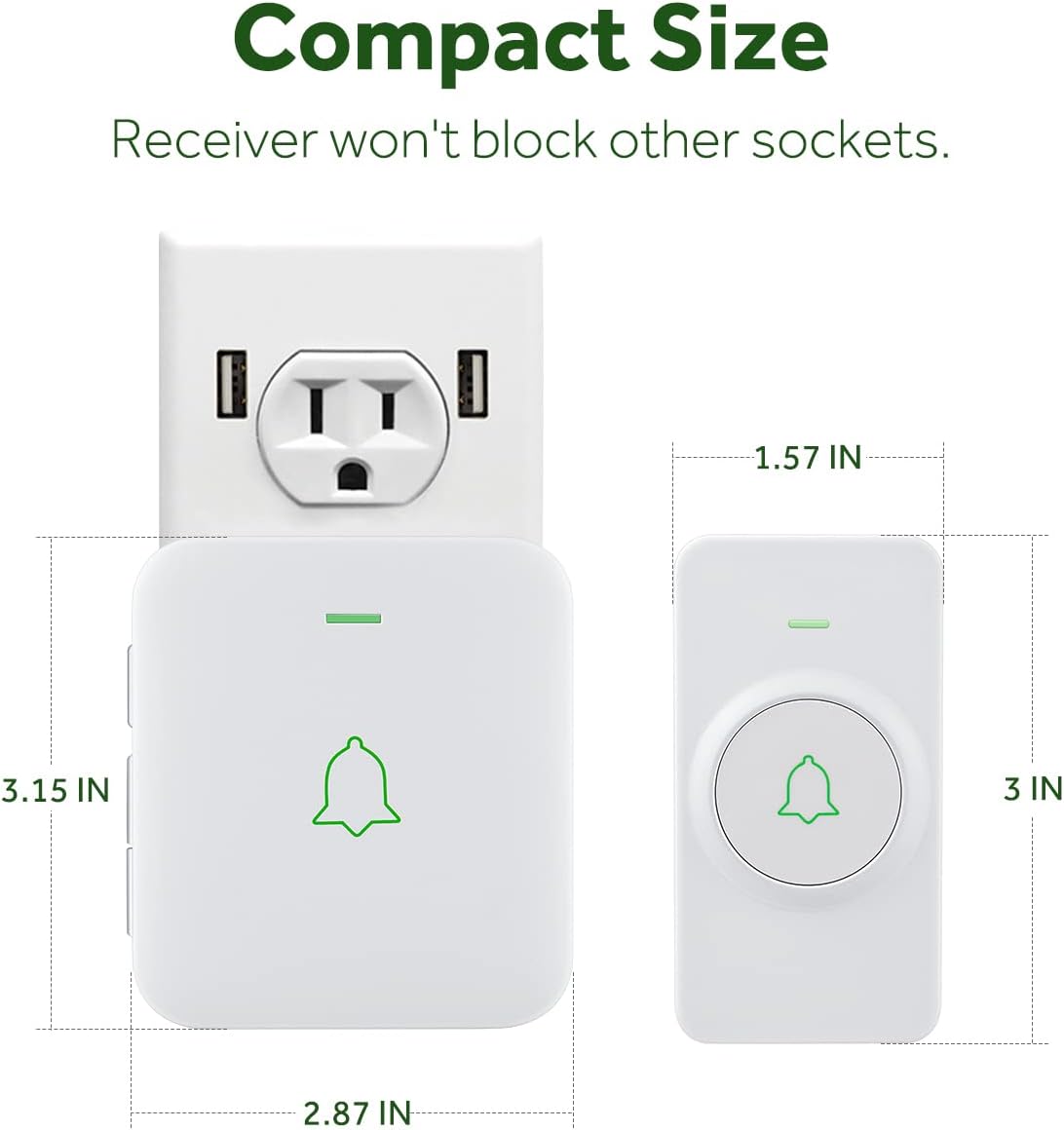
Image 4.2: The compact size of both the transmitter and receiver, designed to not obstruct adjacent power sockets.
5. Упутства за подешавање
5.1 Installing the Transmitter
The transmitter can be installed using either the provided double-sided adhesive tape or screws and anchor plugs.

Image 5.1: Visual guide for installing the transmitter using either adhesive tape or screws and anchor plugs.
Method A: Using Double-Sided Adhesive Tape
- Пажљиво очистите жељену површину за монтажу како бисте били сигурни да нема прашине и влаге.
- Peel off one side of the protective film from the double-sided adhesive tape and attach it to the back of the transmitter.
- Peel off the other side of the protective film and firmly press the transmitter onto the cleaned surface for at least 30 seconds.
Method B: Using Screws and Anchor Plugs
- Mark the desired mounting points for the transmitter on the wall.
- Избушите две рупе на означеним местима.
- Insert the anchor plugs into the drilled holes.
- Align the transmitter's mounting holes with the anchor plugs and secure it with the provided screws.
Важно: To prevent signal interference, do not install the transmitter close to or on metal surfaces such as metal door frames or mailboxes.
5.2 Plugging in the Receiver
Plug the receiver into a standard electrical outlet in a location where the chime can be easily heard. The LED on the receiver will flash upon initial power-up.
5.3 Pairing the Doorbell System
The transmitter and receiver are pre-paired at the factory. If re-pairing is needed or if you add additional transmitters/receivers, follow these steps:
- Укључите пријемник у утичницу.
- Да бисте ушли у режим упаривања, држите притиснуто дугме за јачину звука на пријемнику 3 секунде. ЛЕД лампица на пријемнику ће трептати.
- Remove the battery insulating film from the transmitter (if not already done).
- Притисните дугме на предајнику. Његова ЛЕД диода ће трептати.
- Након успешног упаривања, пријемник ће се огласити једном зазвоном, а ЛЕД диоде на пријемнику и предајнику ће истовремено трептати.
Video 5.2: Official AVANTEK video demonstrating how to install the wireless doorbell transmitter.
Video 5.3: Official AVANTEK video demonstrating how to pair the wireless doorbell system.
6. Упутство за употребу
6.1 Промена мелодија
The receiver offers 52 different melodies. Use the 'Next' and 'Previous' buttons on the side of the receiver to cycle through the available tunes. Press the doorbell button to preview the selected melody.

Image 6.1: The receiver offers a wide selection of melodies for personalization.
6.2 Подешавање јачине звука
There are 5 adjustable volume levels, with a maximum setting of 115 dB. Use the 'Volume' button on the side of the receiver to increase or decrease the sound level.
6.3 Режим искључења звука
To activate mute mode (0 dB), repeatedly press the 'Volume' button until the sound is off. In this mode, only the LED indicator will flash when the doorbell is pressed, providing a silent visual alert.

Image 6.2: The mute mode feature allows for silent notifications, ideal for quiet environments.
7. Одржавање
7.1 Чишћење
Обришите уређаје меком, сувом крпом. Не користите абразивна средства за чишћење или раствараче.
7.2 Замена батерије (предајник)
The transmitter uses a CR2 battery with an estimated lifespan of 3 years. When the battery is low, the transmitter's LED may not light up or the signal range may decrease. To replace the battery:
- Carefully open the transmitter casing using the provided screwdriver or a small flat-head screwdriver.
- Уклоните стару ЦР2 батерију.
- Уметните нову CR2 батерију, водећи рачуна о исправном поларитету (+/-).
- Затворите цasinг безбедно.
КСНУМКС. Решавање проблема
- Doorbell not chiming: Ensure the receiver is plugged in and powered. Check the transmitter battery. Re-pair the devices if necessary (refer to Section 5.3).
- Short signal range: Ensure the transmitter is not installed on or near metal surfaces. Relocate the receiver to a more central position. Replace the transmitter battery.
- сметње: The doorbell operates on a frequency that minimizes interference with other household devices. If interference occurs, try changing the melody or relocating the receiver.
- Функција меморије: The device remembers your last melody and volume level after a power outage, so no need to reset settings.
9. Спецификације
| Феатуре | Спецификација |
|---|---|
| Број модела | ЦВ-КСНУМКС |
| Домет | До 1000 стопе (300 метара) |
| Мелодије | 52 |
| Волуме Левелс | 5 (до 115 dB) |
| Батерија предајника | 1 к ЦР2 (укључено) |
| Трајање батерије предајника | Прибл. 3 година |
| Водоотпорна оцена | IP55 (Предајник) |
| Радна температура | -4 °Ф до 140 °Ф (-20 °Ц до 60 °Ц) |
| Извор напајања | АЦ & Батерија |
| Димензије производа | Receiver: 2.8 x 0.6 x 3.1 inches; Transmitter: 3.15 x 1.57 x 0.79 inches (approx.) |
10. Гаранција и подршка
For warranty information or technical support, please refer to the contact details provided with your product packaging or visit the official AVANTEK webсајт. Сачувајте рачун као доказ о куповини.


