Увод
This manual provides essential instructions for setting up, operating, and maintaining your Optoma W335 WXGA DLP Professional Projector. Designed for business presentations, classrooms, and home use, this projector delivers bright, clear images with a long lamp life. Please read this manual thoroughly before use to ensure optimal performance and safety.
Сетуп
Распакивање и први преглед
Carefully remove the projector and all accessories from the packaging. Verify that all components listed in the 'What's in the Box' section are present and undamaged.
- W335 projector
- Повер Цорд
- Ремоте
- Батерија
Пласман
The Optoma W335 is portable, weighing less than 7 pounds, making it easy to move between rooms. For optimal viewing, place the projector on a stable, flat surface. Ensure adequate ventilation around the unit to prevent overheating.

Image: The Optoma W335 projector showing its compact size and dimensions (12.44" width, 9.2" depth, 4.27" height).
The projector features adjustable legs for easy height and angle adjustments, allowing you to find the perfect screen area for projection. This helps in achieving a level and properly aligned image.
Повезивање
The W335 offers a variety of input options for connecting to different devices:
- ДВИ: За дигитални видео и аудио високе дефиниције.
- ВГА: For analog video connections, commonly used with computers.
- Композитни видео: За видео стандардне дефиниције.
- Аудио улаз/излаз: For connecting external audio sources or speakers.
- USB Power Out (5V/1.0A): For powering external devices like streaming sticks.
- РС232: За интеграцију система управљања.
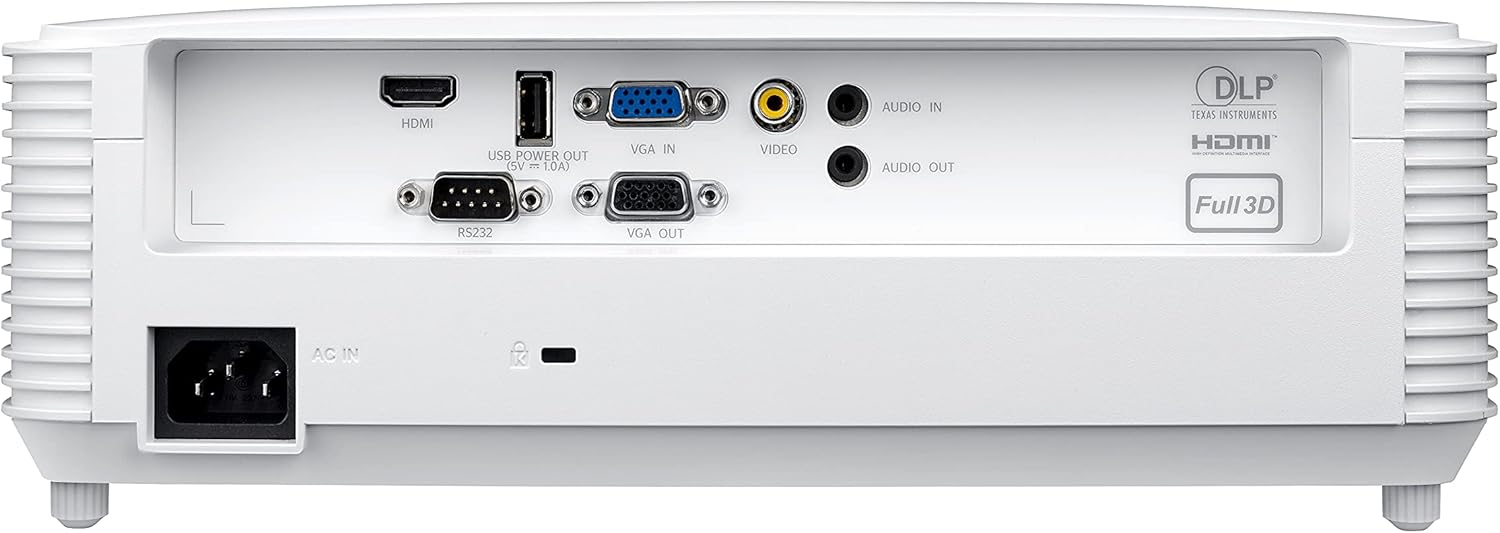
Image: Rear panel of the Optoma W335 projector, clearly showing the HDMI, VGA In, VGA Out, Video, Audio In, Audio Out, RS232, and USB Service Only ports.
Connect your source device (e.g., laptop, Blu-ray player) to the appropriate input port on the projector. Ensure the power cord is securely connected to the projector and a power outlet.
Упутство за употребу
Укључивање/искључивање
Press the power button on the projector's control panel or the remote control to turn the unit on or off. Allow a few moments for the projector to warm up or cool down.

Слика: Врх view of the Optoma W335 projector, highlighting the control panel with power, menu, and navigation buttons, along with focus and zoom rings.
Подешавање слике
- Фокус: Окрените прстен за фокусирање на објективу да бисте изоштрили слику.
- Зумирање: Use the zoom ring to adjust the image size without moving the projector.
- Кеистоне Цоррецтион: The W335 supports vertical keystone correction to square the image if the projector is not perfectly perpendicular to the screen. This can be adjusted via the on-screen menu.
The projector delivers vibrant and sharp WXGA resolution (1280 x 800) images with a 22,000:1 contrast ratio, suitable for various environments including well-lit rooms due to its 3,800 lumens brightness.
Аудио
An integrated 10-watt speaker provides room-filling audio. For enhanced sound, connect external speakers to the Audio Out port.
Одржавање
Lamp Живот
Пројектор лamp has a life of up to 15,000 hours, providing many years of use with minimal maintenance. When the lamp reaches the end of its life, a warning indicator will appear, and the lamp will need to be replaced. Refer to the full user manual for detailed lamp упутства за замену.
Чишћење
- Објектив: Use a soft, lint-free cloth and lens cleaning solution to gently clean the projector lens.
- Екстеријер: Обришите спољашњост цasinОбришите меком, сувом крпом. Избегавајте абразивна средства за чишћење или раствараче.
- Вентилациони отвори: Редовно проверавајте и чистите отворе за вентилацију како бисте осигурали правилан проток ваздуха и спречили прегревање. Користите меку четку или компримовани ваздух да бисте уклонили прашину.
Решавање проблема
- Нема слике:
- Ensure the projector is powered on and the source device is connected and active.
- Check the input source selection on the projector.
- Проверите да ли су сви каблови безбедно повезани.
- Замућена слика:
- Подесите прстен за фокусирање на објективу.
- Ensure the projector is at the correct distance from the screen.
- Use keystone correction if the image is distorted.
- Нема звука:
- Проверите подешавања јачине звука и на пројектору и на изворном уређају.
- Ensure external speakers (if used) are properly connected and powered.
- Verify the audio cable connection.
- Прегревање пројектора:
- Ensure air vents are clear and not obstructed.
- Користите пројектор у добро проветреном простору.
- If the issue persists, power off the projector and allow it to cool down before restarting.
Спецификације
| Феатуре | Детаљ |
|---|---|
| Димензије производа | 9.6 к 12.4 к 3.9 инча |
| Тежина артикла | 6.61 фунти |
| Број модела ставке | В335 |
| Бранд | Оптома |
| Препоручена употреба | Business, Education |
| Посебна карактеристика | Схорт Тхров |
| Технологија повезивања | ХДМИ, ВГА |
| Резолуција екрана | 1280 к 800 (ВКСГА) |
| Осветљеност | 3800 лумена |
| Однос контраста | 22,000:1 |
| Lamp Живот | До 15,000 сати |
| Интегрисани звучник | 10-ватт |
| Тхров Ратио | 1.55 – 1.73:1 |
Гаранција и подршка
For detailed warranty information and technical support, please refer to the official Optoma website or the documentation included with your product. You can also contact Optoma customer service directly for assistance.
Посетите Оптома продавница на Амазону за више информација о производу.


