Увод
Welcome to the user manual for your Nokia 7 Plus TA-1046 smartphone. This guide provides essential information to help you get started, operate, maintain, and troubleshoot your device. The Nokia 7 Plus TA-1046 is an international version, factory unlocked, and operates on GSM networks only. It does not support CDMA networks. Please note that this international version may not carry a warranty in the USA.
This device is a refurbished product, tested and certified to function like new. The refurbishing process includes functionality testing, basic cleaning, inspection, and repackaging. It ships with all relevant accessories.
Сетуп
1. Распакивање и почетна наплата
Carefully unbox your Nokia 7 Plus TA-1046. Before first use, it is recommended to fully charge the device using the provided USB Type-C cable and power adapter.
2. Уметање SIM картица и меморијске картице
The Nokia 7 Plus TA-1046 supports Dual SIM functionality. Locate the SIM tray on the side of the device. Use the provided SIM ejector tool to open the tray. Insert your Nano-SIM cards and, if desired, a microSD card into the designated slots. Ensure the cards are correctly oriented before reinserting the tray firmly into the phone.
Слика: Са стране view of the Nokia 7 Plus TA-1046, illustrating the location of the SIM tray and physical buttons.
3. Укључивање и почетна конфигурација
Press and hold the power button located on the side of the device until the Nokia logo appears. Follow the on-screen instructions to complete the initial setup, which includes selecting your language, connecting to a Wi-Fi network, setting up your Google account, and configuring security features like fingerprint recognition.

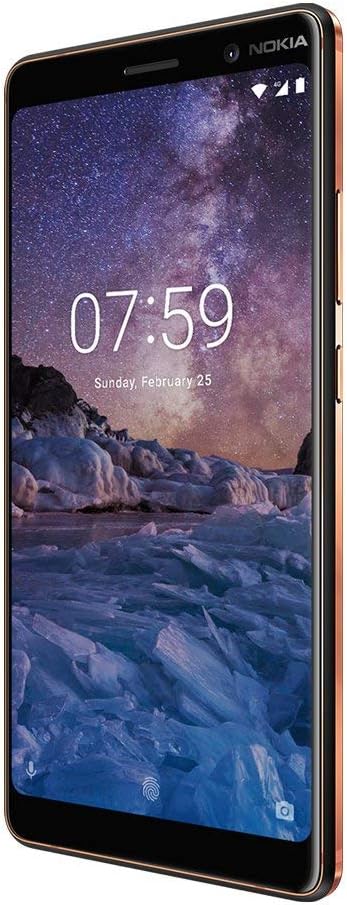
Слика: Фронт view of the Nokia 7 Plus TA-1046, displaying the home screen with time and date.
Управљање вашим уређајем
1. Основна навигација
Your Nokia 7 Plus TA-1046 runs on Android One, providing a clean and intuitive user experience. Use gestures to navigate: swipe up for the app drawer, swipe down for notifications and quick settings, and use the on-screen navigation buttons (Back, Home, Recents).
2. Позиви и поруке
To make a call, open the Phone app and dial the number or select a contact. For messaging, use the Messages app to send and receive SMS/MMS. Ensure your SIM card is active and has network coverage (GSM only).
3. Интернет повезивање
Connect to the internet via Wi-Fi or your mobile data (GSM). To enable Wi-Fi, go to Подешавања > Мрежа и интернет > Wi-Fi. For mobile data, ensure it is enabled under Подешавања > Мрежа и интернет > Мобилна мрежа.
4. Функције камере
The Nokia 7 Plus TA-1046 features a dual rear camera system and a front camera, optimized for photography. Open the Camera app to capture photos and videos. Explore different modes and settings for optimal results.

Слика: Леђа view of the Nokia 7 Plus TA-1046, highlighting the dual camera setup and the circular fingerprint sensor.
5. Биометријска безбедност
Utilize the fingerprint recognition feature for secure and quick unlocking. Register your fingerprints in Settings > Security & location > Fingerprint. The fingerprint sensor is located on the back of the device.
Одржавање
1. Брига о батерији
Your device is equipped with a Lithium-Ion battery. To prolong battery life, avoid extreme temperatures and allow the battery to discharge partially before recharging. Avoid leaving the phone connected to the charger for extended periods after it's fully charged.
2. Чишћење уређаја
Use a soft, lint-free cloth to clean the screen and body of your phone. Avoid using harsh chemicals or abrasive materials, which can damage the finish. While the device is water-resistant, it is not waterproof. Avoid submerging it in liquids.
3. Ажурирања софтвера
As an Android One device, your Nokia 7 Plus TA-1046 receives regular security and operating system updates directly from Google. Ensure your device is connected to Wi-Fi and has sufficient battery charge before installing updates. Check for updates in Подешавања > Систем > Ажурирање система.
Решавање проблема
1. Уређај се не укључује
Ensure the battery is charged. Connect the phone to its charger and wait a few minutes before attempting to power it on again. If the issue persists, try holding the power button for an extended period (10-15 seconds) for a forced restart.
2. Network Connectivity Issues (GSM ONLY)
This device is an international version and supports GSM networks only. It is not compatible with CDMA networks. If you are in a region primarily using CDMA (e.g., some carriers in the USA), you will not get cellular service. For GSM networks, ensure your SIM card is properly inserted and activated. Check signal strength and try restarting the device. Verify that your specific model (TA-1046) supports the 4G LTE bands used by your carrier, as some international versions may lack full band support in certain regions (e.g., Band 4 or 12 for T-Mobile/AT&T in the USA).
3. Freezing or Unresponsive Screen
If the device becomes unresponsive, press and hold the power button for approximately 10 seconds to force a restart. If the problem recurs frequently, consider clearing the cache partition or performing a factory reset (back up your data first).
4. Battery Draining Quickly or Inaccurate Percentage
Battery performance can degrade over time. If you experience rapid battery drain or inconsistent battery percentage readings, try calibrating the battery by fully discharging and then fully recharging the device. Close background apps and reduce screen brightness to conserve power. If the issue persists, it may indicate a battery fault.
5. General Performance Issues
Редовно чистите непотребно files and apps to free up storage space. Restart your phone periodically. If performance remains poor, a factory reset (Подешавања > Систем > Опције ресетовања > Обриши све податке (ресетовање на фабричка подешавања)) can often resolve software-related issues, but remember to back up all important data beforehand.
Спецификације
| Феатуре | Детаљ |
|---|---|
| Бранд | Нокиа |
| Назив модела | 7 Плус |
| Оперативни систем | Андроид Оне |
| Величина инсталиране РАМ меморије | 4 ГБ |
| Капацитет меморије | 64 ГБ |
| Величина екрана | 6 инча |
| Резолуција | 1920 к 1080 |
| Вирелесс Царриер | Откључано |
| Целлулар Тецхнологи | GSM (NO CDMA) |
| Технологија повезивања | Wi-Fi, USB Type C |
| Боја | Црно |
| Број слотова за SIM картице | Дуал СИМ |
| Форм Фацтор | Бар |
| Биометријска безбедносна функција | Препознавање отиска прста |
| Ниво отпорности на воду | Отпоран на воду |
| Опис камере | Front, Rear (Dual Rear Cameras) |
| Number of Front Cameras | 2 |
| Опис батерије | Литијум-јонски |
| Тежина артикла | 8 унци |
| Димензије артикла | 6.7 к 5.6 к 1.1 инча |
| Произвођач | Нокиа |
Информације о гаранцији
Important: This Nokia 7 Plus TA-1046 is an International Version and does not carry a warranty in the USA.
For warranty information in other regions, please refer to the documentation provided with your device at the time of purchase or contact Nokia customer support in your specific country of purchase. As a refurbished product, any specific warranty or return policy would be provided by the refurbisher or seller, not the original manufacturer for this international model in the USA.
Подршка
For further assistance, please visit the official Nokia support website for your region. You can find FAQs, troubleshooting guides, and contact information for customer service. When seeking support, have your device's model number (TA-1046) and IMEI readily available.
Due to the nature of this being an international, unlocked, and refurbished device, direct manufacturer support in certain regions (like the USA) may be limited. Please consult the seller for any post-purchase support or return inquiries.