Увод
Welcome to the user manual for your new Kindle Oasis. This guide provides essential information on setting up, operating, maintaining, and troubleshooting your device. The Kindle Oasis is designed for an optimal reading experience, featuring a high-resolution display, adjustable warm light, and a waterproof design.

Image: Kindle Oasis in a bathtub, highlighting its sleek design and page turn buttons, demonstrating its waterproof capability.
Сетуп
1. Почетна наплата
Before first use, fully charge your Kindle Oasis. Connect the included USB 2.0 charging cable to the device and a 5W power adapter or a computer's USB port. A full charge takes approximately 3 hours.
2. Укључите напајање
Притисните и држите дугме за напајање које се налази на горњој ивици уређаја док се екран не осветли.
3. Language and Wi-Fi Setup
Follow the on-screen prompts to select your preferred language. The device will then guide you through connecting to a Wi-Fi network. The Kindle Oasis supports 802.11b, g, or n standards with WEP, WPA, and WPA2 security.
4. Register Your Device
Register your Kindle Oasis to your Amazon account to access your content library and the Kindle Store. If you do not have an Amazon account, you will be prompted to create one.
Operating Your Kindle Oasis
Читање
To open a book, tap its cover on the home screen. Use the physical page turn buttons on the side of the device or tap the left/right side of the screen to navigate through pages.
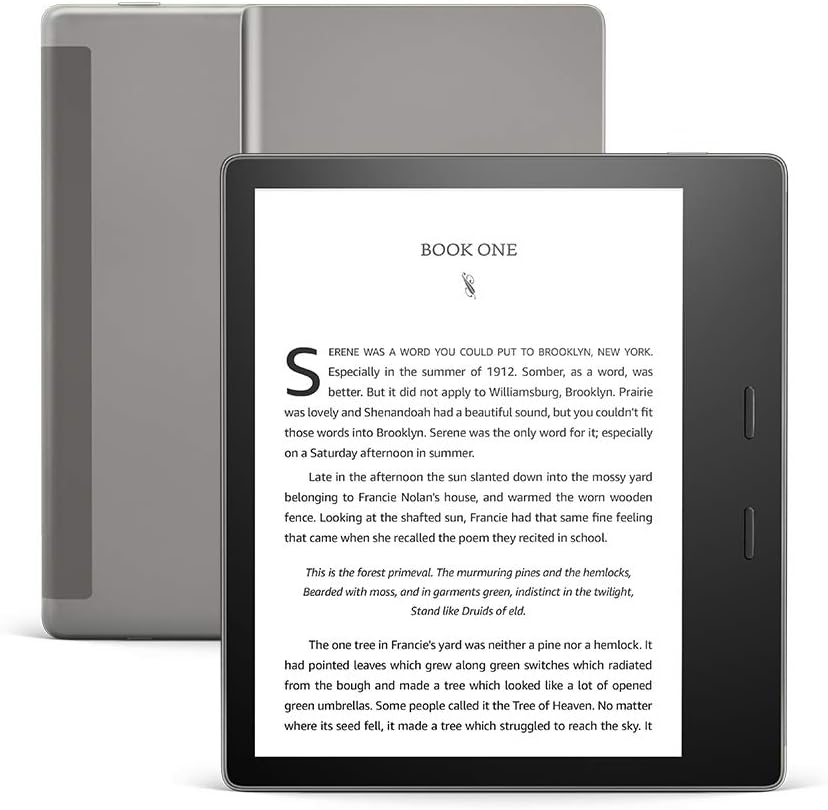
Слика: Фронт view of the Kindle Oasis displaying a book, with its gray cover visible behind it.
Подешавање поставки екрана
Tap the top of the screen to bring up the toolbar. From here, you can adjust:
- Осветљеност: Drag the slider to increase or decrease screen illumination.
- топлина: Adjust the warm light to shift the screen shade from white to amber, reducing eye strain, especially in low light.
- Font Size and Style: Select from various font sizes and styles to customize your reading experience.

Image: Close-up of the Kindle Oasis screen demonstrating the adjustable warm light feature, showing a warmer tone.
Waterproofing (IPX8)
The Kindle Oasis is waterproof (IPX8 rated), meaning it can withstand accidental immersion in 2 meters of fresh water for up to 60 minutes. This allows for reading in environments like the bath or by the pool.

Image: A woman reading her Kindle Oasis while relaxing by a swimming pool, illustrating the device's waterproof capability.
Audible Integration
Your Kindle Oasis supports Audible audiobooks. Connect Bluetooth headphones or speakers to listen to audiobooks. You can seamlessly switch between reading and listening to a book.

Image: A man wearing headphones and a backpack on a beach, presumably listening to an Audible audiobook on his Kindle Oasis, demonstrating the seamless switch between reading and listening.
Одржавање
Чишћење уређаја
Use a soft, lint-free cloth to clean the screen and body of your Kindle Oasis. Do not use abrasive cleaners or solvents.
Баттери Царе
To maximize battery life, avoid exposing the device to extreme temperatures. A single charge can last up to six weeks with wireless and Bluetooth off and light setting at 13. Frequent wireless usage and Audible streaming will reduce battery life.
Ажурирања софтвера
Your Kindle Oasis receives automatic software security updates. Ensure your device is connected to Wi-Fi periodically to receive these updates, which improve performance and add new features.
Решавање проблема
Уређај не реагује
If your Kindle Oasis is unresponsive, try a forced restart. Press and hold the power button for 40 seconds until the device restarts.
Не могу да се повежем са Wi-Fi мрежом
- Уверите се да је ваша Wi-Fi мрежа активна и у домету.
- Проверите лозинку за Wi-Fi.
- Рестартујте свој Wi-Fi рутер.
- Restart your Kindle Oasis.
Батерија се брзо празни
- Reduce screen brightness and warmth settings.
- Искључите Wi-Fi и Bluetooth када их не користите.
- Avoid streaming Audible audiobooks for extended periods without charging.
- Ensure no background processes are consuming excessive power.
Проблеми са екраном
If you notice persistent lines or artifacts on the screen, try restarting the device. If the issue persists, contact customer support.
Спецификације
| Феатуре | Детаљ |
|---|---|
| Дисплаи | Amazon's 7” Paperwhite display technology with next generation e-paper and built-in light, 300 ppi, optimized font technology, 16-level gray scale. |
| Величина | 6.3” x 5.6” x 0.13-.33” (159 x 141 x 3.4-8.4 mm). |
| Тежина | 6.6 оз (188 г). |
| Складиштење на уређају | 32 GB (holds thousands of books or over 160 Audible audiobooks). |
| Трајање батерије | Up to six (6) weeks (based on 30 mins reading/day, wireless/Bluetooth off, light at 13). |
| Време пуњења | Approx. 3 hours from 5W power adapter via USB cable. |
| Ви-Фи повезивање | 802.11b, g, or n standards with WEP, WPA and WPA2 security. |
| Хидроизолација | IPX8 (2 meters fresh water for 60 minutes). |
| Подржани формати садржаја | Kindle Format 8 (AZW3), Kindle (AZW), TXT, PDF, unprotected MOBI, PRC natively; HTML DOC, DOCX, JPEG, GIF, PNG, PMP through conversion; Audible audio format (AAX). |
| Генератион | Kindle Oasis 10th Generation - 2019 release. |
Гаранција и подршка
Информације о гаранцији
Your Kindle Oasis comes with a 1-year limited warranty and service. Optional extended warranties may be available for purchase in some regions.
Корисничка подршка
For further assistance, visit the official Amazon support website or contact Amazon customer service. You can find more information about Kindle devices and user guides on the Amazon webсајту.
Use of Kindle is subject to Amazon's Conditions of Use.


