1. Увод
The MOXA MGate MB3660-16-2DC is a high-performance 16-port Modbus gateway designed for converting between Modbus TCP and Modbus RTU/ASCII protocols. This device facilitates seamless communication between Modbus TCP hosts and Modbus RTU/ASCII serial devices. It features dual DC power inputs for enhanced reliability and redundancy, making it suitable for critical industrial automation applications.
This manual provides essential information for the proper installation, configuration, operation, and maintenance of your MGate MB3660-16-2DC gateway.
2. Безбедносне информације
Please read and understand all safety instructions before operating the device. Failure to do so may result in injury or damage to the equipment.
- Уверите се да је напајање волtage matches the device's requirements (dual DC input).
- Disconnect power before performing any installation or maintenance procedures.
- Инсталирајте уређај у добро проветреном простору како бисте спречили прегревање.
- Избегавајте излагање уређаја влази, екстремним температурама или корозивним срединама.
- Само квалификовано особље треба да обавља инсталацију и сервисирање.
3. Садржај пакета
Проверите да ли ваш пакет садржи следеће ставке:
- MOXA MGate MB3660-16-2DC Modbus Gateway
- Водич за брзу инсталацију
- Гарантни лист
- Прикључни блок за улаз напајања
- DIN-rail mounting kit (if applicable)
If any of these items are missing or damaged, please contact your sales representative immediately.
4. Опис хардвера
The MGate MB3660-16-2DC features multiple ports and indicators for easy setup and monitoring.
4.1 Предња плоча
The front panel typically includes LED indicators for power, network activity, and serial port status.
- PWR1/PWR2 ЛЕД диода: Indicates status of primary/secondary DC power input.
- ЛЕД ФАУЛТ: Indicates system errors or warnings.
- LAN1/LAN2 LEDs: Indicate Ethernet link and activity.
- Serial Port LEDs (1-16): Indicate data transmission/reception on each serial port.
4.2 Rear/Side Panels
These panels house the connection ports:
- Улазна снага: Dual DC power input terminal blocks for redundant power.
- Етхернет портови: RJ45 ports for Modbus TCP network connection.
- Серијски портови: 16 DB9 or terminal block connectors for Modbus RTU/ASCII devices.
- Дугме за ресетовање: For restoring factory default settings.
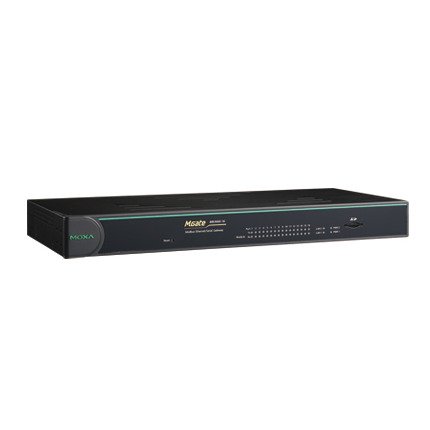
Слика 1: Предња страна view of the MOXA MGate MB3660-16-2DC Modbus Gateway, showing LED indicators and general form factor.
5. Подешавање
5.1 Монтажа
The MGate MB3660-16-2DC can be mounted on a DIN-rail or wall-mounted using the provided kit.
- Монтажа на ДИН шину: Attach the DIN-rail clip to the back of the device and snap it onto a standard DIN-rail.
- Монтажа на зид: Secure the wall-mount plates to the device, then use screws to fix the device to a wall or panel.
5.2 Прикључак за напајање
Connect two independent DC power sources to the dual power input terminal blocks for redundancy. Ensure correct polarity.
- Connect the positive (+) wire to the V+ terminal.
- Connect the negative (-) wire to the V- terminal.
- Connect the ground wire to the ⊗ terminal.
5.3 Мрежна веза
Connect the Ethernet ports to your Modbus TCP network using standard RJ45 Ethernet cables.
5.4 Serial Device Connection
Connect your Modbus RTU/ASCII serial devices to the 16 serial ports. Configure the serial port settings (baud rate, data bits, parity, stop bits, mode) via the device's web console or utility to match your serial devices.
5.5 Почетна конфигурација
Приступите уређају web-based management interface by connecting a computer to the same network segment and entering the default IP address (refer to the Quick Installation Guide for the default IP). Configure network settings, Modbus mapping, and serial port parameters as required for your application.
6. Руковање капијом
Once configured, the MGate MB3660-16-2DC operates as a transparent Modbus gateway, converting requests between Modbus TCP masters and Modbus RTU/ASCII slaves.
6.1 Modbus Communication Flow
- Modbus TCP master sends a request to the gateway's IP address and configured TCP port.
- The gateway translates the Modbus TCP request into a Modbus RTU/ASCII request.
- The gateway sends the serial request to the designated Modbus RTU/ASCII slave device via the appropriate serial port.
- The slave device responds to the gateway.
- The gateway translates the serial response back to Modbus TCP and forwards it to the Modbus TCP master.
6.2 Monitoring Status
Regularly check the LED indicators on the front panel to monitor the device's operational status:
- PWR1/PWR2: Should be solid green when power is supplied.
- KVAR: Should be off during normal operation. A red light indicates an error.
- ЛАН ЛЕД диоде: Solid green for link, blinking for activity.
- Serial Port LEDs: Blink when data is being transmitted or received on that port.
7. Одржавање
To ensure optimal performance and longevity of your MGate MB3660-16-2DC, follow these maintenance guidelines:
- Чишћење: Periodically clean the device's exterior with a soft, dry cloth. Do not use liquid or aerosol cleaners.
- Ажурирања фирмвера: Check the MOXA website for the latest firmware versions. Apply updates as recommended to enhance features and security.
- Провера животне средине: Уверите се да радно окружење остаје у прописаним опсезима температуре и влажности.
- Инспекција каблова: Regularly inspect all connected cables for damage or loose connections.
КСНУМКС. Решавање проблема
Овај одељак пружа решења за уобичајене проблеме на које можете наићи.
| Проблем | Могући узрок | Решење |
|---|---|---|
| Device not powering on (PWR LEDs off) | No power supply; faulty power adapter; incorrect wiring. | Check power connections and source; verify power adapter functionality. |
| No network connectivity (LAN LEDs off) | Faulty Ethernet cable; incorrect network settings; switch/router issue. | Check Ethernet cable; verify IP settings; test with another network port. |
| Грешка серијске комуникације | Incorrect serial port settings (baud rate, parity); wrong wiring; slave device issue. | Verify serial port settings match slave device; check serial cable wiring; test slave device independently. |
| FAULT LED is red | System error; hardware malfunction. | Consult the product manual for specific FAULT codes or contact technical support. Try power cycling the device. |
8.1 Ресетовање на фабричка подешавања
If issues persist, you may need to perform a factory reset. Locate the reset button (usually a small pinhole) and press it for 5-10 seconds while the device is powered on. This will restore all settings to their default values.
9. Спецификације
| Феатуре | Спецификација |
|---|---|
| Модел | МГате МБ3660-16-2ДЦ |
| Сериал Портс | 16 (RS-232/422/485, software selectable) |
| Етхернет портови | 2 x 10/100BaseT(X) auto-sensing RJ45 (typically for redundancy) |
| Подржани протоколи | Modbus TCP, Modbus RTU, Modbus ASCII |
| Повер Инпут | Dual DC Power Input (e.g., 12-48 VDC, specific range may vary by model revision) |
| Редундантност | Dual power inputs |
| Радна температура | Typically -40 to 75°C (Industrial Grade) |
| Температура складиштења | Typically -40 to 85°C |
| Влажност | 5 до 95% РХ (без кондензације) |
| Димензије (Ш к Д к В) | Specific dimensions vary, refer to product datasheet for exact measurements. |
| Тежина | Приближно 22 фунте (10 кг) |
| Произвођач | МОКСА |
10. Гаранција и подршка
10.1 Гаранција на производ
MOXA products typically come with a standard manufacturer's warranty. Please refer to the warranty card included in your package or visit the official MOXA website for detailed warranty terms and conditions specific to the MGate MB3660-16-2DC.
10.2 Техничка подршка
For technical assistance, troubleshooting, or further inquiries, please contact MOXA's technical support team. Support resources, including FAQs, drivers, and documentation, are available on the official MOXA webсајту.
- МОКСА Webсајт: ввв.мока.цом
- Контакт за подршку: Refer to the 'Support' section on the MOXA webсајт за регионалне контакт информације.


