Увод
This manual provides detailed instructions for the IPEGA PG-9068 Bluetooth Wireless Game Controller Gamepad. It covers setup, operation, maintenance, and troubleshooting to ensure optimal performance and longevity of your device. This gamepad is designed for use with Android, iOS, and PC systems, as well as Smart TVs and set-top boxes.
Производ је завршенview

Слика 1: Предња страна view of the IPEGA PG-9068 Bluetooth Wireless Game Controller, showing the dual analog sticks, D-pad, action buttons (A, B, X, Y), and central function buttons.

Слика 2: Под углом view of the IPEGA PG-9068, highlighting the ergonomic grip and shoulder buttons.
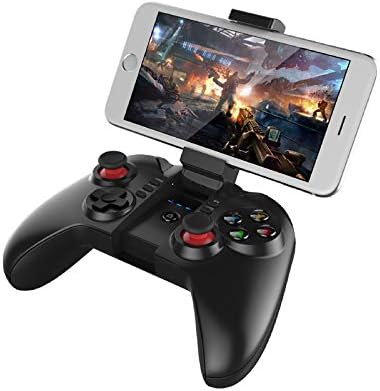
Figure 3: The IPEGA PG-9068 with a smartphone securely mounted in its integrated holder, demonstrating its mobile gaming capability.
Подешавање и повезивање
Пуњење Гамепад-а
Before initial use, fully charge the gamepad. Connect the provided USB charging cable to the gamepad's charging port and to a DC5V power source (e.g., computer USB port, USB wall adapter). The charging indicator light will show the charging status.
- Цхаргинг Волtagе/Цуррент: ДЦ5В/500мА
- Капацитет батерије: 350мАх
- Континуирана употреба: Approximately 10 hours on a full charge
- Време приправности: Up to 30 days when fully charged
Упутства за Блуетоотх упаривање
The PG-9068 supports various connection modes for different devices. Ensure the gamepad is sufficiently charged before attempting to pair.
- Укључено: Притисните и држите ХОМЕ button for 3 seconds to power on the gamepad.
- Уђите у режим упаривања:
- Андроид стандардни режим: Притисните и држите Кс + ХОМЕ until the indicator light flashes rapidly.
- iOS Standard Mode: Притисните и држите И + ХОМЕ until the indicator light flashes rapidly.
- PC/Direct Play Mode: Притисните и држите А + ХОМЕ until the indicator light flashes rapidly.
- Активирајте Bluetooth на уређају: On your smartphone, tablet, or PC, go to Bluetooth settings and enable Bluetooth.
- Тражи Уређаји: Scan for available Bluetooth devices. The gamepad will appear as "PG-9068" or "IPEGA-9068".
- Повежите се: Select "PG-9068" to pair. Once connected, the indicator light on the gamepad will become solid.
- Воркинг Волtage: ДЦ3.7В
- Блуетоотх даљина преноса: ≤8 метара
If pairing fails, turn off the gamepad, disable Bluetooth on your device, and repeat the steps. For PC connection, a Bluetooth adapter may be required if your PC does not have built-in Bluetooth.
Упутство за употребу
Game Modes and Compatibility
The IPEGA PG-9068 supports various gaming platforms and modes:
- Андроид: Compatible with most Android smartphones, tablets, Smart TVs, and set-top boxes. Supports games that have native gamepad support.
- иОС: Compatible with iOS devices (iPhone, iPad). Supports MFi (Made For iPhone/iPad) games and other games with gamepad compatibility.
- ПЦ: Supports Windows and Mac OS X systems. May require specific drivers or software for certain games, though many modern games support XInput or DirectInput controllers natively.
Распоред и функције дугмади
Familiarize yourself with the gamepad's button layout:
| Дугме/компонента | Функција |
|---|---|
| Лева аналогна палица | Movement, camera control (game dependent) |
| Десни аналогни штап | Camera control, aiming (game dependent) |
| D-Pad (смерни тастер) | Directional input, menu navigation |
| Дугмад А, Б, Кс, И | Action buttons (jump, attack, interact, etc.) |
| L1/R1 (Shoulder Buttons) | Commonly used for actions like shooting, aiming, or menu navigation |
| L2/R2 (Triggers) | Analog input for acceleration, braking, or precise actions |
| SELECT/BACK Button | Menu, map, or specific game functions |
| Дугме СТАРТ | Pause, start game, confirm actions |
| Дугме ХОМЕ | Power on/off, return to home screen (device dependent), pairing mode activation |
| Дугме ТУРБО | Enables rapid fire for selected action buttons. Press TURBO + Action Button to activate/deactivate. |
Одржавање и њега
Proper maintenance ensures the longevity and optimal performance of your IPEGA PG-9068 gamepad.
- Чишћење: Користите меку, суву крпу да обришете површину контролера за игру. За тврдокорну прљавштину, благо обришитеampИсперите крпу водом. Избегавајте употребу јаких хемикалија, растварача или абразивних средстава за чишћење.
- Складиштење: Чувајте гејмпад на хладном и сувом месту, даље од директне сунчеве светлости, екстремних температура и високе влажности.
- Одржавање батерије:
- Избегавајте често потпуно пражњење батерије.
- If storing for extended periods, charge the battery to about 50% to prevent deep discharge.
- Не излажите батерију ватри или екстремној топлоти.
- Руковање: Avoid dropping the gamepad or subjecting it to strong impacts. Do not attempt to disassemble the gamepad, as this will void the warranty.
Решавање проблема
If you encounter issues with your IPEGA PG-9068, refer to the following common problems and solutions:
| Проблем | Могући узрок | Решење |
|---|---|---|
| Гејмпад се не укључује. | Ниска батерија. | Потпуно напуните гејмпад. |
| Упаривање са уређајем није могуће. | Incorrect pairing mode; Bluetooth off on device; interference. | Ensure correct pairing mode (X+HOME for Android, Y+HOME for iOS, A+HOME for PC). Verify Bluetooth is enabled on your device. Move closer to the device. Restart both gamepad and device. |
| Гејмпад се често искључује. | Слаба батерија; предалеко од уређаја; сметње. | Recharge the gamepad. Stay within 8 meters of the connected device. Reduce wireless interference from other devices. |
| Дугмад/палице не реагују. | Софтверска грешка; физичко оштећење. | Restart the gamepad and the connected device. Test in a different game or application. If problem persists, contact customer support. |
| Gamepad not recognized by PC. | Missing Bluetooth adapter/drivers; incorrect mode. | Ensure PC has Bluetooth and drivers are installed. Try A+HOME pairing mode. Some games may require specific controller emulation software. |
Техничке спецификације
| Параметар | Валуе |
|---|---|
| Модел | ПГ-9068 |
| Бранд | Ипега |
| Повезивање | Блуетоотх бежични |
| Воркинг Волtage | ДЦ3.7В |
| Воркинг Цуррент | <10мА |
| Време непрекидног коришћења | Прибл. 10 сата |
| Успавана струја | <10уА |
| Цхарге Волtagе/Струја | ДЦ5В/500мА |
| Блуетоотх удаљеност преноса | ≤8 метара |
| Капацитет батерије | 350мАх |
| Време приправности | Up to 30 days (full power) |
| Компатибилни системи | Android, iOS, Windows, Mac OS X |
| Компатибилни уређаји | Smartphones, Tablets, Smart TVs, Set-top Boxes, PC Computers |
Гаранција и подршка
For warranty information or technical support, please refer to the documentation provided with your purchase or visit the official Ipega webсајт. Сачувајте доказ о куповини за потребе гаранције.


