1. Производ је готовview
The JBL TUNE 110 In-Ear Headphones are designed to deliver JBL Pure Bass Sound in a lightweight, comfortable, and compact form factor. These wired headphones feature 9mm drivers for powerful audio reproduction and include a convenient one-button remote with a built-in microphone for easy control of music playback and calls. The tangle-free flat cable ensures hassle-free use and storage.

Image 1.1: The JBL TUNE 110 In-Ear Headphones in Blue, showcasinњихов елегантан дизајн.
2. Шта је у кутији
Upon unboxing your JBL TUNE 110 In-Ear Headphones, you should find the following components:
- JBL TUNE 110 In-Ear Headphones
- Multiple sizes of ear tips (typically Small, Medium, Large) to ensure a comfortable and secure fit.
- A carrying pouch for convenient storage and portability.
Видео 2.1: Званичник прекоview of the JBL TUNE 110 In-Ear Headphones, demonstrating key features and components.
3. Подешавање
Follow these steps to set up your JBL TUNE 110 In-Ear Headphones:
- Изаберите врхове за уши: Choose the ear tips that provide the most comfortable and secure fit for your ears. A good seal is crucial for optimal sound quality and bass performance. Gently attach them to the earbuds.
- Уметните слушалице: Carefully insert the earbuds into your ear canals. Ensure they are seated snugly.
- Повежите се са уређајем: Plug the 3.5mm audio jack into the headphone port of your audio device (smartphone, tablet, laptop, etc.).

Слика 3.1: Бочна страна view of the JBL TUNE 110 earbud, illustrating its in-ear design.
4. Упутство за употребу
The JBL TUNE 110 features a convenient one-button remote for easy control:
- Пусти/паузирај музику: Press the button once to play or pause your music.
- Одговори/заврши позив: Притисните дугме једном да бисте одговорили на долазни позив или завршили текући позив.
- Одбиј позив: Press and hold the button for approximately 2 seconds to reject an incoming call.
- Следећа нумера: Press the button twice quickly to skip to the next track.
- Претходни запис: Press the button three times quickly to go back to the previous track.
- Гласовни асистент: Press and hold the button for approximately 3 seconds to activate your device's voice assistant (if supported).
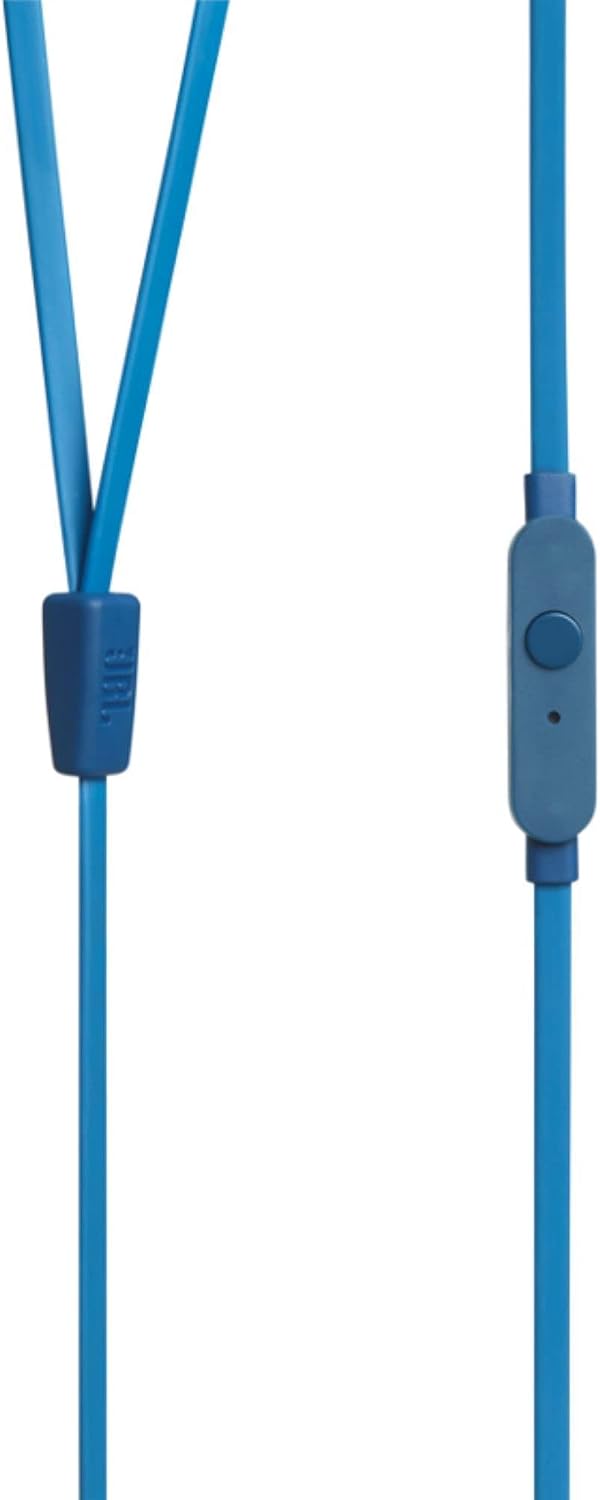
Image 4.1: Close-up of the one-button remote control and built-in microphone on the JBL TUNE 110 cable.
5. Карактеристике
- JBL чисти бас звук: Experience powerful and clear bass, a signature of JBL audio.
- Драјвери од 9 мм: Equipped with dynamic 9mm drivers for high-quality sound reproduction.
- One-Button Remote with Microphone: Seamlessly manage music playback and hands-free calls.
- Равни кабл који се не запетљава: Designed to prevent tangles, making the headphones easy to store and use.
- Лаган и удобан: Ergonomically designed for extended listening comfort.
- Пасивно поништавање буке: The in-ear design provides a degree of passive noise isolation.
6. Спецификације
| Феатуре | Спецификација |
|---|---|
| Бранд | ЈБЛ |
| Назив модела | JBL TUNE 110 |
| Број модела | JBLT110BLUAM |
| Технологија повезивања | Виред |
| Јацк за слушалице | 3.5 мм прикључак |
| Дривер Сизе | 9мм динамички драјвер |
| Импеданса | 16 Охмс |
| Контрола буке | Пасивно уклањање буке |
| Тежина артикла | 0.32 унце (приближно 9 грама) |
| Димензије производа | 2.36 к 1.18 к 6.89 инча |
| Материјал | Пластика |
| Боја | Плава |
| Цабле Феатуре | Тангле Фрее |
7. Одржавање
Proper care will extend the life and performance of your headphones:
- Савети за чишћење ушију: Regularly remove the silicone ear tips and wash them with mild soap and water. Ensure they are completely dry before reattaching.
- Чишћење слушалица: Gently wipe the earbuds with a soft, dry cloth. Avoid using harsh chemicals or abrasive materials.
- Нега каблова: Although the cable is tangle-free, avoid excessive pulling or sharp bends to prevent internal damage. When not in use, coil the cable neatly.
- Складиштење: Store your headphones in the provided carrying pouch to protect them from dust, dirt, and physical damage.
КСНУМКС. Решавање проблема
If you encounter any issues with your JBL TUNE 110 headphones, refer to the following common solutions:
- Нема звука:
- Уверите се да је 3.5 мм прикључак потпуно уметнут у аудио порт вашег уређаја.
- Проверите ниво јачине звука на вашем аудио уређају.
- Тестирајте слушалице са другим аудио уређајем да бисте искључили проблем специфичан за тај уређај.
- Poor Sound Quality / Lack of Bass:
- Verify that the ear tips are correctly sized and provide a good seal in your ear canal.
- Ensure the ear tips are clean and free from debris.
- Микрофон не ради:
- Confirm the 3.5mm jack is fully inserted.
- Проверите подешавања аудио улаза на уређају да бисте били сигурни да је изабран спољни микрофон.
- Тестирајте микрофон са другим уређајем или апликацијом.
9. Гаранција и подршка
JBL products are manufactured to high standards and undergo rigorous quality control. For detailed warranty information, product registration, and technical support, please visit the official JBL website or contact your local JBL customer service center. Keep your proof of purchase for warranty claims.