1. Увод
This manual provides essential instructions for the installation, operation, and maintenance of your FSP iFP600 Uninterruptible Power Supply (UPS). Please read this manual thoroughly before installing or operating the unit to ensure proper function and safety. The FSP iFP600 is designed to provide reliable power backup and surge protection for your electronic devices.

Слика 1.1: Предња страна view of the FSP iFP600 UPS, showcasinг његовим компактним дизајном и интегрисаним ЛЦД екраном.
2. Безбедносна упутства
Please adhere to these important safety guidelines during installation, operation, and maintenance of the UPS:
- Не отварајте UPS уређајasinг. Унутра нема делова које корисник може сам да поправи. Сво сервисирање препустите квалификованом сервисном особљу.
- Do not connect appliances that could overload the UPS, such as laser printers, vacuum cleaners, or heaters.
- Уверите се да је УПС повезан на уземљену утичницу са наизменичном струјом.
- Avoid placing the UPS in direct sunlight, near heat sources, or in environments with excessive dust, humidity, or corrosive substances.
- Position the UPS in a well-ventilated area to prevent overheating.
- In case of fire, use a dry chemical extinguisher. Water can be hazardous.
- The battery inside the UPS is not user-replaceable. Battery replacement should only be performed by qualified personnel.
3. Производ је готовview
The FSP iFP600 UPS provides reliable power protection for your critical electronics. It features a compact design and an intuitive LCD display for monitoring status.
3.1 Садржај пакета
Након отварања паковања, проверите да ли су све компоненте присутне и да ли су оштећене:
- FSP iFP600 UPS Unit
- Кориснички приручник (овај документ)
- Повер Цорд
- УСБ комуникациони кабл
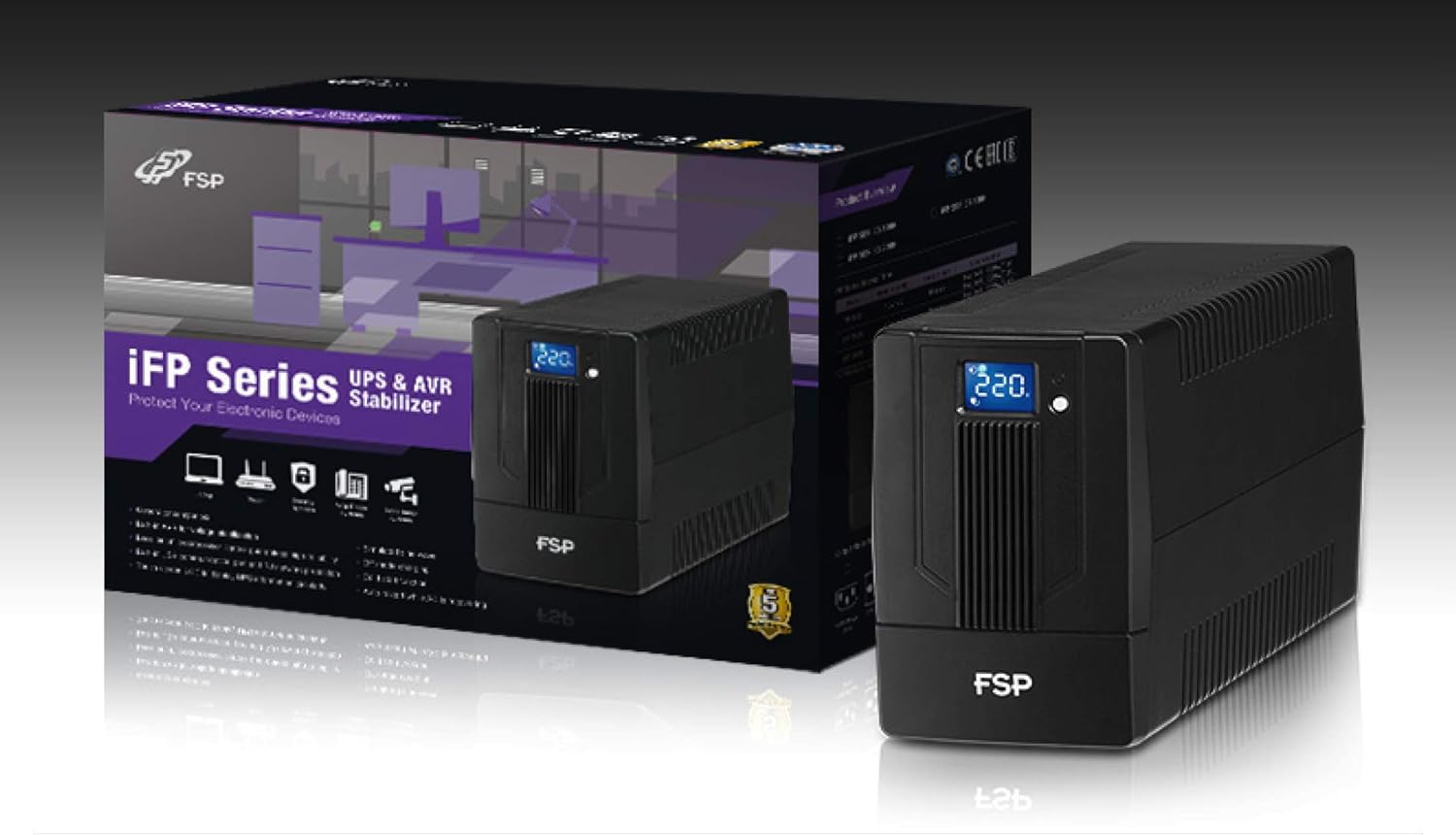
Image 3.1: The FSP iFP600 UPS shown alongside its retail packaging, illustrating the product's presentation.
3.2 Компоненте задње плоче
Familiarize yourself with the connections on the rear panel of the UPS:

Слика 3.2: Детаљно view of the FSP iFP600 UPS rear panel, highlighting connection points.
- Продајна места: Two SCHUKO type outlets for connecting protected equipment.
- АЦ улаз: Connects the UPS to the main utility power.
- Fuse/Breaker: Overcurrent protection for the UPS.
- УСБ комуникација: Port for connecting to a computer for monitoring and management.
- Combo RJ11/RJ45 Surge Protection: Provides surge protection for telephone/network lines.
4. Подешавање и инсталација
Follow these steps to set up your FSP iFP600 UPS:
- Распакивање: Пажљиво извадите UPS из паковања. Проверите да ли има оштећења приликом транспорта.
- Пласман: Place the UPS on a flat, stable surface in a clean, cool, and well-ventilated area. Ensure adequate clearance around the unit for airflow.
- Прво пуњење: Connect the UPS to a standard grounded AC outlet using the provided power cord. Allow the unit to charge for at least 4-6 hours before initial use to ensure optimal battery performance. The UPS will charge whether it is turned on or off.
- Опрема за повезивање: Plug your computer, monitor, and other critical electronic devices into the UPS outlets (A). Do not connect surge suppressors or power strips to the UPS outlets.
- USB Communication (Optional): Connect the USB cable from the UPS USB port (D) to your computer's USB port to enable power management software features (software not included, typically downloaded from manufacturer's webсајт).
- RJ11/RJ45 Protection (Optional): For surge protection of your telephone or network line, connect the incoming line to the 'IN' port of the Combo RJ11/RJ45 (E) and connect the 'OUT' port to your device.
5. Упутство за употребу
5.1 Укључивање/искључивање
- За укључивање: Притисните и држите дугме за напајање на предњој плочи отприлике 2 секунде док не чујете звучни сигнал и ЛЦД екран се не упали.
- За искључивање: Press and hold the power button for approximately 2 seconds until you hear a beep and the LCD display turns off.
5.2 Информације о ЛЦД екрану
The FSP iFP600 features an LCD display that provides real-time status information. The display is touch-sensitive for navigating information.

Image 5.1: The LCD display of the FSP iFP600 UPS, indicating voltage output and its touch-screen functionality.
The LCD display typically shows:
- Улазни волtage
- Оутпут Волtage
- Ниво напуњености батерије
- Лоад Левел
- Operating Mode (e.g., AC mode, Battery mode)
- Warning/Fault Indicators
5.3 Battery Mode Operation
When the utility power fails or fluctuates outside acceptable limits, the UPS will automatically switch to battery mode. During battery mode, the UPS will provide power to connected equipment from its internal battery. An audible alarm will sound to indicate battery operation.
6. Одржавање
Proper maintenance ensures the longevity and reliability of your UPS.
- Чишћење: Користите меку, суву крпу за чишћење спољашњости UPS-а. Не користите течна или аеросолна средства за чишћење.
- Одржавање батерије: To maximize battery life, ensure the UPS is connected to AC power and fully charged. If the UPS is stored for an extended period, recharge it every three months to prevent battery degradation.
- Замена батерије: The internal battery (12V / 7Ah x1) is not user-serviceable. Battery replacement should only be performed by FSP-certified service personnel or a qualified technician. Incorrect battery replacement can pose a risk of explosion or injury.
- Складиштење: Store the UPS in a cool, dry place with adequate ventilation. Ensure the battery is fully charged before storage.
КСНУМКС. Решавање проблема
Refer to the following table for common issues and their solutions. If the problem persists, contact FSP support.
| Симптом | Звучни аларм | Могући узрок | Решење |
|---|---|---|---|
| UPS operating on battery power | Звучни сигнал се оглашава на сваких 10 секунди | Utility power failure or fluctuation | Save work and shut down equipment if power outage is prolonged. UPS will return to AC mode when power is restored. |
| Упозорење о ниској батерији | Пишта сваке секунде | Напуњеност батерије је критично ниска | Immediately save work and shut down connected equipment. |
| Стање преоптерећења | Звучни сигнал сваке 0.5 секунде | Connected equipment exceeds UPS capacity | Disconnect non-essential equipment until the alarm stops. Ensure total load is within UPS capacity. |
| Квар УПС-а | Непрекидно пиштање | Унутрашња грешка или квар | Turn off the UPS and disconnect it from the AC outlet. Contact FSP technical support. |
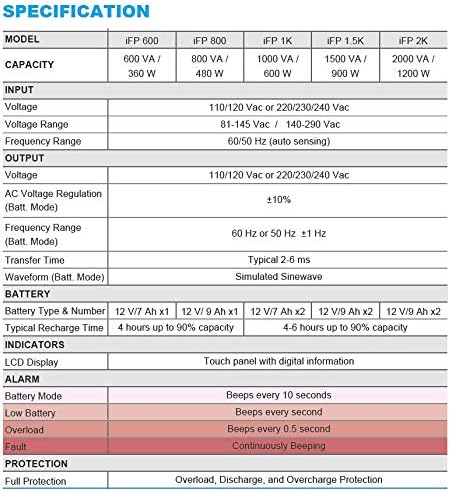
Image 7.1: Excerpt from the FSP iFP series specification table, detailing alarm indicators and their meanings.
8. Спецификације
Detailed technical specifications for the FSP iFP600 UPS:
| Феатуре | Спецификација |
|---|---|
| Модел | iFP 600 |
| Капацитет | 600 ВА / 360 В |
| Улазни волtage | 110/120 Vac or 220/230/240 Vac |
| Улазни волtagе Распон | 81-145 Vac / 140-290 Vac |
| Опсег улазне фреквенције | 60/50 Хз (аутоматско откривање) |
| Оутпут Волtage | 110/120 Vac or 220/230/240 Vac |
| АЦ Волtagе Регулатива (Батт Моде) | ±10% |
| Output Frequency Range (Batt. Mode) | 60 Hz or 50 Hz ±1 Hz |
| Трансфер Тиме | Типично 2-6 мс |
| Таласни облик (Батт. Режим) | Симулирани синусни талас |
| Тип и број батерије | 12V / 7Ah x1 |
| Типично време пуњења | 4 hours up to 90% capacity |
| Индикатори | LCD Display (Touch panel with digital information) |
| Заштита | Overload, Discharge, and Overcharge Protection |
| Тежина артикла | 9.24 фунте (4.2 кг) |
| Димензије производа (ДкШкВ) | 11.81 к 3.98 к 5.59 инча |
| Боја | Црно |
| Материјал | Метал |
9. Гаранција и подршка
FSP products are designed for reliability and performance. For warranty information, please refer to the warranty card included with your product or visit the official FSP website. For technical support, troubleshooting assistance, or service inquiries, please contact FSP customer service through their official channels.
Више информација и ресурса за подршку можете пронаћи на FSP Store on Amazon.


