Увод
The TENMIYA A200 Portable Bluetooth Speaker is designed to provide high-quality audio with versatile connectivity options. Featuring Bluetooth 5.0, FM radio, TF card, USB, and AUX input, this speaker offers a comprehensive audio experience for various environments, from home to outdoor gatherings. Its compact design and remote control functionality ensure ease of use and portability.

Image: The TENMIYA A200 speaker in beech color, showcasing its front panel with a large speaker grille, digital display, control buttons, and a remote control placed in front.
Шта је у кутији
Молимо вас да проверите садржај пакета како бисте били сигурни да су све ставке присутне и у добром стању:
- 1 x TENMIYA A200 Bluetooth Speaker
- 1 к даљински управљач
- 1 к АУКС кабл (3.5 мм)
- 1 к УСБ кабл за пуњење
- 1 x Упутство за употребу (овај документ)
Сетуп
1. Пуњење звучника
Before first use, fully charge the speaker. Connect the provided USB charging cable to the speaker's DC 5V input port and the other end to a USB power adapter (not included) or a computer USB port. The charging indicator will show the charging status. A full charge typically takes about 3-4 hours.
2. Укључивање/искључивање
Locate the power switch on the side of the speaker. Slide it to the "ON" position to power on the speaker. Slide it to the "OFF" position to power off.
3. Блуетоотх веза
- Power on the speaker. It will automatically enter Bluetooth pairing mode, indicated by a flashing Bluetooth icon on the digital display.
- На свом уређају (паметном телефону, таблету, лаптопу) омогућите Блутут и потражите доступне уређаје.
- Select "TENMIYA A200" from the list of devices.
- Once connected, the speaker will emit a confirmation sound, and the Bluetooth icon on the display will stop flashing.

Image: The TENMIYA A200 speaker displaying "Bluetooth 4.1" (note: product specs state 5.0, this image might be older) and a smartphone screen showing music playback, illustrating Bluetooth connectivity.
4. Повезивање AUX улаза
For devices without Bluetooth, use the provided 3.5mm AUX cable. Connect one end to the speaker's AUX input port and the other end to the audio output jack of your device (e.g., MP3 player, computer, TV). The speaker will automatically switch to AUX mode.
5. TF Card and USB Playback
Insert a TF (MicroSD) card or a USB flash drive containing MP3 music files into the respective slots on the side of the speaker. The speaker will automatically detect the storage device and begin playing music.
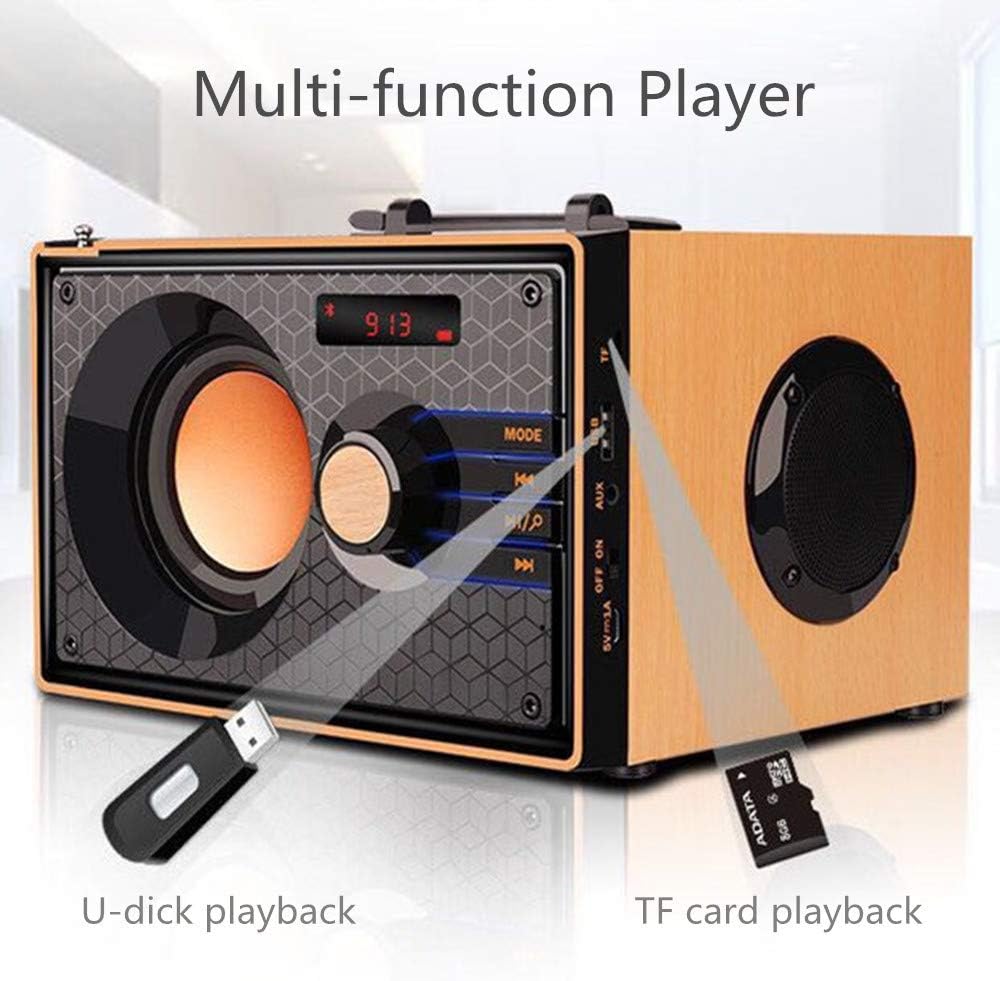
Image: A close-up of the side panel of the TENMIYA A200 speaker, highlighting the USB and TF card input slots with a USB drive and TF card inserted, demonstrating multi-function playback.
Упутство за употребу
1. Избор режима
Притисните тастер МОДЕ button on the speaker's front panel or the remote control to cycle through available modes: Bluetooth, FM Radio, AUX, TF Card, and USB.
2. Контрола јачине звука
Rotate the large knob on the front panel clockwise to increase volume and counter-clockwise to decrease volume. Alternatively, use the ВОЛ+ и ВОЛ- дугмад на даљинском управљачу.
3. Playback Control (Bluetooth, TF Card, USB)
- Притисните тастер Пусти/Паузирај дугме (▶▶) to play or pause the current track.
- Притисните тастер Превиоус Трацк дугме (◀◀) to go to the beginning of the current track or the previous track.
- Притисните тастер Нект Трацк дугме (▶▶) да бисте прешли на следећу нумеру.
4. Рад ФМ радија
- Пребаците се на FM режим помоћу МОДЕ дугме.
- To automatically scan and save available stations, press and hold the Пусти/Паузирај button. The speaker will scan and store stations with strong signals.
- To manually tune or navigate through saved stations, use the Превиоус Трацк и Нект Трацк дугмад.
- Extend the telescopic antenna on the back of the speaker for improved FM reception.

Image: A man relaxing on a couch, listening to the TENMIYA A200 speaker which has its telescopic antenna extended, indicating FM radio functionality.
5. Употреба даљинског управљача
The included remote control provides convenient access to all speaker functions from a distance of up to 10 feet. Functions include power on/off, mode selection, volume control, track navigation, play/pause, and direct station input for FM radio (if supported by the remote's number pad).
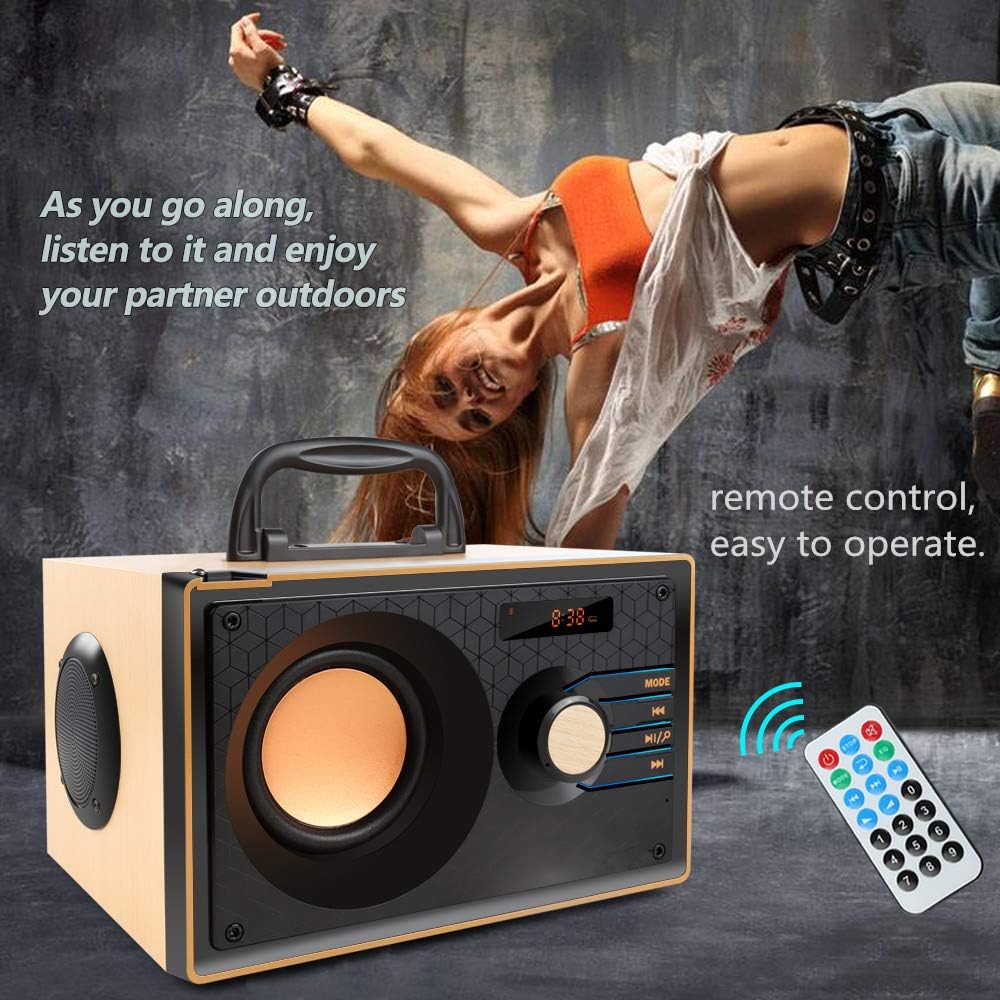
Image: The TENMIYA A200 speaker with its remote control, emphasizing the ease of operation from a distance.
Одржавање
- Keep the speaker away from water, moisture, and direct sunlight.
- Очистите звучник меком, сувом крпом. Не користите абразивна средства за чишћење или раствараче.
- Избегавајте испуштање звучника или његово излагање јаким ударцима.
- Чувајте звучник на хладном и сувом месту када га не користите дуже време.
Решавање проблема
| Проблем | Могући узрок | Решење |
|---|---|---|
| Звучник се не укључује. | Low battery; Power switch is off. | Charge the speaker; Ensure the power switch is in the "ON" position. |
| Нема звука. | Јачина звука је прениска; изабран је погрешан режим; уређај није правилно повезан. | Increase volume; Press MODE button to select correct input; Reconnect device. |
| Блуетоотх веза не успева. | Звучник није у режиму упаривања; Bluetooth уређаја је искључен; Предалеко од звучника. | Ensure speaker is in Bluetooth mode and flashing; Turn on device Bluetooth; Move device closer (within 10 meters/33 feet). |
| Слаб ФМ радио пријем. | Антена није извучена; Подручје слабог сигнала. | Fully extend the telescopic antenna; Try repositioning the speaker for better signal. |
| Даљински управљач не ради. | Battery depleted; Obstruction between remote and speaker; Too far from speaker. | Replace remote battery; Remove obstructions; Move closer to speaker (within 10 feet). |
Спецификације
| Феатуре | Детаљ |
|---|---|
| Бранд | ТЕНМИИА |
| Модел | А200 |
| Излазна снага звучника | 10W (5W + 2.5W x 2) |
| Спеакер Унит | 3" + 2" x 2 |
| Фреквенцијски одзив | 60Hz - 20kHz |
| Блуетоотх верзија | 5.0 |
| Блуетоотх домет | До 10 метара (33 стопе) |
| Капацитет батерије | 2200мАх |
| Време пуњења | Прибл. 3-4 сати |
| Време играња | Прибл. 8 сати (при 40% запремине) |
| Инпут Повер | ДЦ 5В |
| Димензије (Д к Ш к В) | 7.5 к 6.1 к 4.7 инча (190 к 155 к 120 мм) |
| Тежина артикла | 2.91 фунти |
| Подржане функције | Bluetooth, FM Radio, TF Card, USB, AUX Input |
| Контролни метод | Manual buttons, Remote Control |

Image: The TENMIYA A200 speaker with its dimensions labeled (190mm length, 155mm depth, 120mm height), illustrating its compact size.
Гаранција и подршка
The TENMIYA A200 Portable Bluetooth Speaker comes with a worry-free 12-month warranty. If you encounter any issues or have questions regarding your product, please contact our customer service team. We are committed to providing the best customer service and will respond to your inquiries within 24 hours.
For support, please refer to the contact information provided on the product packaging or the seller's page where you purchased the item.


