1. Производ је готовview
The waveshare 1.5inch RGB OLED Display Module is a compact display unit featuring a 1.5-inch diagonal screen with 128x128 pixels. It supports 16-bit high color (65K colors) and communicates via a Serial Peripheral Interface (SPI). This module is designed for integration with various microcontrollers and single-board computers, including Arduino, Raspberry Pi, Jetson Nano, and STM32.
The display incorporates an embedded SSD1351 controller, which manages the 128RGB x 128 Dot Matrix OLED/PLED. The controller includes a 128x128x18bit SRAM for display buffering and supports both 262k and 65k color depths. Communication options include 4-wire SPI and 3-wire SPI, optimizing for reduced module area and efficient use of controller I/O resources.

Figure 1: waveshare 1.5inch RGB OLED Display Module. This image shows the compact display module with its pin headers and the vibrant color display capabilities.
2. Карактеристике
- Екран високе резолуције: 128x128 pixels, offering clear and detailed visuals.
- Vibrant Color Depth: 16-bit high color (65K colors) for rich and colorful image display.
- Уграђени контролер: Utilizes the SSD1351 driver for efficient display management.
- Flexible Interface: Supports both 4-wire SPI and 3-wire SPI communication, configurable via an onboard resistor.
- Широка компатибилност: Designed for use with popular development platforms such as Raspberry Pi, Jetson Nano, Arduino, and STM32.
- Компактне димензије: Module measures 44.5 x 37 mm.
- Оператинг Волtage: Compatible with 3.3V/5V power supplies.
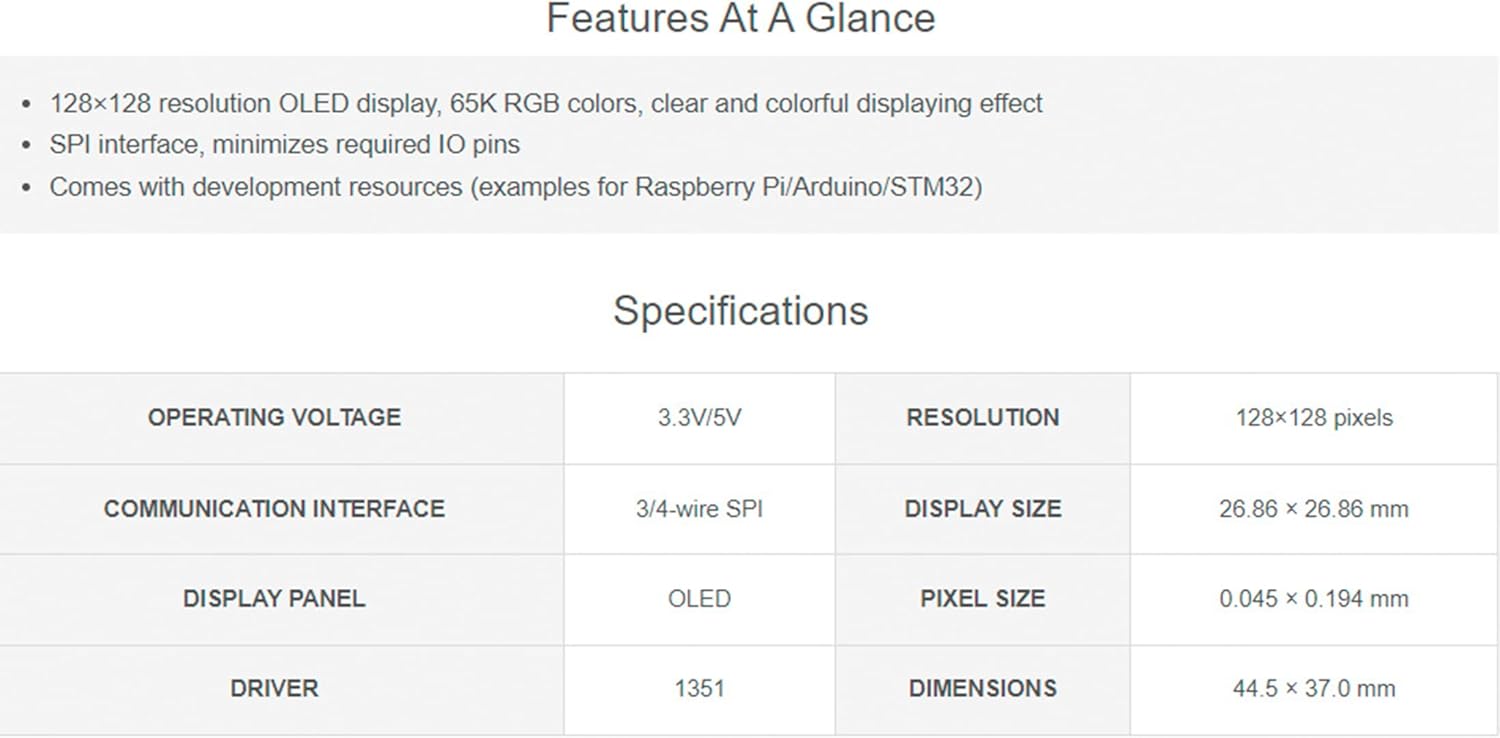
Figure 2: Key features and specifications of the 1.5inch RGB OLED Module, including resolution, color depth, and interface type.
3. Садржај пакета
Проверите да ли су све ставке присутне у пакету:
- 1 x 1.5inch RGB OLED Module
- 1 x PH2.0 7Pin Cable
4. Спецификације
| Параметар | Валуе |
|---|---|
| Оператинг Волtage | 3.3В / 5В |
| Суппорт Интерфаце | 4-жични SPI, 3-жични SPI |
| Контролор | ССД1351 |
| Резолуција | 128 (В) РГБ к 128 (В) |
| Боја екрана | 65K color |
| Dimension (Display Area) | 26.855 (Х) к 26.855 (В) мм |
| Величина пиксела | 0.045 (Х) к 0.194 (В) мм |
| Димензије модула | 44.5 к 37 мм |
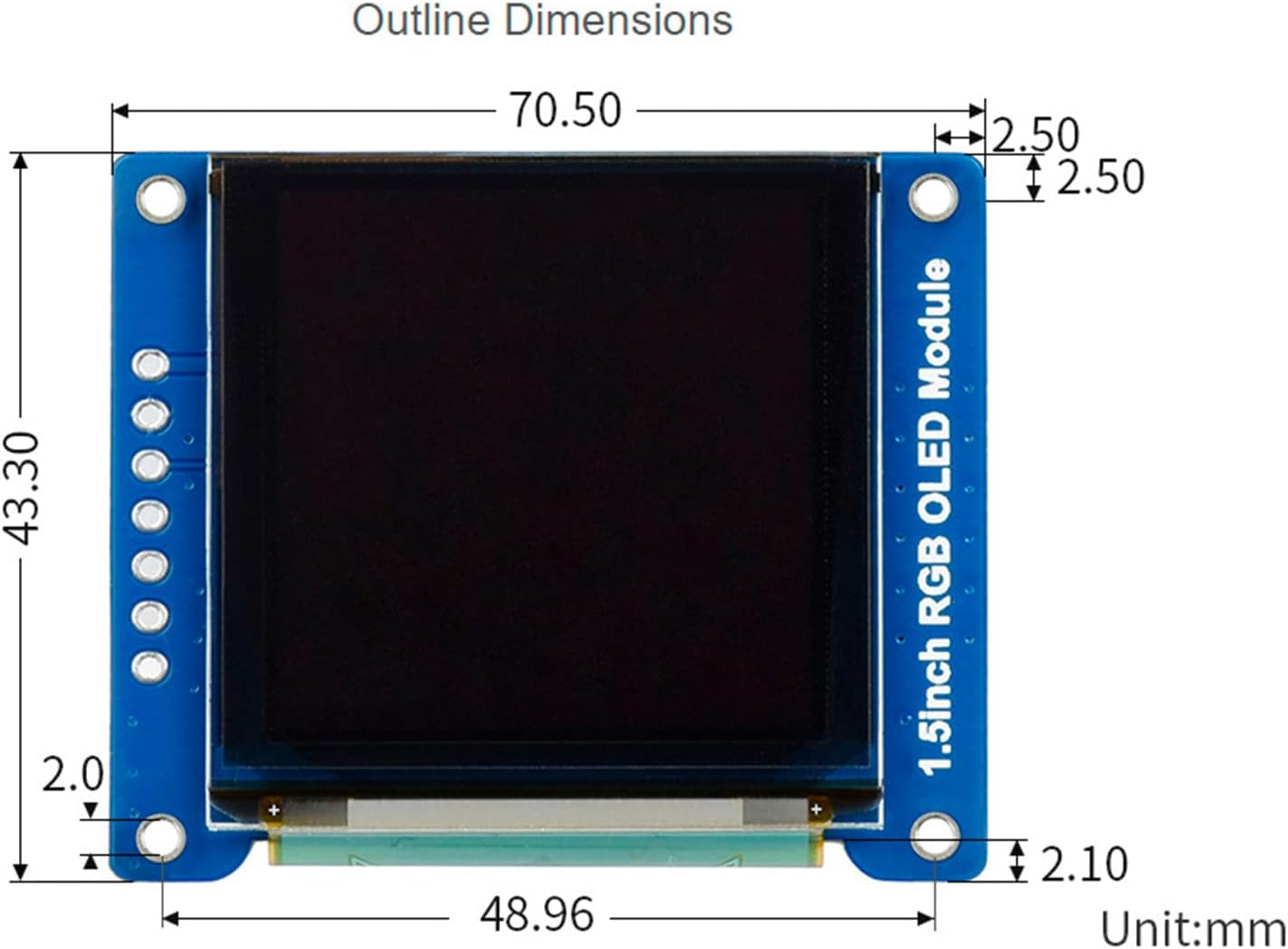
Figure 3: Detailed outline dimensions of the 1.5inch RGB OLED Module in millimeters.
5. Setup and Hardware Connection
This section details the physical connection of the 1.5inch RGB OLED Module to common development boards. Ensure that the power supply voltagе и логика волtage are consistent between the module and your controller to prevent improper operation.
5.1 Опис пина
- ВЦЦ: 3.3V/5V Power input
- ГНД: Гроунд
- ДИН: Data input (SPI MOSI)
- СЦЛ: Clock input (SPI SCK)
- ЦС: Chip Select, active low
- ДЦ: Data/Command signal selection (low for command, high for data)
- РСТ: Ресет сигнал, активан низак
5.2 Connecting with Raspberry Pi
Follow the diagram below for connecting the OLED module to a Raspberry Pi. Ensure correct pin mapping for SPI communication.

Figure 4: Wiring diagram for connecting the 1.5inch RGB OLED Module to a Raspberry Pi, showing pin-to-pin connections for power, ground, and SPI signals.
5.3 Connecting with Arduino Board
Refer to the following diagram for connecting the OLED module to an Arduino board. Pay close attention to the SPI pin assignments for your specific Arduino model.

Figure 5: Wiring diagram for connecting the 1.5inch RGB OLED Module to an Arduino board, illustrating the necessary connections for power, ground, and SPI communication.
6. Упутство за употребу
The 1.5inch RGB OLED Module communicates primarily via SPI. To operate the display, you will need to interface with its SSD1351 controller using appropriate software libraries for your chosen development platform.
6.1 Software Libraries and Exampлес
Waveshare provides development resources and example code for various platforms, including Raspberry Pi, Jetson Nano, Arduino, and STM32. These resources typically include libraries for the SSD1351 controller, allowing you to initialize the display, draw graphics, and display text.
За детаљне водиче за програмирање и нпр.ample code, please refer to the official online documentation:
waveshare 1.5inch RGB OLED Module Online Documentation
When using Arduino, libraries such as the Adafruit SSD1351 library are commonly used and compatible with this module. Ensure that your sketch defines the correct pins for SPI communication (DIN, SCL, CS, DC, RST) as per your hardware connection.
7. Одржавање
To ensure the longevity and optimal performance of your 1.5inch RGB OLED Display Module, follow these maintenance guidelines:
- Руковање: Handle the module by its edges to avoid touching the display surface or electronic components.
- Чишћење: If necessary, gently clean the display surface with a soft, lint-free cloth. Do not use abrasive cleaners or solvents.
- Складиштење: Модул чувајте на сувом месту без прашине, даље од директне сунчеве светлости и екстремних температура.
- Снага: Always ensure the correct operating voltage (3.3V/5V) is applied. Incorrect voltagможе оштетити модул.
- Статички електрицитет: Take precautions against electrostatic discharge (ESD) when handling the module, as electronic components are sensitive to static.
КСНУМКС. Решавање проблема
If you encounter issues with your 1.5inch RGB OLED Display Module, consider the following troubleshooting steps:
- Нема екрана/празан екран:
- Verify power connections (VCC and GND) and ensure the correct voltage (3.3V/5V) is supplied.
- Check all SPI connections (DIN, SCL, CS, DC, RST) for proper wiring and continuity.
- Ensure the reset pin (RST) is correctly handled by your code or pulled high after power-up.
- Confirm that the display initialization code in your program is correct and matches the SSD1351 controller.
- Incorrect Colors/Garbled Display:
- Check the data input (DIN) and clock (SCL) lines for interference or incorrect timing.
- Verify that the correct color depth (e.g., 65K colors) is configured in your software library.
- Ensure the Data/Command (DC) pin is switching correctly between data and command modes.
- Code Compilation Errors:
- Ensure all necessary libraries (e.g., Adafruit SSD1351) are installed and correctly included in your project.
- Verify that your development environment is properly set up for your chosen platform (Arduino IDE, Raspberry Pi OS, etc.).
- Consult the online documentation and community forums for specific platform-related issues.
For further assistance, refer to the official waveshare online documentation or contact their support channels.
9. Гаранција и подршка
For information regarding product warranty, please refer to the purchase documentation or the official waveshare website. General support and detailed technical resources, including datasheets and programming examples, are available through the waveshare online documentation portal.
Online Documentation/User Manual: //bit.ly/3TriWqs
For specific technical inquiries or issues not covered in this manual, please visit the waveshare support page or contact their customer service directly.


