Увод
This manual provides detailed instructions for the setup, operation, and maintenance of your LIGE BW0223 Smart Watch. Please read this guide thoroughly to ensure proper use and to maximize the features of your device. The LIGE BW0223 Smart Watch is designed to assist with fitness tracking, health monitoring, and smart notifications, compatible with both iOS and Android devices.
1. Подешавање
1.1 Пуњење уређаја
Before initial use, fully charge your LIGE BW0223 Smart Watch. Connect the magnetic charging cable to the charging contacts on the back of the watch and plug the USB end into a standard USB power adapter (5V/1A recommended). The watch display will indicate charging status. A full charge typically takes approximately 2 hours.

The back of the LIGE Smart Watch features a magnetic charging interface and advanced optical sensors for continuous monitoring of heart rate, blood pressure, and blood oxygen levels.
1.2 Инсталација и упаривање апликације
- Преузмите пратећу апликацију: Scan the QR code provided in the watch packaging or search for the designated companion app (e.g., 'FitPro' or 'LIGE Smart') in your smartphone's app store (App Store for iOS, Google Play Store for Android).
- Омогући Блуетоотх: Уверите се да је Блуетоотх омогућен на вашем паметном телефону.
- Отворите апликацију: Launch the installed app and follow the on-screen instructions to create an account or log in.
- Упарите сат: Within the app, navigate to the device management section (often labeled 'Device', 'My Device', or 'Add Device'). The app will search for available Bluetooth devices. Select 'BW0223' or 'LIGE Smart Watch' from the list to initiate pairing. Confirm the pairing request on both your phone and the watch if prompted.
1.3 Почетна подешавања
After successful pairing, complete your personal profile within the app, including gender, age, height, and weight. This information helps improve the accuracy of fitness and health data. You can also set preferences for units of measurement (metric/imperial) and time format (12/24-hour).
2. Упутство за употребу
2.1 Приказ и навигација
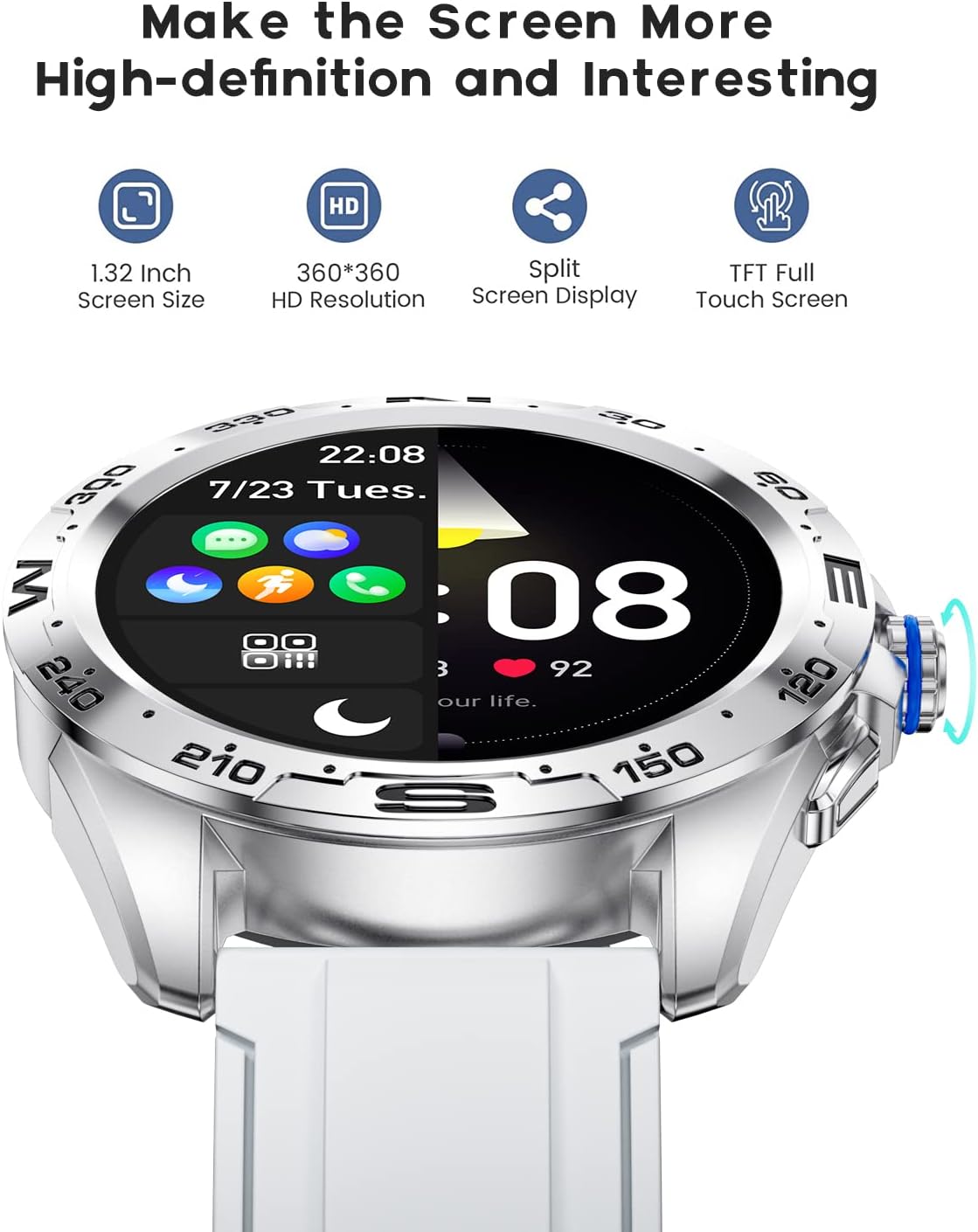
The LIGE BW0223 Smart Watch features a 1.28-inch full touch screen with 360x360 HD resolution. Navigate the watch interface using touch gestures:
- Превуците нагоре/надоле: Листајте кроз меније или обавештења.
- Превуците лево/десно: Приступите брзим функцијама или различитим екранима са подацима.
- Додирните: Изаберите ставку или потврдите радњу.
- Притисните бочно дугме: Вратите се на почетни екран или укључите/искључите уређај.

The LIGE Smart Watch features a 1.28-inch full touch screen with 360x360 HD resolution, offering clear visuals and responsive interaction. It supports a split-screen display for quick access to functions.
2.2 спортских режима
The watch supports 7 sports modes, including walking, running, cycling, and climbing. To access:
- Swipe on the watch face to find the 'Sports' or 'Workout' icon.
- Додирните да бисте изабрали жељену активност.
- Tap 'Start' to begin tracking. The watch will record duration, steps, calories burned, and distance.
- To end a workout, swipe right or press the side button, then select 'End' or 'Pause'.
2.3 Мониторинг здравља
The LIGE BW0223 Smart Watch provides 24/7 heart rate tracking, blood pressure, and blood oxygen monitoring. These measurements are for reference only and should not be used for medical diagnosis.
- Откуцаји срца: Превуците прстом до интерфејса за откуцаје срца да бисте view your current heart rate. The watch continuously monitors your heart rate throughout the day.
- Blood Pressure/Blood Oxygen: Swipe to the respective interfaces and tap to initiate a measurement. Ensure the watch is snug on your wrist for accurate readings.
- Праћење сна: Wear the watch to bed, and it will automatically track your sleep patterns, including deep sleep, light sleep, and wake-up times. View детаљни подаци о спавању у пратећој апликацији.
2.4 Блутут позиви
After pairing your watch with the app and enabling the Bluetooth call function (usually a separate Bluetooth connection in your phone's settings, e.g., 'BW0223_CALL'), you can make and receive calls directly from your watch.
- Упућивање позива: Access the 'Dialer' or 'Contacts' function on your watch to dial a number or select a contact.
- Примање позива: Када примите позив, сат ће приказати идентификацију позиваоца. Додирните зелену икону да бисте одговорили или црвену икону да бисте одбили позив.
- The watch features a built-in microphone and speaker for hands-free communication.

With the LIGE Smart Watch, you can make and receive Bluetooth calls directly from your wrist. It includes a built-in microphone and speaker for convenient communication.
2.5 Обавештења о порукама
Enable message notifications through the companion app to receive alerts for SMS, calls, and various social media applications (e.g., Facebook, Twitter, WhatsApp, LinkedIn, InstagRAM) директно на вашем сату.
- Ensure the app has necessary permissions to access notifications on your smartphone.
- Configure which apps send notifications to your watch within the companion app settings.
- Превуците прстом надоле на бројчанику сата да бисте view недавна обавештења.

The LIGE Smart Watch provides call and message reminders, displaying notifications from SMS, Facebook, Twitter, WhatsApp, LinkedIn, and Instagram directly on your wrist.
НИКАДА Прилагодба
Personalize your watch by changing watch faces. Many options are available directly on the watch or through the companion app.
- На праћењу: Long-press the watch face, then swipe left or right to browse available faces. Tap to select.
- Преко апликације: Open the companion app, navigate to 'Dial Market' or 'Watch Faces' to explore and download additional designs.
Personalize your LIGE Smart Watch with a variety of customizable watch faces and a rich user interface. Choose from different styles to match your preference and occasion.
3. Одржавање
3.1 Чишћење сата
Regularly clean your watch to ensure optimal performance and hygiene. Use a soft, lint-free cloth to wipe the screen and watch body. For stubborn dirt, slightly dampen the cloth with water. Avoid using harsh chemicals, abrasive materials, or strong detergents.
3.2 Отпорност на воду (IP68)
The LIGE BW0223 Smart Watch is IP68 waterproof, meaning it is resistant to dust and can withstand immersion in water up to 1.5 meters for 30 minutes. It is suitable for daily use, such as hand washing, rain, and splashes.
Важна ограничења:
- Do not wear the watch in hot showers, saunas, or steam rooms, as steam and hot water can compromise the seals.
- Avoid diving or high-pressure water activities.
- Do not operate buttons or the touchscreen underwater.
- If the watch gets wet, dry it thoroughly before charging or operating.
3.3 Одржавање батерије
Да бисте продужили век трајања батерије:
- Избегавајте екстремне температуре.
- Редовно пуните сат, али избегавајте да га остављате потпуно празног дуже време.
- Reduce screen brightness and disable unnecessary notifications or features if battery life is a concern.
КСНУМКС. Решавање проблема
4.1 Сат се не укључује или не пуни
- Уверите се да је кабл за пуњење безбедно повезан и са сатом и са извором напајања.
- Verify the power adapter and USB port are functional.
- Очистите контакте за пуњење на сату и каблу да бисте уклонили прашину или остатке.
- Allow the watch to charge for at least 30 minutes before attempting to power it on.
4.2 Проблеми са Bluetooth везом
- Уверите се да је Bluetooth омогућен на вашем паметном телефону и сату.
- Keep the watch within the Bluetooth range of your smartphone (typically 10 meters).
- Поново покрените и паметни телефон и сат.
- Unpair the watch from your phone's Bluetooth settings and re-pair it through the companion app.
- Ensure the companion app is running in the background and has necessary permissions.
4.3 Notifications Not Working
- Verify the watch is successfully paired with the companion app.
- Check notification settings within the companion app to ensure desired apps are enabled.
- Ensure your smartphone's notification access is granted to the companion app (check phone settings: Apps & notifications > Special app access > Notification access).
- Disable 'Do Not Disturb' mode on both your phone and watch.
4.4 Нетачна очитавања здравственог стања
- Уверите се да сат чврсто приања на зглоб, отприлике ширине једног прста од кости зглоба.
- Keep the sensor clean and free from sweat or dirt.
- За најбољу тачност, останите мирни током мерења.
- Remember that health data from smartwatches is for reference and not intended for medical use.
5. Спецификације
| Број модела | БВ0223 |
| Бранд | ЛИГЕ |
| Величина екрана | 1.28 инча |
| Унос људског интерфејса | Тоуцхсцреен |
| Технологија повезивања | Блуетоотх |
| Оцена водоотпорности | ИП68 |
| Тип батерије | Литхиум Полимер |
| Облик | Роунд |
| Тежина артикла | 7 унци |
6. Информације о гаранцији
The LIGE BW0223 Smart Watch comes with a standard limited warranty against manufacturing defects. The warranty period typically covers 12 months from the date of purchase. This warranty does not cover damage caused by misuse, accidents, unauthorized modifications, or failure to follow the instructions in this manual. Please retain your proof of purchase for warranty claims.
7. Корисничка подршка
If you encounter any issues or have questions not covered in this manual, please contact LIGE customer support. Refer to the contact information provided with your product packaging or visit the official LIGE webсајт за помоћ.


