1. Увод
The Razer Viper is an ultralight ambidextrous wired optical gaming mouse designed for high-performance gaming. It features Razer's advanced optical switches and a high-precision 16,000 DPI optical sensor, ensuring speed, accuracy, and durability. This manual provides essential information for setting up, operating, maintaining, and troubleshooting your Razer Viper gaming mouse.
2. Садржај пакета
- Razer Viper Wired Optical Mouse
- Important Product Information Guide (not included in this digital manual)
3. Производ је готовview
The Razer Viper is engineered for competitive play, focusing on lightweight design and responsive performance. Key features include:
- Ултралаки дизајн: Weighing approximately 69g, it's designed for minimal fatigue during extended gaming sessions.
- Razer Optical Mouse Switches: Utilizes light beam-based actuation for faster response times and enhanced durability (up to 70 million clicks).
- Razer 5G Optical Sensor: Provides up to 16,000 DPI with 99.4% tracking accuracy.
- Razer Speedflex Cable: A flexible, low-drag cable designed to minimize resistance and provide a wireless-like feel.
- Амбидекстрални дизајн: Symmetrical shape with programmable buttons on both sides, suitable for left and right-handed users.
- 8 програмабилних дугмади: Customizable via Razer Synapse 3 for macros and remapping.
- Onboard DPI Storage: Store up to 5 DPI profiles directly on the mouse.
- Разер Цхрома РГБ осветљење: Customizable lighting with 16.8 million color options.
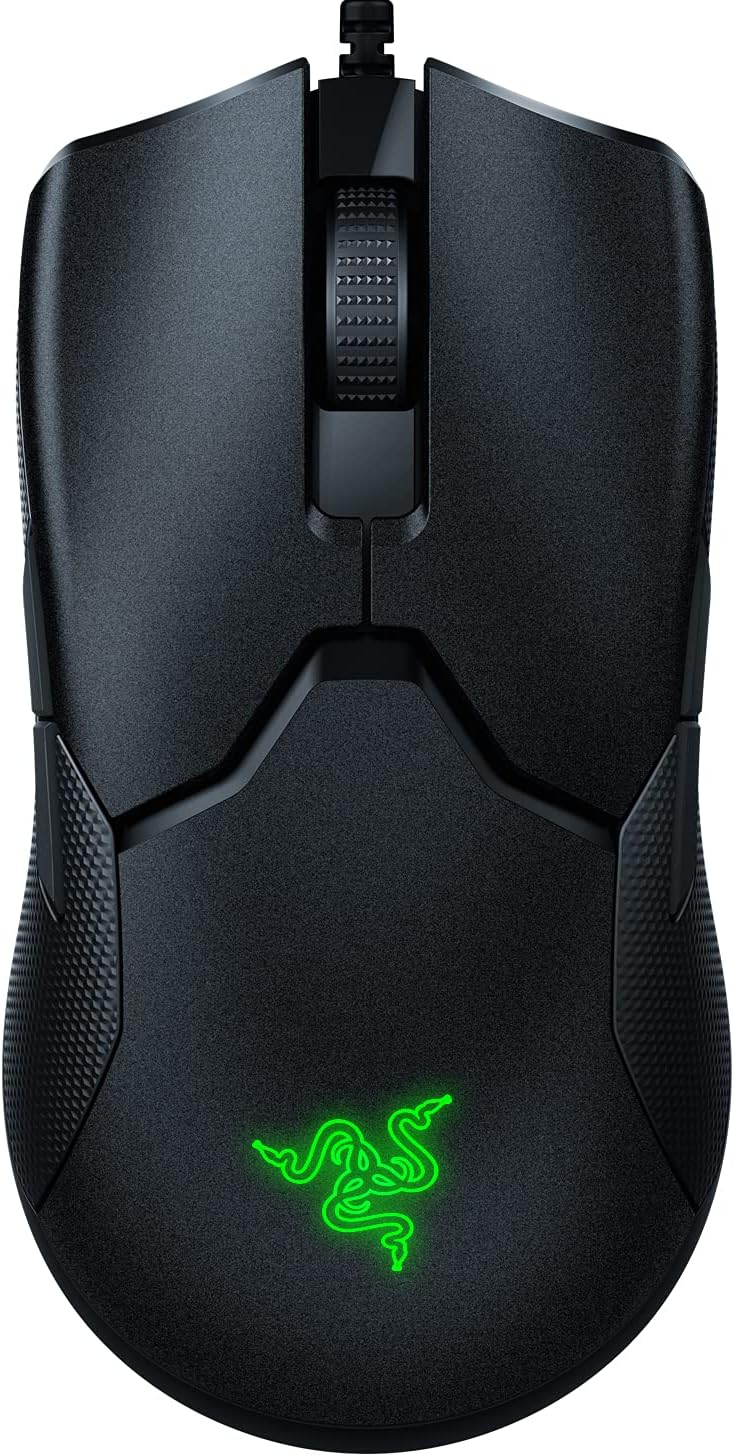
Figure 3.1: Razer Viper Wired Optical Gaming Mouse. This image shows the top-down view of the black Razer Viper mouse, highlighting its ambidextrous design and the illuminated Razer logo.
4. Подешавање
4.1 Connecting Your Razer Viper
- Пронађите слободан УСБ порт на рачунару.
- Plug the USB connector of your Razer Viper mouse into the USB port.
- Ваш рачунар би требало аутоматски да детектује и инсталира потребне драјвере.
4.2 Installing Razer Synapse 3 (Optional, Recommended)
To unlock advanced customization options, including button remapping, DPI adjustments, Chroma RGB lighting effects, and surface calibration, install Razer Synapse 3 software.
- Download Razer Synapse 3 from the official Razer webсајт: ввв.разер.цом/синапсе
- Пратите упутства на екрану да бисте инсталирали софтвер.

Figure 4.1: Razer Viper with Speedflex Cable. This image shows the Razer Viper mouse connected via its flexible Speedflex cable, emphasizing the low-drag design.
5. Operating Your Razer Viper
5.1 Основне функције
- Леви клик: Примарна акција.
- Десни клик: Секундарни радни/контекстни мени.
- Точак за померање: Померање горе/доле, клик средњим тастером миша.
- Side Buttons (Left & Right): Подразумевано за прелазак унапред/уназад web browsers, customizable via Synapse 3.
5.2 ДПИ подешавање
The Razer Viper features a dedicated DPI Stage button on the underside of the mouse to prevent accidental presses during intense gameplay. This button allows you to cycle through up to 5 pre-configured DPI sensitivity stagес.
- To change DPI: Press the "DPI Stage" button located on the bottom of the mouse.
- An LED indicator next to the button will change color to show the active DPI profile.

Figure 5.1: Razer Viper DPI Button. This image shows the underside of the Razer Viper mouse, pointing out the DPI Stage button and its LED indicator.
5.3 Customization with Razer Synapse 3
Razer Synapse 3 provides comprehensive control over your mouse settings:
- Прилагодите: Remap buttons, assign macros, and configure secondary functions (HyperShift).
- Перформансе: Adjust DPI sensitivity stages (100 to 16,000 DPI) and polling rate (up to 1000 Hz).
- Осветљење: Personalize Chroma RGB lighting effects and brightness.
- калибрација: Optimize tracking for your specific mouse mat surface.

Figure 5.2: Razer Synapse 3 Button Customization Interface. This screenshot displays the Razer Synapse 3 software interface, showing how users can customize the 8 programmable buttons on the Razer Viper mouse.
6. Одржавање
6.1 Чишћење миша
- Искључите миш из рачунара пре чишћења.
- Лагано користите меку крпу која не оставља длачице дampводом или благим раствором за чишћење да бисте обрисали површину.
- Избегавајте употребу јаких хемикалија, абразивних средстава за чишћење или прекомерну влагу.
- Clean the optical sensor area gently with a cotton swab to ensure optimal tracking performance.
6.2 Управљање кабловима
The Speedflex cable is designed to be flexible. To prolong its lifespan, avoid sharp bends or excessive pulling. Use the included cable tie to manage excess cable length.
КСНУМКС. Решавање проблема
7.1 Миш не реагује
- Уверите се да је USB кабл безбедно прикључен у исправан USB порт на рачунару.
- Покушајте да прикључите миш на други УСБ порт.
- Поново покрените рачунар.
- If using a USB hub, try connecting the mouse directly to the computer.
7.2 Tracking Issues
- Очистите оптички сензор на доњој страни миша.
- Ensure your mouse mat surface is clean and free of debris.
- Perform surface calibration using Razer Synapse 3.
- Test the mouse on a different surface to rule out surface-related issues.
7.3 Razer Synapse 3 Not Detecting Mouse
- Ensure Razer Synapse 3 is updated to the latest version.
- Restart Razer Synapse 3.
- Reinstall Razer Synapse 3 if the issue persists.
8. Спецификације
| Феатуре | Детаљ |
|---|---|
| Број модела | РЗ01-0255 |
| Сензор | Razer 5G Optical Sensor |
| ДПИ (тачке по инчу) | До 16,000 |
| Тачност праћења | 99.4% |
| Прекидачи | Razer Optical Mouse Switches (70 million click lifespan) |
| Дугмад | 8 Програмабилна дугмад |
| Дизајн | Ambidextrous, Ultralight (approx. 69g) |
| Кабл | Разер Спеедфлек кабл |
| Осветљење | Разер Цхрома РГБ |
| Уграђена меморија | Yes (up to 5 DPI profiles) |
| Повезивање | УСБ |
| Димензије производа | 4.99 к 2.61 к 1.49 инча |
| Тежина артикла | approx. 69g (2.43 oz) |
9. Гаранција и подршка
For warranty information, technical support, or to register your product, please visit the official Razer support webсајт:
Сачувајте доказ о куповини за гаранцијске захтеве.


