Увод
Хвала вам на куповиниasing the Smart Starsat SR-90000 XTREAM HD DVB-S2 Satellite Receiver. This device is designed to provide a high-quality viewing experience with its H.265 HEVC (High Efficiency Video Coding) support and Full HD 1080P output. This manual will guide you through the setup, operation, and maintenance of your new satellite receiver, ensuring optimal performance and longevity.
Безбедносне информације
- Пажљиво прочитајте сва упутства пре употребе уређаја.
- Не излажите пријемник киши или влази како бисте спречили пожар или струјни удар.
- Осигурајте одговарајућу вентилацију око јединице како бисте спречили прегревање.
- Не отварајте цasinг; све сервисирање препустите квалификованом особљу.
- Користите само струјни адаптер који је испоручен са јединицом.
- Држите уређај даље од директне сунчеве светлости, извора топлоте и јаких магнетних поља.
Садржај пакета
Молимо вас да означите поље за следеће ставке:
- Smart Starsat SR-90000 XTREAM Receiver
- 2 Remote Controls (one standard, one with WiFi technology)
- ВиФи антена
- АВ кабл
- Повер Адаптер
- Кориснички приручник (овај документ)
- Гарантни лист
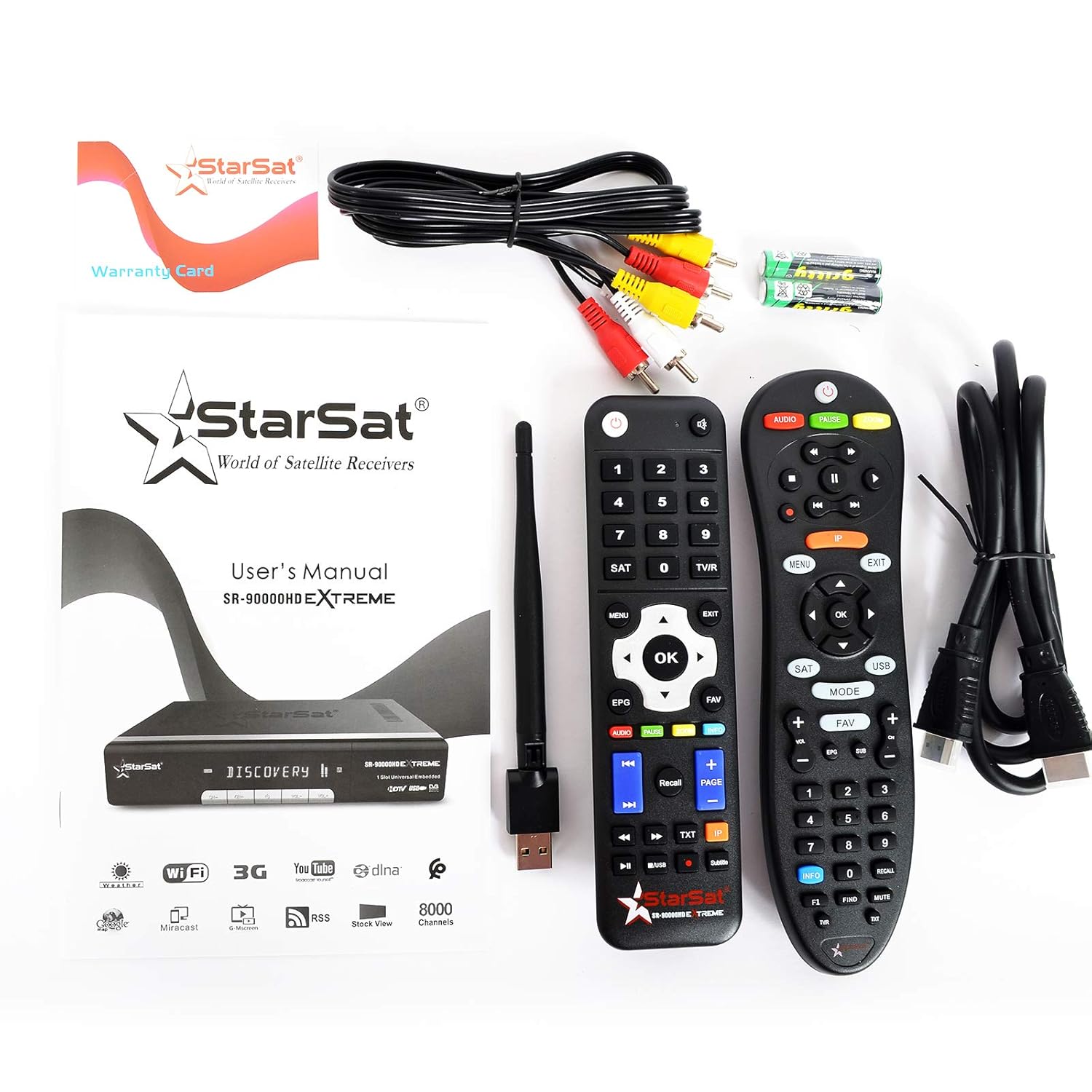
Image: All items included in the Smart Starsat SR-90000 XTREAM Receiver package.
Производ је завршенview
Предња плоча
The front panel of the SR-90000 XTREAM receiver features a display for channel numbers and status indicators, along with basic control buttons for power, channel up/down, and volume. A USB port is also accessible on the front for convenient media playback or software updates.
Прикључци задњег панела
The rear panel provides all necessary ports for connecting your receiver to a television, satellite dish, and network.

Image: Rear panel connections of the SR-90000 XTREAM Receiver.
Key Ports:
- TUNER 1 IN / TUNER 2 IN: Connect your satellite dish cables here.
- УСБ 2.0: Two USB ports for external storage devices (e.g., USB drives for media playback or recording).
- DV OUT: HDMI output for connecting to your television.
- AUDIO L/R, VIDEO: RCA (AV) outputs for older televisions.
- КОАКСИЈАЛНО: Дигитални аудио излаз.
- РС232: Сервисни порт.
- ЛАН: Етернет порт за жичану мрежну везу.
- НАПАЈАЊЕ: Повежите адаптер за напајање.
- ОН/ОФФ прекидач: Главни прекидач за напајање.
Сетуп
1. Повезивање са телевизором
- Ensure both your TV and the receiver are powered off.
- For best quality, connect an HDMI cable from the DV OUT port on the receiver to an HDMI input on your TV.
- Alternatively, use the supplied AV cable to connect the АУДИО Л/Р и ВИДЕО ports on the receiver to the corresponding inputs on your TV.
2. Connecting to Your Satellite Dish
- Connect the coaxial cable(s) from your satellite dish LNB(s) to the TUNER 1 IN и/или TUNER 2 IN портови на пријемнику.
3. Connecting to the Network (Optional)
- Жична веза: Повежите Етернет кабл са рутера на ЛАН порт на пријемнику.
- Бежична веза: Screw the provided WiFi antenna into the designated port on the receiver. You will configure the wireless connection in the system settings after initial power-on.
4. Укључивање и почетно подешавање
- Connect the power adapter to the receiver and then to a power outlet.
- Флип тхе ОН/ОФФ switch on the rear panel to the 'ON' position.
- Turn on your TV and select the correct HDMI or AV input source.
- Follow the on-screen instructions for initial setup, which typically includes language selection, time zone, and satellite configuration/channel scan.
Упутство за употребу
Функције даљинског управљача
The receiver comes with two remote controls. The primary remote offers comprehensive control over all receiver functions. Familiarize yourself with the button layout for easy navigation.
Image: The two remote controls provided with the receiver.
- СНАГА: Turns the receiver on/off or to standby.
- МЕНИ: Accesses the main menu for settings and features.
- ОК/ЕНТЕР: Confirms selections or displays channel list.
- ДУГМЕ СА СТРЕЛИЦАМА: Navigate through menus and channels.
- ЕКСИТ: Returns to the previous screen or live TV.
- ВОЛ +/-: Подешава јачину звука.
- ЦХ +/-: Мења канале.
- ЕПГ: Приказује електронски водич кроз програме.
- УСБ: Accesses media fileса повезаног УСБ уређаја.
- ФАВ: Accesses favorite channel lists.
- АУДИО: Changes audio tracks or language.
- ТКСТ: Функција телетекста.
Навигација кроз мени
Притисните тастер МЕНУ button on your remote to access the main menu. Use the arrow buttons to navigate through options such as Installation, Channel Manager, System Settings, Media Center, and Network Settings. Press OK да изаберете опцију и ЕКСИТ да се вратим.
Управљање каналима
In the Channel Manager menu, you can perform tasks such as:
- Скенирање канала: Тражи new satellite channels.
- Уреди канале: Move, delete, or lock channels.
- Favorite Groups: Create custom lists of your preferred channels.
Репродукција медија
Insert a USB storage device into one of the USB ports. Navigate to the Media Center menu to browse and play supported media files (video, audio, images). The receiver supports DLNA for streaming content from compatible devices on your local network.
Интернет функције
Connect your receiver to the internet via LAN or WiFi (configure in Network Settings) to access features like YouTube and other online services.
Одржавање
- Чишћење: Use a soft, dry cloth to clean the exterior of the receiver. Do not use liquid cleaners or aerosols.
- вентилација: Ensure that the ventilation openings on the receiver are not blocked to prevent overheating.
- Ажурирања софтвера: Периодично проверавајте произвођачеве website or the receiver's system settings for available software updates to ensure optimal performance and access to new features.
Решавање проблема
| Проблем | Могући узрок | Решење |
|---|---|---|
| Нема слике или звука | Incorrect TV input selected; loose cables; receiver not powered on. | Check TV input source; ensure all cables (HDMI/AV, power) are securely connected; power on the receiver. |
| Даљински управљач не ради | Празне батерије; препрека између даљинског и пријемника; даљински управљач није правилно усмерен. | Replace batteries; remove obstructions; point remote directly at the receiver's IR sensor. |
| Нема сателитског сигнала | Dish misalignment; loose LNB cable; bad weather. | Check LNB cable connection; ensure dish is properly aligned (may require professional assistance); wait for weather to clear. |
| Није могуће повезати се на ВиФи | Incorrect password; WiFi antenna not connected; router issues. | Verify WiFi password; ensure WiFi antenna is securely attached; restart your router. |
Спецификације
| Феатуре | Опис |
|---|---|
| Модел | СР-90000 |
| Видео Децодинг | H.265 HEVC, Full HD 1080P |
| Тип тјунера | DVB-S2 (Double Tuner) |
| УСБ портови | 2 (УСБ 2.0) |
| Повезивање | WiFi (via included antenna), LAN (Ethernet), IR |
| Аудио излаз | AC/DC, Coaxial, Audio L/R |
| Видео Оутпут | HDMI (DV OUT), Video RCA |
| Подржане функције | YouTube, DLNA, EPG, Multi Language, DISEQC1.0 / 1.1, PAL/NTSC |
| Компатибилни уређаји | Телевизија |
| Тежина артикла | 1.46 кг |
| Димензије (пакет) | 31.3 к 29.9 к 7.7 цм |
Гаранција и подршка
Your Smart Starsat SR-90000 XTREAM Receiver comes with a 1-year service warranty. For technical support, further information, or to check for software updates, please visit the official Starsat webсајт:

Image: Product box highlighting features and the official Starsat webсајт за подршку.


