Увод
This manual provides essential information for the safe and efficient operation of your Dual MCR 4 Portable DAB+/FM Radio. This device offers both digital DAB+ and analog FM radio reception, ensuring a wide range of listening options. Its color TFT display enhances usability by showing station names and additional information. With intuitive controls, auxiliary input, and headphone jack, the MCR 4 is designed for versatile and enjoyable audio experiences.
Безбедносне информације
- Пажљиво прочитајте сва упутства пре употребе уређаја.
- Држите уређај даље од воде, влаге и високих температура.
- Не покушавајте да растављате или модификујете уређај. Сва сервисирања препустите квалификованом особљу.
- Use only the provided power adapter or recommended battery types.
- Обезбедите одговарајућу вентилацију око уређаја током рада.
- Одложите батерије одговорно у складу са локалним прописима.
Садржај пакета
Молимо вас да проверите да ли су све ставке присутне у пакету:
- Dual MCR 4 Main Unit
- Повер Адаптер
- Упутство за употребу
Производ је завршенview
The Dual MCR 4 features a compact design with intuitive controls for easy access to its functions. Key components include:
- Color TFT Display: Приказује информације о станици, време и опције менија.
- Окретно дугме: For tuning, volume control, and menu navigation.
- Memory Buttons: To save and recall your favorite radio stations.
- Телескопска антена: For optimal radio signal reception.
- Auxiliary Input (AUX-IN): Located at the back, for connecting external audio devices.
- Слушалице: Located at the back, for private listening.
- Mechanical On/Off Switch: Located at the back, for direct power control.
- Passive Membrane: Located at the back, contributing to exceptional sound quality.
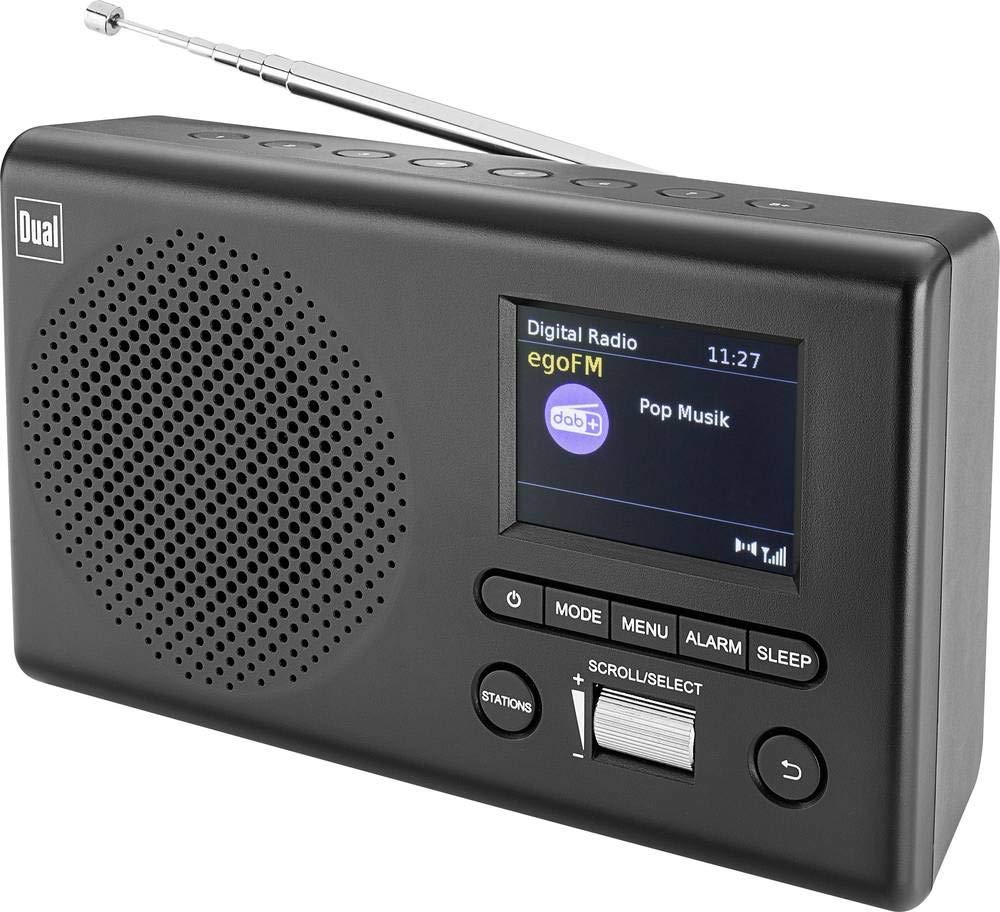
Слика: Фронт view of the Dual MCR 4 Portable DAB+/FM Radio, showing the color TFT display, rotary knob, and control buttons. The radio has a black and silver finish.
Сетуп
1. Напајање уређаја
The Dual MCR 4 can be powered by either the included AC power adapter or batteries, offering portability.
- Коришћење АЦ адаптера: Connect the power adapter to the DC IN port on the back of the radio and plug the other end into a standard wall outlet.
- Коришћење батерија: Open the battery compartment on the bottom/back of the radio and insert the required batteries (type and quantity usually specified inside the compartment or in the full manual). Ensure correct polarity.
2. Подешавање антене
Extend the telescopic antenna fully for optimal reception of both DAB+ and FM radio signals. Adjust its position for the best signal quality.
3. Initial Power On and Station Scan
After connecting power, switch on the radio using the mechanical ON/OFF switch at the back. The radio will typically perform an automatic station scan upon first use, searching for available digital (DAB+) and analog (FM) radio stations. This process may take a few moments.
Упутство за употребу
1. Основна операција
- Укључивање/искључивање: Use the mechanical switch at the back. For standby, a dedicated button on the front might be available (refer to physical unit).
- Контрола јачине звука: Rotate the main rotary knob to adjust the listening volume.
2. DAB+ радио режим
- Selecting DAB+ Mode: Press the MODE button (if available) or navigate through the menu using the rotary knob until DAB+ mode is selected.
- Избор станице: After an automatic scan, use the rotary knob to scroll through the list of available DAB+ stations. Press the knob to confirm your selection.
- Чување унапред подешених вредности: Tune to your desired station. Press and hold a memory button (e.g., 1-5) until the display confirms the station is saved.
- Подсећање на унапред подешене поставке: Briefly press the corresponding memory button to recall a saved station.
- Прикажи информације: The color TFT display will show station name, program information (DLS), and potentially station logos or slideshows.
3. Режим ФМ радија
- Selecting FM Mode: Press the MODE button or navigate through the menu until FM mode is selected.
- Ручно подешавање: Rotate the tuning knob to manually adjust the frequency.
- Аутоматско скенирање: Press and hold the tuning knob or a dedicated scan button to automatically search for the next available FM station.
- Чување унапред подешених вредности: Tune to your desired FM station. Press and hold a memory button until the display confirms the station is saved.
- Подсећање на унапред подешене поставке: Briefly press the corresponding memory button to recall a saved station.
4. Auxiliary Input (AUX-IN)
Connect an external audio device (e.g., smartphone, MP3 player) to the AUX-IN port on the back of the radio using a 3.5mm audio cable. Select AUX mode on the radio to play audio from the connected device.
5. Употреба слушалица
For private listening, plug standard 3.5mm headphones into the headphone jack located on the back of the unit. The internal speaker will automatically mute.
Одржавање
- Чишћење: Обришите радио меком, сувом крпом. Не користите абразивна средства за чишћење или раствараче.
- Складиштење: If storing for an extended period, remove batteries and store the unit in a cool, dry place.
- Брига о антени: Handle the telescopic antenna gently to prevent damage.
Решавање проблема
| Проблем | Могуће решење |
|---|---|
| Нема струје |
|
| Лош радио пријем |
|
| Нема звука из звучника |
|
Спецификације
| Бранд | Дуал |
| Број модела | 76074 |
| Боја | Црна, Сребрна |
| Технологија подешавања | ДАБ+, ФМ |
| Технологија повезивања | Auxiliary (AUX-IN) |
| Посебне карактеристике | Portable, Color TFT Display |
| Компатибилни уређаји | Headphones, External Audio Devices (via AUX-IN) |
| Извор напајања | Mains (AC Adapter), Battery Powered |
| Укључене компоненте | Main Unit, Power Adapter, User Manual |
| Препоручена употреба | Музика |
Гаранција и подршка
For warranty information and technical support, please refer to the specific warranty card included with your product or contact Dual customer service. The included user manual provides detailed instructions and contact information.


