1. Готовоview
The WEILAILIFE Universal Bullet Security Camera Junction Box is designed to provide a secure and weatherproof enclosure for your security camera cables and connections. Made from durable aluminum, this junction box protects your equipment from environmental elements such as sun exposure, heavy rain, dust, and corrosion, ensuring longevity and reliable performance for both indoor and outdoor surveillance systems.
Кључне карактеристике:
- Водоотпоран и издржљив: Constructed from aluminum to withstand harsh weather conditions.
- Заштита каблова: Features rear/bottom access for cable routing, providing ample space to hide and protect connectors and excess cables.
- Једноставна инсталација: Designed for straightforward mounting with included screws, suitable for various camera types.
- Универзална компатибилност: Compatible with most IP/POE surveillance bullet cameras, offering a neat and protected wire arrangement.

Image 1: WEILAILIFE Universal Bullet Security Camera Junction Box. This image displays the white, circular junction box, highlighting its robust design for security camera installations.
2. Подешавање и инсталација
Follow these steps to properly install your WEILAILIFE Universal Bullet Security Camera Junction Box and mount your camera.
Распакивање и компоненте:
Before installation, ensure all components are present. Each 8-pack includes:
- 8 x Metal Junction Boxes
- 8 x гумена прстена
- 32 x Waterproof Plugs
- 8 x Fixing Stickers
- 8 x Screw Packs (for wall mounting)
- Screws (for attaching camera to box)
Video 1: Metal Junction Box 8 Packs. This video demonstrates the unboxing of the 8-pack junction boxes and shows all included components.
Кораци инсталације:
- Отворите предњу корицу: Unscrew the front cover of the junction box to access the interior.
- Prepare for Cable Routing: Remove the appropriate rubber grommet and the center hole plug from the front cover. If your camera cable has a large connector, use the C-hole grommet provided.
- Провуците кабл: Pass the camera cable through the prepared holes in the front cover. Coil any excess cable neatly inside the junction box to ensure a clean and protected installation.
- Attach Camera to Cover: Use the provided screws to securely attach your bullet camera's base to the front cover of the junction box. Ensure it is snug and stable.
- Означите и избушите рупе: Hold the assembled junction box (with camera attached) against the desired mounting surface. Use a marker to accurately mark the screw holes on the wall. Drill pilot holes using an appropriate drill bit for your wall type.
- Обезбедите кутију: Insert the wall anchors (if necessary) into the drilled holes. Align the junction box with the holes and secure it to the wall using the provided screws.
- Snap the Cover: Carefully snap the front cover, with the camera attached, back onto the main body of the junction box. Ensure a tight seal, especially for outdoor installations, to maintain waterproofing.
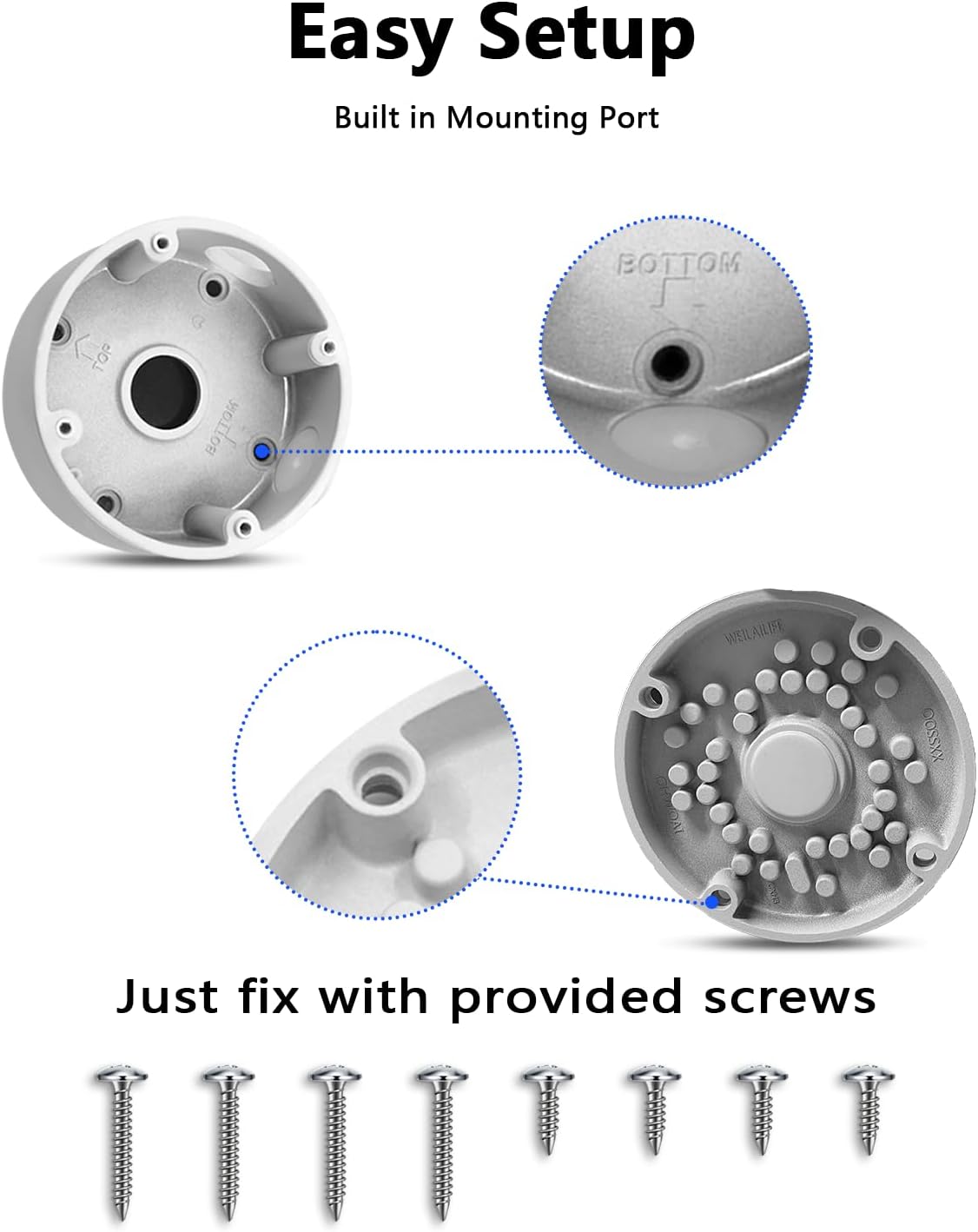
Image 2: Easy Setup with Built-in Mounting Port. This image illustrates the internal structure of the junction box, showing the mounting points and cable routing options for simplified installation.
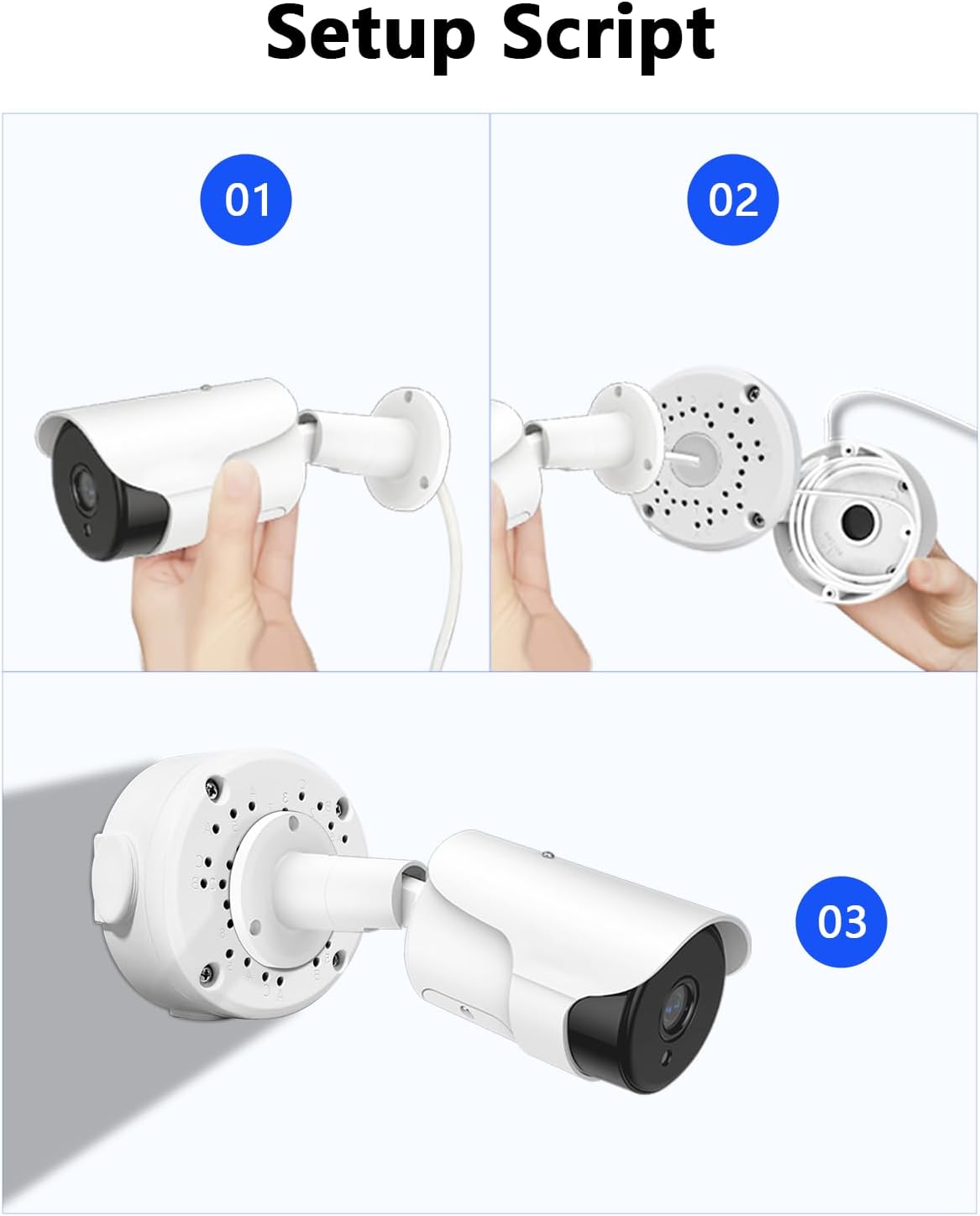
Image 3: Setup Script for Camera Installation. This image provides a visual guide to the three main steps of attaching a bullet camera to the junction box cover and then mounting it.
Video 2: Metal Junction Box Installation. This video provides a step-by-step tutorial on how to install the metal junction box with a security camera.
3. Упутство за употребу
The WEILAILIFE Universal Bullet Security Camera Junction Box is a passive component designed to house and protect your camera's wiring. Its operation is directly tied to the functionality of the security camera it encloses. Once installed, the junction box requires no direct operation.
For operating your security camera, refer to the specific instruction manual provided with your camera. This typically involves:
- Connecting the camera to power and network (if applicable).
- Configuring the camera through its dedicated mobile application or computer software.
- Setting up motion detection, recording schedules, and alert notifications.
- Accessing live view и снимљено фуtage.
Video 3: WEILAILIFE Brand Video. This video showcases the general use and benefits of WEILAILIFE security cameras, including remote monitoring via a smartphone app, which is how the camera housed by the junction box would be operated.
4. Одржавање
The WEILAILIFE Universal Bullet Security Camera Junction Box is designed for minimal maintenance due to its durable aluminum construction and weatherproof features. However, periodic checks can help ensure its continued performance:
- Визуелни преглед: Periodically inspect the junction box for any signs of physical damage, cracks, or loose components.
- Интегритет печата: Check the rubber rings and waterproof plugs for any degradation or displacement, especially after extreme weather conditions. Ensure all seals are intact to prevent water ingress.
- Чишћење: If installed outdoors, gently clean the exterior of the junction box with a soft, damp cloth to remove dirt, dust, or debris that may accumulate. Avoid using harsh chemicals or abrasive materials.
- Затегнутост завртња: Occasionally verify that all mounting screws and screws attaching the camera to the box are tight. Do not overtighten.
КСНУМКС. Решавање проблема
The junction box itself is a passive enclosure and typically does not require troubleshooting. Most issues will stem from the camera or its connections. If you experience problems, consider the following:
- Продирање воде: If you suspect water has entered the box, carefully open it (ensuring power to the camera is off) and inspect the cables and connections for moisture or corrosion. Ensure all waterproof plugs and seals are correctly seated.
- Лабаве везе: If the camera is losing power or signal, check that all cable connections inside the junction box are secure and properly seated.
- Camera Stability: If the camera feels loose or unstable, check the screws attaching it to the junction box cover and the screws securing the box to the mounting surface.
For camera-specific issues (e.g., no video, poor image quality, network connectivity problems), please consult the troubleshooting section of your security camera's instruction manual.
6. Спецификације

Image 4: Product Dimensions. This image provides a visual representation of the junction box's key measurements, including diameter and depth.
| Феатуре | Детаљ |
|---|---|
| Материјал | Алуминијум |
| Бранд | ВЕИЛАИЛИФЕ |
| Боја | Бела |
| Стиле | Професионални |
| Димензије производа | 4" Д x 4" Ш x 2" В (приближно 10.16 цм Д x 10.16 цм Ш x 5.08 цм В) |
| Финисх Типе | Паинтед |
| Врста инсталације | Screw-In, Surface Mount |
| Тежина артикла | 5.17 pounds (for 8 Pack) |
| Број модела ставке | 8 Пацк |
| Величина | 4.7" x 4.7" x 2.8" (приближно 11.94 цм x 11.94 цм x 7.11 цм) |
| Посебне карактеристике | Waterproof, UV-Protection |
| Употреба | Оутдоор |
| Укључене компоненте | Junction Box * 8, Waterproof Plug * 32, Rubber Ring * 8, Screw Bag * 8 |
7. Гаранција и подршка
This WEILAILIFE product comes with a manufacturer warranty for 1 year from the date of purchase. Service is provided from a US location.
For warranty claims, technical support, or any inquiries regarding your product, please contact WEILAILIFE customer service through the retailer's platform or the official WEILAILIFE webсајту.


