1. Увод
This manual provides essential information for the safe and efficient installation, operation, and maintenance of the TURCK NI6U-EG08-AP6X-H1341 Proximity Sensor. Please read all instructions carefully before proceeding with installation or operation to ensure proper function and prevent damage.
2. Безбедносна упутства
- Always disconnect power to the circuit before installing, wiring, or servicing the sensor.
- Инсталацију и одржавање треба да обавља само квалификовано особље које је упознато са електричним системима и безбедносним процедурама.
- Observe all local, national, and international electrical codes and regulations.
- Не прекорачујте наведену радну запреминуtagе или тренутне оцене.
- Protect the sensor from mechanical damage, excessive vibration, and extreme temperatures outside its specified operating range.
3. Производ је готовview
The TURCK NI6U-EG08-AP6X-H1341 is an UPROX M8x1 barrel-type inductive proximity sensor. It is designed for non-contact detection of metallic objects within its sensing range. This sensor features an extended 6mm sensing range, a 3-wire DC PNP output configuration, and operates on a 10-30VDC power supply. Electrical connection is made via an M12 male connector.
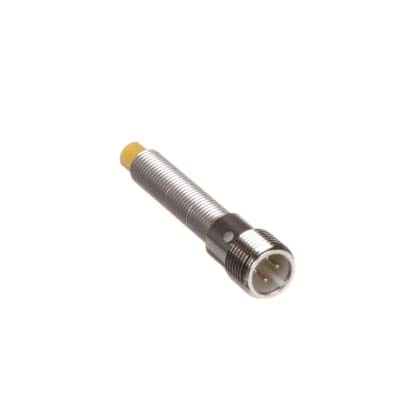
Image 1: TURCK NI6U-EG08-AP6X-H1341 Proximity Sensor. This image shows the M8x1 barrel-shaped sensor with its M12 male connector.
4. Подешавање
4.1. Монтажа
- Select a mounting location where the sensor's sensing face can reliably detect the target object without obstruction.
- Ensure the sensor is securely fastened using appropriate mounting hardware for M8x1 barrel sensors.
- Maintain sufficient clearance around the sensor body, especially if it is a non-flush mount type, to prevent interference from surrounding metal. For flush-mountable sensors, ensure the sensing face is flush with the mounting surface.
4.2. Ожичење
Connect the sensor to the control system according to the following wiring diagram for a 3-wire DC PNP sensor with an M12 connector:
- Pin 1 (Brown wire): +10-30 VDC (Power Supply Positive)
- Pin 3 (Blue wire): 0 VDC (Power Supply Negative / Ground)
- Pin 4 (Black wire): PNP Output (Switching signal to load)
Ensure all connections are tight and properly insulated. Verify the power supply voltage is within the specified 10-30VDC range.
5. Упутство за употребу
Once properly installed and wired, the TURCK NI6U-EG08-AP6X-H1341 sensor operates automatically. When a metallic object enters the sensor's 6mm sensing field, the PNP output (black wire) will switch from its OFF state to its ON state (supplying positive voltage to the load). When the metallic object leaves the sensing field, the output will return to its OFF state. The UPROX technology ensures consistent sensing performance across various metal types without requiring correction factors.
6. Одржавање
The TURCK NI6U-EG08-AP6X-H1341 proximity sensor is designed for long-term, maintenance-free operation. However, periodic checks can help ensure optimal performance:
- Keep the sensing face clean and free from excessive dirt, dust, or metallic debris.
- Inspect the M12 connector and wiring for any signs of damage, corrosion, or loose connections.
- Ensure the sensor remains securely mounted and its position has not shifted.
There are no user-serviceable parts inside the sensor. Do not attempt to open or repair the device.
КСНУМКС. Решавање проблема
| Проблем | Могући узрок | Решење |
|---|---|---|
| Нема излазног сигнала |
|
|
| Интермитентни излаз |
|
|
| Reduced sensing range |
|
|
8. Спецификације
- Модел: NI6U-EG08-AP6X-H1341
- Тип сензора: Inductive Proximity Sensor, UPROX
- Housing Style: M8x1 Barrel
- Опсег осетљивости: 6 мм
- Тип излаза: 3-wire DC PNP, Normally Open (NO)
- Оператинг Волtage: 10-30 ВДЦ
- веза: М12 мушки конектор
- Оцена заштите: Typically IP67 (Dust tight and protected against immersion up to 1m)
- Радна температура: -25°C to +70°C (Typical industrial range)
9. Гаранција и подршка
For detailed warranty information, technical support, or service inquiries regarding your TURCK NI6U-EG08-AP6X-H1341 Proximity Sensor, please refer to the official TURCK website or contact their authorized customer support channels. Keep your purchase documentation for warranty claims.
TURCK Official Webсајт: ввв.турцк.цом


