Увод
This manual provides comprehensive instructions for setting up, operating, maintaining, and troubleshooting your Mercusys MR50G AC1900 Dual-Band Wi-Fi 5 Router. The MR50G is designed to deliver high-speed wireless connectivity with AC1900 speeds, Gigabit Ethernet ports, and advanced features like MU-MIMO and Beamforming.

Слика: Фронт view of the Mercusys MR50G router, illustrating its dual-band capabilities with 5GHz (1300 Mbps) and 2.4GHz (600 Mbps) speeds.
Водич за подешавање
1. Садржај пакета
Проверите да ли ваш пакет садржи следеће ставке:
- Mercusys MR50G AC1900 Dual-Band Wi-Fi 5 Router
- Повер Адаптер
- Етхернет Цабле
- Quick Installation Guide (User Guide)
2. Физичка веза
Пратите ове кораке да бисте повезали рутер:
- Искључивање: Искључите напајање из модема и рутера (ако је применљиво).
- Повежите модем са рутером: Connect one end of the provided Ethernet cable to the WAN port (usually blue) on your MR50G router and the other end to your modem's Ethernet port.
- Повежите уређаје (опционо): For wired connections, connect your computer or other devices to the LAN ports (yellow) on the MR50G router using Ethernet cables.
- Укључено: Connect the power adapter to the router's power port and plug it into a power outlet. Power on your modem, then power on the MR50G router.
- Сачекајте индикаторе: Wait for the router's LED indicators to stabilize. The Power LED should be solid green.
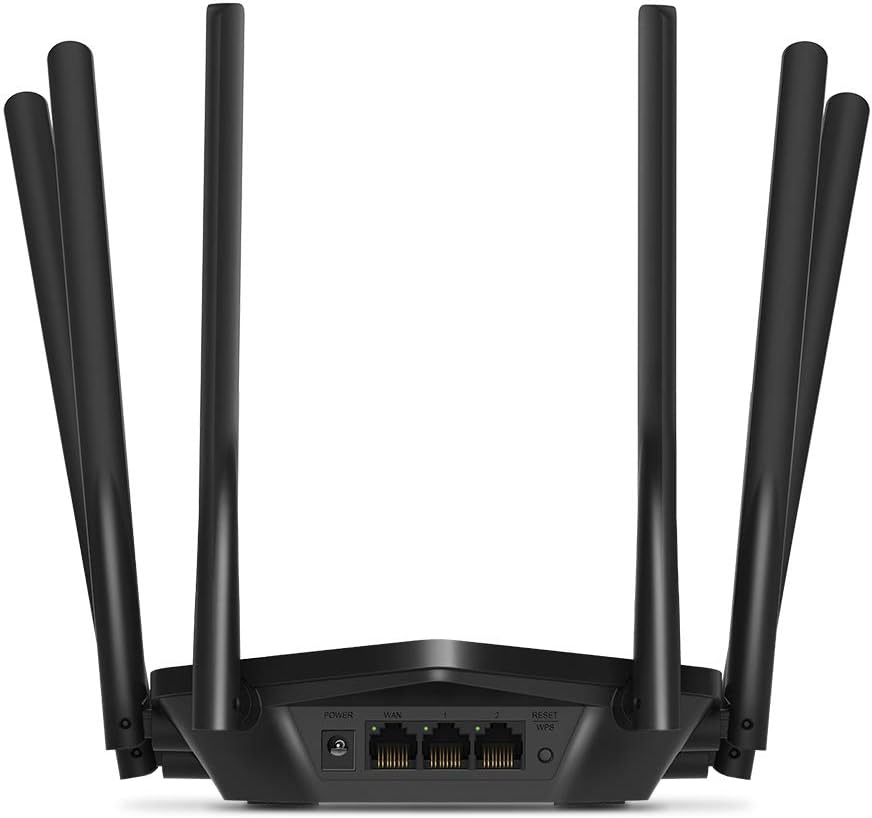
Слика: Позади view of the Mercusys MR50G router, illustrating the power input, WAN port (blue), and three LAN ports (yellow) for wired connections, along with the Reset/WPS button.
3. Почетна конфигурација
Да бисте први пут конфигурисали рутер:
- Повежите се на Ви-Фи: Connect your computer or mobile device to the router's default Wi-Fi network (SSID and password are typically printed on a label on the bottom of the router).
- Приступ Web Интерфејс: Отвори а web претраживач и тип
mwlogin.netor192.168.1.1у траку за адресу. - Креирај лозинку за пријаву: Follow the on-screen instructions to create a login password for the router's management page.
- Пратите брзо подешавање: The Quick Setup wizard will guide you through basic internet and wireless settings.
Упутство за употребу
1. Basic Wi-Fi Settings
Након пријављивања у web интерфејс:
- Име мреже (ССИД): Navigate to the Wireless settings to change your Wi-Fi network names (SSIDs) for both 2.4 GHz and 5 GHz bands.
- Лозинка: Set a strong, unique password for your Wi-Fi networks. The MR50G supports WPA3 for enhanced security.
- Тип безбедности: It is recommended to use WPA2-PSK/WPA3-Personal for optimal security.
2. Dual-Band Operation
The MR50G operates on two frequency bands:
- 2.4 ГХз: Пружа ширу покривеност и бољи продор кроз зидове, погодан за општу употребу интернета и старије уређаје.
- 5 ГХз: Offers faster speeds and less interference, ideal for bandwidth-intensive activities like 4K streaming and online gaming, but with a shorter range.
You can configure separate SSIDs for each band or use Smart Connect to combine them into a single SSID, allowing the router to automatically assign devices to the optimal band.
3. Режим приступне тачке
To use the MR50G as an Access Point (AP) to extend an existing wired network:
- Повежите се: Connect an Ethernet cable from your existing router's LAN port to one of the MR50G's LAN ports (not the WAN port).
- Конфигуриши: Log into the MR50G's web interface, navigate to the Operation Mode settings, and select "Access Point Mode". Follow the prompts to complete the setup.
4. Напредне функције
- МУ-МИМО: Технологија за више корисника, вишеструке улазе, вишеструке излазе омогућава рутеру да комуницира са више уређаја истовремено, побољшавајући ефикасност мреже.
- Обликовање зрака: Фокусира Wi-Fi сигнале ка повезаним уређајима, побољшавајући јачину и домет сигнала.
- ВПН подршка: The router supports VPN functionality, allowing for secure remote access or connection to VPN services. Refer to the router's web interface for specific VPN client/server configurations.
- Родитељски надзор: Manage and restrict internet access for specific devices or users.
- Мрежа гостију: Направите засебну Wi-Fi мрежу за госте, одржавајући вашу главну мрежу безбедном.
Одржавање
1. Ажурирања фирмвера
Regularly check for and install firmware updates to ensure optimal performance, security, and access to new features. Firmware updates can typically be found in the router's web interface under System Tools or Advanced settings.
2. Ресетовање рутера
If you encounter persistent issues or forget your login password, you may need to reset the router to its factory default settings:
- With the router powered on, press and hold the Reset/WPS button on the back panel for approximately 5-10 seconds until the LED indicators flash.
- Release the button and wait for the router to restart. All settings will be restored to factory defaults.
3. Оптимално постављање
For the best Wi-Fi coverage and performance:
- Place the router in a central location in your home or office.
- Avoid placing it near obstructions like thick walls, metal objects, or large appliances (microwaves, refrigerators) that can interfere with Wi-Fi signals.
- Elevate the router if possible, as Wi-Fi signals tend to spread downwards.

Image: Mercusys MR50G router positioned on a table, demonstrating a typical placement for optimal signal distribution within a living space.
Решавање проблема
1. Нема приступа интернету
- Проверите везе: Уверите се да су сви Ethernet каблови безбедно повезани са исправним портовима (WAN ка модему, LAN ка уређајима).
- Поново покрените уређаје: Power cycle your modem, then the router, and then your connected devices.
- Проверите WAN LED индикатор: Verify that the WAN LED on the router is lit, indicating a connection to the modem.
- Статус интернет провајдера: Обратите се свом интернет провајдеру (ISP) да бисте потврдили да нема преосталог сервиса.tagес у вашој области.
2. Slow Wi-Fi Speeds
- Постављање рутера: Ensure the router is placed optimally (refer to "Optimal Placement" section).
- сметње: Move the router away from other electronic devices that may cause interference.
- Избор опсега: For speed-critical applications, ensure your device is connected to the 5 GHz band.
- Оптимизација канала: У рутеру web интерфејс, покушајте да промените Wi-Fi канал за оба опсега од 2.4 GHz и 5 GHz на мање загушен.
- Фирмвер: Уверите се да је фирмвер вашег рутера ажуриран.
3. Не могу да приступим страници за управљање рутером
- ИП адреса: Ensure you are using the correct address (
mwlogin.netor192.168.1.1). - Жична веза: Try accessing the page from a computer connected directly to the router via an Ethernet cable.
- Обриши кеш прегледача: Обришите своје web кеш меморију и колачиће прегледача или покушајте са другим прегледачем.
- Заштитни зид/Антивирус: Привремено онемогућите све заштитне зидове или антивирусне програме на рачунару који би могли блокирати приступ.
- Ресетујте рутер: If all else fails, perform a factory reset (refer to "Resetting the Router" section).
Спецификације
| Модел | MR50G (EU) |
| Вирелесс Стандардс | ИЕЕЕ 802.11а/б/г/н/ац |
| Фреквенција | 2.4 GHz и 5 GHz (двопојасни) |
| Дата Рате | AC1900 (600 Mbps на 2.4 GHz, 1300 Mbps на 5 GHz) |
| Етхернет портови | 1x гигабитни WAN порт, 3x гигабитни LAN порта |
| Антене | 6x Fixed Omni-Directional Antennas |
| Безбедност | WPA-PSK / WPA2-PSK / WPA3-Personal |
| Димензије (Ш к Д к В) | 15.72 к 17.56 к 4.5 цм |
| Тежина | 450 г |
| Посебне карактеристике | MU-MIMO, Beamforming, Access Point Mode, VPN Support, Parental Controls, Guest Network |
| Повер Инпут | 100-240В ~ 50/60Хз |
Гаранција и подршка
Mercusys products come with a limited warranty. For detailed warranty information, please refer to the warranty card included with your product or visit the official Mercusys webсајту.
For technical support, firmware updates, and additional resources, please visit the Mercusys support website. You can typically find contact information and FAQs there.
Official Mercusys Webсајт: ввв.мерцусис.цом


