1. Увод
Thank you for choosing the GoHawk RE9-X Motorcycle/UTV Bluetooth Speaker System. This manual provides essential information for the proper installation, operation, and maintenance of your new speaker system. Please read this manual thoroughly before use to ensure optimal performance and safety.

Image 1.1: GoHawk RE9-X Speaker System Overview
The GoHawk RE9-X is a waterproof speaker system designed for motorcycles, ATVs, UTVs, 4-wheelers, Go-Karts, and Golf Karts. It features Bluetooth wireless connectivity, an integrated LED light strip, AUX-in, FM radio, and a USB port for MP3 playback.
2. Безбедносне информације
- Always ensure the speaker system is securely mounted to prevent detachment during vehicle operation.
- Verify all wiring connections are correct and insulated to avoid electrical shorts or damage.
- Do not operate the speaker system at excessively high volumes that may impair your ability to hear traffic or emergency signals.
- This product is designed for 12V DC power systems only. Connecting to other voltagИзвори могу проузроковати штету.
- While the unit is waterproof, avoid submerging it in water or exposing it to high-pressure water jets.
3. Садржај пакета
Молимо вас да проверите пакет за следеће ставке:
- 1 x Speaker Stereo Main Unit
- 2 к Монтажни Цлamps
- 1 x Појас за напајање
- 1 x Упутство за употребу (овај документ)
4. Карактеристике
The GoHawk RE9-X speaker system offers a range of features for an enhanced audio experience:
- Блуетоотх бежични: Stream audio from compatible devices.
- 24 White LEDs Strip: Integrated lighting feature, controllable with one click.
- УСБ 2.0 порт: Подржава МП3 file playback from USB drives.
- АУКС-ИН: 3.5 мм аудио улаз за жично повезивање.
- ФМ радио: Built-in radio tuner.
- Display with Clock: Digital display for information and time.
- Водоотпорни дизајн: Advanced protection against water exposure.
- Алуминијумско кућиште: Durable and satin-finished construction.
- Innovative Mounting: Ball stub design with 360-degree swivel for flexible installation.
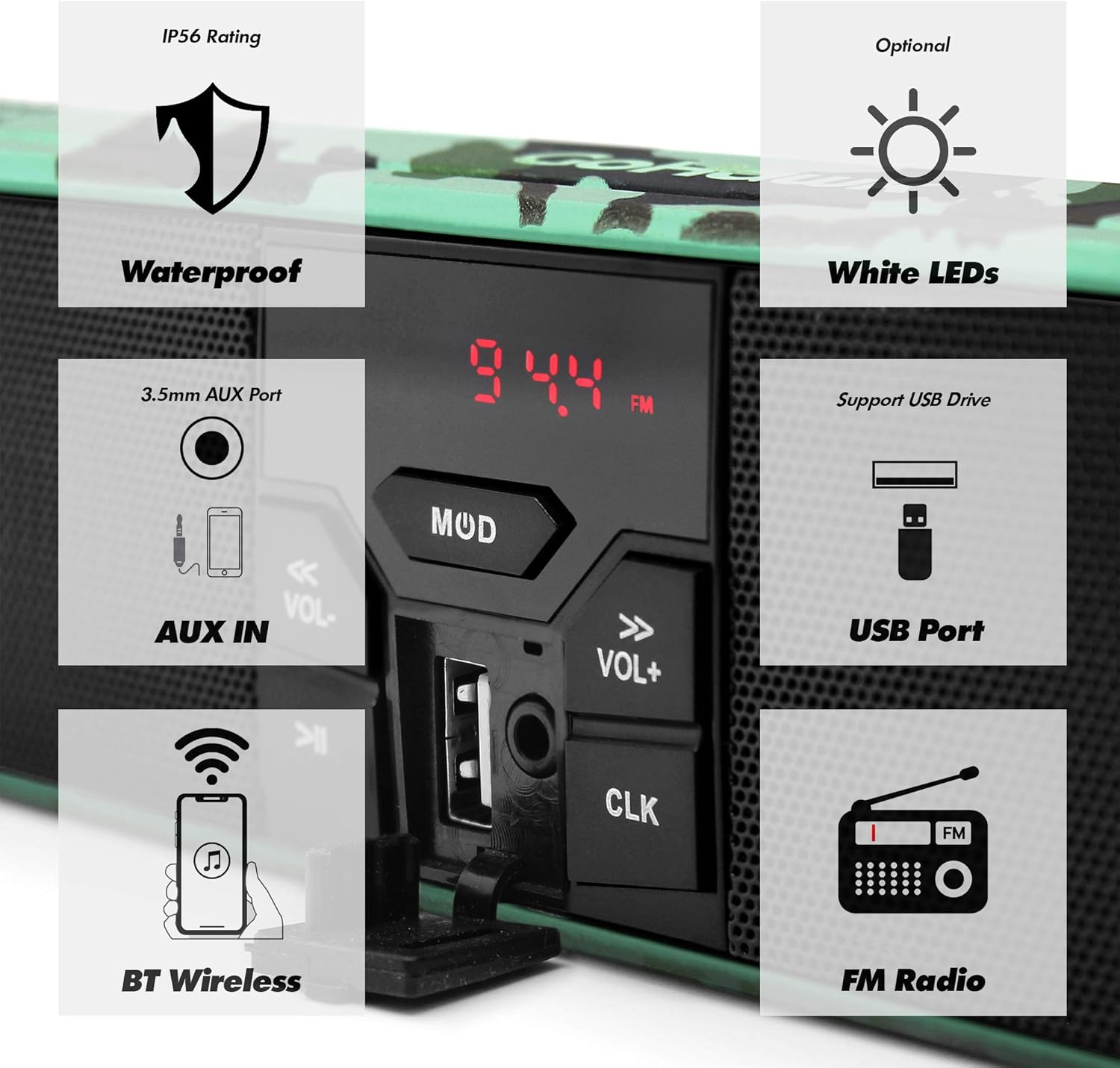
Image 4.1: Key Features of the RE9-X System
5. Инсталација и подешавање
5.1 Handlebar Clearance Measurement
Before installation, measure your handlebar's center clearance. The RE9-X model has an overall width of 18-1/4 inches. If your clearance is smaller, consider the RE8 model (16-3/4 inches overall width).

Image 5.1: Handlebar Clearance Comparison and Wiring Diagram
5.2 Mounting the Speaker System
- Причврстите монтажни цлamps to your vehicle's handlebar. The clamps support handlebar sizes from 7/8 inch to 1 1/4 inches.
- Secure the speaker unit to the mounting clamps using the ball stub design. This allows for 360-degree swivel adjustment to achieve the desired angle.
- Ensure all mounting bolts are tightened securely to prevent movement during operation.
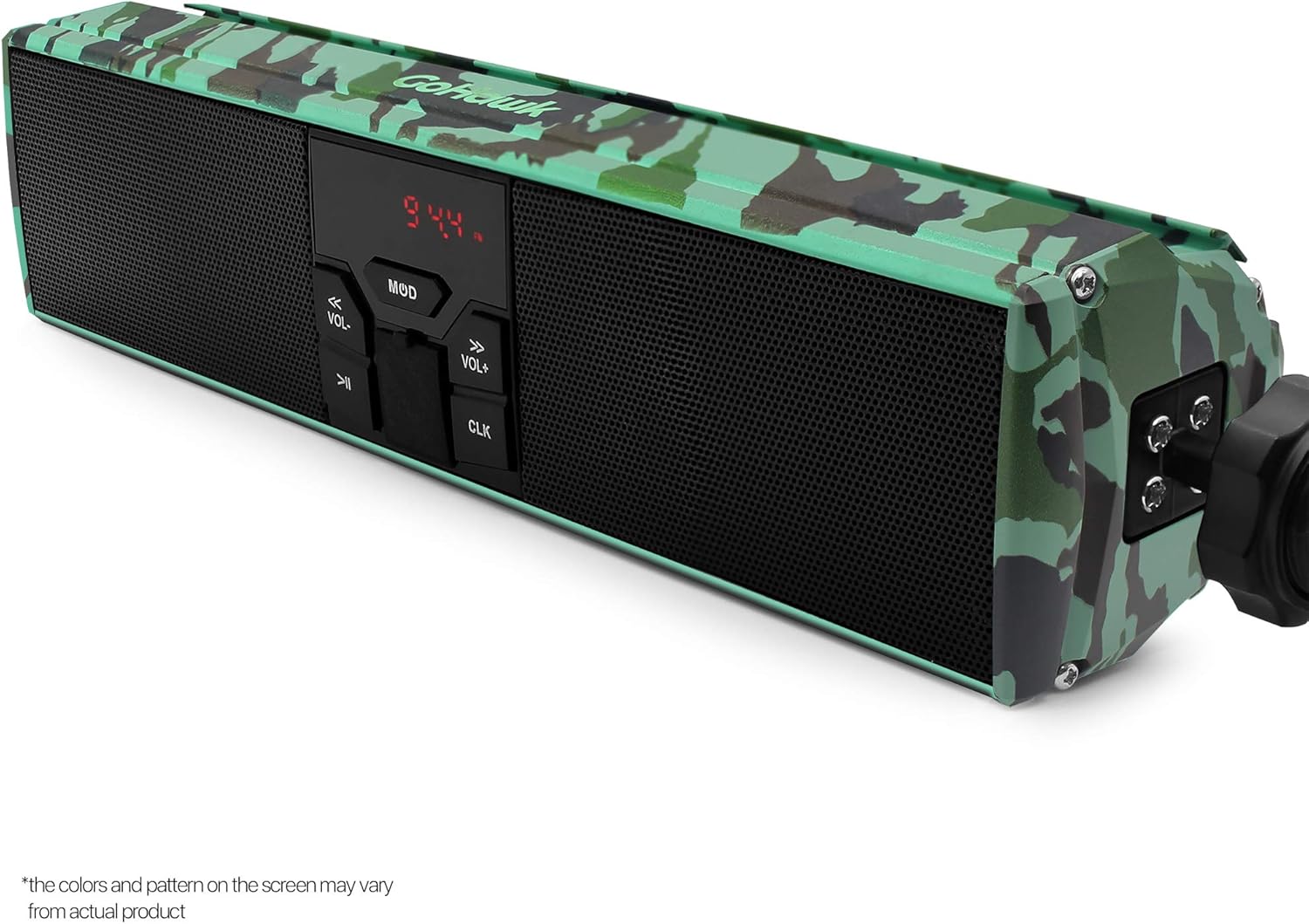
Image 5.2: Mounting Clamp and Swivel Mechanism
5.3 Ожичење
The system includes a 59-inch battery cable harness with ring terminal connectors for direct connection to your 12V DC battery.
- Connect the red wire of the power harness to the positive (+) terminal of your 12V battery.
- Connect the black wire of the power harness to the negative (-) terminal of your 12V battery.
- Ensure all connections are tight and properly insulated to prevent short circuits.
- Route the wiring safely, away from moving parts or heat sources, and secure it with cable ties if necessary.

Image 5.3: Power Harness Wiring Diagram

Image 5.4: Speaker System Mounted on Handlebar
6. Операција
6.1 Укључивање/искључивање
Притисните тастер МОД дугме за укључивање или искључивање уређаја.
6.2 Избор режима
Притисните тастер МОД button repeatedly to cycle through available modes: Bluetooth, FM Radio, AUX-IN, USB.
6.3 Контрола јачине звука
Користите ВОЛ+ и ВОЛ- дугмад за подешавање нивоа јачине звука.
6.4 Блуетоотх упаривање
- Switch the speaker system to Bluetooth mode. The display will indicate pairing readiness.
- На свом мобилном уређају омогућите Блуетоотх и потражите доступне уређаје.
- Select "GoHawk RE9-X" (or similar name) from the list to pair.
- Once paired, you can stream audio wirelessly. The wireless transmission range is typically over 15 meters.
Рад са 6.5 FM радиом
- Switch the speaker system to FM Radio mode.
- Користите Превиоус Трацк и Нект Трацк buttons (often labeled with arrows) to scan for radio stations.
- The display will show the current frequency (e.g., 94.4 FM).
6.6 Репродукција са УСБ-а
- Убаците УСБ диск који садржи МП3 fileс у УСБ порт.
- Switch the speaker system to USB mode.
- The system will automatically begin playing MP3 fileс. Користити Превиоус Трацк и Нект Трацк дугмад за навигацију по стазама.
6.7 AUX-IN Usage
Connect an external audio device (e.g., MP3 player) to the 3.5mm AUX-IN port using a standard audio cable. Switch the speaker system to AUX-IN mode to play audio from the connected device.
6.8 ЛЕД светлосна трака
The integrated 24 white LED strip can be turned on or off with a single click of the dedicated LED button (often indicated by an arrow icon).
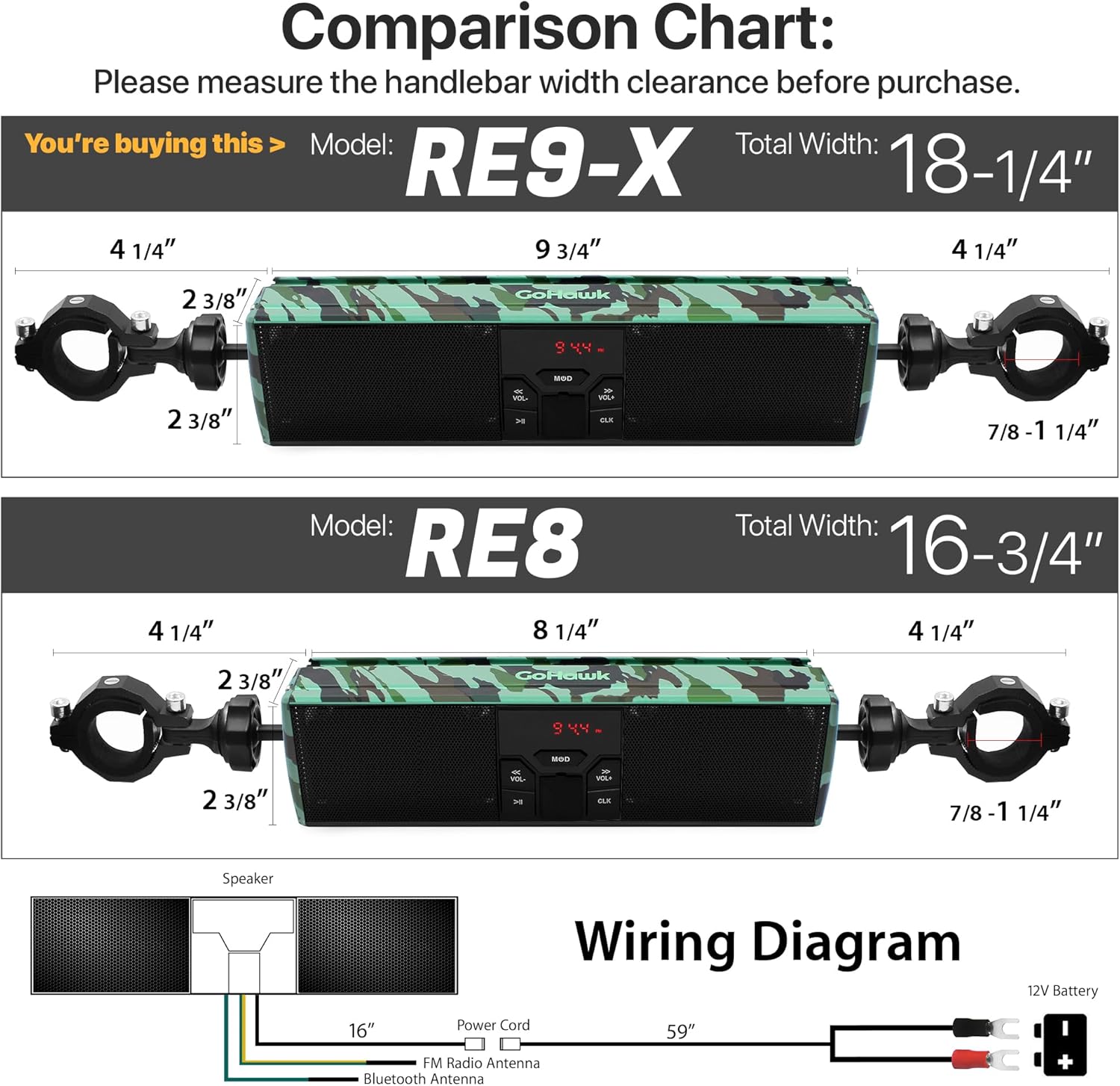
Image 6.1: Illuminated LED Strip
6.9 Приказ сата
The digital display also functions as a clock. Refer to the specific button on your unit (often labeled ЦЛК) for setting the time.
7. Одржавање
- Чишћење: Користите меку, дamp cloth to clean the speaker unit. Avoid harsh chemicals or abrasive cleaners.
- Водоотпорна њега: Although waterproof, ensure all ports (USB, AUX-IN) are covered when not in use to maintain water resistance.
- Провера везе: Periodically check all wiring connections for corrosion or looseness, especially after riding in wet conditions.
- Сигурност монтаже: Regularly inspect the mounting clamps and bolts to ensure they remain tight and secure.
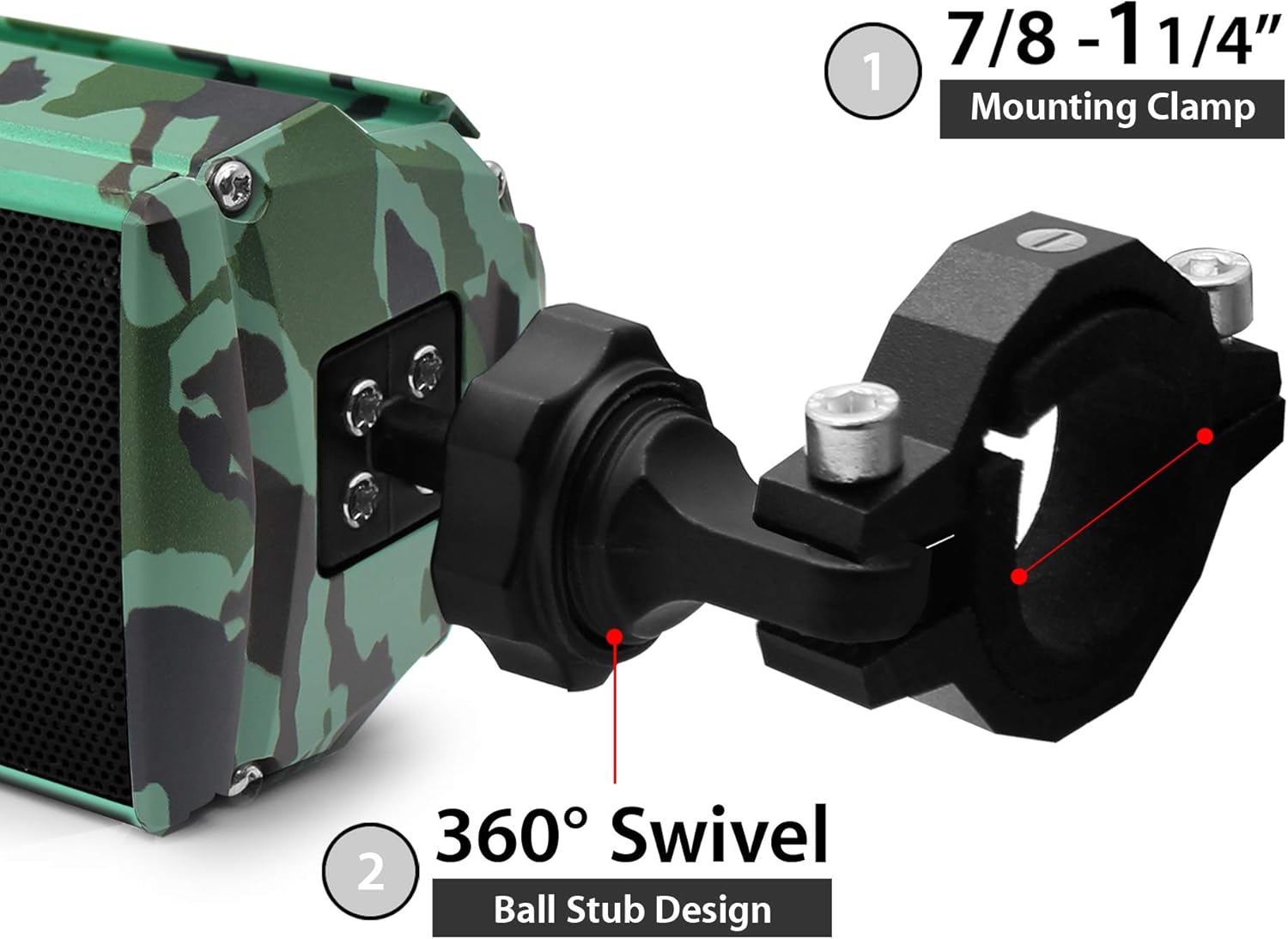
Image 7.1: Aluminum Housing with Camo Green Finish
КСНУМКС. Решавање проблема
| Проблем | Могући узрок | Решење |
|---|---|---|
| Нема струје | Лабав прикључак за напајање, прегорели осигурач, низак напон батеријеtage. | Check power harness connections. Verify battery voltage. Inspect vehicle's fuse box. |
| Нема звука | Volume too low, incorrect mode, device not paired (Bluetooth), faulty cable (AUX). | Increase volume. Select correct input mode. Re-pair Bluetooth device. Check AUX cable. |
| Блуетоотх се не повезује | Speaker not in pairing mode, device too far, interference. | Уверите се да је звучник у Bluetooth режиму. Приближите уређај. Рестартујте оба уређаја. |
| Лош ФМ пријем | Weak signal, interference, antenna obstruction. | Relocate vehicle for better signal. Scan for stronger stations. |
| Проблеми са репродукцијом са USB-а | Неподржано file format, corrupted USB drive, drive not properly inserted. | Осигурати files are MP3 format. Try a different USB drive. Reinsert USB drive. |
9. Спецификације
| Феатуре | Спецификација |
|---|---|
| Модел | РЕ9-Кс |
| Ратед Волtage | 12В ДЦ |
| Максимална улазна снага | КСНУМКСВ к КСНУМКС |
| Називна импеданса | 4 - 8 Ω |
| Блуетоотх верзија | 4.0 |
| Домет бежичног преноса | > 15m (49.21 feet) |
| Фреквенцијски опсег | 20Hz - 20kHz |
| FM Cover | 87.5 - 108 MHz |
| ФМ осетљивост | ≤37дБ |
| ФМ изобличење | ≤0.5% |
| ФМ СНР | ≥40дБ |
| АУКС-ИН | 3.5 мм Јацк |
| УСБ подршка | USB Drive in MP3 format |
| Speaker Width (Body) | 9-3/4 ин. |
| Speaker Width (Overall) | 18-1/4 ин. |
| Управљач Цлamp Величина | 7/8 to 1-1/4 in. |
| Материјал | Алуминијум |
| Ниво отпорности на воду | Водоотпоран |
10. Информације о гаранцији
This GoHawk product comes with a limited warranty. For specific details regarding warranty coverage, duration, and terms, please refer to the warranty card included with your purchase or contact GoHawk customer support.
11. Корисничка подршка
If you encounter any issues or have questions regarding your GoHawk RE9-X speaker system that are not covered in this manual, please contact GoHawk customer support for assistance. Contact information can typically be found on the product packaging or the official GoHawk webсајту.


