1. Увод
Хвала вам на куповиниasing the YESIDO YSP03 Sports Bluetooth In-Ear Earphones. This manual provides essential information for the safe and efficient use of your new earphones. Please read it thoroughly before use and retain it for future reference.
2. Безбедносне информације
- Не излажите слушалице екстремним температурама, влази или корозивним срединама.
- Избегавајте испуштање, ударање или савијање слушалица.
- Не растављајте нити модификујте слушалице. То може поништити гаранцију и проузроковати оштећење.
- Држите слушалице даље од деце и кућних љубимаца.
- Користите само приложени кабл за пуњење или сертификовани еквивалент.
- Слушајте на умереним нивоима јачине звука како бисте спречили оштећење слуха.
- Do not use the earphones while driving or in situations where you need to be aware of your surroundings.
3. Садржај пакета
Молимо вас да проверите пакет за следеће ставке:
- YESIDO YSP03 Sports Bluetooth In-Ear Earphones
- УСБ кабл за пуњење
- Упутство за употребу
- Ear tips (various sizes, typically)
4. Производ је готовview
The YESIDO YSP03 earphones feature an in-ear design with a control unit for easy operation. They support Bluetooth wireless connectivity and also offer direct music playback via an SD card.
Control Unit and Ports
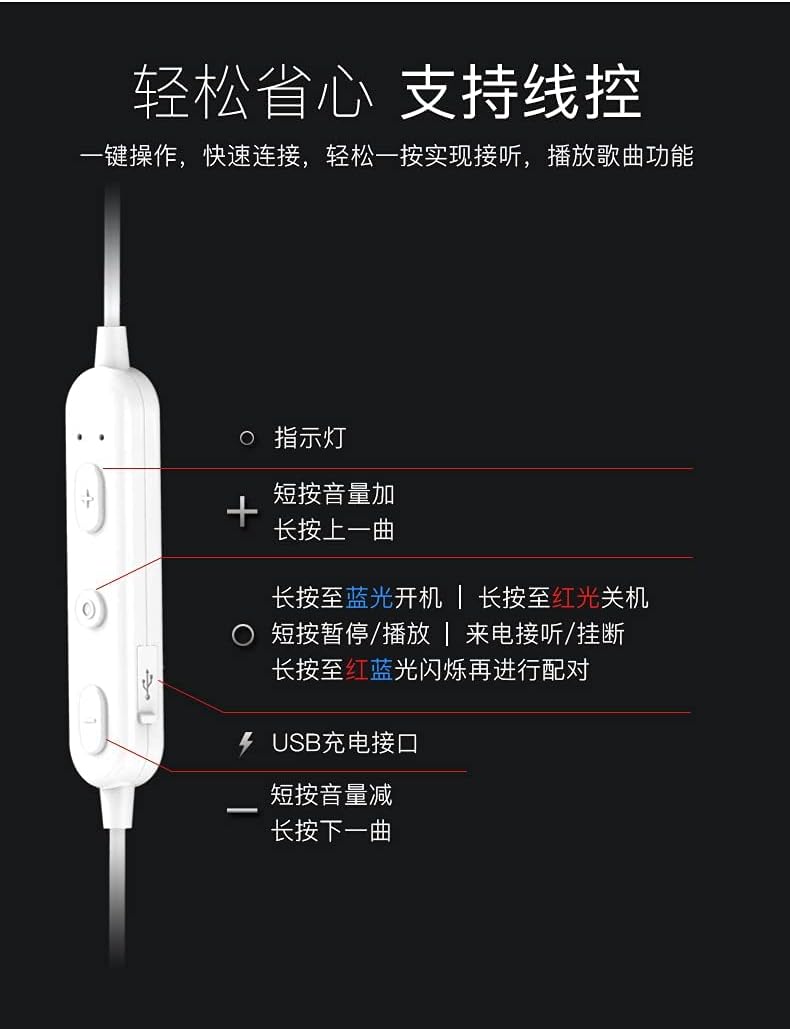
слика: Детаљно view of the earphone control unit, showing the indicator light, volume/track buttons, multi-function button, and USB charging port.
- Светло индикатора: Displays status (power, pairing, charging).
- Дугме „+“: Short press for Volume Up; Long press for Previous Track.
- Вишефункционално дугме (централно): Long press for Power On (blue light) / Power Off (red light); Short press for Play/Pause or Answer/Hang up calls; Long press until red and blue lights flash for Pairing Mode.
- Дугме „-“: Short press for Volume Down; Long press for Next Track.
- УСБ пуњач: За повезивање кабла за пуњење.
Слот за СД картицу
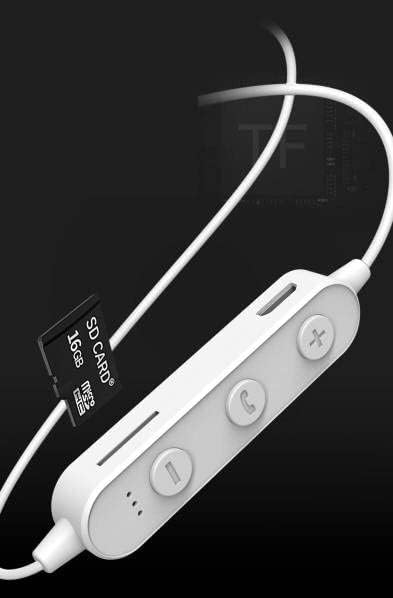
слика: Close-up of the control unit showing the SD card slot, indicating direct music playback without a phone. A 64GB card can store approximately 15,000 songs.
The earphones feature an integrated SD card slot, allowing you to play music directly from a memory card without needing a connected device. This is ideal for sports or activities where carrying a phone is inconvenient.
5. Подешавање
5.1 Пуњење слушалица
- Connect the USB charging cable to the USB charging port on the earphone control unit.
- Повежите други крај USB кабла са USB адаптером за напајање (није укључен) или USB портом рачунара.
- The indicator light will typically show a red light during charging and turn off or change color when fully charged.
- Дозволите отприлике 1-2 сата за потпуно пуњење.
5.2 Блуетоотх упаривање
- Уверите се да су слушалице искључене.
- Press and hold the Multi-function Button (center button) for approximately 5-7 seconds until the indicator light flashes red and blue alternately. This indicates pairing mode.
- On your mobile phone or Bluetooth-enabled device, go to the Bluetooth settings and turn on Bluetooth.
- Тражи available devices. You should see "YESIDO YSP03" or a similar name in the list.
- Select "YESIDO YSP03" to connect. Once successfully paired, the indicator light will typically flash blue slowly or turn off.
- Ако се затражи лозинка, унесите „0000“.
5.3 Уметање SD картице
- Locate the SD card slot on the control unit.
- Gently insert a formatted Micro SD card (TF card) with the metal contacts facing down until it clicks into place.
- The earphones will automatically detect the card and switch to SD card playback mode if no Bluetooth device is connected or if Bluetooth is disconnected.
6. Упутство за употребу
6.1 Укључивање/искључивање
- Укључено: Press and hold the Multi-function Button until the blue indicator light appears.
- Искључивање: Press and hold the Multi-function Button until the red indicator light appears.
6.2 Репродукција музике (Блутут режим)
- Пусти/паузирај: Кратко притисните вишенаменско дугме.
- Појачавање звука: Short press the '+' Button.
- Смањивање јачине звука: Short press the '-' Button.
- Следећа нумера: Long press the '-' Button.
- Претходни запис: Long press the '+' Button.
6.3 Управљање позивима
- Одговори/заврши позив: Short press the Multi-function Button when an incoming call is received.
- Одбиј позив: Long press the Multi-function Button when an incoming call is received.
- Поновно бирање последњег броја: Двапут притисните вишефункционално дугме.
6.4 Репродукција са SD картице
- Once an SD card is inserted and detected, the earphones will automatically begin playing music from the card.
- The same controls for Play/Pause, Volume, Next/Previous Track apply as in Bluetooth mode.
7. Одржавање
- Чишћење: Користите меку, суву крпу за чишћење слушалица. Не користите јаке хемикалије или абразивне материјале.
- Складиштење: Чувајте слушалице на хладном и сувом месту, даље од директне сунчеве светлости и екстремних температура.
- Одржавање батерије: To prolong battery life, charge the earphones regularly, even if not in frequent use. Avoid fully discharging the battery for extended periods.
КСНУМКС. Решавање проблема
| Проблем | Решење |
|---|---|
| Earphones won't power on. | Ensure the earphones are fully charged. Press and hold the Multi-function Button for a longer duration. |
| Упаривање са уређајем није могуће. | Ensure earphones are in pairing mode (red and blue flashing light). Turn off and on Bluetooth on your device. Move closer to the earphones. Forget the device in your phone's Bluetooth settings and try pairing again. |
| Нема звука. | Check volume levels on both earphones and your connected device. Ensure earphones are properly connected via Bluetooth or that the SD card is inserted correctly and contains playable files. |
| SD card not playing. | Ensure the SD card is inserted correctly and contains compatible audio files (e.g., MP3). Try re-inserting the card. Ensure no Bluetooth device is actively connected, as SD card playback might be prioritized when Bluetooth is disconnected. |
| Лош квалитет звука. | Ensure there are no obstructions between the earphones and your device. Move closer to your device. Try a different audio source or file. |
9. Спецификације
| Феатуре | Детаљ |
|---|---|
| Бранд | YESIDO |
| Број модела | ИСП03 |
| Боја | Бела |
| Постављање уха | Ин-Еар |
| Технологија повезивања | бежични (Блуетоотх) |
| Контрола буке | Ниједан |
| Компатибилни уређаји | Мобилни телефони |
| Специфичне употребе за производ | Спортс |
| Цабле Феатуре | Бежично |
| Ниво отпорности на воду | Није водоотпоран |
| Тип контроле | Воице Цонтрол |
| Контролни метод | App (Voice Control implies app integration for some functions) |
Перформансе батерије

слика: Visual representation of battery performance metrics for the YESIDO YSP03 earphones.
- Време репродукције музике: Отприлике 9 сата
- Headphone Standby Time: Отприлике 120 сата
- Трајање позива: Отприлике 7.5 сата
*Note: These data are obtained from YESIDO laboratory tests, and slight deviations may occur due to changes in objective environment and usage patterns.
10. Гаранција и подршка
10.1 Информације о гаранцији
This product is provided without an explicit warranty. Please refer to your retailer's return policy for any issues within the applicable return period.
10.2 Корисничка подршка
For further assistance or inquiries, please contact the retailer where you purchased the product. You may also visit the official YESIDO website for general product information and potential support resources.


