1. Увод
The Viatom SleepU is a rechargeable wrist pulse oximeter designed for continuous monitoring of blood oxygen saturation (SpO2) and heart rate. It provides advanced sleep analysis and real-time data, making it a valuable tool for personal health management. This manual provides detailed instructions for the proper use, maintenance, and troubleshooting of your SleepU device.

Image: The Viatom SleepU device, highlighting its lightweight and comfortable design, and its ability to monitor blood oxygen, pulse rate, and movement.
2. Производ је готовview
2.1 Компоненте
The Viatom SleepU package typically includes the following items:
- SleepU Wrist Unit (Oximeter)
- Comfortable Ring Sensor
- УСБ кабл за пуњење
- Упутство за употребу
2.2 Кључне карактеристике
- Праћење у реалном времену: Provides continuous SpO2 and heart rate data.
- Континуирано снимање: Records trends of SpO2 and heart rate over extended periods, unlike traditional finger oximeters.
- Удобан дизајн: Lightweight wrist unit with a soft, comfortable silicone ring sensor that stays securely in place during sleep.
- Adjustable Vibration Alert: Can be configured via the app to vibrate if oxygen saturation levels fall below a preset threshold.
- Integrated Memory: Stores up to 4 sets of 10-hour data, allowing standalone operation without a smartphone.
- App for Android and iOS: The Vihealth app supports detailed data analysis and reporting.
- Пуњива батерија: Offers up to 16 hours of battery life on a single charge.
- Apple Health Synchronization: Integrates with Apple Health for a comprehensive view of your health data.
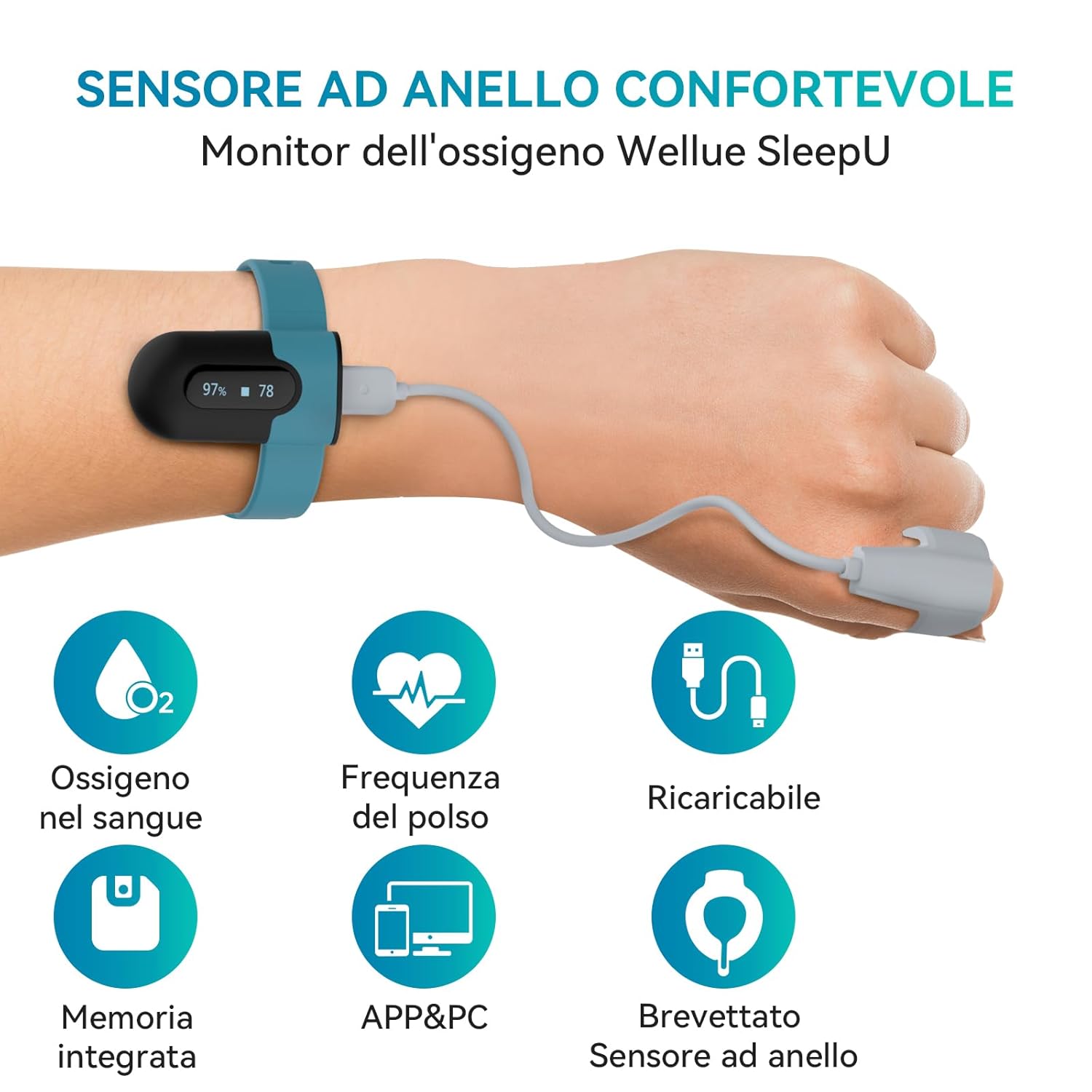
Image: The SleepU device worn on the wrist, illustrating its comfortable ring sensor and key functionalities like blood oxygen and pulse monitoring.

Image: A visual comparison highlighting the benefits of the unique ring sensor over traditional designs, emphasizing comfort and effective vibration alerts for improved sleep quality.
3. Безбедносне информације
Please read all safety information carefully before using the device. Improper use may result in inaccurate readings or device damage.
- This device is intended for general wellness and health management. It is not a medical device and should not be used for diagnosis or treatment of any medical condition.
- Consult a healthcare professional for interpretation of results and before making any medical decisions.
- Држите уређај ван домашаја деце и кућних љубимаца.
- Do not use the device in an MRI environment or in areas with high electromagnetic interference.
- Avoid vigorous exercise during measurement, as this may lead to inaccurate readings.
- Немојте растављати, поправљати или модификовати уређај.
- За пуњење користите само приложени УСБ кабл.
4. Подешавање
4.1 Пуњење уређаја
Before first use, fully charge the SleepU device. Connect the USB charging cable to the wrist unit and a standard USB power adapter (not included) or a computer USB port. The device display will indicate charging status. A full charge typically takes a few hours and provides up to 16 hours of continuous use.
4.2 Ношење уређаја
The SleepU device consists of a wrist unit and a ring sensor. For accurate readings, follow these steps:
- Place the wrist unit comfortably on your wrist, similar to a watch.
- Insert your thumb or index finger into the silicone ring sensor. Ensure the sensor is snug but not too tight, allowing for comfortable blood circulation.
- Connect the ring sensor cable to the wrist unit. The device will automatically power on and begin measurement once the sensor is properly connected and placed on a finger.

Image: Step-by-step guide on wearing the sensor, connecting to the app, and important usage tips.
4.3 Инсталација и упаривање апликације
To access detailed data and reports, download the Вихелт апликацију из App Store-а (iOS) или Google Play продавнице (Android).
- Download and install the Vihealth app on your smartphone.
- Омогућите Блуетоотх на свом паметном телефону.
- Open the Vihealth app and follow the on-screen instructions to add your device. Select "SleepU" from the list of available devices.
- The app will automatically pair with your SleepU device.
5. Упутство за употребу
5.1 Starting Monitoring
Once the device is charged and worn correctly with the ring sensor connected, it will automatically begin monitoring. The small display on the wrist unit will show real-time SpO2 percentage and heart rate (BPM).
5.2 Understanding Readings
The device continuously tracks your blood oxygen levels and pulse rate. Normal SpO2 levels are typically between 95% and 100%. Pulse rate varies by individual and activity level.

Image: The SleepU device tracking blood oxygen and pulse rate throughout the day, providing continuous health insights.
5.3 Vibration Alerts
The SleepU device features an integrated vibration alert system. You can set custom SpO2 thresholds within the Vihealth app. If your oxygen level drops below the set threshold, the device will vibrate to alert you. This feature is particularly useful for monitoring during sleep.

Image: Real-time notification feature, where the device vibrates to alert the user if oxygen levels fall below a preset threshold.
5.4 Континуирано праћење
The SleepU is designed for continuous monitoring, especially during sleep. It records data throughout the night, providing a comprehensive overview of your SpO2 and heart rate trends. This data is crucial for understanding sleep patterns and potential health concerns.

Image: The SleepU device providing smart adjustable vibration alerts to help improve sleep quality by monitoring SpO2 levels.
6. App and PC Software
6.1 Vihealth App (iOS & Android)
The Vihealth app offers a user-friendly interface for viewing, analyzing, and managing your health data. It provides detailed reports, multi-parameter analysis, and unlimited storage for your readings.
- Подаци у реалном времену: View current SpO2 and heart rate.
- Историјски подаци: Access all recorded data, with options to view weekly, monthly, and yearly trends.
- O2 Score: Provides an O2 score and trends based on your oxygen levels.
- Detailed Reports: Generates comprehensive reports with graphs and statistics, including time spent below certain SpO2 levels.

Image: The free Vihealth app for iOS and Android, offering detailed reports, multi-parameter analysis, and a user-friendly interface.

Image: App interface displaying device battery status, oxygen level alert settings, and data collection intervals.

Image: App interface allowing users to view all historical data and O2 score trends over different time periods.

Слика: Детаљна view within the app, showing specific SpO2 and pulse rate data, including distribution and time spent below critical oxygen levels.
6.2 PC Software and Reports
The SleepU device also supports PC software for more in-depth analysis and report generation. You can download the software from the official ViATOM webсајту.
- Преузимање података: Connect your device to a PC to download recorded data.
- Свеобухватни извештаји: Generate detailed sleep reports in PDF or CSV format.
- Professional Analysis: The software provides advanced graphical representations of SpO2 and heart rate trends, O2 score, and other relevant metrics.

Image: The SleepU device seamlessly integrates with both smartphone apps and PC software for comprehensive sleep report generation.

Image: The free PC software allows users to export sleep reports in PDF or CSV format for unlimited analysis and sharing.

Слика: Бивши/аample of the Oxygen Level Report, detailing blood oxygen and heart rate trends, O2 score, and duration of specific oxygen levels.
7. Одржавање
7.1 Чишћење
- Wipe the wrist unit and ring sensor with a soft, dry cloth.
- Ако је потребно, користите крпу лагано дampened with water or a mild disinfectant. Do not immerse the device in liquid.
- Избегавајте употребу абразивних средстава за чишћење или растварача.
7.2 Складиштење
- Уређај чувајте на хладном и сувом месту, даље од директне сунчеве светлости и екстремних температура.
- Keep the device in its original packaging or a protective case when not in use.
7.3 Одржавање батерије
- Редовно пуните уређај, чак и ако га не користите често, како бисте одржали здравље батерије.
- Избегавајте потпуно пражњење батерије током дужег периода.
КСНУМКС. Решавање проблема
If you encounter issues with your Viatom SleepU device, please refer to the following common problems and solutions:
| Проблем | Могући узрок | Решење |
|---|---|---|
| Уређај се не укључује | Low battery; Sensor not connected properly | Charge the device; Ensure the ring sensor is securely connected to the wrist unit. |
| Нетачна очитавања | Improper sensor placement; Movement during measurement; Cold fingers | Ensure the sensor is snug on the finger; Remain still during measurement; Warm your hands if they are cold. |
| Cannot connect to app (Bluetooth) | Bluetooth off; Device not in pairing mode; App issues | Ensure Bluetooth is enabled on your phone; Restart the SleepU device and the app; Try re-pairing the device in the app settings. |
| No data recorded | Device not worn correctly; Battery drained; Memory full | Ensure proper wearing and sensor connection; Charge the device; Sync data to app/PC to clear memory. |
9. Спецификације
| Феатуре | Детаљ |
|---|---|
| Бранд | ViATOM |
| Назив модела | SB-SleepUA02 |
| Measurement Range (SpO2) | 0% до 100% |
| Трајање батерије | До 16 сати |
| Тип батерије | 1 литијум-полимерска батерија (укључена) |
| Димензије (Д к Ш к В) | 9Д к 7Ш к 9В цм |
| Произвођач | Виатом |
| Земља порекла | Кина |
10. Гаранција и подршка
10.1 Гаранција
The Viatom SleepU device comes with a Двогодишња гаранција произвођача од датума куповине. Ова гаранција покрива недостатке у материјалу и изради при нормалној употреби. Не покрива штету насталу услед злоупотребе, незгода, неовлашћених модификација или нормалног хабања.
Сачувајте доказ о куповини за гаранцијске захтеве.
10.2 Корисничка подршка
For technical assistance, warranty claims, or any questions regarding your SleepU device, please contact ViATOM customer support through their official webсајт или контакт информације које сте добили уз паковање производа.
Такође можете посетити ViATOM brand store on Amazon за више информација и ресурса.


