1. Увод
This manual provides detailed instructions for the IPEGA PG-SW023 Bluetooth Wireless Game Controller. This versatile controller is designed to enhance your gaming experience across multiple platforms, including N-S consoles, PlayStation 3 (PS3), Android devices, and personal computers running Windows 7, 8, or 10.
Please read this manual carefully before using the product to ensure proper operation and to maximize its features.
2. Карактеристике производа
- Компатибилност са више платформи: Suitable for gaming on N-S consoles, PS3, Android devices, and PCs (Windows 7/8/10).
- Побољшано искуство играња: Supports vibration feedback and a six-axis gyroscope function for immersive gameplay and precise control.
- Customizable Macro Function: Rear buttons can be configured as common keys or combination keys for simplified actions.
- Continuous TURBO Function: Features a dedicated TURBO button for rapid-fire actions, compatible with N-S Pro gamepads.
- Ергономски дизајн: Engineered for comfort during extended gaming sessions, fitting securely in the palm.

Image: The IPEGA PG-SW023 Wireless Game Controller highlighting its key features: two vibrating motors, six-axis design, high-sensitive buttons, and Turbo function.
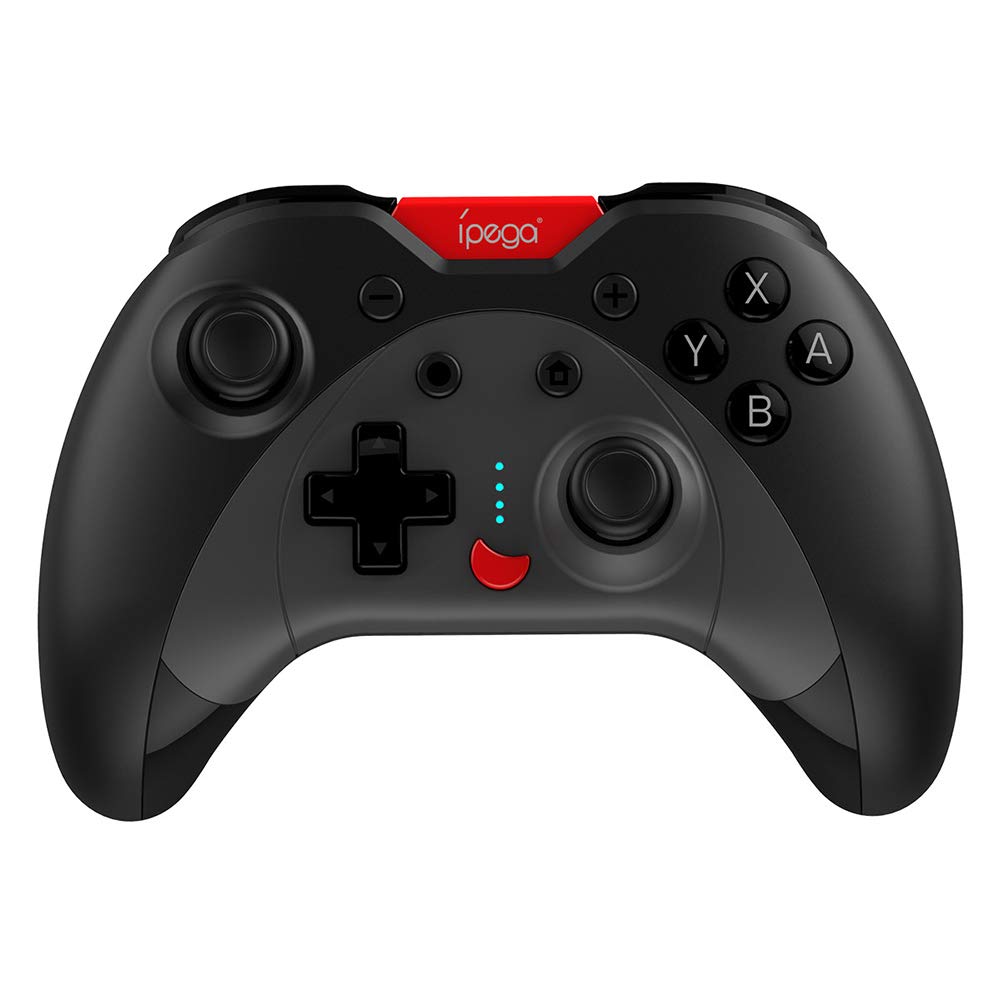
Image: A green IPEGA PG-SW023 controller illustrating its built-in six-axis gyroscope design for improved body feeling and accurate targeting.
3. Садржај пакета
Молимо вас да проверите да ли су све ставке присутне у пакету:
- 1 x IPEGA PG-SW023 Wireless Game Controller
- 1 к Типе-Ц кабл за пуњење
- 1 к Упутство за употребу
4. Спецификације
| Феатуре | Спецификација |
|---|---|
| Бранд | Ипега |
| Модел | ПГ-СВ023 |
| Опције боја | Black, Green, Blue, Yellow |
| Оператинг Волtage | ДЦ 3.7В |
| Оператинг Цуррент | <30мА |
| Статичка струја | <20уА |
| Цонтинуоус Плаитиме | Прибл. 15 сата |
| Улазни волtagе/Струја | ДЦ 5В/500мА |
| Време пуњења | Прибл. 2 сата |
| Блуетоотх верзија | 3.0 |
| Трансмиссион Дистанце | ≤8 метара |
| Капацитет батерије | 400мАх |
| Димензије производа | КСНУМКС к КСНУМКС к КСНУМКС цм (КСНУМКС к КСНУМКС к КСНУМКС инча) |
| Тежина производа | Приближно 215 г (7.58 унци) |
| Компатибилни уређаји | N-S Console, PS3, Android, PC (Win 7/8/10) |
| Повезивање | бежични (Блуетоотх) |
| Извор напајања | Баттери Поверед |
5. Подешавање
5.1 Пуњење контролера
- Connect the provided Type-C charging cable to the controller's charging port.
- Повежите други крај кабла са УСБ извором напајања (нпр. рачунаром, УСБ адаптером за зид).
- The indicator lights on the controller will show charging status. Once fully charged (approx. 2 hours), the lights will indicate completion or turn off.
5.2 Упаривање са уређајима
The pairing method varies slightly depending on the device. Ensure the controller is sufficiently charged before attempting to pair.

Image: A blue IPEGA PG-SW023 controller positioned in front of a Nintendo Switch, PlayStation 3, and a laptop, illustrating its multi-platform compatibility.
5.2.1 Pairing with N-S Console
- On your N-S console, go to the HOME Menu.
- Изаберите „Контролери“ > „Промени хват/редослед“.
- Press and hold the pairing button on the IPEGA controller (refer to controller diagram for exact location) until the indicator lights begin to flash rapidly.
- The console will detect the controller. Once paired, the indicator light will become solid.
5.2.2 Pairing with PS3
- Повежите контролер са PS3 конзолом помоћу Type-C кабла.
- Притисните дугме ХОМЕ на контролеру.
- Once recognized, you can disconnect the cable and the controller should remain paired wirelessly.
5.2.3 Упаривање са Андроид уређајима
- Омогућите Блуетоотх на свом Андроид уређају.
- On the controller, press and hold the Android pairing button combination (refer to controller diagram or quick start guide for specific button combination, usually 'A' + HOME or 'X' + HOME) until the indicator lights flash rapidly.
- On your Android device, search for new Bluetooth devices and select 'IPEGA PG-SW023' (or similar name) from the list.
- Након упаривања, индикаторска лампица на контролеру ће почети да светли континуирано.
5.2.4 Упаривање са рачунаром (Windows 7/8/10)
- Уверите се да је на вашем рачунару омогућен Bluetooth.
- Go to 'Settings' > 'Devices' > 'Bluetooth & other devices' and click 'Add Bluetooth or other device'.
- Select 'Bluetooth'.
- On the controller, press and hold the PC pairing button combination (refer to controller diagram or quick start guide for specific button combination, usually 'L1' + HOME or 'Y' + HOME) until the indicator lights flash rapidly.
- Select 'IPEGA PG-SW023' (or similar name) from the list of available devices on your PC.
- Након упаривања, индикаторска лампица на контролеру ће почети да светли континуирано.
6. Упутство за употребу
6.1 Основне функције дугмади
The controller features standard gaming buttons including directional pad, analog sticks, action buttons (A, B, X, Y), shoulder buttons (L1, R1), and triggers (L2, R2). Specific button mapping may vary by game and platform.

Image: Hands comfortably gripping a black IPEGA PG-SW023 controller, showcasing its ergonomic design for comfortable and convenient use.
6.2 ТУРБО Функција
The TURBO function allows for continuous rapid input of a selected button. This can be useful in games requiring fast, repeated button presses.
- To activate TURBO: Press and hold the desired action button (e.g., A, B, X, Y) and then press the TURBO button simultaneously. The button will now continuously input as long as it's held down.
- To deactivate TURBO: Repeat the same process (press the action button and TURBO button simultaneously).

Image: A yellow IPEGA PG-SW023 controller with its prominent TURBO button, shown with a Nintendo Switch console, illustrating the auto-fire feature.
6.3 макро функција
The macro function allows you to assign a sequence of button presses or a single common button to the programmable rear buttons. This can simplify complex in-game actions.
- Refer to the specific instructions provided in the quick start guide or on the manufacturer's website for detailed steps on programming macro buttons, as this process can vary.
6.4 Вибрације и жироскоп
The controller features dual motors for vibration feedback, providing tactile sensations that correspond to in-game events. The built-in six-axis gyroscope allows for motion control in supported games, offering a more immersive and precise aiming experience.

Image: A blue IPEGA PG-SW023 controller in use, with visual cues indicating its double motor vibrating design for immersive feedback during gameplay.
7. Одржавање
Правилна нега ће продужити век трајања вашег контролера:
- Чишћење: Користите меку, суву крпу за чишћење контролера. За тврдокорну прљавштину, благо дampОбришите крпу водом или благим раствором за чишћење. Избегавајте јаке хемикалије.
- Складиштење: Чувајте контролер на хладном и сувом месту, даље од директне сунчеве светлости и екстремних температура.
- Избегавајте утицај: Do not drop or subject the controller to strong impacts, as this can damage internal components.
- Изложеност течности: Keep the controller away from liquids. If it comes into contact with liquid, power it off immediately and allow it to dry completely before attempting to use it again.
КСНУМКС. Решавање проблема
If you encounter issues with your IPEGA PG-SW023 controller, try the following solutions:
- Контролер се не повезује:
- Уверите се да је контролер потпуно напуњен.
- Проверите да ли је Блуетоотх омогућен на вашем уређају.
- Try re-pairing the controller by following the setup instructions for your specific device.
- Move the controller closer to the device to ensure it is within the 8-meter transmission range.
- Поново покрените и контролер и свој уређај за игру.
- Дугмад не реагују:
- Check if the controller is properly connected and paired.
- Test the controller with another game or application to rule out software-specific issues.
- Уверите се да се испод дугмади не заглављују остаци.
- Вибрација не ради:
- Verify that the game or system settings have vibration enabled.
- Some games may not support vibration feedback.
- Кратак век трајања батерије:
- Ensure the controller is fully charged before use.
- Battery life can vary based on usage intensity (e.g., continuous vibration).
- Избегавајте пуњење у изузетно топлим или хладним окружењима.
9. Гаранција и подршка
For warranty information, technical support, or service inquiries regarding your IPEGA PG-SW023 Bluetooth Wireless Game Controller, please refer to the product packaging or contact the manufacturer directly through their official webсајт или канале за корисничку подршку. Сачувајте рачун као доказ о куповини за евентуалне рекламације у вези са гаранцијом.


