Увод
Thank you for choosing the Kingslim D1 Pro 2K Dash Cam. This device is designed to provide comprehensive recording of your driving environment, both front and inside the cabin, ensuring enhanced safety and evidence collection. Featuring dual Sony sensors for clear night vision, it is an ideal solution for various users, including professional drivers and families.

Figure 1: Kingslim D1 Pro Dash Cam with its mobile application interface and GPS tracking capabilities.
Укључене компоненте
Молимо вас да проверите да ли су све компоненте присутне у пакету:
- Заграда
- Camera Body (Kingslim D1 Pro Dash Cam)
- Алат за инсталацију
- Унутрашња батерија (унапред инсталирана)
- Брзи водич

Figure 2: Detailed diagram of the Kingslim D1 Pro Dash Cam highlighting its key components and features.
Водич за подешавање
1. Монтажа камере
- Очистите подручје ветробранског стакла где намеравате да монтирате камеру за аутомобил.
- Причврстите вакуумски носач на камеру на инструмент табли.
- Press the suction cup firmly against the windshield and flip the lever to secure it. Ensure the camera has a clear view of the road and the cabin.
2. Инсталација СД картице
- The Kingslim D1 Pro supports up to 128GB SD cards. A Class 10 or higher speed rating is recommended.
- Insert the SD card into the designated slot on the dash cam until it clicks into place.
- Format the SD card via the dash cam's settings menu before first use to ensure optimal performance.

Figure 3: Illustration of SD card insertion into the Kingslim D1 Pro Dash Cam, highlighting its storage capacity.
3. Прикључак за напајање
- Connect the provided car charger to the dash cam's mini-USB power port.
- Укључите други крај ауто пуњача у утичницу за упаљач у вашем возилу.
- Камера у аутомобилу ће се аутоматски укључити и почети снимање када се укључи паљење возила.
4. Wi-Fi & App Control Setup
- Download the free Kingslim app from the App Store (iOS) or Google Play Store (Android).
- На камери за аутомобил, омогућите Wi-Fi у менију подешавања.
- On your smartphone, connect to the dash cam's Wi-Fi network (SSID and password will be displayed on the dash cam screen).
- Отворите апликацију Kingslim да бисте view ливе фооtagе, репродукција снимака, преузимање fileс, и подесите поставке.

Figure 4: The Kingslim D1 Pro's built-in Wi-Fi and GPS features, enabling app control and easy sharing of recordings.
Руковање Дасх Цам
1. Dual Recording Capabilities
- The D1 Pro captures crystal-clear footage with a 4K front-facing camera and a 1080p cabin-facing camera.
- Both cameras feature a 170-degree wide angle, ensuring comprehensive coverage.
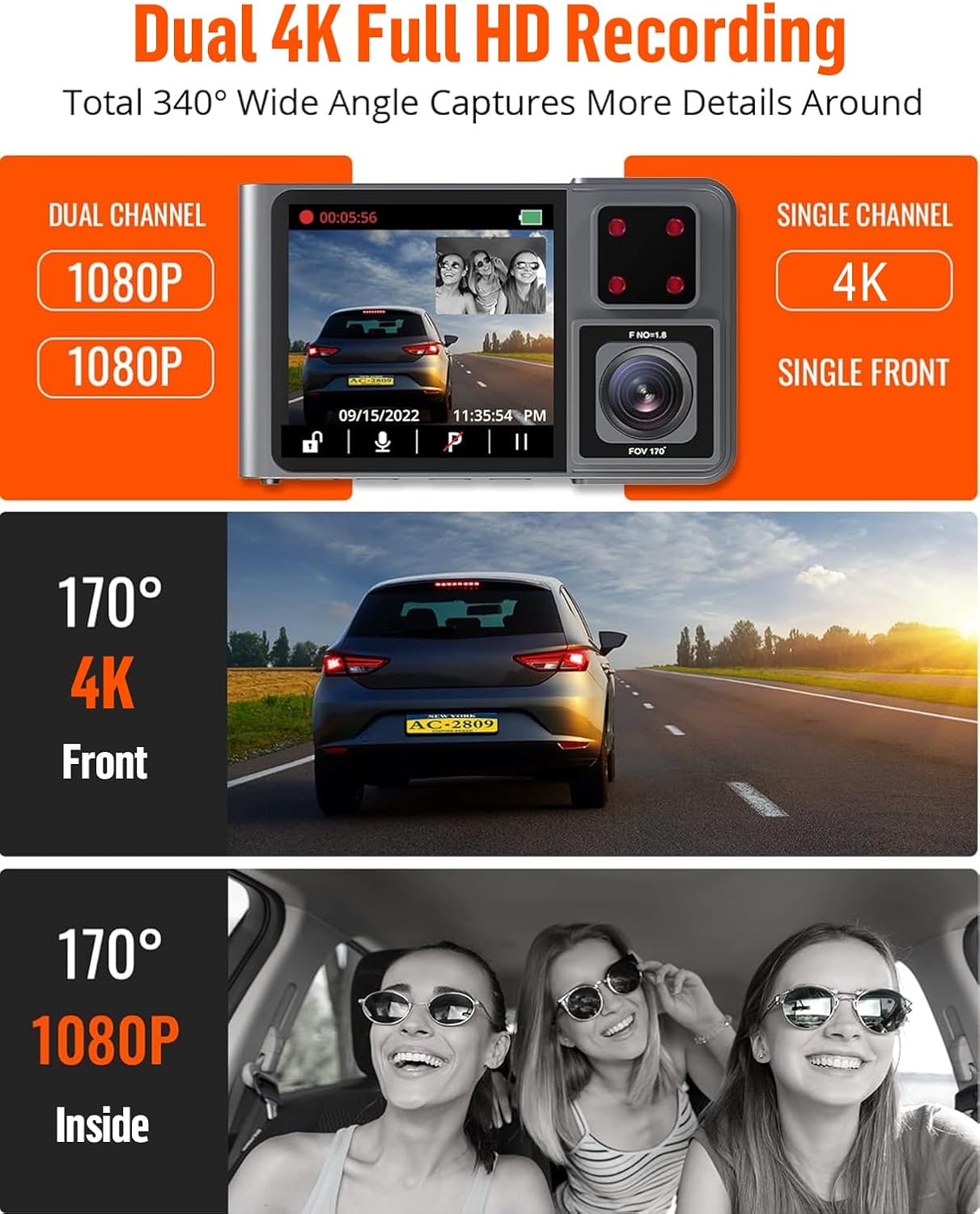
Figure 5: The Kingslim D1 Pro offers dual 1080p recording for front and interior, or single 4K recording for the front, with wide-angle views.
2. Лооп Рецординг
- The dash cam records video in continuous loops. When the SD card is full, the oldest unlocked files will be automatically overwritten.
- This ensures continuous recording without manual intervention.
3. G-Sensor (Emergency Video Lock)
- The built-in G-sensor automatically detects sudden shakes or collisions.
- Upon detection, the current video footage is automatically locked and saved to prevent it from being overwritten by loop recording. This preserves crucial evidence.

Figure 6: The Kingslim D1 Pro's G-sensor automatically locks emergency video footage, and its 24-hour parking monitor provides continuous security.
4. 24-часовни надзор паркинга
- With the parking monitor feature enabled, the dash cam will automatically record a 20-second video if any collision or impact is detected while the vehicle is parked.
- This feature requires a continuous power supply or the dash cam's internal battery.

Figure 7: The 24-hour parking monitor provides continuous surveillance, recording incidents like impacts or theft attempts while parked.
5. Супер ноћни вид
- Equipped with advanced firmware and dual Sony sensors, the D1 Pro captures detailed footagе чак иу условима слабог осветљења.
- This ensures reliable evidence during nighttime drives.

Figure 8: The Kingslim D1 Pro's Super Night Vision, powered by dual Sony sensors, ensures clear recordings in low-light and backlit environments.
6. GPS праћење
- The included GPS module records accurate driving location, speed, and route.
- Ови подаци могу бити viewed directly on Google Maps via the Kingslim app or dedicated PC player, aiding in journey analysis.
Одржавање
- Чишћење: Користите меку, суву крпу за чишћење сочива и кућишта камере за аутомобил. Избегавајте употребу абразивних средстава за чишћење или растварача.
- Брига о СД картици: Regularly format the SD card (once a month is recommended) to maintain optimal performance and prevent data corruption. Back up any important videos before formatting.
- температура: Избегавајте излагање камере за аутомобил екстремним температурама током дужег периода, јер то може утицати на век трајања батерије и интегритет компоненти.
Решавање проблема
| Проблем | Могуће решење |
|---|---|
| Камера у аутомобилу се не укључује. |
|
| Снимање се неочекивано прекида. |
|
| Проблеми са Wi-Fi везом. |
|
| Лош квалитет видеа ноћу. |
|
Спецификације
| Феатуре | Детаљ |
|---|---|
| Димензије производа | 6.85 к 5.16 к 2.6 инча |
| Тежина артикла | 14 унци |
| Назив модела | Д1 Про |
| Батерије | Потребна је 1 литијум-јонска батерија (укључена) |
| Технологија повезивања | Ви-Фи |
| Посебне карактеристике | 2K dash cam front and inside, Built-In GPS, Loop Recording, Parking Monitor, Wi-Fi APP Control |
| Резолуција снимања видео записа | 2K (напред), 1080P (унутра) |
| Тип монтаже | Усисни носач |
| Боја | Греи |
| Max SD Card Capacity | 128ГБ |
Информације о гаранцији
The Kingslim D1 Pro Dash Cam comes with a 2 година гаранције from the date of purchase. This warranty covers manufacturing defects and malfunctions under normal use. Please retain your proof of purchase for warranty claims. For detailed terms and conditions, refer to the official Kingslim webсајту или контактирајте корисничку подршку.
Корисничка подршка
For any questions, technical assistance, or warranty claims, please contact Kingslim customer support through the following channels:
- Службено Webсајт: Посетите званичника Кингслима website for FAQs, software updates, and contact forms.
- Подршка путем е-поште: Refer to your Quick Guide or the Kingslim webсајт за наменску адресу е-поште за подршку.
We are committed to providing excellent service and support for your Kingslim product.


