1. Увод
This manual provides essential instructions for the safe and efficient use of your Ulefone Armor X7 Pro Dual SIM smartphone. The Armor X7 Pro is designed for durability, featuring IP68/69K water, dust, and drop resistance, making it suitable for challenging environments. Please read this manual thoroughly before operating your device.

Figure 1: Ulefone Armor X7 Pro, showing the front display and the textured back panel with camera module.
2. Производ је готовview
2.1 Компоненте уређаја
Familiarize yourself with the key components of your Ulefone Armor X7 Pro.

Слика 2: Предња страна view of the Ulefone Armor X7 Pro, highlighting the display, front camera, and earpiece.
- Предња камера: За селфије и видео позиве.
- Слушалица: For audio during calls.
- Приказ: 5-inch screen for interaction.
- микрофон: За гласовни унос.

Слика 3: Позади view of the Ulefone Armor X7 Pro, showing the main camera, flash, and fingerprint sensor.
- Главна камера: За снимање фотографија и видео записа.
- ЛЕД блиц: Provides illumination for photos and can serve as a flashlight.
- Сензор отиска прста: For secure device unlocking and authentication.
- говорник: За аудио излаз.
2.2 Робустан дизајн
The Armor X7 Pro features a robust construction designed to withstand harsh conditions. Its reinforced corners and durable casing provide protection against drops, dust, and water ingress.
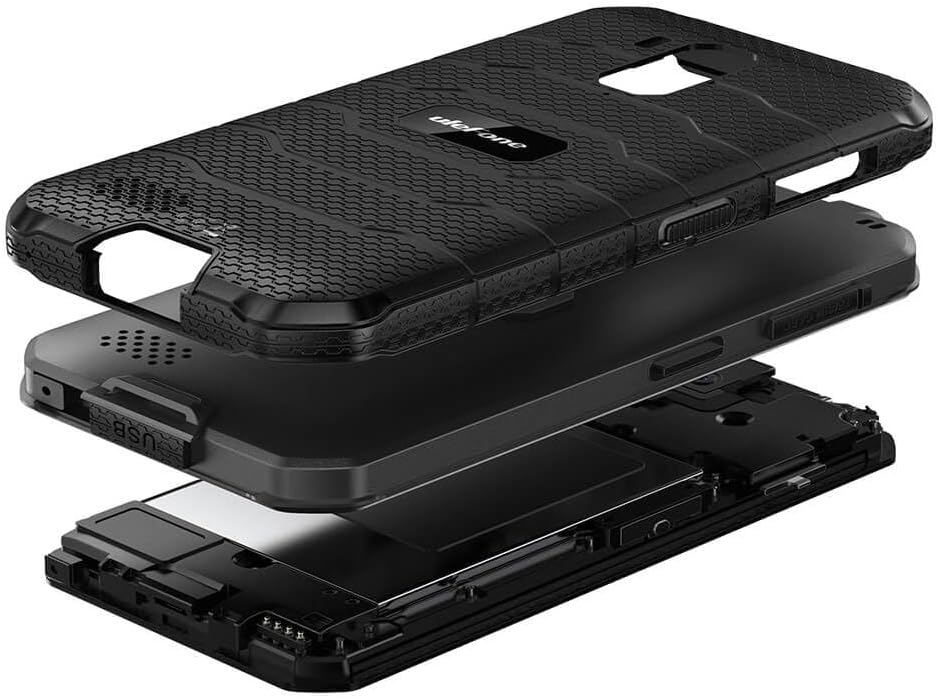
Слика 4: Експлодирао view illustrating the multi-layered rugged construction of the Ulefone Armor X7 Pro.
3. Подешавање
3.1 Инсталација SIM картице и MicroSD картице
- Пронађите лежиште за СИМ картицу са стране уређаја.
- Користите приложени алат за избацивање СИМ картице да бисте отворили лежиште.
- Carefully place your Nano-SIM cards and/or a MicroSD card into the designated slots. Ensure the gold contacts face downwards.
- Gently push the tray back into the device until it clicks into place. Ensure the tray is fully sealed to maintain water and dust resistance.
3.2 Пуњење уређаја
Before first use, fully charge your Ulefone Armor X7 Pro.
- Прикључите USB кабл на порт за пуњење на телефону.
- Connect the other end of the USB cable to a power adapter, then plug the adapter into a power outlet.
- Индикатор пуњења ће се појавити на екрану.
3.3 Укључивање/искључивање
- За укључивање: Притисните и држите дугме за напајање док се не појави логотип Улефона.
- За искључивање: Притисните и држите дугме за напајање док се на екрану не појаве опције напајања, а затим изаберите „Искључи“.
4. Упутство за употребу
4.1 Основна навигација
Use touch gestures such as tap, swipe, pinch, and spread to navigate the interface.
4.2 Обављање позива и слање порука
- Позиви: Отворите апликацију „Телефон“, унесите број и додирните икону за позив.
- Поруке: Open the 'Messages' app, tap 'Start chat', enter the recipient and your message.
4.3 Коришћење камере
Open the 'Camera' app. Tap the shutter button to take a photo or the video icon to record a video. Swipe left or right to switch between modes.
4.4 Откључавање отиском прста
Да бисте подесили откључавање отиском прста:
- Go to 'Settings' > 'Security & location' > 'Fingerprint'.
- Пратите упутства на екрану да бисте регистровали отисак прста.
- Once registered, you can unlock your device by placing your finger on the sensor.
4.5 Мрежна повезаност
- Ви-Фи: Go to 'Settings' > 'Network & internet' > 'Wi-Fi'. Turn Wi-Fi on and select a network to connect.
- Мобилни подаци: Go to 'Settings' > 'Network & internet' > 'Mobile network'. Ensure 'Mobile data' is enabled.
5. Одржавање
5.1 Чишћење уређаја
Користите меку крпу која не оставља влакна за чишћење екрана и кућишта телефона. Избегавајте употребу јаких хемикалија или абразивних материјала.
5.2 Отпорност на воду и прашину (IP68/IP69K)
The Ulefone Armor X7 Pro is rated IP68/IP69K, meaning it is resistant to dust and can withstand water immersion up to 1.5 meters for 30 minutes. It can also handle high-pressure, high-temperature water jets. To maintain this resistance:
- Ensure all port covers (USB, SIM tray) are securely closed.
- Do not expose the device to water if any port covers are open or damaged.
- If the device gets wet, dry it thoroughly before charging or opening any ports.
- Avoid exposing the device to saltwater or other liquids that may corrode components.
5.3 Одржавање батерије
- Избегавајте екстремне температуре, које могу смањити век трајања батерије.
- Use only Ulefone-approved chargers and cables.
- Не бушите и не оштећујте батерију.
КСНУМКС. Решавање проблема
Ако наиђете на проблеме са уређајем, испробајте следећа решења:
| Проблем | Решење |
|---|---|
| Уређај се не укључује | Уверите се да је батерија напуњена. Притисните и држите дугме за напајање најмање 10 секунди да бисте поново покренули уређај. |
| Лош мрежни сигнал | Check SIM card installation. Move to an area with better network coverage. Restart the device. |
| Батерија се брзо празни | Close unused apps. Reduce screen brightness. Disable Wi-Fi/Bluetooth when not in use. |
| Апликације се руше или замрзавају | Clear app cache/data in Settings. Update apps. If persistent, consider a factory reset (back up data first). |
If problems persist, contact Ulefone customer support.
7. Спецификације
Key technical specifications for the Ulefone Armor X7 Pro:
- Модел: UF-AX7P/BK
- Димензије: 0.57 к 3.11 к 5.91 инча
- Тежина: 8.3 унци (234 грама)
- Величина екрана: 5 инча
- РАМ: 4 ГБ
- Капацитет меморије: 32 ГБ
- Ћелијска технологија: 4G
- Технологија бежичне мреже: ГСМ
- SIM Card Slot Count: Дуал СИМ
- Biometric Security Feature: Препознавање отиска прста
- Отпорност на воду/прашину: ИП68/69К
- Произвођач: Улефон
8. Гаранција и подршка
8.1 Информације о гаранцији
Your Ulefone Armor X7 Pro comes with a two-year warranty against factory defects. This warranty covers manufacturing faults and material defects under normal use. It does not cover damage caused by misuse, accidents, unauthorized modifications, or normal wear and tear.
8.2 Корисничка подршка
For technical assistance, warranty claims, or further inquiries, please visit the official Ulefone website or contact their customer service department. Refer to your purchase documentation for specific contact details.


