Varmilo VBS108 Lure Bot Mechanical Keyboard
Упутство за употребу
Увод
Thank you for choosing the Varmilo VBS108 Lure Bot Mechanical Keyboard. This keyboard is designed for versatility and durability, featuring triple mode connectivity (Bluetooth 5.0, 2.4GHz Wireless, and USB-C), high-quality PBT dye-sub keycaps, and Cherry MX Brown switches for a tactile typing experience. This manual provides detailed instructions for setup, operation, maintenance, and troubleshooting to ensure optimal performance and longevity of your keyboard.
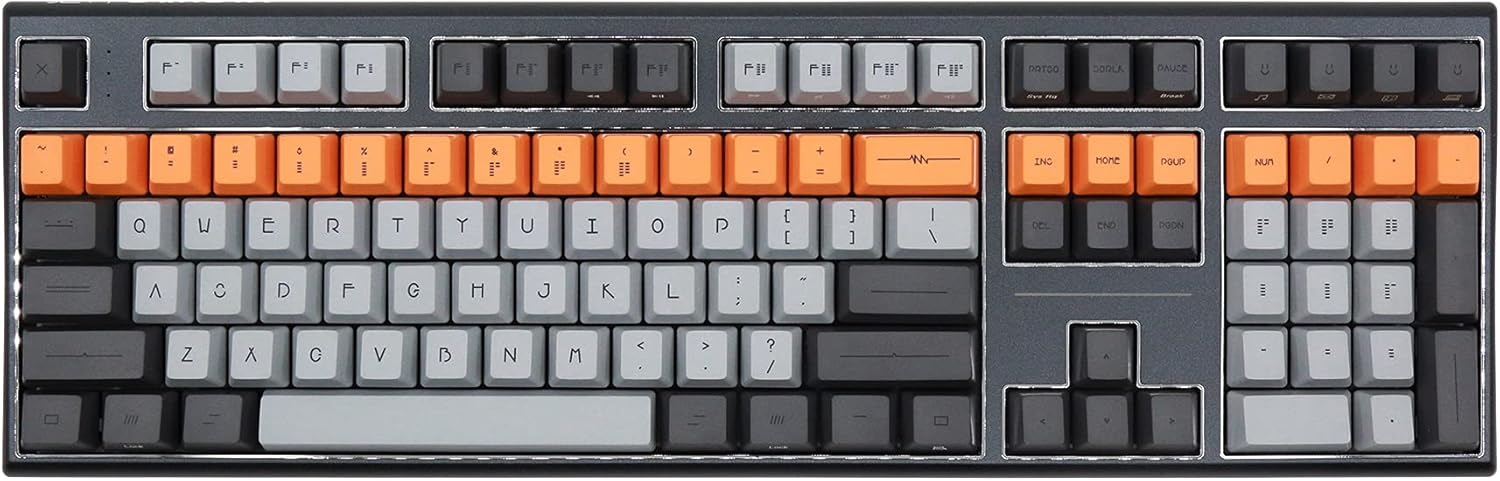
Figure 1: Varmilo VBS108 Lure Bot Mechanical Keyboard
Садржај пакета
Молимо вас да се уверите да су све ставке присутне у пакету:
- Varmilo VBS108 Lure Bot Mechanical Keyboard
- УСБ-Ц на УСБ-А кабл
- 2.4GHz Wireless Dongle (typically stored in the keyboard's battery compartment or a dedicated slot)
- Извлачење капица за тастере (може бити укључено)
- Кориснички приручник (овај документ)
Сетуп
The Varmilo VBS108 offers three connectivity modes: USB-C wired, 2.4GHz wireless, and Bluetooth 5.0.
1. USB-C Wired Connection
- Пронађите USB-C порт на тастатури (обично на горњој ивици).
- Повежите један крај приложеног USB-C кабла са тастатуром.
- Повежите други крај (USB-A) са доступним USB портом на рачунару.
- Тастатура ће бити аутоматски препозната и спремна за употребу.
2. Бежична веза од 2.4 GHz
- Locate the 2.4GHz wireless dongle.
- Укључите кључ у слободан УСБ порт на рачунару.
- Ensure the keyboard is in 2.4GHz mode (refer to the keyboard's function key combinations or a physical switch if available).
- Тастатура би требало да се аутоматски повеже.
3. Bluetooth 5.0 веза
- Ensure the keyboard is in Bluetooth pairing mode. This typically involves holding down a specific Fn key combination (e.g., Fn + 1, Fn + 2, or Fn + 3 for different profiles) until an indicator light flashes. Consult your keyboard's specific key legend for Bluetooth pairing.
- На рачунару или уређају отворите подешавања за Bluetooth.
- Тражи new devices and select "Varmilo VBS108" or a similar name from the list.
- Пратите сва упутства на екрану да бисте довршили процес упаривања.
Оперативни
The Varmilo VBS108 keyboard includes various function key combinations for enhanced control.
Function Key Combinations (Fn + Key)
- Fn + F1-F12: Multimedia controls (play/pause, volume up/down, mute, etc.). Refer to the keycap legends for specific functions.
- Фн + Вин: Закључај/откључај Windows тастер.
- Fn + Left Alt: Switch between macOS and Windows layouts (if supported).
- Фн + К/В/Е: Пребацивање између Bluetooth profileс (ако је применљиво).
- Фн + Р: Switch to 2.4GHz wireless mode.
- Фн + Т: Switch to USB-C wired mode.
- Fn + тастери са позадинским осветљењем: Adjust backlight brightness or effects (if applicable).
Adjustable Flip-out Feet
The keyboard features 3-stage adjustable flip-out feet on the underside, allowing you to customize the typing angle for ergonomic comfort.

Figure 2: Adjustable Flip-out Feet
Одржавање
Proper maintenance ensures the longevity and performance of your Varmilo keyboard.
Чишћење тастатуре
- Тастери: Use a keycap puller to carefully remove keycaps. Clean them with a mild soap solution and a soft cloth, then rinse thoroughly and air dry completely before reattaching.
- Случај: Wipe the keyboard case with a soft, slightly damp, крпа која не оставља влакна. Избегавајте употребу јаких хемикалија или абразивних материјала.
- Између кључева: Use compressed air to remove dust and debris from between the key switches. A small brush can also be used for stubborn particles.

Figure 3: PBT Dye-Sub Keycaps
Решавање проблема
If you encounter issues with your Varmilo VBS108 keyboard, try the following solutions:
- Тастатура не реагује (жичана): Уверите се да је USB-C кабл безбедно повезан и са тастатуром и са рачунаром. Покушајте са другим USB портом или каблом.
- Keyboard not responding (Wireless/Bluetooth):
- Проверите ниво батерије.
- Ensure the keyboard is in the correct mode (2.4GHz or Bluetooth).
- For 2.4GHz, ensure the dongle is properly inserted and try a different USB port.
- For Bluetooth, unpair and re-pair the keyboard with your device. Ensure your device's Bluetooth is enabled.
- Кључеви се не региструју: Remove the keycap and check for any obstructions around the switch. Clean the area with compressed air.
- Повремена веза: Ensure there are no major sources of interference (e.g., other wireless devices) near the keyboard or dongle.
- Ажурирање фирмвера: Check the official Varmilo website for any available firmware updates for your model, which can resolve known issues.
Спецификације
| Феатуре | Детаљ |
|---|---|
| Бранд | Вармило |
| Модел | VBS108 Lure Bot |
| Технологија повезивања | Bluetooth 5.0, 2.4GHz Wireless, USB-C |
| Тип прекидача | Трешња MX Браун |
| Кеицап Материал | PBT Dye-Sub |
| Број кључева | 104 |
| Компатибилни уређаји | PC |
| Боја | Cherry MX Brown (keyboard color scheme) |
| Посебна карактеристика | 3-Сtage Adjustable Flip-out Feet |
Гаранција и подршка
Varmilo products are designed for quality and reliability. For information regarding warranty coverage, technical support, or service, please refer to the warranty card included with your product or visit the official Varmilo webсајт. Такође можете контактирати продавца од кога сте купили производ за помоћ.


