1. Увод
Welcome to the user manual for your new boAt Airdopes 621 Truly Wireless Earbuds. This guide provides detailed instructions on how to set up, operate, maintain, and troubleshoot your earbuds to ensure you get the best possible audio experience. The Airdopes 621 offers an impressive 150 hours of playback with its charging case, ASAP Charge technology for quick power-ups, and IPX7 water resistance for durability.
2. Шта је у кутији
- 1 x boAt Airdopes 621 TWS Earbuds
- 1 к кућиште за пуњење
- КСНУМКС к УСБ кабел за пуњење типа Типе-Ц
- 2 x Additional Earbud Tips (pairs)
- 1 к Упутство за употребу
3. Производ је готовview
The boAt Airdopes 621 earbuds are designed for comfort and secure fit, featuring a never-drop design. The charging case includes a digital battery indicator for convenient power monitoring.

The boAt Airdopes 621 earbuds, showcasing their sleek black design and in-ear fit.

The charging case features a clear digital display indicating the battery level.

The earbuds are shown alongside their open charging case, ready for use.
Контроле
The Airdopes 621 features smooth touch controls for easy management of music playback, calls, and voice assistant activation.
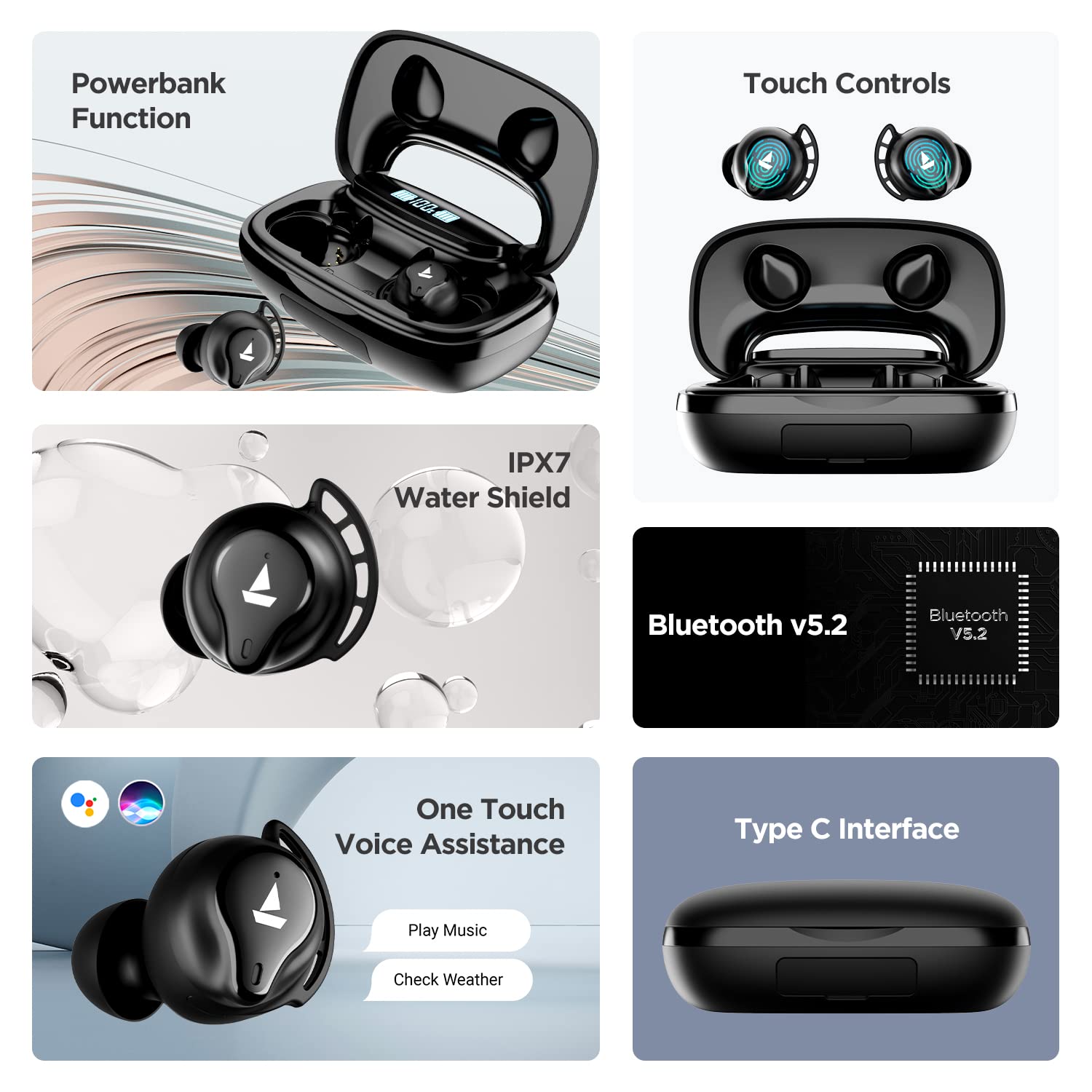
A visual summary of key features including power bank function, touch controls, IPX7 water resistance, Bluetooth v5.2, voice assistance, and Type-C interface.
4. Подешавање
4.1 Пуњење слушалица и футроле
Before first use, fully charge the Airdopes 621. Place both earbuds into the charging case. Connect the Type-C charging cable to the case and a power source. The digital indicator on the case will show the charging status.
The ASAP Charge technology provides up to 60 minutes of playback with just 5 minutes of charging.

Illustration of the ASAP Charge feature, highlighting 5 minutes of charge for 60 minutes of playtime.
4.2 Функција преносног пуњача
The 2600mAh capacity of the charging case allows it to function as a power bank, providing emergency power to other devices via its USB-A output port (cable not included).
4.3 Упаривање са вашим уређајем
- Open the lid of the charging case. The earbuds will power on automatically due to IWP (Insta Wake N' Pair) Technology.
- Ensure Bluetooth is enabled on your device (smartphone, tablet, etc.).
- Тражи "Airdopes 621" in the list of available Bluetooth devices.
- Select "Airdopes 621" to connect. Once connected, you will hear an audio prompt.
The earbuds will automatically connect to the last paired device when taken out of the case, provided Bluetooth is active on the device.

Visual representation of the IWP Technology, showing the earbuds automatically appearing for connection when the case is opened.
5. Упутство за употребу
5.1 Укључивање/искључивање
- Укључено: Open the charging case lid. The earbuds will power on automatically.
- Искључивање: Вратите слушалице у кутијицу за пуњење и затворите поклопац. Аутоматски ће се искључити.
5.2 Репродукција музике
- Пусти/паузирај: Једном додирните било коју слушалицу.
- Следећа нумера: Двапут додирните десну слушалицу.
- Претходни запис: Двапут додирните леву слушалицу.
5.3 Управљање позивима
- Одговори/заврши позив: Једном додирните било коју слушалицу.
- Одбиј позив: Притисните и држите било коју слушалицу 2 секунде.
5.4 Гласовни асистент
- Активирајте гласовног асистента (Siri/Google Assistant): Трипут додирните било коју слушалицу.
6. Одржавање
- Чишћење: Редовно чистите слушалице и кућиште за пуњење меком, сувом крпом. Не користите јаке хемикалије или абразивне материјале.
- Отпорност на воду: The Airdopes 621 are IPX7 rated, meaning they are protected against immersion in water up to 1 meter for 30 minutes. Do not intentionally submerge them or use them for swimming. Ensure the charging port is dry before charging.
- Складиштење: Чувајте слушалице у њиховој футроли за пуњење када их не користите како бисте их заштитили и одржали напуњеним. Избегавајте екстремне температуре.
КСНУМКС. Решавање проблема
- Слушалице се не повезују/упарују:
- Уверите се да су обе слушалице напуњене.
- Искључите Блутут на уређају, а затим га поново укључите.
- Forget "Airdopes 621" from your device's Bluetooth settings and try pairing again.
- Place both earbuds back in the case, close the lid, wait a few seconds, then open the lid to re-initiate pairing.
- Само једна слушалица ради:
- Уверите се да су обе слушалице напуњене.
- Вратите обе слушалице у кутијицу за пуњење, затворите поклопац, а затим га поново отворите. Ово их често поново синхронизује.
- If the issue persists, try resetting the earbuds (refer to the full product manual for specific reset instructions if available, as this varies by model).
- Футрола за пуњење се не пуни:
- Проверите кабл за пуњење и адаптер. Пробајте други кабл или извор напајања.
- Ensure the Type-C cable is fully inserted into the charging port.
- Лош квалитет звука или прекиди везе:
- Ensure the earbuds are within the Bluetooth range (up to 10 meters) of your device.
- Смањите сметње тако што ћете се удаљити од других бежичних уређаја или јаких електромагнетних поља.
- Clean the earbud tips and speaker mesh to ensure no debris is blocking the sound.
- Ensure the earbud tips fit snugly in your ears for optimal sound quality.
8. Спецификације
| Феатуре | Спецификација |
|---|---|
| Назив модела | Аирдопес 621 |
| Технологија повезивања | Блуетоотх |
| Бежична комуникациона технологија | Заиста бежично |
| Блуетоотх верзија | 5.2 |
| Блуетоотх домет | 10 метара |
| Playback Time (per charge) | До 5.5 сати |
| Укупно време репродукције (са футролом) | До 150 сати |
| АСАП Цхарге | 5 Mins Charge = 60 Mins Playtime |
| Порт за пуњење | Типе-Ц |
| Ниво отпорности на воду | ИПКС7 |
| Величина аудио драјвера | 6 милиметара |
| Контролни метод | Додирните |
| Подршка гласовног помоћника | Сири, Гоогле помоћник |
| Капацитет батерије кућишта | 2600mAh (functions as Powerbank) |
| Тежина артикла | 106 грама |
| Димензије производа | 8.9 к 5.3 к 3.2 цм |
9. Гаранција и подршка
Your boAt Airdopes 621 comes with a Двогодишња гаранција произвођача from the date of purchase. This warranty covers manufacturing defects. Please retain your purchase receipt for warranty claims.
For further assistance, technical support, or warranty claims, please visit the official boAt website or contact their customer service. You can find more information and support resources on the boAt Store on Amazon.


