1. Увод
The Enttec OCTO Mk2 (model 71521) is a robust and reliable 8-universe, dual-output eDMX to LED pixel data converter designed for installation-grade projects. This smart controller connects directly to LED lights and supports various eDMX protocols including Art-Net, sACN, ESP, and KiNet. It is compatible with most SPI LED strips and offers features like standalone FX mode, Overdrive Mode for increased universe output, and an intuitive web интерфејс за конфигурацију.
2. Безбедносне информације
- Ensure the device is installed by qualified personnel in accordance with local electrical codes.
- Use only the specified power supply (DC 4-60V, 5W max) to prevent damage.
- Не излажите уређај влази, екстремним температурама или корозивним срединама.
- Искључите напајање пре него што направите било каква повезивања или извршите одржавање.
- Уређај је дизајниран само за употребу у затвореном простору.
3. Садржај пакета
The Enttec OCTO Mk2 package typically includes:
- Enttec OCTO Mk2 Unit
- Power Supply (with universal connectors)
- Етхернет Цабле
- Кратки водич (није укључен у овај дигитални приручник)
4. Производ је готовview
The OCTO Mk2 features a compact 4-module DIN-rail form factor with dual pixel outputs. It includes an Identify/Reset button for wiring verification and flexible mounting options.
4.1. Фронт View

Слика 1: Предња страна view of the Enttec OCTO Mk2, highlighting the status LEDs for Power, Data RX, Data TX, and IP connection, along with the Identify button.
4.2. Позади View (Mounting and Ethernet Ports)

Слика 2: Задња страна view of the Enttec OCTO Mk2, illustrating the DIN rail mounting clip and the Ethernet IN and THROUGH ports.
4.3. Ethernet Ports Detail

Слика 3: Детаљно view of the Ethernet 10/100 IN and THROUGH ports, along with the Reset/Identify button.
4.4. Power and Output Terminals
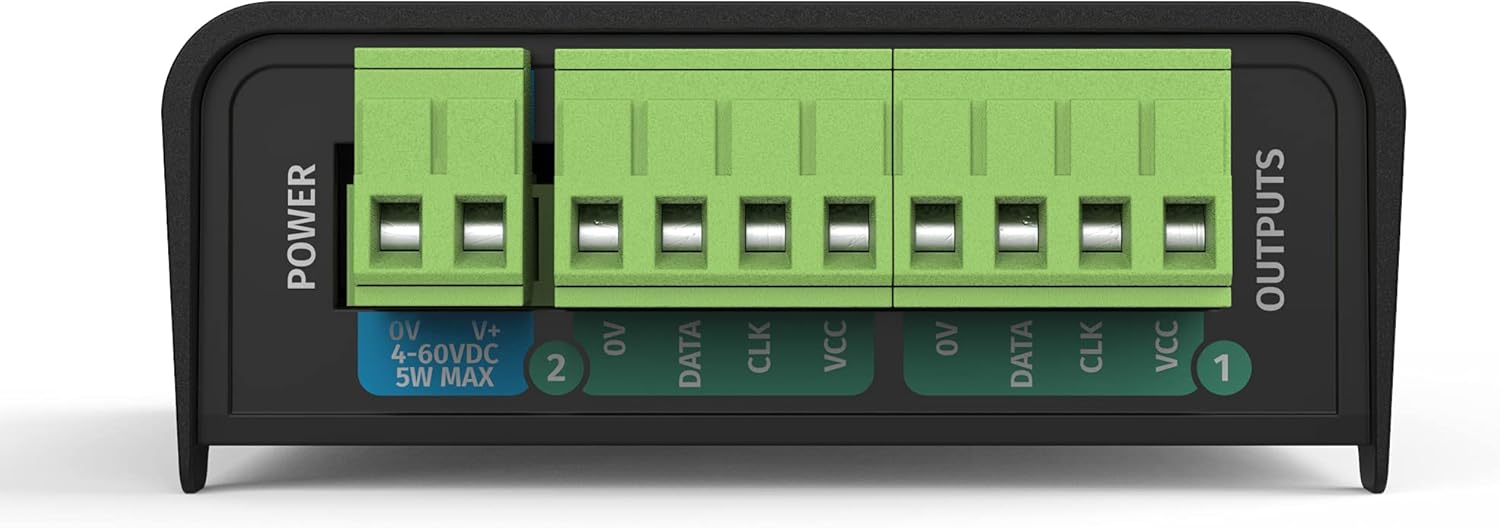
Figure 4: Close-up of the power input terminals (0V, V+, DC 4-60V) and the dual SPI-TTL data output terminals (0V, Data, CLK, VCC for each output).
5. Подешавање
5.1. Физичке везе
- Прикључак за напајање: Connect the provided power supply to the "POWER" terminals (0V and V+) on the OCTO Mk2. Ensure the voltagе је у опсегу од 4-60V једносмерне струје.
- Етхернет веза: Connect an Ethernet cable from your network switch or computer to the "IN" Ethernet port on the OCTO Mk2. For daisy-chaining, use the "THROUGH" port to connect to another network device.
- LED Pixel Output: Connect your SPI LED strips or pixel dots to the "OUTPUTS" terminals. Each output provides connections for 0V (Ground), Data, CLK (Clock), and VCC (Power). Refer to your LED strip's specifications for correct wiring.
5.2. Network Configuration (Accessing the Web Интерфејс)
The OCTO Mk2 features a built-in web interface for configuration. To access it, your computer needs to be on the same network as the OCTO Mk2.
- Почетна веза: Connect your computer directly to the OCTO Mk2 using an Ethernet cable, or ensure both are on the same local network.
- Identify IP Address: The default IP address for the OCTO Mk2 is typically printed on the device or found in the quick start guide. If using DHCP, the device will obtain an IP address from your network.
- Приступ Web Интерфејс: Отвори а web browser and enter the IP address of the OCTO Mk2 into the URL bar. This will open the device's configuration page.
- Конфигуришите подешавања мреже:
- Идите до Подешавања таб.
- To assign a static IP address, uncheck the ДХЦП Енабле опција.
- Manually enter the desired ИП адреса, НетМаск, и Гатеваи. Ensure the IP address is unique on your network and within the same subnet as your control computer.
- Кликните Пријавите се да сачувате промене.
Refer to the datasheet image for an exampле оф тхе web interface settings:

Figure 5: Excerpt from the Enttec OCTO Mk2 datasheet, showing an overview оф тхе web interface with network and DMX port settings.

Figure 6: Excerpt from the Enttec OCTO Mk2 datasheet, detailing updated features like UL Certification, Overdrive Mode, Standalone Mode, and Free ELM Software License.
6. Радни режими
6.1. eDMX Control
The OCTO Mk2 supports various eDMX protocols for controlling your LED pixels from a compatible DMX software or console.
- Подржани протоколи: Art-Net, sACN, ESP, and KiNet.
- Конфигурација: У web интерфејс под DMX Port Settings, поставите Тип to "Output (DMX Out)" and select your desired Протокол (e.g., Art-Net). Configure the Универзум settings (Net, Subnet, Uni) to match your DMX setup.
- Спајање излаза: The device supports output merging options like "LTP Merge (Latest Takes Precedence)" to handle multiple DMX sources.
6.2. Standalone Mode with Inbuilt FX Engine
The OCTO Mk2 can operate in Standalone Mode, allowing you to create and run gradient effects directly from the device without an external DMX source.
- Access the inbuilt FX engine via the web interface to design and edit effects.
- Configure the device to run these standalone shows automatically upon power-up.
6.3. Overdrive Mode
Overdrive Mode allows the OCTO Mk2 to output more than 4 universes per port, boosting total output up to 16 universes. This feature is useful for managing a higher universe count.
- Note that utilizing Overdrive Mode may result in a lower maximum Frames Per Second (FPS). Evaluate your specific needs to determine its suitability.
7. Supported SPI LED Protocols
The OCTO Mk2 is compatible with a wide range of SPI LED protocols, including but not limited to:
- АПА 104
- ГС8208Б
- SPXL (16-bit & 8-bit)
- СК6812
- ТМ1804, ТМ1812, ТМ1814
- UCS1903, UCS2903, UCS2904, UCS8903 (16-bit & 8-bit), UCS8904 (16-bit & 8-bit)
- ВС2811, ВС2812, ВС2812Б, ВС2813, ВС2815, ВС2818
- AHL003 (16-bit & 8-bit)
- SJ1221 (16-bit & 8-bit)
- TLC5973 (16-bit & 8-bit)
- Ability to create custom pixel output protocols (refer to the user manual for criteria).
8. Одржавање
- Чишћење: Користите меку, суву крпу за чишћење уређаја. Не користите течна или аеросолна средства за чишћење.
- Ажурирања фирмвера: Редовно проверавајте енттец.цом for the latest firmware updates. Always review release notes for special instructions before updating.
- Складиштење: Чувајте уређај на хладном и сувом месту када се не користи.
КСНУМКС. Решавање проблема
- Нема напајања: Check power connections and ensure the power supply is functioning correctly. Verify the input voltagе је унутар наведеног опсега.
- Нема мрежне везе:
- Ensure Ethernet cables are securely connected.
- Verify network settings (IP address, subnet mask, gateway) in the web interface are correct for your network.
- If using a static IP, ensure it is unique and not conflicting with other devices.
- No DMX/Pixel Output:
- Check the DMX Port Settings in the web interface (Type, Protocol, Universe).
- Verify the wiring of your LED strips to the output terminals (Data, CLK, VCC, GND).
- Use the Identify button on the device to check correct wiring without a data source.
- Ensure your DMX control software is correctly configured to send data to the OCTO Mk2's IP address and universe.
- Lower FPS in Overdrive Mode: This is expected behavior. If higher FPS is critical, consider reducing the number of universes or adjusting your setup.
10. Спецификације
| Феатуре | Детаљ |
|---|---|
| Број модела | OCTO (71521) |
| Димензије производа | 3.96 к 2.84 к 1.34 инча |
| Тежина артикла | 3.88 унци |
| Повер Инпут | DC 4-60V, 5W max |
| ДМКС Универсес | 8 (up to 16 with Overdrive Mode) |
| Протокол везе података | Етхернет |
| eDMX Protocols | Art-Net, sACN, ESP, KiNet |
| Опције монтаже | TS35 DIN rail or Surface mount |
| УЛ Цертифицатион | Yes (Serial numbers 2374307 or higher) |
11. Гаранција и подршка
For warranty information, technical support, and additional resources, please visit the official Enttec webсајт на ввв.енттец.цом. You can also find information regarding the free ELM software 8 Universe license and the latest firmware downloads there.


