Производ је завршенview
The Sena Spider ST1 is a Mesh-equipped communication headset designed for motorcycle riders. It features a glove-friendly jog-dial control and operates exclusively on Sena's Mesh intercom platform. This system enhances rider-to-rider communication with robust reliability, offering both Multi-Channel Open Mesh and Group Mesh modes. It includes upgraded HD Speakers for improved audio quality and is compatible with the Sena Motorcycle App.

Слика: Фронт view of the Sena Spider ST1 communication system, showing the main unit with the jog dial and LED indicator.
Садржај пакета
The Sena Spider ST1 package typically includes the following components:
- Communication Device (Sena Spider ST1 unit)
- УСБ кабл за пуњење
- Speaker Set (HD Speakers)
- Microphone (Boom or Wired, depending on kit)
- Mounting Hardware (Clamp Kit, Glued Surface Mounting Plate)
- Velcro Pads for Speakers and Microphone
Подешавање и инсталација
1. Пуњење уређаја
Before first use, fully charge the Sena Spider ST1. Connect the provided USB charging cable to the device's charging port and a USB power source. The LED indicator will show charging status.
- Време пуњења: Приближно 2.5 сата за потпуно пуњење.
- Трајање батерије: До 12 сата разговора.
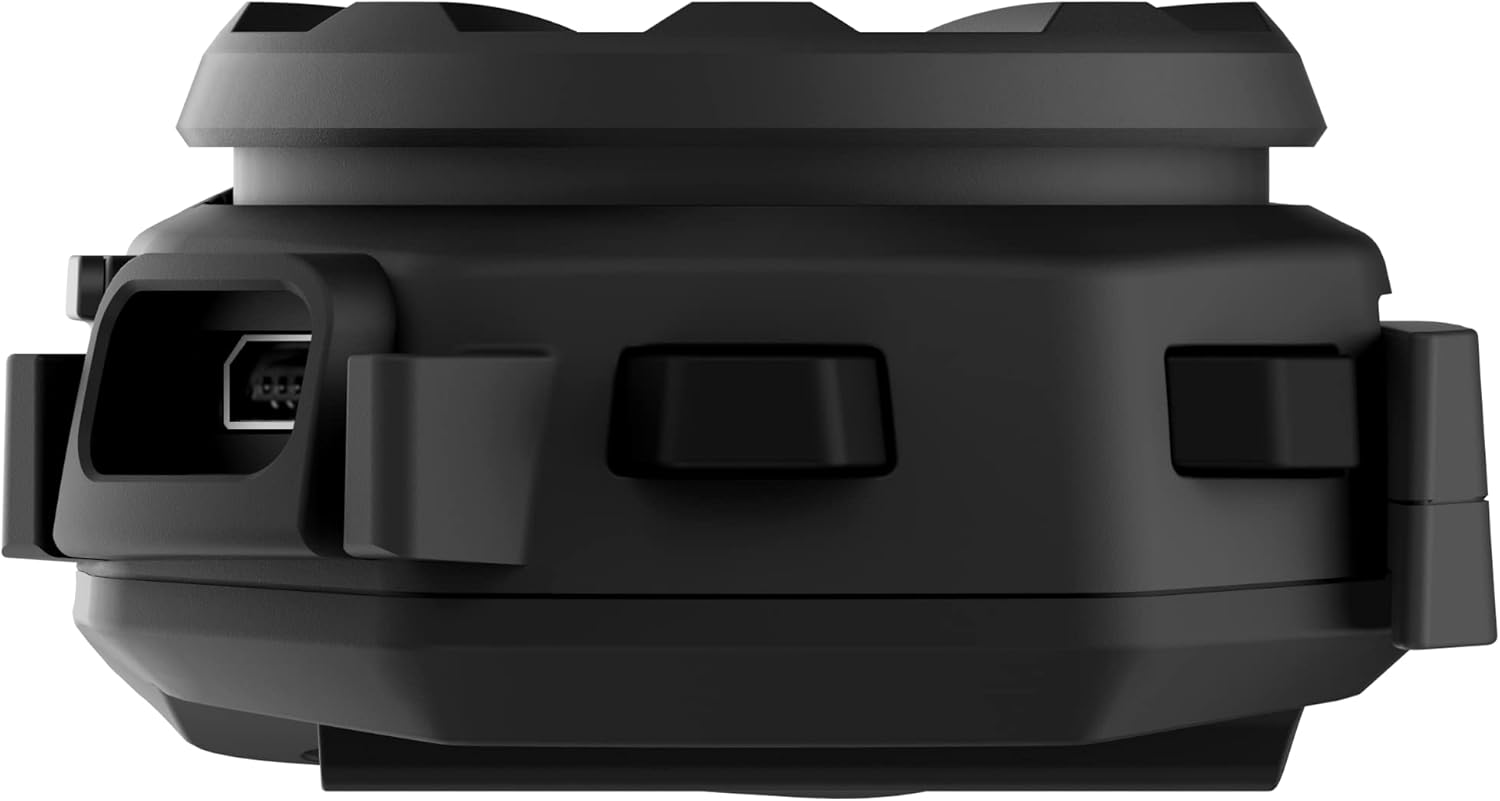
Слика: Са стране view of the Sena Spider ST1 unit, highlighting the USB charging port for power connection.
2. Mounting on Helmet
The Spider ST1 can be mounted using either the clamp kit or the glued surface mounting plate. Ensure the mounting location allows for easy access to the jog dial and does not obstruct helmet functionality.
- Изаберите локацију: Select a flat surface on the left side of your helmet.
- Причврстите носач: Securely attach the chosen mounting accessory (clamp or adhesive plate) to the helmet.
- Инсталирајте звучнике: Place the HD Speakers inside the helmet's ear pockets using the Velcro pads. Ensure they are positioned directly over your ears for optimal audio quality.
- Инсталирајте микрофон: Attach the microphone to the helmet, positioning it close to your mouth but not directly in front of it to avoid wind noise.
- Прикључите главну јединицу: Slide the Spider ST1 main unit onto the mounted accessory until it clicks securely into place.

Image: The Sena Spider ST1 communication system securely mounted on the side of a motorcycle helmet, with its LED indicator illuminated.
Упутство за употребу
Укључивање/искључивање
- Укључено: Притисните и држите Јог Диал 1 секунду.
- Искључивање: Притисните и држите Јог Диал 5 секунде.
Контрола јачине звука
- Повећајте јачину звука: Rotate the Jog Dial clockwise.
- Смањи јачину звука: Rotate the Jog Dial counter-clockwise.
Месх Интерцом
The Spider ST1 utilizes Sena's Mesh Intercom technology for seamless group communication.
- Мрежасти интерфон укључен/искључен: Press the Mesh Intercom Button (located on the side of the unit).
- Multi-Channel Open Mesh: Allows communication with a near-limitless number of riders. Switch between 9 channels using the Sena Motorcycle App.
- Групна мрежа: Supports up to 24 participants in a private group. Create and manage groups via the Sena Motorcycle App.

Image: A screenshot displaying the user interface of the Sena Motorcycle App, showing options for Mesh Grouping and Channel selection.
Smartphone Connectivity (Bluetooth 5.1)
Connect your Spider ST1 to your smartphone for music, phone calls, and GPS navigation.
- Режим упаривања: With the unit off, press and hold the Jog Dial for 5 seconds until the LED flashes red and blue.
- Повежите се: On your smartphone, go to Bluetooth settings and select "Sena Spider ST1" from the list of available devices.
- Функције:
- Репродукција музике/пауза: Притисните Јог Диал.
- Следећа нумера: Rotate Jog Dial clockwise and hold for 1 second.
- Претходни запис: Rotate Jog Dial counter-clockwise and hold for 1 second.
- Одговори/заврши позив: Притисните Јог Диал.
- Гласовни асистент (Siri/Google асистент): Притисните Јог Диал на 3 секунди.
Одржавање и њега
- Чишћење: Обришите јединицу меком крпом, дamp тканина. Немојте користити јаке хемикалије или абразивна средства за чишћење.
- Складиштење: Чувајте уређај на хладном и сувом месту када се не користи.
- Одржавање батерије: For optimal battery life, avoid storing the device in extremely hot or cold conditions. Charge the battery at least once every six months if not used regularly.
- Отпорност на воду: The device is water resistant, but not fully waterproof. Avoid submerging it in water.
Решавање проблема
| Проблем | Могући узрок | Решење |
|---|---|---|
| Уређај се не укључује. | Ниска батерија. | У потпуности напуните уређај. |
| Нема звука из звучника. | Speakers not connected properly or volume too low. | Check speaker connections. Increase volume using the Jog Dial. |
| Cannot connect to Mesh Intercom. | Mesh Intercom is off or out of range. | Ensure Mesh Intercom is enabled. Move closer to other Mesh users. |
| Проблеми са упаривањем преко Bluetooth-а. | Device not in pairing mode or smartphone Bluetooth is off. | Put the Spider ST1 in pairing mode. Ensure smartphone Bluetooth is on and visible. Try restarting both devices. |
| Лош квалитет микрофона. | Microphone not positioned correctly or obstructed. | Adjust microphone position closer to your mouth. Ensure it is not blocked by helmet padding. |
Спецификације
| Феатуре | Детаљ |
|---|---|
| Назив модела | СПИДЕР |
| Број модела ставке | SPIDER-ST1-01 |
| Материјал | Гума |
| Боја | Црно |
| Тежина артикла | 60 грама (2.12 унци) |
| Димензије производа | 1.8"Д к 3.8"Ш к 1"В |
| Трајање батерије | 12 сати (време разговора) |
| Време пуњења | 2.5 сата |
| Блуетоотх верзија | 5.1 |
| Бежична комуникациона технологија | Bluetooth, Mesh Intercom |
| Maximum Mesh Range | До 5 миља (8 км) |
| Максимална излазна снага звучника | 100 Ваттс |
| Фреквенцијски одзив | 10000 Хз |
| Ниво отпорности на воду | Отпоран на воду |
| Укључене компоненте | Communication Device, Cable |
Гаранција и подршка
Информације о гаранцији
The Sena Spider ST1 comes with a 2-годишња гаранција од датума куповине. Ова гаранција покрива недостатке у материјалу и изради при нормалној употреби. Молимо вас да сачувате доказ о куповини за потребе подношења захтева за гаранцију.
Корисничка подршка
For further assistance, technical support, or warranty inquiries, please refer to the official Sena resources:
- Званично упутство за употребу (PDF): Довнлоад ПДФ Ручно
- Sena Official Store: Visit Sena Store on Amazon
- For the most up-to-date support information, visit the official Sena webсајту.


