Производ је завршенview
This manual provides essential information for the safe and efficient use of your Kratos Refrigeration 69K-889HC Commercial Premium Reach-in Freezer. Please read all instructions carefully before installation and operation.

Слика 1: Предња страна view of the Kratos 69K-889HC Commercial Premium Reach-in Freezer, showing the single door and bottom-mounted compressor grille.

Figure 2: Angled front-side view of the Kratos 69K-889HC freezer, highlighting its stainless steel construction.

Слика 3: Унутрашњост view of the freezer with the door open, showing the adjustable shelving and internal lighting.
Упутства за подешавање
- Распакивање: Carefully remove all packaging materials. Inspect the freezer for any shipping damage. Report any damage immediately to the carrier and supplier.
- Пласман: Position the freezer on a strong, level surface capable of supporting its weight when fully loaded. Ensure adequate ventilation around the unit. Maintain a minimum of 6 inches (15 cm) clearance from walls and other equipment for proper airflow.
- Нивелисање: Use the adjustable casters to level the unit. Ensure the freezer is stable and does not rock.
- Прво чишћење: Пре прве употребе, очистите унутрашње и спољашње површине благим раствором сапуна и воде. Добро исперите и осушите.
- Прикључак за напајање: Connect the freezer to a dedicated electrical outlet that matches the voltagе и ampзахтеве за напајање наведене на етикети производа. Не користите продужне каблове.
- Прво појачање: After connecting power, allow the unit to run empty for at least 2-4 hours to reach the desired operating temperature before loading with products.
Упутство за употребу
Контрола температуре
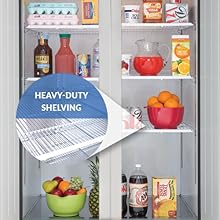
Figure 4: Digital temperature controls for precise temperature management.
- The freezer is equipped with digital temperature controls for precise temperature management.
- The current internal temperature is displayed on the digital panel.
- Use the up and down arrows to adjust the set temperature. Refer to the controller's specific instructions for detailed programming.
Пуњење замрзивача
- Ensure proper air circulation by not overfilling the freezer. Leave space between items and the interior walls.
- Distribute weight evenly across the shelves. The freezer includes heavy-duty shelving.

Слика 5: Прample of heavy-duty shelving in a Kratos unit, designed for commercial use.
Рад на вратима
- The freezer features a self-closing door to minimize temperature fluctuations and energy consumption.
- Ensure the door closes completely after each use.
Одржавање
Редовно чишћење
- Ентеријер: Clean the interior regularly with a mild, non-abrasive cleaner. Remove shelves and clean them separately. Rinse with clean water and dry thoroughly.
- Екстеријер: Wipe down the stainless steel exterior with a soft cloth and a stainless steel cleaner. Avoid abrasive pads or cleaners that can scratch the surface.
- Заптивке за врата: Inspect and clean door gaskets weekly. Ensure they are free of food debris and remain flexible for a tight seal. Replace worn or damaged gaskets promptly.
Чишћење намотаја кондензатора
- The condenser coils should be cleaned every 30 days or as needed, depending on the operating environment.
- Искључите јединицу пре чишћења.
- Remove the front grille. Use a stiff brush or vacuum cleaner to remove dust and debris from the condenser coils.
- Failure to clean the condenser coils regularly can lead to reduced efficiency, increased energy consumption, and potential equipment failure.
Аутоматско одмрзавање
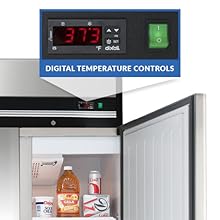
Figure 6: The freezer features an automatic defrost system to prevent ice buildup.
- This freezer features an automatic defrost system, eliminating the need for manual defrosting.
- Ensure the drain pan is clear and the drain line is not obstructed to allow proper water removal during defrost cycles.
Решавање проблема за
| Проблем | Могући узрок | Решење |
|---|---|---|
| Замрзивач се не хлади | Уређај је искључен из струје или је нестала струјаtage | Проверите кабл за напајање и осигурач. |
| Замрзивач се не хлади | Температура је постављена превисоко | Adjust thermostat to a lower setting. |
| Замрзивач се не хлади | Прљави намотаји кондензатора | Clean condenser coils as per maintenance instructions. |
| Прекомерна бука | Јединица није ниво | Adjust leveling casters. |
| Прекомерна бука | Лабаве компоненте | Обратите се квалификованом сервисном особљу. |
| Врата нису правилно заптивена | Dirty or damaged door gasket | Clean or replace door gasket. |
| Врата нису правилно заптивена | Obstruction in door path | Remove any items blocking the door. |
For issues not listed above or if solutions do not resolve the problem, contact Kratos customer support or a qualified service technician.
Спецификације
| Феатуре | Детаљ |
|---|---|
| Бранд | Кратос |
| Број модела | 69К-889 |
| Тежина артикла | 280 фунти |
| Врста инсталације | Самостални |
| Тип одмрзавања | Аутоматски |
| Број полица | 3 |
| Димензије производа (Д x Ш x В) | 33.3"Д к 27"Ш к 83.5"В |
Информације о гаранцији
The Kratos 69K-889HC Commercial Premium Reach-in Freezer comes with a comprehensive warranty:
- 3 године делови и рад
- 5 година на компресору
Important Warranty Restrictions:
- Warranty is void if the unit is used in a residential setting.
- A 90-day limited warranty applies to food trucks or mobile applications.
For detailed warranty terms and conditions, please refer to the official warranty document provided with your purchase or contact Kratos customer support.
Video 1: Kratos Premium Refrigerator Overview. This video highlights key features including the stainless steel exterior, self-closing doors, LED lighting, digital temperature controls, and warranty details applicable to Kratos premium refrigeration units.
Корисничка подршка
For technical assistance, parts inquiries, or warranty claims, please contact Kratos customer support:
- Телефон: Refer to your purchase documentation for the most current contact number.
- Webсајт: Visit the official Kratos webсајт за често постављана питања и ресурсе за подршку.
- Емаил: Use the contact form on the Kratos webсајт за подршку путем е-поште.
When contacting support, please have your model number (69K-889) and serial number ready.


