1. Увод
Thank you for choosing the PROXTEND X502 Full HD Webcam. This manual provides detailed instructions to help you set up, operate, and maintain your webcam for optimal performance. The X502 is designed to deliver clear 1080p video at 30 frames per second, featuring an omni-directional microphone and automatic low light correction for various lighting conditions.
2. Садржај пакета
Молимо вас да проверите да ли су све ставке присутне у вашем пакету:
- PROXTEND X502 Full HD Webcam (PX-CAM007)
- Integrated Universal Mounting Clip
- Кориснички приручник (овај документ)
3. Подешавање
Follow these steps to set up your PROXTEND X502 Webкамера:
- Монтажа Webкамера:
Тхе webcam features an integrated universal mounting clip. You can place the webcam on top of your computer monitor, laptop screen, or a flat surface. Adjust the clip to securely hold the webcam in position. The webcam also supports mini tripod mounting (tripod not included).
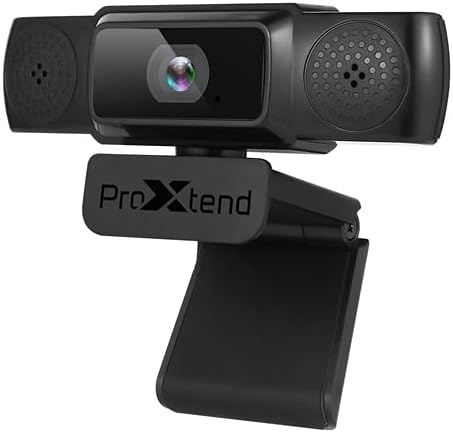
Image: The PROXTEND X502 Full HD Webcam shown with its universal mounting clip, suitable for monitors or flat surfaces.
- Повезивање са рачунаром:
Прикључите УСБ кабл из webУкључите камеру у слободан USB порт на рачунару. webcam is plug-and-play, meaning your operating system should automatically detect and install the necessary drivers. No additional software installation is typically required.
- Driver Installation Verification:
After connecting, allow a few moments for your computer to recognize the device. You can verify successful installation in your operating system's Device Manager (Windows) or System Information (macOS) under 'Cameras' or 'Imaging Devices'.
4. Упутство за употребу
Једном webcam is set up, you can begin using it with various applications:
- Одабиром Webкамера:
Open your preferred video conferencing, streaming, or recording application (e.g., Zoom, Microsoft Teams, Skype, OBS Studio). Navigate to the application's video and audio settings. Select "PROXTEND X502" as your camera and microphone input device.

Слика: Фронт view of the PROXTEND X502 Full HD Webcam, highlighting the lens and integrated microphones.
- Квалитет видеа:
Тхе webcam automatically adjusts for optimal image quality, including auto-focus and auto low light correction. Ensure adequate lighting for the best video performance. The 1920x1080p resolution at 30fps provides clear and smooth video.
- Квалитет звука:
The integrated omni-directional microphone captures sound from all directions. Position yourself appropriately to ensure your voice is clearly picked up. Most applications allow you to adjust microphone input levels in their audio settings.
5. Карактеристике
Key features of the PROXTEND X502 Full HD Webcam include:
- 1 / 2.7 ”ЦМОС сензор слике
- 2 мегапиксела
- Resolution: 1920x1080 at 30 frames per second
- Вишенамјенски микрофон
- Универзални клип за монтажу
- Mini Tripod Support
- Аутоматска корекција при слабом осветљењу
6. Спецификације
Detailed technical specifications for the PROXTEND X502 Full HD Webкамера:

Image: A visual representation of the PROXTEND X502 Full HD Webcam's key features and technical specifications.
| Феатуре | Спецификација |
|---|---|
| Сензор слике | 1/2.7" CMOS Image Sensor |
| Мегапиксела | 2 МП |
| Максимална резолуција | 1920к1080 |
| Видео Ресолутион | 1920к1080 |
| Мак ФПС | 30 фпс |
| Формат за декодирање видео записа | Х.264/МЈПГ |
| Режим експозиције | Ауто |
| Баланс белог | Ауто |
| Добитак | Ауто |
| Компензација при слабом осветљењу | Ауто |
| Viewинг Англе | 77° |
| Фоцал Дистанце | 10 цм до бесконачности |
| Фоцус Типе | Ауто |
| Микрофон | Омни-дирецтионал |
| Аудио Сampлинг Рате | 1 канал 16бит 16К 32К 44.1К 48К |
| Аудио формат | ПЦМ, компатибилан УАЦ 1.0 |
| Интерфејс | УСБ 2.0 |
| Цабле Ленгтх | 1.5 м |
| Компатибилан ОС | Windows XP, Windows 7 (32bit/64bit), Windows 8, Windows 10, Android V5.0 or higher OS, MAC OS 10.6 or higher |
| Димензије производа | 12.7 к 7.62 к 5.08 цм |
| Тежина производа | 453.59 г |
КСНУМКС. Решавање проблема
If you encounter issues with your PROXTEND X502 Webкамера, испробајте следећа решења:
- Без слике/видеа:
- Уверите се да је USB кабл безбедно повезан са оба webкамера и ваш рачунар.
- Покушајте са другим УСБ портом на рачунару.
- Поново покрените рачунар.
- Check your application's settings to ensure the PROXTEND X502 is selected as the video input.
- Verify that no other application is currently using the webцам.
- Нема звука/микрофон не ради:
- Ensure the PROXTEND X502 is selected as the microphone input in your application's audio settings.
- Check your computer's sound settings to ensure the microphone is enabled and not muted.
- Adjust the microphone input level in your system or application settings.
- Лош видео квалитет:
- Обезбедите довољно осветљења у свом окружењу.
- Очистите webcam lens gently with a soft, lint-free cloth.
- Check your internet connection speed if streaming, as bandwidth can affect video quality.
8. Одржавање
Да бисте обезбедили дуговечност и оптималне перформансе вашег webкамера:
- Чишћење: Нежно обришите webcam lens with a soft, dry, lint-free cloth. Avoid using harsh chemicals or abrasive materials.
- Складиштење: Када није у употреби, чувајте webкамеру на чистом и сувом месту, даље од екстремних температура и директне сунчеве светлости.
- Руковање: Izbegavajte ispuštanje webcam or subjecting it to strong impacts.
9. Гаранција и подршка
The PROXTEND X502 Full HD Webкамера долази са 7 година гаранције, ensuring peace of mind regarding your purchase. For warranty claims, technical support, or any inquiries not covered in this manual, please refer to the contact information provided with your product packaging or visit the official PROXTEND webсајту.
10. Информације о усклађености
This device complies with relevant regulatory standards for electronic equipment. For detailed compliance information, please refer to the product packaging or the official PROXTEND webсајту.


