Производ је завршенview
The Poly Sync 60 USB/Bluetooth smart speakerphone is designed to provide clear audio for small to medium conference rooms. It features powerful twin speakers and a six-microphone array that focuses on voices while reducing background noise. This allows for natural conversations, even when multiple participants speak simultaneously. The device offers versatile connectivity options, including USB-A, USB-C, and Bluetooth, enabling connection to PCs, Macs, and smartphones. It is powered by an AC adapter, eliminating the need for battery charging during use. For larger spaces, two units can be wirelessly paired to expand voice pickup coverage.
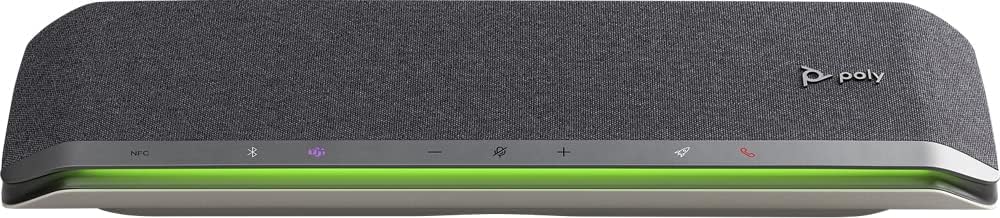
Слика: Фронт view of the Poly Sync 60 Smart Speakerphone, showing the speaker grille, control buttons, and an illuminated LED light bar.
Садржај пакета
- Poly Sync 60 Speakerphone
- Main power supply with global pin adapters
- USB cable with USB-A and USB-C connectors
Кључне карактеристике
- Напредни аудио: Six-microphone steerable array for echo and noise reduction, ensuring clear voice pickup.
- Двоструки звучници: High-performance speakers deliver rich, clear audio for all participants.
- АЦ Поверед: Operates continuously via AC power, eliminating battery concerns.
- Могућност даиси ланца: Wirelessly pair two units for extended coverage in larger meeting spaces.
- Флексибилно повезивање: Connects to computers via combined USB-A/USB-C cable and to smartphones via Bluetooth.
- USB Video Camera Support: Connect a USB video camera to the speakerphone for combined audio and video with a single cable to the computer.
- Mobile Device Charging: Two USB ports allow charging of up to two mobile phones simultaneously.
- Сертификовано од стране Microsoft Teams-а: Includes a dedicated Teams button for instant access to the Teams application.
Водич за подешавање
1. Прикључак за напајање
Connect the provided main power supply to the Poly Sync 60 and plug it into a wall outlet. The device requires AC power for operation.
2. Connecting to a Computer (PC/Mac)
Use the integrated USB cable to connect the Poly Sync 60 to your computer. The cable supports both USB-A and USB-C ports. Once connected, the device should be recognized automatically by your operating system.
3. Connecting to a Smartphone (Bluetooth)
- Притисните и држите Блуетоотх дугме on the Poly Sync 60 until the LED indicator flashes blue.
- On your smartphone, navigate to the Bluetooth settings and select "Poly Sync 60" from the list of available devices.
- Када се упари, ЛЕД индикатор ће постати плаво.
4. Daisy Chain Two Units (Optional)
For expanded audio coverage, two Poly Sync 60 units can be wirelessly paired. Refer to the official Poly support documentation for detailed instructions on how to enable this feature.
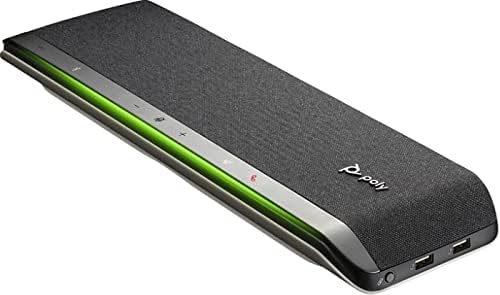
Слика: Са стране view of the Poly Sync 60 Smart Speakerphone, highlighting the USB ports for charging mobile devices and connecting a video camera.
Упутство за употребу
Основне контроле
- Појачавање/утишавање: Користите + и - buttons to adjust the speaker volume.
- Искључи/Укључи звук: Притисните тастер microphone icon button to mute or unmute the microphone. The LED indicator will change color to show mute status.
- Одговор/Завршетак позива: Притисните тастер phone icon button да одговорите или прекинете позив.
- Microsoft Teams Button: Притисните тастер Teams icon button to launch or interact with the Microsoft Teams application (if certified version).
Пуњење мобилних уређаја
Connect your mobile phone or other USB-powered device to one of the two USB ports on the Poly Sync 60 to charge it during a meeting.
Одржавање и њега
- Clean the Poly Sync 60 with a soft, dry, lint-free cloth.
- Do not use abrasive cleaners, solvents, or strong chemicals, as these may damage the device.
- Избегавајте излагање уређаја екстремним температурама, влажности или директној сунчевој светлости.
- Чувајте спикерфон на хладном и сувом месту када га не користите.
Решавање проблема
- Нема звука/микрофон не ради:
- Ensure the device is powered on and the AC adapter is securely connected.
- Verify that the speakerphone is not muted (check the mute button LED).
- Check the volume levels on both the Poly Sync 60 and your connected computer/smartphone.
- Confirm that the Poly Sync 60 is selected as the audio input/output device in your computer's sound settings or conferencing application.
- Проблеми са повезивањем (USB):
- Покушајте да повежете УСБ кабл на други порт на рачунару.
- Поново покрените рачунар.
- Connection Issues (Bluetooth):
- Ensure Bluetooth is enabled on your smartphone and the Poly Sync 60 is in pairing mode.
- Unpair and then re-pair the device from your smartphone's Bluetooth settings.
- Уверите се да ниједан други Bluetooth уређај не изазива сметње.
- Echo or Background Noise:
- Place the speakerphone centrally in the room, away from walls or highly reflective surfaces.
- Ensure the room is quiet and free from excessive background noise.
Техничке спецификације
| Феатуре | Спецификација |
|---|---|
| Назив модела | Синхронизација 60 |
| Број модела ставке | 216873-01 |
| Спеакер Типе | Мултимедија |
| Технологија повезивања | Блуетоотх, УСБ |
| Бежична комуникациона технологија | Блуетоотх |
| Блуетоотх домет | 3 метара |
| Извор напајања | Цордед Елецтриц |
| Максимална излазна снага звучника | 60 Ваттс |
| Режим аудио излаза | Стерео |
| Конфигурација канала сурроунд звука | 2.0 |
| Контролни метод | Притисните дугме |
| Димензије производа | 1.5"Д к 15.5"Ш к 4.8"В |
| Тежина артикла | 2.2 фунти (1000 грама) |
| Препоручена употреба | Office work, remote work, conference calls, personal entertainment, charging mobile devices |
| Тип монтаже | Таблетоп Моунт |
| Произвођач | Поли |
| УПЦ | 017229172517, 197029590572 |
Информације о гаранцији
The Poly Sync 60 Smart Speakerphone comes with a full manufacturer's warranty. For detailed information regarding warranty terms, duration, and claim procedures, please refer to the official Poly webсајт или документацију о гаранцији која је приложена уз вашу куповину.
Подршка
For further assistance, product updates, software downloads, or detailed guides, please visit the official Poly support website. You can also contact Poly customer service for technical support or service inquiries.
Official Poly Webсајт: ввв.поли.цом