1. Увод
Thank you for choosing the CHONCHOW US801 Gaming Keyboard and Mouse Combo. This manual provides detailed instructions for setting up, operating, and maintaining your new peripheral set. Please read this manual carefully before use to ensure optimal performance and longevity of your product.

Image: The CHONCHOW US801 Gaming Keyboard and Mouse Combo, showcasing its full-size layout and ergonomic design.
2. Садржај пакета
The CHONCHOW US801 Gaming Keyboard and Mouse Combo package includes:
- 1 x CHONCHOW US801 Wired Gaming Keyboard
- 1 x CHONCHOW US801 Wired Gaming Mouse
- 1 x Упутство за употребу (овај документ)
3. Упутства за подешавање
The CHONCHOW US801 Gaming Keyboard and Mouse Combo is a plug-and-play device. No additional drivers or software are typically required for basic functionality.
- Повежите тастатуру: Locate an available USB 2.0 port on your computer, laptop, or gaming console. Insert the USB connector of the keyboard into the port.
- Повежите миш: Locate another available USB 2.0 port. Insert the USB connector of the mouse into the port.
- Препознавање система: Your operating system (Windows, Mac OS, Xbox, PS4) should automatically detect and install the necessary drivers. This process may take a few moments. A notification typically appears once the device is ready for use.
- Initial Functionality Test: After installation, test the keyboard by typing and the mouse by moving the cursor and clicking buttons to ensure they are working correctly.
Note on Initial Connection:
In rare cases, after connecting the USB cable, the keyboard backlight may not illuminate fully or correctly. This can occur due to static electricity or repeated disconnections/reconnections causing signal issues with the operating system. If this happens, please wait patiently for approximately 20 seconds for the keyboard's light control chip to restart. If the issue persists, ensure your computer is connected to the internet, then reconnect the keyboard and wait for the "driver installation is complete" notification. If problems continue, refer to the Troubleshooting section or contact customer support.
4. Keyboard Features and Operation
4.1. Контрола позадинског осветљења
The keyboard features adjustable RGB backlighting with multiple modes and brightness levels.
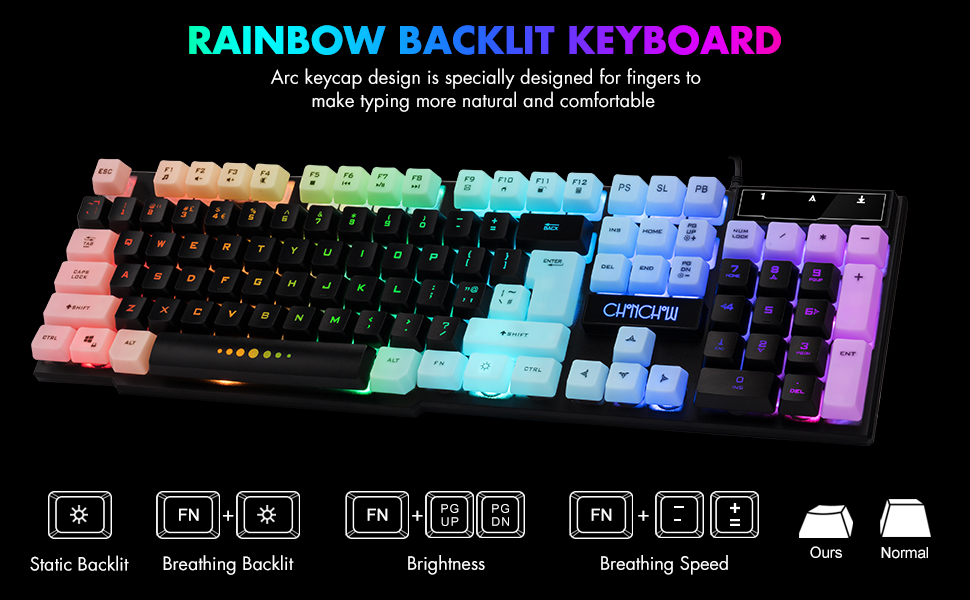
Image: Visual guide for controlling keyboard backlighting, showing key combinations for various effects.
- Укључивање/искључивање позадинског осветљења: Притисните тастер Сијалица key (usually located near the right Ctrl key).
- Switch Backlight Mode (Breathing/Static): Притисните FN + Сијалица кључ.
- Подесите осветљеност: Притисните FN + PG UP to increase brightness, or FN + PG DN да смањи осветљеност.
- Прилагодите брзину дисања: Притисните FN + + to increase breathing speed, or FN + - да се смањи брзина дисања.
4.2. Мултимедијални тастери
The keyboard includes 12 multimedia function shortcut keys for quick access to common functions.

Image: Layout of the keyboard highlighting the 12 multimedia function keys and their corresponding FN key combinations.
| Комбинација тастера | Функција |
|---|---|
| ФН + Ф1 | Мусиц Плаиер |
| ФН + Ф2 | Утишавање звука |
| ФН + Ф3 | Волуме Уп |
| ФН + Ф4 | Муте |
| ФН + Ф5 | Пусти/Заустави |
| ФН + Ф6 | Превиоус Трацк |
| ФН + Ф7 | Пусти/Паузирај |
| ФН + Ф8 | Нект Трацк |
| ФН + Ф9 | Емаил |
| ФН + Ф10 | Web Хоме |
| ФН + Ф11 | Закључавање екрана |
| ФН + Ф12 | Калкулатор |
4.3. Анти-гостинг тастери
The keyboard features 19 anti-ghosting keys, ensuring that multiple key presses are registered simultaneously, which is crucial for gaming.

Image: The keyboard layout with 19 anti-ghosting keys visually indicated.
4.4. WIN Key Lock
The Windows key can be disabled to prevent accidental presses during gaming sessions.

Image: Close-up of the Windows key with an overlay indicating its lock function.
- Disable/Enable WIN Key: Притисните FN + ВИН кључ.
5. Mouse Features and Operation
The gaming mouse features 7-color breathing LED lighting and adjustable DPI settings.

Image: The CHONCHOW gaming mouse displaying its 7-color LED breathing light effect.
5.1. Подешавање DPI-ја
The mouse offers four levels of DPI sensitivity to suit different tasks and preferences.
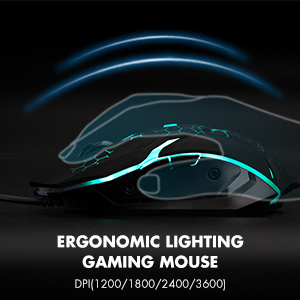
Image: The ergonomic design of the gaming mouse, highlighting its lighting and DPI settings.
- Нивои ДПИ: 1200 / 1800 / 2400 / 3600 DPI.
- Подесите DPI: Притисните тастер Дугме ДПИ (usually located behind the scroll wheel) to cycle through the available DPI settings.
5.2. Mouse Buttons
The mouse is equipped with 6 buttons for enhanced control:
- Дугме левог клика
- Десни клик на дугме
- Scroll Wheel (Clickable)
- Дугме ДПИ
- Дугме за напред
- Дугме за назад
6. Компатибилност
The CHONCHOW US801 Gaming Keyboard and Mouse Combo offers wide compatibility with various operating systems and devices.
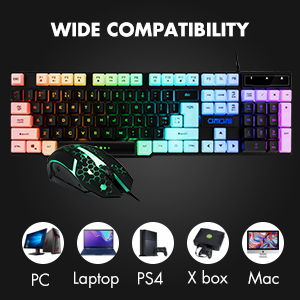
Image: Icons representing various compatible devices including PC, Laptop, PS4, Xbox, and Mac.
- Оперативни системи: Windows 2000 / 2003 / XP / Vista / Win7 / Win8 / Win10
- Уређаји: PC, Computer, Laptop, PS4, Xbox, Mac
7. Одржавање
Proper maintenance ensures the longevity and optimal performance of your keyboard and mouse.
- Чишћење: Use a soft, dry cloth to wipe down the surfaces of the keyboard and mouse. For deeper cleaning, especially for dust under keycaps, the keycaps are removable. Gently pull them off for cleaning and press them back into place. Avoid using harsh chemicals or abrasive materials.
- Просипање: The keyboard features drainage holes to help mitigate damage from minor spills. In case of a liquid spill, immediately disconnect the keyboard from your device, turn it upside down to drain, and allow it to dry completely before reconnecting.
- Складиштење: Чувајте тастатуру и миш на хладном и сувом месту, даље од директне сунчеве светлости и екстремних температура.
КСНУМКС. Решавање проблема
If you encounter issues with your CHONCHOW US801 Gaming Keyboard and Mouse Combo, please refer to the following common solutions:
- Тастатура/миш не реагује:
- Ensure both USB cables are securely plugged into your device's USB ports.
- Try connecting the keyboard and mouse to different USB ports.
- Поново покрените рачунар или играћу конзолу.
- Test the devices on another computer to rule out system-specific issues.
- Backlight Issues (Not Bright / Partially Lit):
- Wait approximately 20 seconds after connecting; the keyboard's light control chip may be restarting due to static electricity or repeated connections.
- Ensure your computer is connected to the internet, then reconnect the keyboard. Wait for the "driver installation is complete" notification.
- Подесите осветљеност помоћу FN + ПГ ГОРЕ / ПГ ДН.
- Тастери се не региструју / тастери се не померају:
- Уверите се да је тастатура чиста и да нема прљавштине испод тастера.
- Verify that the WIN key lock is not accidentally engaged if you are experiencing issues with the Windows key.
- Курсор миша скаче или је неправилан:
- Очистите оптички сензор на дну миша.
- Уверите се да користите миш на одговарајућој површини (нпр. подлога за миш).
- Adjust DPI settings to a lower value if the cursor is too sensitive.
If the problem persists after attempting these steps, please contact CHONCHOW customer support for further assistance.
9. Спецификације
| Феатуре | Детаљ |
|---|---|
| Бранд | Чончоу |
| Број модела | УС801 |
| Технологија повезивања | УСБ Виред |
| Распоред тастатуре | 104-Keys Full Size |
| Позадинско осветљење тастатуре | RGB (Rainbow Backlit) |
| Специјалне функције тастатуре | 19 Anti-Ghosting Keys, 12 Multimedia Keys, WIN Key Lock, Ergonomic, Removable Keycaps |
| Нивои DPI миша | 1200 / 1800 / 2400 / 3600 ДПИ |
| Дугмад миша | 6 Buttons (Left, Right, Forward, Backward, DPI, Scroll Wheel) |
| Mouse Backlighting | 7-Color Breathing LED |
| Димензије производа (тастатура) | 17 к 5.1 к 1.3 инча |
| Тежина артикла | 1.94 фунти |
| Материјал | Пластика |
10. Гаранција и подршка
CHONCHOW stands behind the quality of its products. Your CHONCHOW US801 Gaming Keyboard and Mouse Combo is covered by the following:
- 30-Day Refund or Replacement: За све проблеме у року од 30 дана од куповине.
- 12-Month After-Sales Service: For quality-related problems within 12 months of purchase.
For friendly and easy-to-reach support, please contact our customer service team. Refer to your purchase documentation or the CHONCHOW official webсајт за контакт детаље.