
FLEXISPOT E4 Classic
FLEXISPOT E4 Classic Electric Standing Desk User Manual
Model: E4 Classic | Brand: FLEXISPOT
Увод
This manual provides detailed instructions for the assembly, operation, and maintenance of your FLEXISPOT E4 Classic Electric Standing Desk. Please read this manual thoroughly before use to ensure proper function and longevity of your product.

Figure 1: The FLEXISPOT E4 Classic Electric Standing Desk, featuring a bamboo contour desktop and silver frame, set up with dual monitors in an office environment.
Безбедносне информације
- Уверите се да су све компоненте добро причвршћене пре употребе.
- Држите децу и кућне љубимце даље од стола током рада.
- Do not overload the desk beyond its specified weight capacity (220 lbs).
- Избегавајте директно стављање течности на контролну таблу или компоненте мотора.
- Искључите напајање пре чишћења или одржавања.
- Користите само испоручени адаптер за напајање.
Садржај пакета
Молимо вас да проверите да ли су сви делови присутни пре почетка монтаже. Ако неки делови недостају или су оштећени, контактирајте корисничку подршку.
- Bamboo Contour Whole-Piece Desktop (55"x28")
- Silver Frame Legs (Dual Motor)
- Цонтрол Панел
- Адаптер за напајање и кабл
- Assembly Hardware (screws, tools, etc.)
- Упутство за употребу (овај документ)
Подешавање и монтажа
За овај производ је потребна монтажа. Пажљиво пратите ове кораке.
- Распакујте компоненте: Пажљиво извадите све делове из паковања и положите их на чисту, меку површину како бисте спречили огреботине.
- Attach Legs to Desktop: Position the desktop upside down. Align the leg frames with the pre-drilled holes on the underside of the desktop. Secure them using the provided screws and tools.
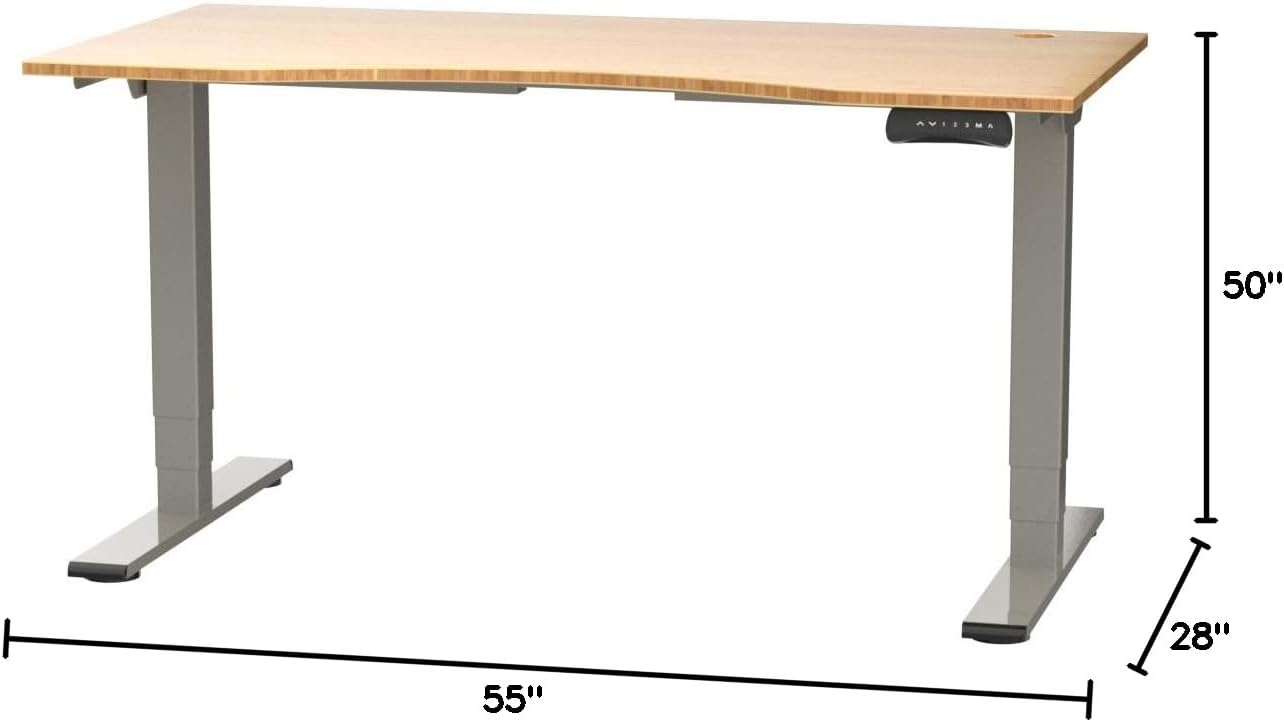
Figure 2: Desk dimensions indicating 55 inches width, 28 inches depth, and adjustable height up to 50 inches.
- Инсталирајте контролни панел: Mount the control panel to the desired location on the underside of the desktop, typically on the front edge for easy access. Connect the control panel cable to the motor control box.

Figure 3: The programmable control panel with LED display, up/down buttons, and memory presets (1, 2, 3, M, A).
- Прикључите напајање: Plug the power adapter into the control box, and then plug the power cable into a standard electrical outlet.
- Управљање кабловима: Utilize the two cable management holes on the desktop to route and organize your cables, preventing clutter.

Figure 4: Detail showing the integrated cable management holes and the water-resistant surface of the bamboo desktop.
- Почетна калибрација: After assembly and power connection, the desk may require an initial calibration. Refer to the "Operating Instructions" section for details on resetting or calibrating the desk.
Упутство за употребу
Подешавање висине
The FLEXISPOT E4 Classic desk features a dual-motor lift system for smooth and quiet height adjustments.
- Подигните радни сто: Притисните и држите Стрелица горе button (▲) on the control panel. The desk will move upwards.
- Доњи сто: Притисните и држите Стрелица надоле button (▼) on the control panel. The desk will move downwards.
- Release the button at your desired height. The desk can adjust from 24.4 inches to 50 inches.
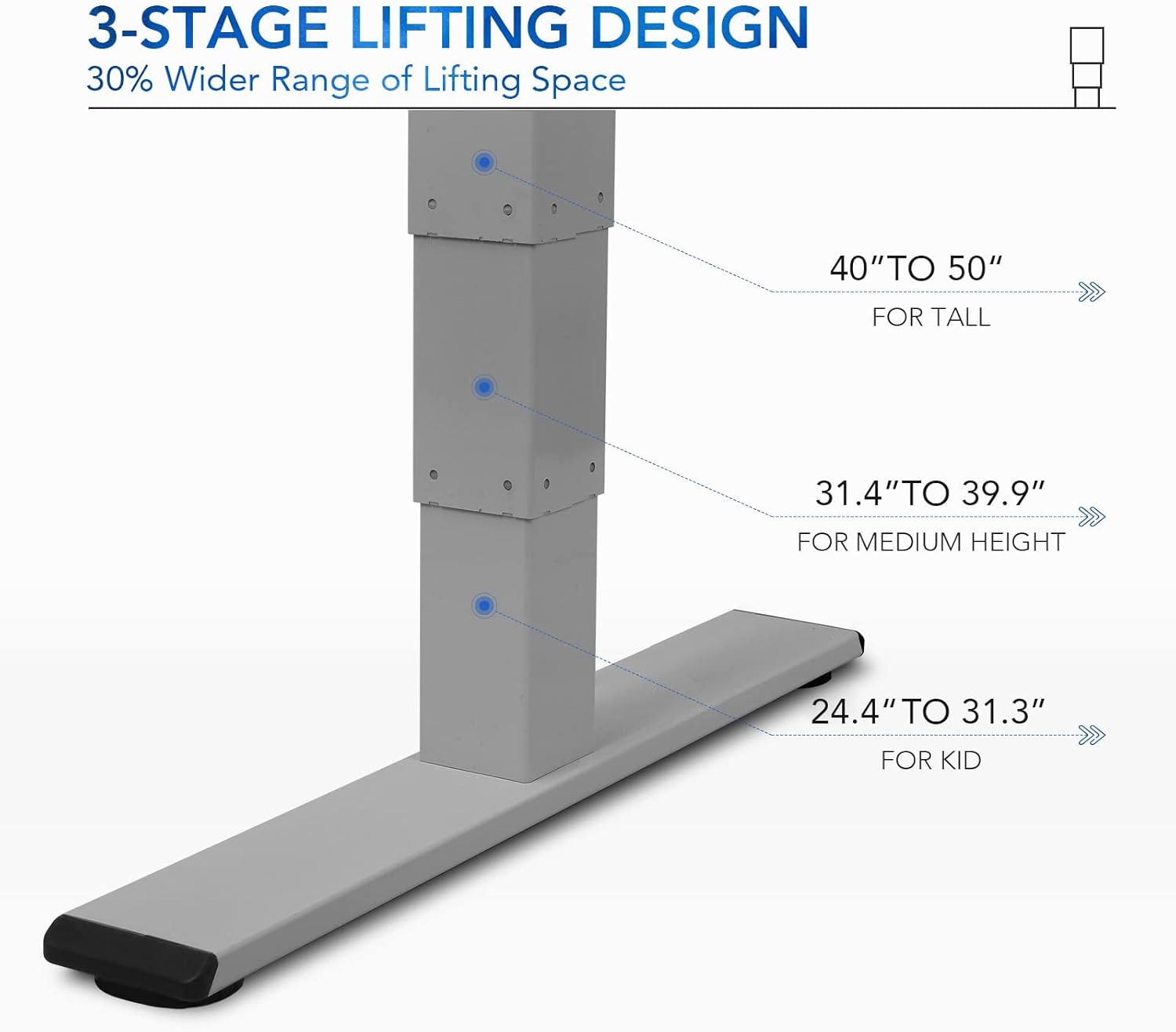
Слика 5: Седмицеtage lifting design provides a wide range of height adjustments, suitable for various user heights, from 24.4" (kid) to 50" (tall).
Programmable Memory Presets
The control panel allows you to save up to three preferred height settings for quick adjustments.
- Подесите позицију меморије:
- Подесите сто на жељену висину помоћу дугмади горе/доле.
- Притисните тастер М button. The LED display will show "S-".
- У року од 3 секунде, притисните једно од нумеричких дугмади ("1", "2", или "3") to save the current height to that preset. The display will show "S-1", "S-2", or "S-3" to confirm.
- Подсетите се меморијске позиције: Једноставно притисните одговарајуће дугме са бројем ("1", "2", или "3"). Сто ће се аутоматски померити на сачувану висину.
Sit/Stand Reminder
The "A" button can be used to set a reminder to switch between sitting and standing positions.
- Consult the full manual for detailed instructions on setting and customizing the sit/stand reminder function.
Ergonomic Curved Design
The 55"x28" desktop features an ergonomic curved design for enhanced comfort and efficiency during work or study.

Figure 6: The ergonomic curved edge of the desktop, designed to provide a more comfortable and natural working posture.
Одржавање
- Чишћење: Обришите површину стола и оквир меком крпомamp cloth. Avoid abrasive cleaners or harsh chemicals. The bamboo surface is designed to be water-resistant, making it easy to clean.
- Нега мотора: The dual-motor system is designed for low noise and durability. No specific user maintenance is required for the motors.
- Управљање кабловима: Periodically check that all cables are neatly routed through the cable management holes and are not pinched or tangled.
- Провера причвршћивача: Occasionally check all screws and fasteners to ensure they remain tight. Retighten if necessary.
Решавање проблема
| Проблем | Могући узрок | Решење |
|---|---|---|
| Радни сто се не помера. | Power cable disconnected; overload protection activated; motor error. | Check power connections. Reduce weight on desk. Unplug and replug power after 10 minutes. Perform a reset (see below). |
| Сто се помера неравномерно или производи необичну буку. | Loose fasteners; obstruction; motor synchronization issue. | Check and tighten all assembly screws. Ensure no obstructions under the desk. Perform a reset. |
| LED display shows an error code (e.g., "E01", "RST"). | System error; need for reset. | Процедура ресетовања: Press and hold the Down Arrow button until the desk reaches its lowest position and then slightly rises. Release the button. If the error persists, unplug the desk for 10 minutes and try again. |
| Предефинисана подешавања меморије не раде. | Presets not saved correctly. | Re-save your desired memory positions following the "Programmable Memory Presets" instructions. |
If the issue persists after attempting these solutions, please contact FLEXISPOT customer support.
Спецификације
| Феатуре | Детаљ |
|---|---|
| Модел | E4 Classic |
| Бранд | ФЛЕКСИСПОТ |
| Материјал за радну површину | Bamboo Contour Whole-Piece Board |
| Материјал оквира | Alloy Steel (Silver Frame) |
| Димензије производа (Д x Ш x В) | 28"D x 55"W x 50"H (Max Height) |
| Опсег подешавања висине | 24.4" до 50" |
| Систем за подизање | Dual Motor, 3-Stage Lifting |
| Тежина Капацитет | До 220 лбс |
| Посебне карактеристике | Electric Height Adjustment, Programmable Memory Presets, Sit/Stand Reminder, Curved Ergonomic Design, Cable Management Holes, Waterproof Surface |
| Обавезна монтажа | Да |
Гаранција и подршка
FLEXISPOT products are designed for durability and performance. For specific warranty details regarding your E4 Classic Electric Standing Desk, please refer to the warranty card included with your purchase or visit the official FLEXISPOT webсајту.
For technical support, troubleshooting assistance, or to inquire about replacement parts, please contact FLEXISPOT customer service:
- Webсајт: ввв.флекиспот.цом
- Емаил: support@flexispot.com
- Телефон: Обратите се службенику webсајт за регионалне контакт бројеве.
When contacting support, please have your product model (E4 Classic) and purchase information ready.