1. Увод
This manual provides instructions for the proper use and maintenance of your Sena Parani A20 Bluetooth Intercom Headset. Please read this manual thoroughly before operating the device to ensure optimal performance and safety.
The Parani A20 is designed for motorcycle communication, offering features such as 4-way Bluetooth intercom, HD 2-way intercom, and smartphone connectivity for music and calls.
2. Садржај пакета
The Sena Parani A20 package typically includes the following components:
- Parani A20 Headset Unit
- Спеакер Сет
- Боом Мицропхоне
- Жични микрофон
- Монтажа Цлamp Кит
- УСБ кабл за пуњење
- Кориснички приручник (овај документ)

Слика: Прекоview of the Sena Parani A20 headset and its included components, such as the main unit, speakers, boom microphone, and wired microphone.
3. Подешавање и инсталација
3.1 Пуњење уређаја
Before first use, fully charge the Parani A20 headset. Connect the USB charging cable to the headset and a power source. The charging time is approximately 2.5 hours.
3.2 Mounting the Headset
The Parani A20 can be mounted to most motorcycle helmets using the included clamp kit. Ensure the mounting location allows for clear access to the controls and does not obstruct helmet functionality.
- Choose a suitable location on the left side of your helmet.
- Securely attach the mounting clamp to the helmet shell.
- Slide the Parani A20 main unit onto the mounted clamp док не кликне на своје место.

Image: The Sena Parani A20 headset unit attached to the side of a motorcycle helmet, showing its position relative to the helmet's structure.
3.3 Installing Speakers and Microphones
Install the speakers inside the helmet's ear pockets and route the microphone cable to the front of the helmet. Two microphone options are provided:
- Бум микрофон: Recommended for open-face or modular helmets. Position the microphone close to your mouth.
- Жичани микрофон: Suitable for full-face helmets. Secure it inside the chin bar.
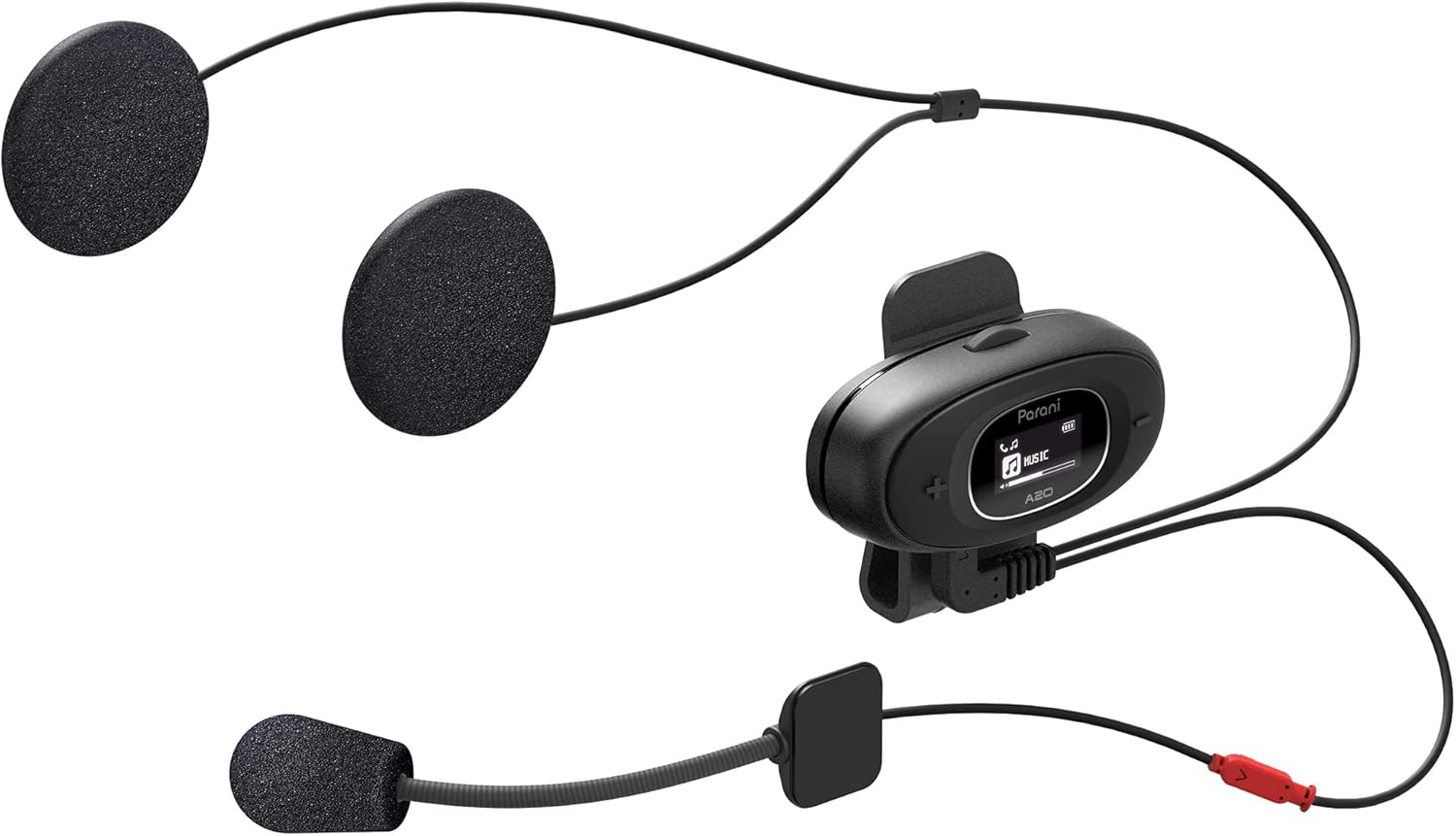
Image: The Sena Parani A20's speakers and both microphone types (boom and wired) are displayed, ready for installation inside a helmet.
4. Упутство за употребу
4.1 Укључивање/искључивање
- Укључено: Притисните и држите Централно дугме за 1 секунду.
- Искључивање: Притисните и држите Централно дугме за 5 секунде.
4.2 Упаривање са паметним телефоном путем Bluetooth-а
To connect your Parani A20 to a smartphone for music, GPS, or phone calls:
- With the headset off, press and hold the Централно дугме for 5 seconds until the LED flashes red and blue, indicating pairing mode.
- On your smartphone, go to Bluetooth settings and select "Parani A20" from the list of available devices.
- Once paired, the LED will flash blue.
4.3 Интерфонска комуникација
The Parani A20 supports 4-way Bluetooth intercom and HD 2-way intercom with a range of up to 1 km (0.6 miles).
- Starting Intercom: Кратко притисните Централно дугме to initiate intercom with a paired Parani A20 unit.
- Завршетак интерфона: Кратко притисните Централно дугме опет.
- Multi-way Intercom: Follow the specific pairing instructions in the full manual for connecting multiple units.

Слика: Детаљна view of the Parani A20 unit, highlighting its LCD screen which displays intercom status and battery level, along with the control buttons.
4.4 Репродукција музике и контрола јачине звука
- Пусти/паузирај: Притисните тастер Централно дугме during music playback.
- Појачавање звука: Притисните тастер (+) Дугме.
- Смањивање јачине звука: Притисните тастер (-) Дугме.
- The Parani A20 offers exceptional sound quality with enhanced bass and clarity.
4.5 Телефонски позиви
- Одговори на позив: Кратко притисните Централно дугме.
- Заврши позив: Кратко притисните Централно дугме.
- Одбиј позив: Притисните и држите Централно дугме за 2 секунде.

Image: A motorcycle rider on the road, wearing a helmet equipped with the Sena Parani A20 intercom, demonstrating its use in a riding context.
5. Одржавање и њега
- Keep the device dry. The Parani A20 is not water-resistant.
- Очистите јединицу меком, дamp тканина. Не користите јаке хемикалије или раствараче.
- Чувајте уређај на хладном и сувом месту када се не користи.
- Ensure the charging port is free from dust and debris.
КСНУМКС. Решавање проблема
6.1 Уређај се не укључује
- Check battery level. Charge the device for at least 30 minutes.
- Ensure the power button is pressed correctly (hold for 1 second).
6.2 No Audio from Speakers
- Verify that the speakers are correctly plugged into the headset unit.
- Check the volume level on both the headset and your connected smartphone.
- Ensure the headset is properly paired with your audio source.
6.3 Интерфон се не повезује
- Ensure both units are within the specified intercom range (up to 1 km).
- Re-pair the intercom units if connection issues persist.
- Проверите да ли има препрека или сметњи.
6.4 Ресетовање на фабричка подешавања
If the device is not functioning correctly, a factory reset may resolve the issue. Refer to the full manual for specific instructions on performing a factory reset.
7. Спецификације
| Назив модела | Parani A20 |
| Блуетоотх верзија | 5.1 |
| Интерцом Ранге | До 1 км (0.6 миље) |
| Тип интерфона | 4-way Bluetooth, HD 2-way |
| Време пуњења | Отприлике 2.5 сата |
| Фрекуенци Спецтрум | 20 Hz - 10,000 Hz |
| Тежина | 240 г |
| Димензије | 18.7 к 11.8 к 6.4 цм |
| Материјал | Пластика |
| Отпорност на воду | Није водоотпоран |
| Компатибилни уређаји | Mobile phones, Motorcycles |
8. Гаранција и подршка
For warranty information and technical support, please refer to the official Sena webсајт или контактирајте локалног продавца. Сачувајте доказ о куповини за потребе гаранције.
Онлине ресурси: Посетите Сена webсајту for the latest firmware updates, FAQs, and detailed product manuals.
9. Важне информације о безбедности
- Увек дајте приоритет безбедности у саобраћају. Не користите уређај на начин који вас одвлачи од вожње.
- Ensure the device is securely mounted to your helmet.
- Не излажите уређај екстремним температурама или директној сунчевој светлости током дужег периода.
- Чувати ван домашаја деце.


