Увод
This manual provides detailed instructions for the installation, operation, and maintenance of your VIMAR 02971.B Smart Thermostat. Please read this manual thoroughly before using the device to ensure proper function and safety.
Производ је завршенview
The VIMAR 02971.B is a smart thermostat designed for ambient temperature control in both heating and air conditioning systems. It features a rotary wheel for intuitive control, supports 2-pipe and 4-pipe installations, and includes fan-coil control with 3 speeds and proportional settings. This device offers advanced temperature control capabilities and can be integrated into a home automation system.
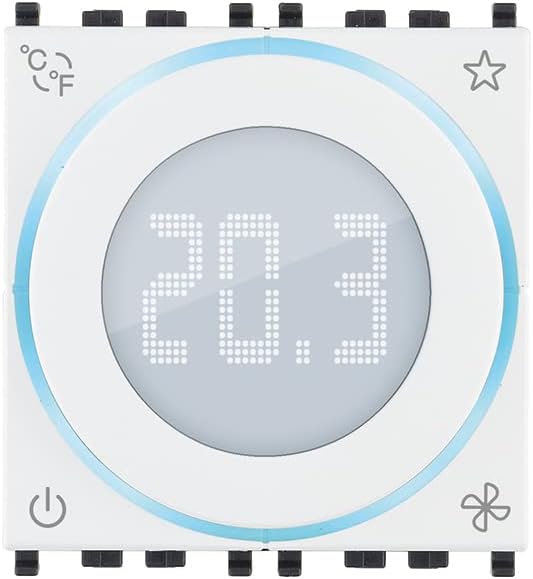
Слика 1: Предња страна view of the VIMAR 02971.B Smart Thermostat. The central display shows the current temperature, and the rotary wheel allows for adjustments. Icons indicate various functions.
Спецификације
| Феатуре | Детаљ |
|---|---|
| Број модела | 02971.Б |
| Бранд | ВИМАР |
| Боја | Бела |
| Повезивање | Виред |
| Посебне карактеристике | Advanced Temperature Control |
| Тип контролера | Mechanical Knob, Button |
| Специфичне употребе | Heating, Air Conditioning |
| Тип контроле температуре | Мануал |
| Извор напајања | Баттери Поверед |
| Волtage | 230 Волтс |
| Компатибилност | Requires Eikon, Arké, Plana plates and dedicated support 16723 for Idea installation. |
| Temperature Control Class (ON/OFF) | Class I (1% contribution) |
| Temperature Control Class (PID) | Class IV (2% contribution) |
| Modulating Thermostat Class | Class V (3% contribution) with analog actuator 01466.1 |
| Улаз сензора | 1 input for electronic temperature sensor (20432, 19432, or 14432) or wired temperature sensor (02965.1) |
| Позадинско осветљење | Бела ЛЕД |
| Модули | 2 модула |
Подешавање и инсталација
Мере предострожности
- Ensure power is disconnected before beginning any installation or wiring.
- Инсталацију треба да изврши квалификовани електричар у складу са локалним електричним прописима.
- Не излажите уређај влази или екстремним температурама.
Монтажа
- The thermostat is designed for installation with dedicated support 16723 (for Idea series) and requires Eikon, Arké, or Plana plates for completion.
- Choose a central location on an interior wall, away from direct sunlight, drafts, and heat sources, to ensure accurate temperature readings.
- Mount the dedicated support (e.g., 16723) securely to the wall.
Ожичење
The VIMAR 02971.B is a wired thermostat. Refer to the wiring diagram provided with your HVAC system and the specific instructions for the 02971.B model. Ensure all connections are secure and correctly terminated.
- Connect the power supply (230 Volts).
- Connect to the HVAC system for heating and cooling control.
- If using an external temperature sensor (e.g., 20432, 19432, 14432, or 02965.1), connect it to the designated input.
- For modulating control (Class V), interface with analog actuator 01466.1.
Операција
Укључивање/искључивање
Притисните тастер Повер icon (bottom-left) to turn the thermostat on or off. The display will illuminate when the device is active.
Figure 2: Location of the Power icon on the thermostat.
Подешавање температуре
Rotate the central wheel to adjust the desired temperature. The digital display will show the set temperature as you turn the wheel.
Changing Temperature Units (°C/°F)
Притисните тастер ° Ц/° Ф icon (top-left) to toggle between Celsius and Fahrenheit temperature display units.
Figure 3: Location of the °C/°F unit selection icon.
Контрола вентилатора
The thermostat supports 3-speed fan-coil control. Press the Фан icon (bottom-right) to cycle through fan speeds or modes (e.g., Auto, Low, Medium, High). Refer to your system's specific configuration for available fan modes.
Figure 4: Location of the Fan control icon.
Favorite/Program Mode
Тхе Звезда icon (top-right) may be used to access favorite settings or activate a pre-programmed mode. Consult your home automation system's documentation for specific functionality related to this icon.
Figure 5: Location of the Star icon, typically for favorite or program modes.
Одржавање
Чишћење
- Wipe the thermostat's surface with a soft, dry cloth.
- Do not use abrasive cleaners, solvents, or chemical sprays, as these can damage the device.
Замена батерије
As the device is battery-powered, replace batteries when the low battery indicator appears on the display (if applicable) or when the device ceases to function. Refer to the installation guide for specific battery type and replacement procedure.
Решавање проблема
| Проблем | Могући узрок | Решење |
|---|---|---|
| Дисплеј термостата је празан. | Нема струје или празне батерије. | Check power supply (230V). Replace batteries if applicable. Ensure the device is switched on. |
| HVAC system not responding. | Incorrect wiring, system fault, or thermostat not in correct mode. | Verify wiring connections. Check HVAC system for error codes. Ensure thermostat is set to heating or cooling mode and desired temperature is appropriate. |
| Нетачно очитавање температуре. | Thermostat location, external sensor issue. | Ensure thermostat is not exposed to direct sunlight, drafts, or heat sources. Check external sensor connection if used. |
| Fan not operating correctly. | Incorrect fan setting or wiring issue. | Cycle through fan modes using the fan icon. Verify fan-coil wiring. |
Гаранција и подршка
For warranty information and technical support, please refer to the documentation provided with your purchase or visit the official VIMAR webсајт. Сачувајте доказ о куповини за потребе гаранције.
Spare parts availability information is not available at this time. Software updates are not guaranteed.


