1. Увод
This manual provides detailed instructions for the setup, operation, and maintenance of your ITECH Fusion 2 S Smartwatch and accompanying Wireless Headphones. The ITECH Fusion 2 S is designed to help you monitor your health and fitness goals, offering features such as heart rate tracking, step counting, sleep monitoring, and multi-sport modes. The included wireless headphones provide an integrated audio experience.
2. Садржај пакета
Молимо вас да проверите да ли су све ставке присутне у вашем пакету:
- ITECH Fusion 2 S Smartwatch
- Бежичне слушалице
- USB Charging Cable (for smartwatch)
- USB Charging Cable (for headphones)
- Кориснички приручник (овај документ)

Image: The ITECH Fusion 2 S Smartwatch and Wireless Headphones displayed within their retail packaging.
3. Девице Оверview
3.1. ITECH Fusion 2 S Smartwatch

Image: The ITECH Fusion 2 S Smartwatch with a grey camouflage band shown alongside the matching wireless headphones.
The smartwatch features a touch screen display, a side button for navigation, and sensors on the rear for health monitoring. The display shows time, date, activity data, and notifications.

Image: A close-up of the ITECH Fusion 2 S Smartwatch display, highlighting features such as heart rate monitor, apps and notifications, multi-sports modes, water resistance, calorie tracker, music remote, pedometer, sleep monitor, hydration reminder, and extended 14-day battery life.
3.2. Wireless Headphones
The wireless headphones are over-ear style with cushioned earcups and an adjustable headband. Controls for audio playback and calls are located on the earcup.

Слика: Страна А view of the ITECH Wireless Headphones, illustrating features like powerful sound quality, convenient controls, comfort for hours, and a go-anywhere design.

Слика: Детаљна view of the ITECH Wireless Headphones, emphasizing noise isolating fit, built-in microphone, Bluetooth wireless technology, and up to 8 hours of playback.

Image: A diagram of the ITECH Wireless Headphones highlighting the flexible headband, comfortable ear cushion, foldable design, and convenient controls, along with key technical specifications.
4. Подешавање
4.1. Пуњење уређаја
Before first use, fully charge both your smartwatch and wireless headphones.
- паметни сат: Connect the USB charging cable to the charging port on the back of the smartwatch and to a USB power source. The battery icon on the screen will indicate charging status.
- Wireless Headphones: Connect the USB charging cable to the charging port on the headphones and to a USB power source. An indicator light will show charging status and turn off when fully charged.
4.2. Укључивање/искључивање
- паметни сат: To power on, press and hold the side button until the screen illuminates. To power off, navigate to the 'Settings' menu on the smartwatch, then select 'Power Off'.
- Wireless Headphones: To power on, press and hold the power button until the indicator light flashes. To power off, press and hold the power button again until the indicator light turns off.
4.3. Pairing the Smartwatch with Your Smartphone
The ITECH Fusion 2 S Smartwatch is compatible with both iPhone and Android devices.
- Преузмите iTECH Wearables апликацију из Аппле Апп Сторе-а или Гоогле Плаи продавнице.
- Уверите се да је Блуетоотх омогућен на вашем паметном телефону.
- Open the iTECH Wearables app and follow the on-screen instructions to create an account and pair your smartwatch.
- The app will guide you through connecting the smartwatch via Bluetooth. Confirm the pairing request on both your phone and smartwatch.
4.4. Pairing the Wireless Headphones
- Уверите се да су слушалице искључене.
- Притисните и држите дугме за напајање док индикаторска лампица не почне брзо да трепери, што указује на режим упаривања.
- On your smartphone or other Bluetooth-enabled device, go to Bluetooth settings and search for available devices.
- Select "ITECH Headphones" (or similar name) from the list to connect. The indicator light will change to a steady blue when successfully paired.
5. Управљање паметним сатом
5.1. Навигација
- Екран на додир: Превуците прстом лево/десно, горе/доле да бисте се кретали кроз меније и функције. Додирните да бисте изабрали.
- Бочно дугме: Притисните да бисте се вратили на почетни екран или пробудили уређај.
5.2. Бројчаници сата
Customize your smartwatch display by changing watch faces. On the home screen, press and hold the display, then swipe left or right to browse available watch faces. Tap to select your preferred design.
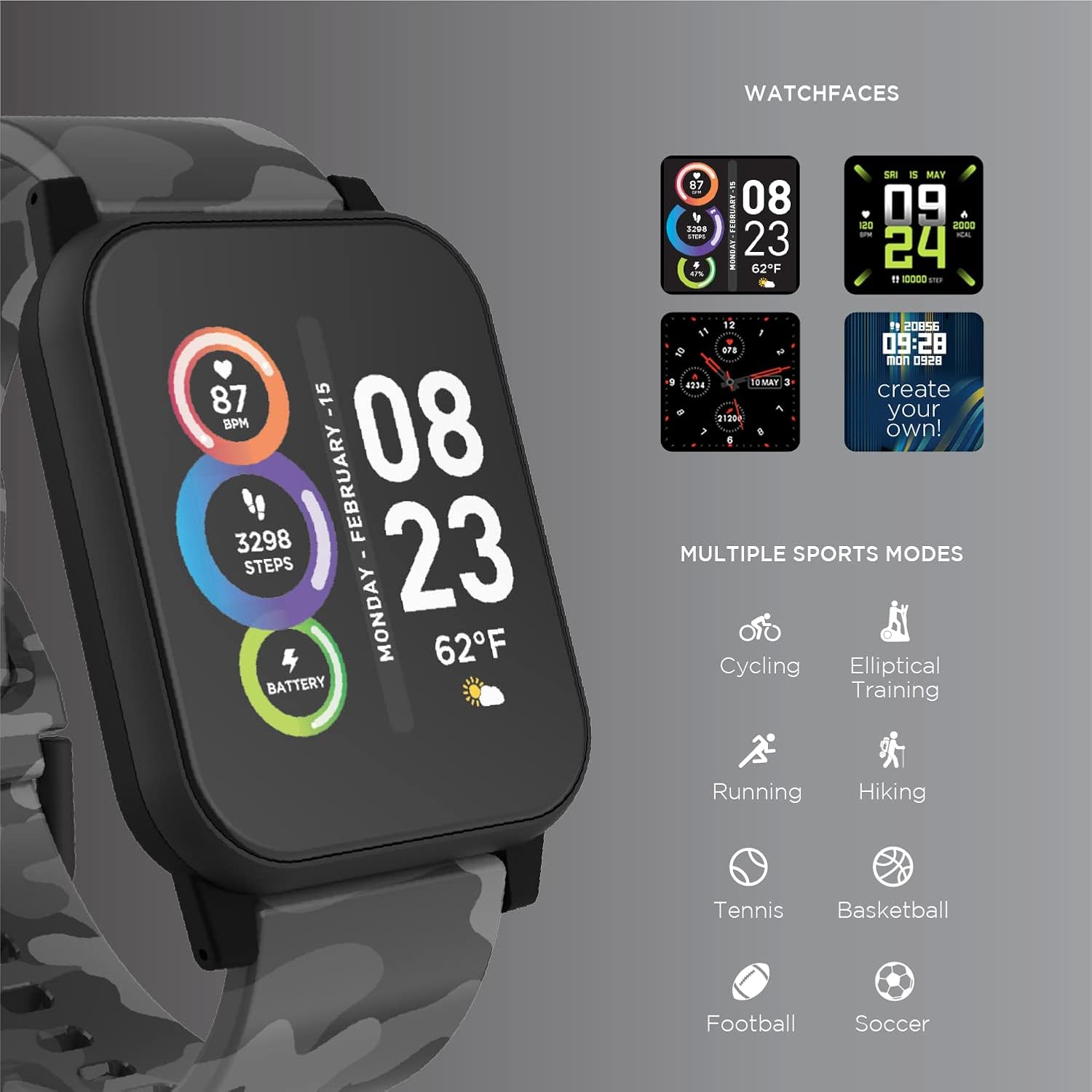
Image: The ITECH Fusion 2 S Smartwatch display showing various customizable watch faces and icons representing multiple sports modes including cycling, elliptical training, running, hiking, tennis, basketball, football, and soccer.
5.3. Основне карактеристике
- Монитор пулса: Access the heart rate feature on your smartwatch to measure your heart rate using the built-in optical sensor. Ensure the watch is snug on your wrist for accurate readings.
- Step Counter (Pedometer): The smartwatch automatically tracks your daily steps, distance, and calories burned. View your progress on the device or in the iTECH Wearables app.
- Монитор спавања: Wear your smartwatch to bed to track your sleep patterns, including light and deep sleep stages. Data is synchronized with the app for detailed analysis.
- Мулти-спорт режими: Select from various sports modes (e.g., running, cycling, hiking) to track specific workout data, including duration, distance, and calories.
- Обавештења о порукама: Receive notifications for calls, texts, and app alerts directly on your smartwatch when connected to your smartphone.
- Праћење калорија: Monitors calories burned throughout the day based on your activity level.
- Подсетник о хидратацији: Set reminders to drink water at regular intervals through the app.
- Даљински управљач за музику: Control music playback on your smartphone directly from your smartwatch (play, pause, skip tracks).
5.4. Интеграција апликација
За свеобухватан view of your health and fitness data, regularly sync your smartwatch with the iTECH Wearables app. The app allows you to set goals, view historical data, customize settings, and manage notifications.
6. Operating the Wireless Headphones
6.1. Контроле
The headphones feature intuitive controls for media playback and call management:
- Дугме за напајање: Притисните и држите да бисте укључили/искључили уређај. Кратак притисак за репродукцију/паузирање.
- Дугмад за јачину звука: Притисните „+“ да бисте повећали јачину звука, „-“ да бисте смањили јачину звука.
- Контрола стазе: Press and hold '+' for next track, '-' for previous track.
- Управљање позивима: Short press power button to answer/end calls. Press and hold to reject calls.
6.2. Аудио функције
- Powerful Sound Quality: Designed to deliver clear and rich audio.
- Noise Isolating Fit: The over-ear design helps to reduce external noise for an immersive listening experience.
- Уграђени микрофон: Омогућава позивање без употребе руку.
6.3. Трајање батерије
The wireless headphones provide up to 8 hours of playback on a single charge, depending on usage and volume levels.

Image: A person wearing the ITECH Fusion 2 S Smartwatch on their wrist and the matching wireless headphones, demonstrating typical use.
7. Одржавање
7.1. Чишћење
- паметни сат: Wipe the screen and band with a soft, damp, крпа која не оставља влакна. Избегавајте јаке хемикалије или абразивне материјале.
- Слушалице: Нежно обришите слушалице и траку за главу меком, сувом крпом. Не урањајте у воду.
7.2. Water Resistance (Smartwatch)
The ITECH Fusion 2 S Smartwatch is IP67 water resistant. This means it is protected against dust and can withstand immersion in water up to 1 meter for up to 30 minutes. It is suitable for daily use and light splashes, but not recommended for swimming, showering, or prolonged water immersion.
7.3. Складиштење
Store your devices in a cool, dry place away from direct sunlight and extreme temperatures when not in use.
КСНУМКС. Решавање проблема
If you encounter issues with your ITECH Fusion 2 S devices, please refer to the following common solutions:
- Уређај се не укључује: Ensure the device is fully charged. Try connecting it to a different USB power source.
- Smartwatch not pairing with phone: Ensure Bluetooth is enabled on your phone and the smartwatch is within range. Restart both devices and try pairing again through the iTECH Wearables app.
- Слушалице се не упарују: Ensure headphones are in pairing mode (rapidly flashing indicator light). Check your device's Bluetooth settings and try reconnecting.
- Inaccurate heart rate/step readings: Уверите се да паметни сат чврсто приања на зглоб, не превише стегнут или превише лабав. Очистите сензор на полеђини сата.
- Обавештења се не приказују: Check app permissions on your smartphone to ensure the iTECH Wearables app has access to notifications. Verify notification settings within the app.
- Audio issues with headphones: Ensure headphones are fully charged and properly paired. Check volume levels on both the headphones and the connected device.
If problems persist, consider performing a factory reset (refer to the smartwatch settings menu or contact customer support for headphones). For further assistance, please contact Itech customer support.
9. Спецификације
| Феатуре | Детаљ |
|---|---|
| Димензије производа | КСНУМКС к КСНУМКС к КСНУМКС цм; КСНУМКС г |
| Број модела ставке | 900366Б-40-Г57 |
| Оперативни систем | Android (Compatible with iPhone and Android) |
| Посебне карактеристике | Heart Rate Monitor, Step Counter, Sleep Monitor, Message Notifications, Multi-Sport Modes |
| Технологија повезивања | УСБ |
| Стандард бежичне комуникације | Блуетоотх |
| Састав батерије батерије | Литхиум Ион |
| ГПС | Истина |
| Smartwatch Shape | Скуаре |
| Smartwatch Screen Size | 1.3 инча |
| Бранд | Itech |
| Назив модела | Fusion 2 Bundle |
| Отпорност на воду | ИП67 |
| Headphones Playback Time | До 8 сати |
| Headphones Driver Diameter | 40мм |
| Headphones Connection Type | Блуетоотх® КСНУМКС |
| Импеданса слушалица | 32 ома ±15% |
| Фреквенцијски одзив слушалица | 20Hz - 20kHz |
10. Гаранција и подршка
Your ITECH Fusion 2 S Smartwatch and Wireless Headphones are covered by a manufacturer's warranty. Please refer to the warranty card included in your package or visit the official Itech webсајт за детаљне услове гаранције.
For technical support, troubleshooting assistance, or warranty claims, please contact Itech customer service through their official webсајт или контакт информације наведене у документацији вашег производа.


