1. Увод
Thank you for choosing the Dalton 10 kVA Uninterruptible Power Supply (UPS) unit. This manual provides essential information for the safe and efficient operation of your UPS. Please read this manual thoroughly before installation and operation, and keep it for future reference.
This UPS is designed to provide reliable power protection for critical equipment, safeguarding against power outages, surges, and fluctuations. Its advanced technology ensures stable and clean power delivery, extending the lifespan of your connected devices.
2. Безбедносне информације
Always observe the following safety precautions to prevent injury or damage to the UPS and connected equipment:
- Не отварајте UPS уређајasinг. Унутра нема делова које корисник може сам да поправи. Сво сервисирање препустите квалификованом сервисном особљу.
- Ensure the UPS is connected to a grounded power outlet.
- Do not block ventilation openings. Adequate airflow is crucial for proper cooling.
- Избегавајте инсталирање UPS-а у подручјима са прекомерном прашином, влажношћу или екстремним температурама.
- Disconnect the UPS from the AC power source before performing any maintenance or moving the unit.
- Batteries can present a risk of electrical shock and high short-circuit current. Observe proper precautions when working with batteries.
3. Садржај пакета
Carefully unpack the UPS and check if all items are present and undamaged. If any items are missing or damaged, contact your dealer immediately.
- Dalton 10 kVA UPS Unit
- Кориснички приручник (овај документ)
- Улазни кабл за напајање
- Output Power Cables (quantity may vary)
- USB Communication Cable (for monitoring software)
- ЦД са софтвером (ако је применљиво)
4. Производ је готовview
The Dalton 10 kVA UPS is a robust power protection solution. Below is an overview of its typical components and features.
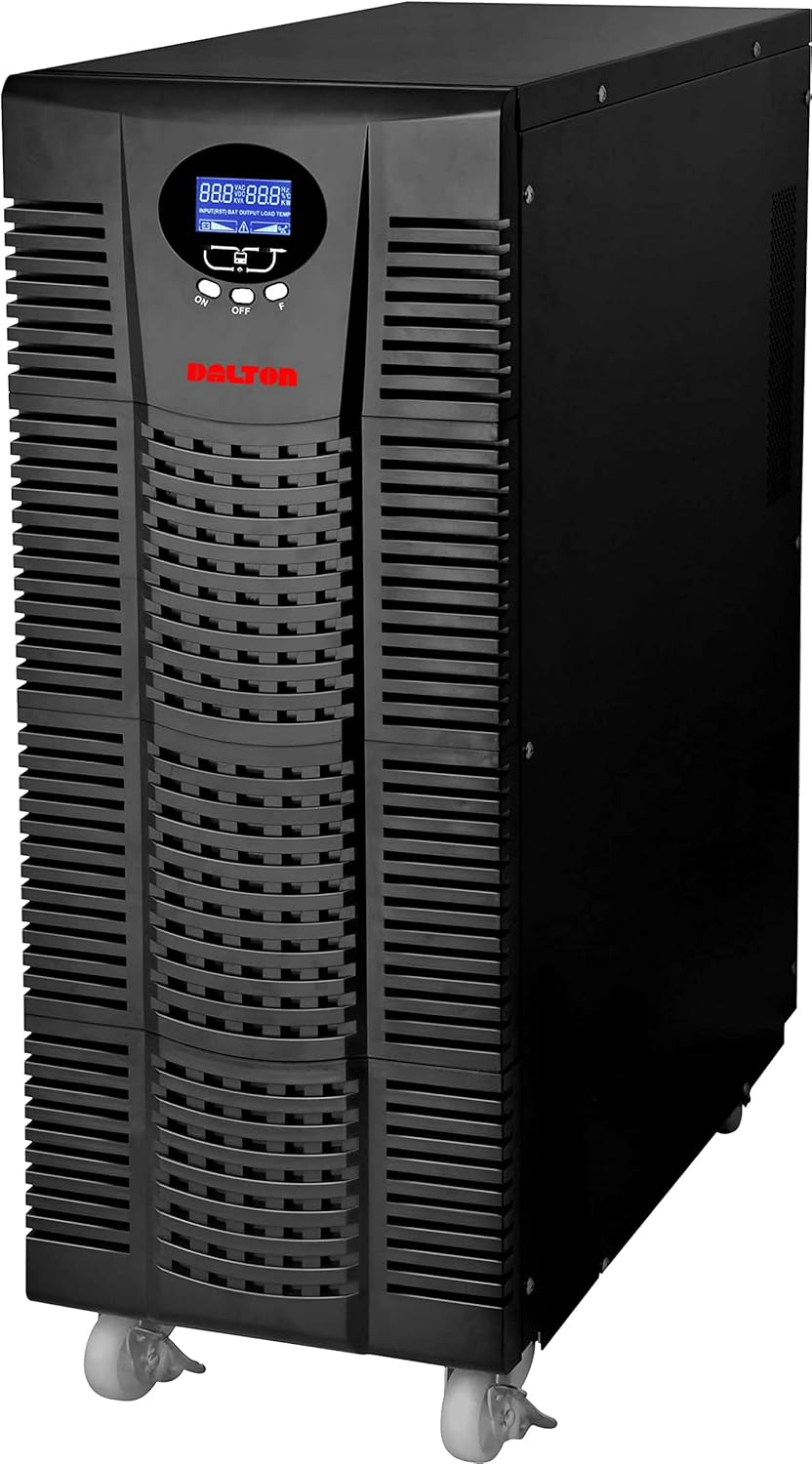
Слика 4.1: Предња страна view of the Dalton 10 kVA UPS unit. This image displays the tall, black tower design of the UPS, featuring a prominent vented front panel for airflow and integrated wheels at the base for easy mobility. The control panel and display are visible towards the top of the unit.
4.1 Предња плоча
- ЛЦД екран: Shows real-time status, input/output voltage, battery level, load percentage, and error codes.
- Контролна дугмад: Used to navigate menus, acknowledge alarms, and perform system tests.
- Дугме за напајање: Укључује или искључује UPS.
4.2 Задња плоча
- Улазни конектор за напајање: For connecting the UPS to the main AC power source.
- Излазне посуде: For connecting protected equipment.
- Communication Ports (USB/RS232): For connecting to a computer for monitoring and management.
- External Battery Connector (if applicable): For connecting optional external battery packs.
- Прекидач: Обезбеђује заштиту од преоптерећења.
5. Подешавање и инсталација
Follow these steps for proper installation of your UPS unit:
- Пласман:
- Place the UPS in a clean, dry, and well-ventilated area.
- Ensure sufficient clearance around the unit for proper airflow.
- Avoid direct sunlight, heat sources, and excessive moisture.
- Почетно пуњење батерије:
- Повежите УПС на уземљену утичницу наизменичне струје.
- Allow the UPS to charge for at least 8 hours before connecting any equipment to ensure full battery capacity. The display will indicate charging status.
- Опрема за повезивање:
- With the UPS turned off and fully charged, connect your critical equipment (computers, servers, networking devices) to the UPS output receptacles.
- Do not connect laser printers or other high-surge current devices to the battery-backed outlets, as this may overload the UPS.
- Укључивање:
- Press and hold the power button on the front panel until you hear a beep and the display illuminates.
- The UPS will perform a self-test and then enter normal operating mode.
6. Упутство за употребу
6.1 Нормалан рад
Once powered on, the UPS continuously monitors the incoming AC power. In normal mode, it provides clean and stable power to connected devices.
6.2 Режим батерије
If the utility power fails or fluctuates outside acceptable limits, the UPS will automatically switch to battery mode, providing power from its internal batteries. An audible alarm will sound, and the LCD display will indicate "Battery Mode".
- During battery mode, save your work and shut down connected equipment gracefully to prevent data loss.
- The duration of battery backup depends on the load connected and the battery charge level.
6.3 Powering Off the UPS
To turn off the UPS and disconnect power to connected devices:
- Shut down all connected equipment.
- Press and hold the power button on the UPS until it powers off.
- Disconnect the UPS from the AC power outlet.
7. Одржавање
7.1 Одржавање батерије
- Regularly charge the batteries by keeping the UPS connected to AC power.
- Perform a battery self-test periodically (refer to your UPS display menu for this option) to check battery health.
- Batteries have a limited lifespan (typically 3-5 years). Contact service for battery replacement when performance degrades.
7.2 Чишћење
- Очистите спољашњост UPS-а меком, сувом крпом.
- Немојте користити течна или аеросолна средства за чишћење.
- Уверите се да су вентилациони отвори без прашине и остатака.
КСНУМКС. Решавање проблема
This section provides solutions to common issues you might encounter with your UPS.
| Проблем | Могући узрок | Решење |
|---|---|---|
| УПС се не укључује. | Нема наизменичне струје; Слаба батерија; Квар UPS-а. | Check power cord connection and wall outlet. Allow UPS to charge for several hours. Contact service if problem persists. |
| УПС непрекидно звучно сигнализира у нормалном режиму. | Overload; Battery fault. | Reduce connected load. Perform battery self-test. |
| Кратко време резервне копије. | Overload; Old battery; Insufficient charging. | Reduce load. Replace battery. Ensure UPS is fully charged. |
For issues not listed here, or if solutions do not resolve the problem, please contact Dalton customer support.
9. Спецификације
| Феатуре | Детаљ |
|---|---|
| Бранд | Далтон |
| Модел | 10 кВА УПС |
| Максимална снага | 10,000 Ваттс |
| Излазна снага | 10,000 Ваттс |
| Фреквенцијски опсег | 50/60 Хз (± 3 Хз) |
| Тип конектора | IEC 320, Battery |
| Боја | Црно |
| Материјал | Метал |
| ASIN | B09NC2FXNC |
| Први доступан датум | 9. децембра 2021. године |
10. Гаранција и подршка
Dalton provides comprehensive support for its products. As authorized distributors in the Arab Republic of Egypt, we maintain an authorized service center for all Dalton UPS units.
- For technical assistance, troubleshooting, or warranty claims, please contact our authorized service center.
- Ensure you have your product model and ASIN (B09NC2FXNC) ready when contacting support.
- Неовлашћене поправке или модификације поништиће гаранцију производа.
For more information, please visit the official Dalton webсајт или контактирајте свог локалног дистрибутера.


