1. Производ је готовview
The Bell & Howell Director Series Zoomatic Camera is a vintage 8mm movie camera equipped with a Varamat Zoom Lens F/1.8. This manual provides essential information for its setup, operation, and maintenance.
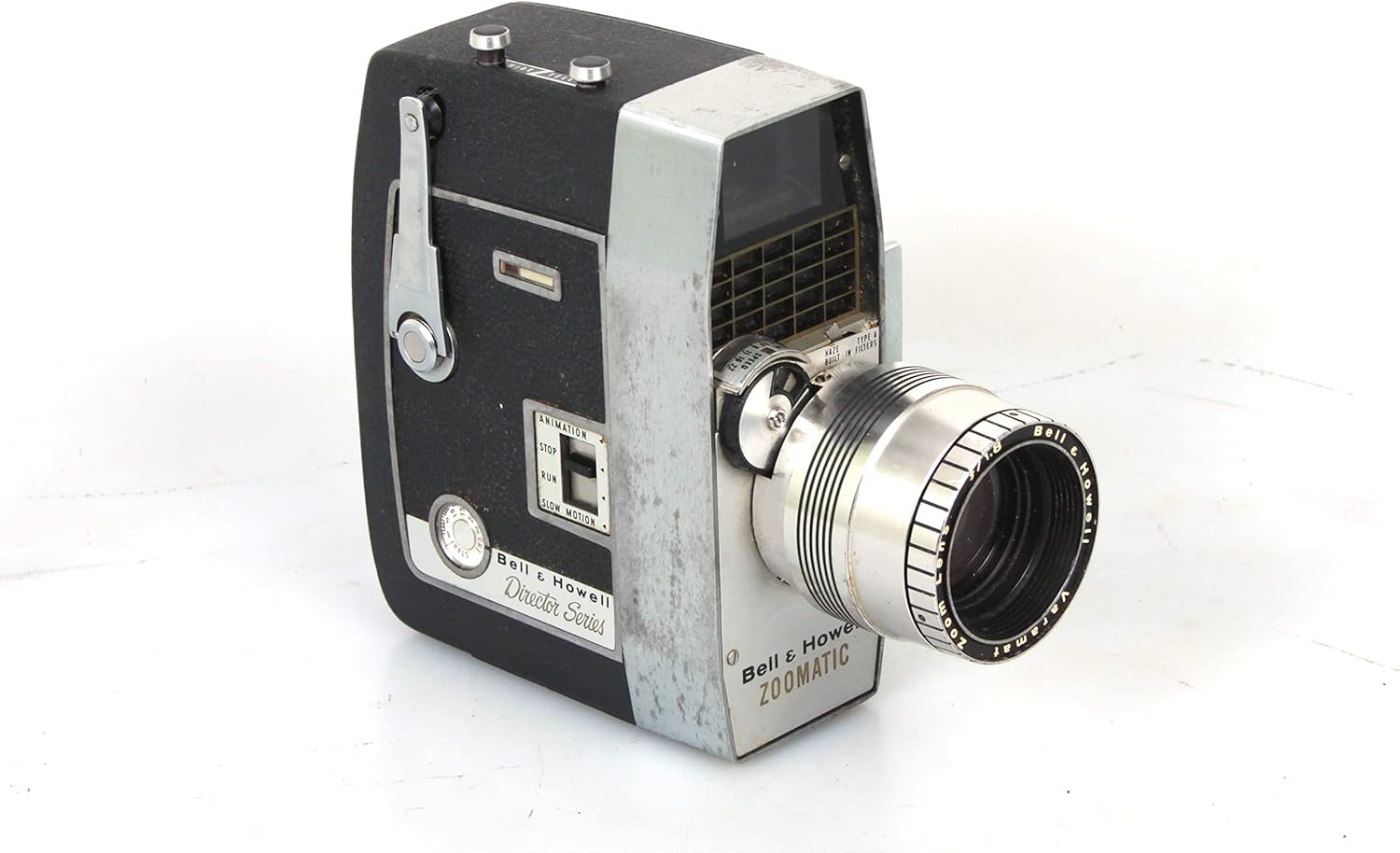
Слика 1.1: Предња страна view of the Bell & Howell Director Series Zoomatic 8mm movie camera, showcasing its classic design and zoom lens.
Кључне карактеристике:
- DIRECTOR SERIES ZOOMATIC CAMERA with a high-quality F/1.8 zoom lens.
- ВИНTAGE design, reflecting classic 8mm film technology.
- Equipped with an automatic exposure control type.
- Designed for movie shooting modes.
2. Подешавање
Before operating your Bell & Howell 8mm movie camera, ensure it is properly set up for film loading and power.
2.1 Учитавање филма
To load film, open the camera's side door. The camera accommodates standard 8mm film reels. Carefully place the film reel onto the supply spindle and thread the film according to the internal diagram, ensuring it passes through the gate and onto the take-up reel. Close the door securely.

Слика 2.1: Унутрашњи view of the camera with the side door open, illustrating the film loading area with supply and take-up reels.
2.2 Извор напајања
Овај винtage camera typically operates on internal batteries (not specified, but common for such models). Ensure fresh batteries are installed in the designated compartment, usually located on the side or bottom of the camera. Refer to the battery compartment for specific battery type and polarity.
3. Упутство за употребу
Familiarize yourself with the camera's controls for optimal filming.
3.1 Filming
To begin filming, press and hold the trigger or recording button, typically located on the side or front grip. Release the button to stop recording. The camera's motor will activate during recording, indicating film transport.

Слика 3.1: Страна view highlighting the film advance mechanism and the lens focus ring.
3.2 Управљање зумом
The Varamat Zoom Lens F/1.8 allows for optical zoom. Adjust the zoom by rotating the zoom ring on the lens barrel. Rotate clockwise for telephoto (zoom in) and counter-clockwise for wide-angle (zoom out). Ensure smooth rotation for consistent footage.

Слика 3.2: Детаљно view of the lens area, showing the zoom ring and other operational dials.
3.3 Подешавање фокуса
To achieve sharp images, adjust the focus ring on the lens. Look through the viewfinder and rotate the focus ring until the subject appears clear and sharp. Some models may feature a "Universal Focus Lock" for simplified operation in certain conditions.

Слика 3.3: Фронтална страна view emphasizing the lens and its focus adjustment capabilities.
4. Одржавање
Proper maintenance ensures the longevity and optimal performance of your vintagе камера.
- Чишћење сочива: The lens may accumulate dust and haze over time. Use a soft, lint-free cloth and a specialized lens cleaning solution to gently wipe the lens surfaces. Avoid abrasive materials that could scratch the lens.
- Чишћење тела: Wipe the camera body with a dry, soft cloth to remove dust and fingerprints. For stubborn marks, a slightly damp може се користити крпа, након чега следи одмах сушење.
- Складиштење: Store the camera in a cool, dry place, away from direct sunlight and extreme temperatures. It is advisable to remove batteries during long periods of non-use to prevent leakage.
- Viewпроналазач: Тхе viewfinder may become hazy. While internal cleaning requires professional service, keep the external eyepiece clean with a soft cloth.
КСНУМКС. Решавање проблема
This section addresses common issues you might encounter with your Bell & Howell 8mm movie camera.
| Проблем | Могући узрок | Решење |
|---|---|---|
| Camera motor not running. | Празне или неправилно постављене батерије. | Проверите поларитет батерија и замените их новим батеријама. |
| Филм не напредује. | Improper film loading; film jammed. | Re-load film carefully according to instructions. Check for obstructions. |
| Images appear blurry. | Incorrect focus setting; dirty lens. | Adjust the focus ring. Clean the lens as per maintenance instructions. |
| Viewfinder is hazy. | Internal haze or dust. | Clean external eyepiece. For internal haze, professional cleaning may be required. |
6. Спецификације
| Феатуре | Детаљ |
|---|---|
| Модел | DIRECTOR SERIES ZOOMATIC |
| Ленс | Varamat Zoom Lens F/1.8 |
| Тип филма | 8мм филм |
| Режими снимања | Филм |
| Тип контроле експозиције | Аутоматски |
| Боја | Црно |
| Тежина артикла | 4 фунте (приближно) |
| Тип зумирања | Оптицал Зоом |
7. Гаранција и подршка
Као виноtage item, this Bell & Howell 8mm movie camera may not come with a manufacturer's warranty. For support regarding operation or repair, it is recommended to consult with vintage camera specialists or authorized repair centers. Online communities and forums dedicated to vintage film equipment can also be valuable resources for troubleshooting and advice.


