Увод
Тхе ViewSonic X11-4K projector offers true 4K Ultra HD resolution with HDR/HLG support, advanced LED technology, and smart capabilities in a portable design. This manual provides essential information for setting up, operating, maintaining, and troubleshooting your projector to ensure an optimal cinematic experience in any home environment.
Шта је у кутији
- ViewSonic X11-4K пројектор
- Повер Цабле
- Ремоте Цонтрол
- Водич за брзи почетак
Карактеристике производа
- 4K UHD LED Projection: Delivers bright 1000 ANSI lumens with a short throw lens for supersized movies and games.
- Vivid Colors: Achieves 125% Rec. 709 color accuracy and supports HDR/HLG content for lifelike visuals.
- Премиум аудио: Features built-in Dual Harman Kardon Bluetooth speakers for room-filling sound.
- Лако подешавање: Includes 0.8x-1x digital zoom, instant auto focus, vertical/horizontal keystone, and 4-corner adjustment for flexible placement.
- Могућности стримовања: Supports livestreaming and content consumption from various platforms by adding a compatible dongle (not included).
- Флексибилно повезивање: Compatible with most media players, PCs, Macs, and mobile devices via Wi-Fi, HDMI, and USB-C inputs.
Сетуп
Тхе ViewSonic X11-4K is designed for effortless setup. Place the projector on a stable surface a few feet from your desired projection area. The short throw lens can project images up to 100 inches from a short distance. Utilize the instant auto focus, H/V keystone, and 4-corner adjustments to achieve a perfectly aligned and sharp image.
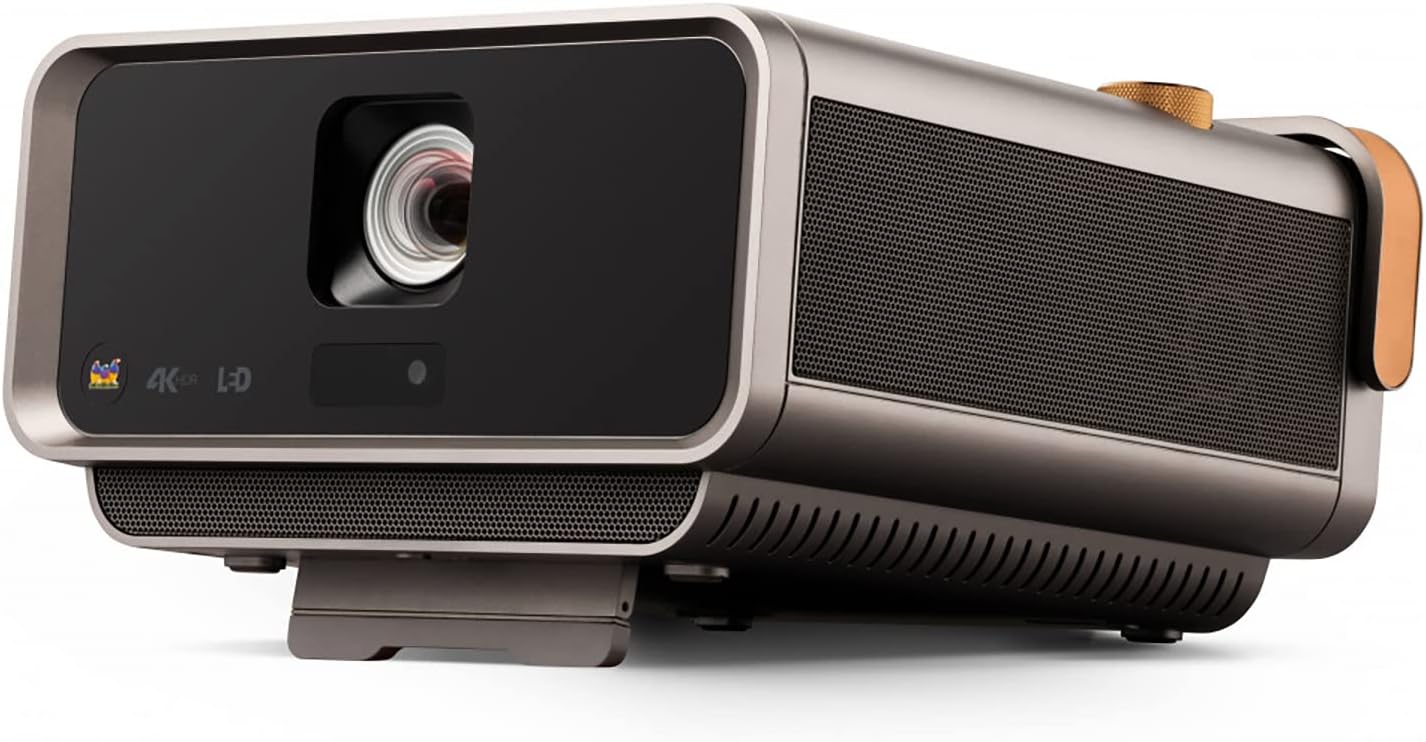
Слика 1: Предња страна view оф тхе ViewSonic X11-4K projector, showcasing the lens and sleek design.

Figure 2: Visual representation of the autofocus, digital zoom, 4-corner keystone, and auto keystone adjustment features for easy setup.
Упутство за употребу
Power on the projector using the dedicated button or remote control. Navigate the on-screen menu using the remote to select input sources, adjust picture settings, and manage audio options. The intuitive interface allows for quick access to all functionalities.

Слика 3: Врх view of the projector showing the integrated control knob for power and volume, along with other control buttons.
Повезивање
The X11-4K offers diverse connectivity options:
- ДВИ: Connect external devices such as Blu-ray players, gaming consoles, or set-top boxes.
- УСБ-Ц: Directly connect compatible mobile devices, laptops, or gaming consoles like the Nintendo Switch for video streaming and power delivery.
- Ви-Фи: Enable wireless screen mirroring from your smartphone, tablet, or computer.
- Блуетоотх: Connect to external Bluetooth speakers or headphones for enhanced audio, or use the projector's built-in Harman Kardon speakers.

Слика 4: Задња страна view of the projector displaying various input and output ports including HDMI, USB-C, and audio jacks.

Figure 5: Illustration of USB-C connectivity with various devices like smartphones, tablets, laptops, and a Nintendo Switch.
Подешавање слике
Achieve the perfect picture with the following adjustment features:
- Instant Auto Focus: The projector automatically adjusts for optimal clarity.
- H/V Keystone: Corrects distorted images when the projector is not perfectly centered.
- Подешавање у 4 угла: Fine-tune each corner of the image independently for a precise fit on any surface.
- Дигитални зум: Подесите величину слике без померања пројектора.

Figure 6: Diagram illustrating the short throw capability, showing screen sizes (80", 100", 120") at various distances (4.7', 5.8', 7').
Аудио
Experience rich and immersive sound with the integrated Harman Kardon speakers. For private listening or connecting to external audio systems, utilize the Bluetooth connectivity or audio output ports.

Figure 7: Image depicting the projector with sound waves emanating from it, highlighting the Harman Kardon speakers and Bluetooth connectivity.
Спецификације
| Феатуре | Детаљ |
|---|---|
| Број модела | Кс11-4К |
| Резолуција екрана | 3840 к 2160 (4К УХД) |
| Осветљеност | КСНУМКС АНСИ Луменс |
| Прецизност боје | 125% Препорука 709 |
| Повезивање | Wi-Fi, HDMI, USB-C, Ethernet, USB 2.0 Type A |
| Посебне карактеристике | Short Throw, H/V Keystone, 4-Corner Adjustment, Instant Auto Focus, Dual Harman Kardon Speakers |
| Димензије производа | 10.3 к 10.7 к 2.7 инча |
| Тежина артикла | 9.9 фунти |

Figure 8: Image detailing the physical dimensions of the ViewПројектор Sonic X11-4K.
Одржавање
Да бисте обезбедили дуговечност и оптималне перформансе вашег ViewSonic X11-4K projector, follow these maintenance guidelines:
- Чишћење сочива: Нежно обришите сочиво пројектора меком крпом која не оставља влакна, намењеном за оптичке површине. Избегавајте абразивне материјале или јаке хемикалије.
- Спољно чишћење: Користите меку, суву крпу за чишћење спољашњости пројектора. За тврдокорне мрље, благо обришитеampу крпу са водом.
- вентилација: Ensure that the projector's ventilation openings are clear and unobstructed to prevent overheating.
- Складиштење: Када се пројектор не користи дуже време, чувајте га на хладном и сувом месту, идеално у оригиналном паковању или заштитној футроли.
Решавање проблема
Ако наиђете на проблеме са пројектором, погледајте следећа уобичајена решења:
- Нема слике: Check all cable connections (HDMI, USB-C) and ensure the correct input source is selected on the projector. Verify the power cable is securely connected.
- Замућена слика: Use the instant auto focus feature or manually adjust the focus. Ensure the projection surface is flat and the projector is stable.
- Искривљена слика: Utilize the H/V keystone and 4-corner adjustment features to correct any trapezoidal or uneven image shapes.
- Нема звука: Check the volume settings on both the projector and the connected source device. Ensure external speakers (if connected via Bluetooth or audio out) are properly paired and powered on.
- Даљински управљач не ради: Замените батерије у даљинском управљачу. Уверите се да нема препрека између даљинског управљача и ИР пријемника пројектора.
Гаранција и подршка
For warranty information, technical support, or service inquiries, please refer to the official ViewСониц website or contact their customer support. Keep your purchase receipt and product serial number handy for any support requests.
Званични видео снимци производа
ViewSonic Home Theater and Business Projectors
Овај видео пружа крајview of ViewSonic's home theater and business projectors, highlighting key features and applications.
4К пројектор за кућни биоскоп
This video demonstrates the capabilities of the 4K home theater projector, focusing on visual quality and user experience.


