
Важне информације о безбедности
Please read this manual carefully before assembly and use to ensure safe operation and to prevent damage to the product or injury to yourself.
- Не прекорачујте максималну носивост 100 кгПреоптерећење може проузроковати нестабилност и оштећења.
- Ensure all cables are properly managed and secured to prevent tripping hazards or damage during height adjustments.
- Држите децу и кућне љубимце даље од стола током рада.
- Do not place hands or other body parts near moving parts of the desk frame during height adjustment.
- Only use the desk for its intended purpose as a workstation.
- Regularly check all screws and bolts to ensure they are tightened.
Производ је завршенview
The FLEXISPOT E1B Electric Standing Desk is designed to provide a versatile and ergonomic workspace. It features a robust dual-motor system for smooth height adjustments and a durable tabletop.
Кључне карактеристике:
- Двомоторни систем: Ensures stable and efficient height adjustment at 25 mm/s.
- Опсег висине: Adjustable from 70 cm to 119 cm to suit various user heights and work preferences.
- Капацитет оптерећења: Supports up to 100 kg, accommodating multiple monitors and office equipment.
- Меморијска подешавања: Control panel with memory functions for saving preferred height settings.
- High-Quality Tabletop: 160x80cm black tabletop, made in the EU from FSC-certified MDF with scratch-resistant high-pressure laminate.
Садржај пакета
Before starting assembly, verify that all components listed below are present and undamaged. If any parts are missing or damaged, please contact customer support.
- Desk Frame (E1B) components (legs, feet, crossbar, motor, control box)
- Tabletop (DT1608-BLACK-EU18)
- Control Panel with Memory Functions
- Адаптер за напајање и кабл
- Assembly Hardware (screws, bolts, Allen keys)
- Прибор за управљање кабловима
- Упутство за употребу
Упутства за подешавање и монтажу
Assembly is designed to be straightforward. It is recommended to assemble the desk on a soft, clean surface to prevent scratches. Two people are recommended for easier assembly.
Корак 1: Распакујте компоненте
Пажљиво извадите све делове из паковања и распоредите их. Проверите садржај паковања.
Корак 2: Саставите оквир стола
- Attach the lifting columns to the crossbar using the provided screws.
- Secure the desk feet to the bottom of the lifting columns.
- Mount the control box to the designated area on the frame.
- Connect the motor cables from the lifting columns to the control box.
- Connect the control panel cable to the control box.

Image: The FLEXISPOT E1B desk frame in black and white, illustrating the height adjustment range from 70cm to 119cm, highlighting the dual motor system, 25mm/s adjustment speed, and low noise operation (less than 50dB).
Корак 3: Причврстите плочу стола
Carefully place the tabletop upside down on a soft surface. Position the assembled desk frame onto the tabletop, aligning the pre-drilled holes. Secure the tabletop to the frame using the provided screws.

Image: A FLEXISPOT desk with a black tabletop, featuring a laptop, books, and a pen holder, demonstrating a functional and organized workspace.
Step 4: Connect Power and Cable Management
Connect the power adapter to the control box and then to a power outlet. Use the included cable management accessories to organize and secure all cables, preventing them from interfering with the desk's movement.
Упутство за употребу
Контролна табла је завршенаview:
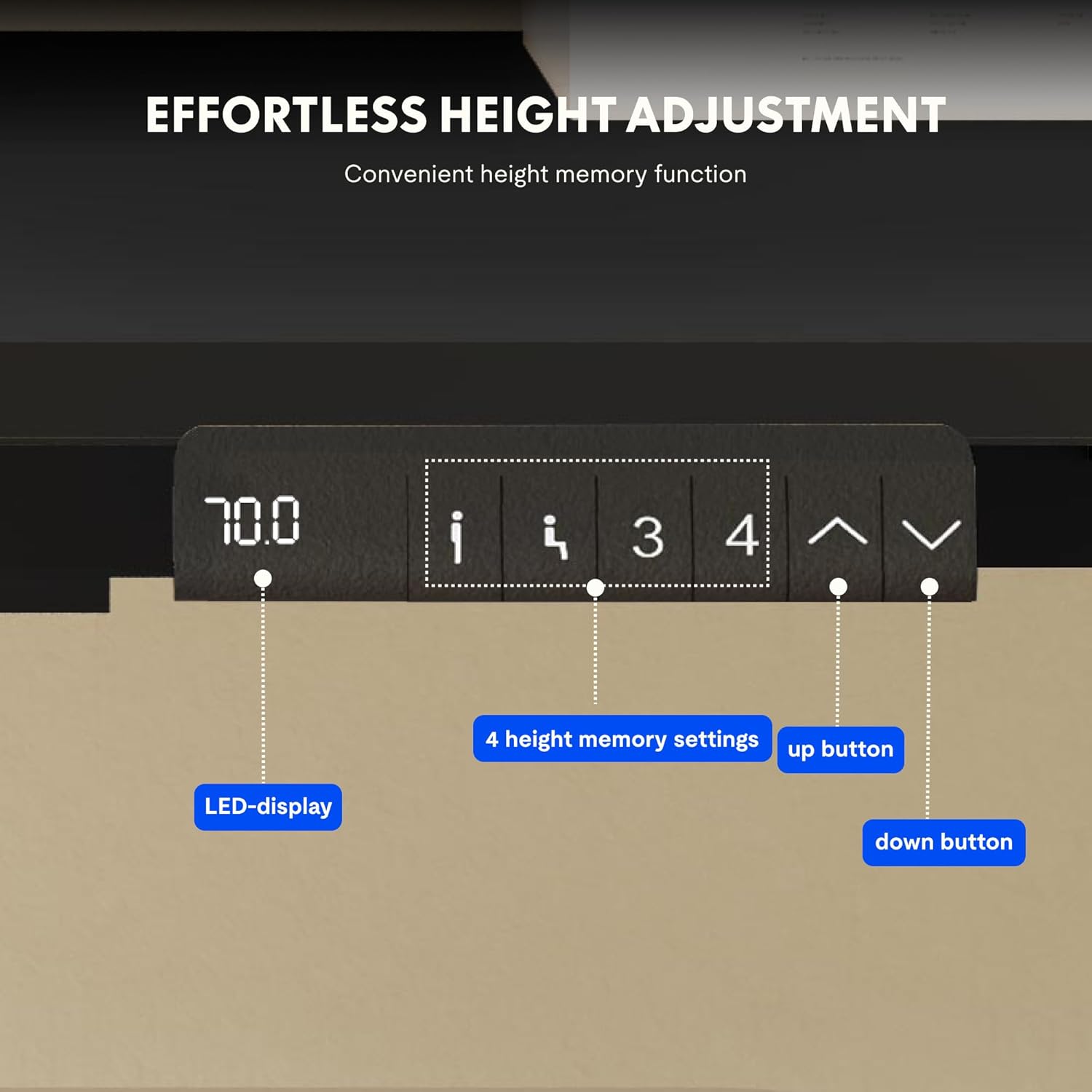
Image: Close-up of the FLEXISPOT desk control panel, showing the LED display for current height, up and down arrow buttons for manual adjustment, and four numbered buttons for saving and recalling height memory presets.
Manual Height Adjustment:
- Притисните и држите Up arrow (^) дугме за подизање стола.
- Притисните и држите Down arrow (v) дугме за спуштање стола.
- Release the button at your desired height. The LED display will show the current height.
Подешавање пресета меморије:
- Подесите сто на жељену висину помоћу стрелица горе/доле.
- Притисните тастер М or "ПОСТАВИ" button (if available, otherwise proceed to step 3).
- Press one of the numbered memory buttons (1, 2, 3 или 4) within 3 seconds. The display will show "S-" followed by the number, indicating the height is saved.
Позивање пресета меморије:
Simply press the desired numbered memory button (1, 2, 3 или 4). Сто ће се аутоматски померити на сачувану висину.
Ресет функција:
If the desk encounters an error or does not move smoothly, a reset may be required. Press and hold the „Доле“ button until the desk reaches its lowest position, then release and press it again for 5-10 seconds until the display shows "RST" or "E-1" and then returns to the lowest height. The desk will then reset to its factory lowest position.
Одржавање
- Чишћење: Обришите површину стола и оквир меком крпомamp крпу. Избегавајте абразивна средства за чишћење или јаке хемикалије.
- инспекција: Периодично проверавајте све завртње и спојеве да бисте били сигурни да су чврсто затегнути. По потреби поново затегните.
- Управљање кабловима: Ensure cables remain tidy and do not obstruct the desk's movement.
- Дистрибуција тежине: Distribute weight evenly on the tabletop to prevent strain on the motors and frame.
Решавање проблема
| Проблем | Могући узрок | Решење |
|---|---|---|
| Радни сто се не помера. | Power cable disconnected; control box error; overloaded desk. | Check power connections. Perform a reset (see Operating Instructions). Reduce weight on the desk. |
| Сто се помера неравномерно или производи необичне звуке. | Loose connections; obstruction; uneven weight distribution. | Check all screws and connections. Remove any obstructions. Redistribute weight evenly. Perform a reset. |
| На дисплеју се приказује код грешке (нпр. Е01, Е02). | Унутрашња системска грешка. | Perform a reset. If the error persists, contact customer support. |
| Предефинисана подешавања меморије не раде. | Presets not saved correctly. | Re-save the memory presets following the instructions. |
Спецификације
| Феатуре | Детаљ |
|---|---|
| Бранд | ФЛЕКСИСПОТ |
| Број модела | E1B+DT1608-BLACK-EU18 |
| Tabletop Dimensions (L x W) | 160 цм к 80 цм |
| Опсег подешавања висине | 70 цм - 119 цм |
| Капацитет оптерећења | 100 кг |
| Брзина подешавања | 25 мм/с |
| Тип мотора | Дуал Моторс |
| Таблетоп Материал | FSC-certified MDF with high-pressure laminate |
| Материјал оквира | легирани челик |
| Боја | Black Tabletop + Black Frame |
Гаранција и подршка
FLEXISPOT products are manufactured to high-quality standards. For warranty information and customer support, please refer to the official FLEXISPOT webсајту или контактирајте свог продавца.
- гаранција: Specific warranty terms may vary by region and product. Please check your purchase documentation or the manufacturer's webсајт за детаље.
- Корисничка подршка: For technical assistance, missing parts, or operational questions, please visit the FLEXISPOT Brand Store или контактирајте њихове званичне канале за подршку.