Увод
This manual provides essential information for the setup, operation, and maintenance of your SteelSeries Apex 9 TKL Optical Gaming Keyboard. Please read these instructions carefully to ensure optimal performance and longevity of your device.
The SteelSeries Apex 9 TKL is a compact tenkeyless (TKL) gaming keyboard featuring OptiPoint optical switches, designed for high-speed performance and customization.
Садржај пакета
- SteelSeries Apex 9 TKL Keyboard
- Одвојиви USB-C на USB-A кабл
- Кеицап Пуллер
- Свитцх Пуллер
- Документација (овај приручник)
Сетуп
1. Повезивање тастатуре
- Locate the detachable USB-C to USB-A cable.
- Connect the USB-C end of the cable to the port on the back of the Apex 9 TKL keyboard.
- Повежите USB-A крај кабла са доступним USB портом на рачунару.
- Ваш оперативни систем ће аутоматски детектовати и конфигурисати тастатуру.
2. Software Installation (SteelSeries GG)
For full customization options, including RGB lighting, key remapping, and actuation point adjustment, download and install the SteelSeries GG software from the official SteelSeries webсајт (стеелсериес.цом/гг).
- Visit the SteelSeries website and navigate to the software download section.
- Download the SteelSeries GG installer for your operating system.
- Покрените инсталатер и пратите упутства на екрану.
- Once installed, launch SteelSeries GG to configure your Apex 9 TKL keyboard.

Image: The SteelSeries Apex 9 TKL keyboard, showcasing its compact design and vibrant RGB lighting, connected to a computer via its detachable USB-C cable.
Управљање тастатуром
Кључне карактеристике и функције
- OptiPoint Optical Switches: These switches utilize light for actuation, providing fast response times.
- 2-Point Actuation: Adjust the key actuation point between 1.0mm for rapid gaming inputs and 1.5mm for more deliberate typing. This setting is configurable via the SteelSeries GG software.
- Swappable Switches: The OptiPoint switches are hot-swappable, allowing for customization, replacement, or repair. Use the included switch puller for removal and installation.
- TKL Form Factor: The tenkeyless design removes the numeric keypad, providing more desk space for mouse movement.
- Двоструко оштећене ПБТ капице за тастатуре: Durable keycaps designed for longevity and a consistent texture.
- РГБ прилагођавање: Per-key RGB lighting is fully customizable through the SteelSeries GG software.
- Rapid Tap: A feature that prioritizes the last key press in a selected pair for faster input, useful in competitive gaming scenarios. Requires the latest SteelSeries GG software update.

Image: Visual representation of the Apex 9 TKL's performance metrics, highlighting its 0.2ms response time and faster actuation compared to other optical keyboards.
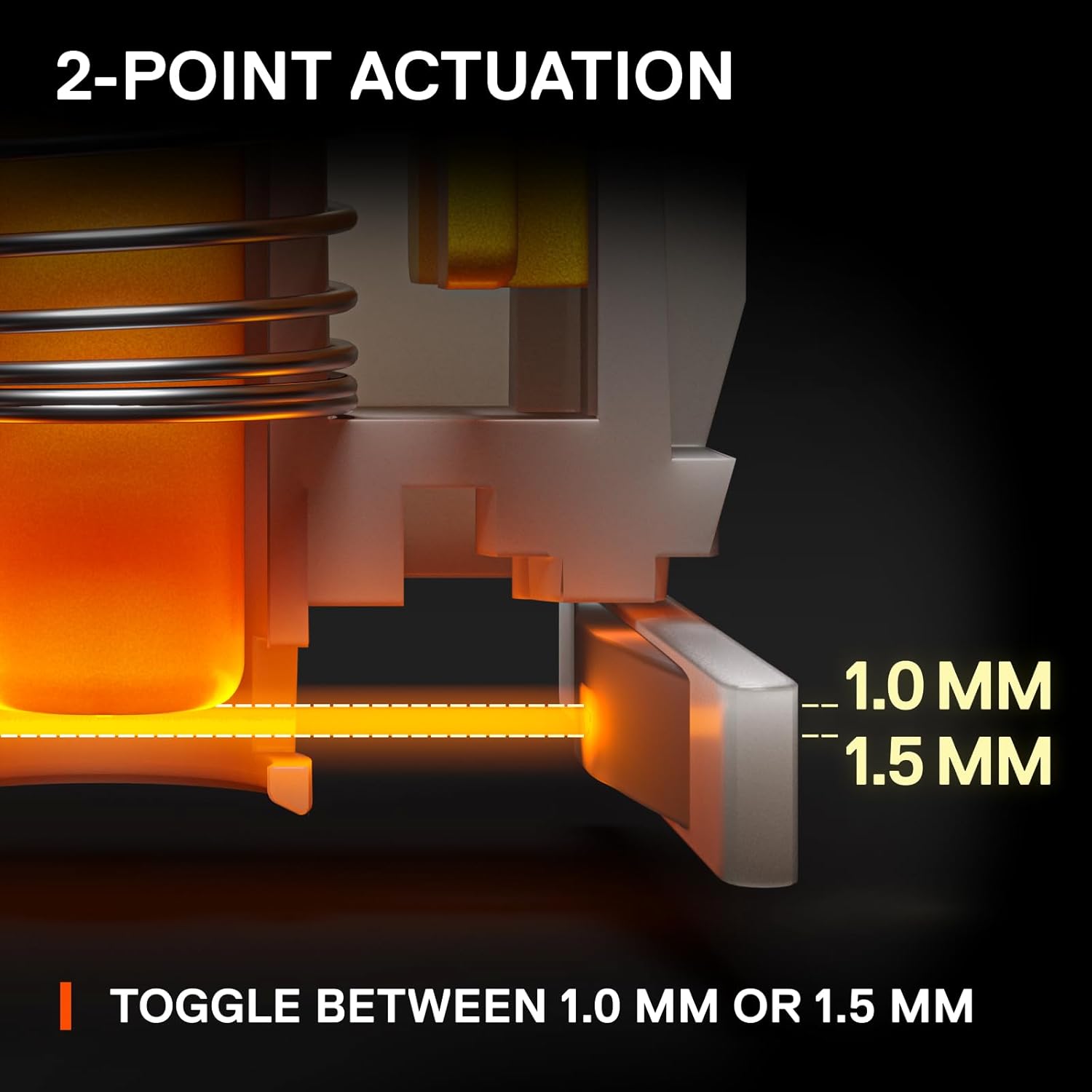
Image: An illustration detailing the adjustable 2-point actuation of the OptiPoint switches, allowing users to select between 1.0mm and 1.5mm actuation depths.

Слика: Крупни план view of the keyboard illustrating the process of swapping OptiPoint switches, with a keycap and switch partially removed.

Image: A diagram explaining the 'Rapid Tap' feature, comparing standard input with Rapid Tap enabled, demonstrating how it enhances responsiveness by prioritizing the last key press.
Одржавање
Чишћење тастатуре
- Искључите тастатуру из рачунара пре чишћења.
- Користите бочицу компримованог ваздуха да бисте уклонили прашину и остатке између тастера.
- For surface cleaning, gently wipe the keycaps and frame with a soft, damp тканина. Избегавајте употребу јаких хемикалија или абразивних материјала.
- Уверите се да је тастатура потпуно сува пре него што је поново повежете са рачунаром.
Замена тастера и прекидача
The Apex 9 TKL features swappable OptiPoint switches and standard keycaps, allowing for easy replacement.
- Уклањање капице тастера: Use the included keycap puller to gently lift keycaps straight up.
- Уклањање прекидача: After removing the keycap, use the included switch puller to carefully grip the switch and pull it straight up.
- Инсталација: Align the new switch with the pins on the keyboard's PCB and press down firmly until it clicks into place. Then, press the new keycap onto the switch stem.

Слика: Експлодирана view illustrating the durable construction of double shot PBT keycaps, highlighting their two-layer design for fade resistance.
Решавање проблема
- Тастатура не реагује:
- Уверите се да је USB кабл безбедно повезан и са тастатуром и са рачунаром.
- Покушајте да повежете тастатуру са другим УСБ портом на рачунару.
- Поново покрените рачунар.
- Check if the keyboard works on another computer to rule out a system-specific issue.
- RGB осветљење не ради/нетачно:
- Ensure the SteelSeries GG software is installed and running.
- Check the lighting settings within the SteelSeries GG software.
- Update the keyboard firmware via SteelSeries GG.
- Тастери се не региструју или се куцају двапут:
- This could indicate a faulty switch. Use the switch puller to remove the affected switch and inspect it. If necessary, replace it with a new OptiPoint switch.
- Уверите се да је прекидач потпуно уметнут у своје утичницу.
- Clean any debris around the switch area.
- Software Issues (SteelSeries GG):
- Ensure your SteelSeries GG software is up to date.
- Try reinstalling the SteelSeries GG software.
- Consult the SteelSeries support website for known issues or updates.
Спецификације
| Бранд | СтеелСериес |
| Број модела | 64847 |
| Распоред тастатуре | Десет кључева (TKL) |
| Тип прекидача | OptiPoint Optical Switches (Swappable) |
| Тачке активирања | Adjustable 1.0mm / 1.5mm |
| Време одговора | 0.2мс |
| Кеицап Материал | Двоструки ПБТ |
| Повезивање | USB-C (Detachable Cable) |
| Позадинско осветљење | РГБ по кључу |
| Хардверска платформа | PC |
| Димензије (ДкШкВ) | 13.99 к 5.05 к 1.65 инча |
| Тежина | 2.3 фунти |
Информације о гаранцији
SteelSeries products are covered by a limited warranty. The specific terms and duration of the warranty may vary by region and product. For detailed warranty information, please refer to the official SteelSeries webсајт или гарантни лист који је испоручен уз ваш производ.
Сачувајте доказ о куповини за гаранцијске захтеве.
Подршка
For further assistance, technical support, or to access the latest drivers and firmware updates, please visit the official SteelSeries support webсајт:
Такође можете пронаћи често постављана питања, водиче за решавање проблема и форуме заједнице на страници за подршку.


