1. Увод
Thank you for choosing the HXSJ X50 Wireless Game Mouse. This manual provides detailed instructions for setting up, operating, and maintaining your new wireless mouse. Please read this manual thoroughly before use to ensure optimal performance and longevity of your device.
Садржај пакета:
- HXSJ X50 Wireless Game Mouse
- УСБ пријемник

Image 1.1: The HXSJ X50 Wireless Game Mouse and its USB receiver.
2. Безбедносне информације
- Do not expose the mouse to water or excessive moisture.
- Избегавајте испуштање или излагање миша јаким ударима.
- Држите уређај даље од екстремних температура.
- Не покушавајте сами да расклапате или поправљате миш. По потреби контактирајте квалификовано сервисно особље.
- Батерије одложите у складу са локалним прописима.
3. Подешавање
3.1 Инсталација батерије
The HXSJ X50 Wireless Game Mouse requires batteries for operation. Please ensure you have the necessary batteries (typically 1x AA battery, not included) before proceeding.
- Пронађите одељак за батерију на доњој страни миша.
- Отворите поклопац одељка за батерије.
- Insert the battery, ensuring correct polarity (+/-).
- Добро затворите поклопац одељка за батерије.
3.2 Повезивање USB пријемника
- Пронађите слободан УСБ порт на рачунару.
- Insert the USB receiver into the USB port. Your computer should automatically detect and install the necessary drivers.
3.3 Укључивање
Slide the power switch, located on the underside of the mouse, to the 'ON' position. The mouse is now ready for use.
4. Упутство за употребу
4.1 Функције дугмета
The HXSJ X50 mouse features 6 buttons for enhanced functionality:
- Леви клик: Primary function, selection.
- Десни клик: Secondary function, context menus.
- Точак за померање: Померање горе/доле, клик средњим тастером миша.
- Дугме за подешавање DPI-ја: Кружи кроз подешавања DPI-ја.
- Page Forward Button: Навигација напред у web претраживачи или file истраживачи.
- Page Backward Button: Навигација уназад web претраживачи или file истраживачи.

Слика 4.1: Бочна страна view showing the ergonomic design and side buttons.
4.2 ДПИ подешавање
Press the DPI adjustment button (located behind the scroll wheel) to cycle through the available sensitivity settings: 1000DPI, 1200DPI, 1600DPI, and 2400DPI. Select the DPI that best suits your preference and task.
4.3 Уштеда енергије
The mouse features a power switch on its underside. To conserve battery life, slide the switch to the 'OFF' position when the mouse is not in use for extended periods.
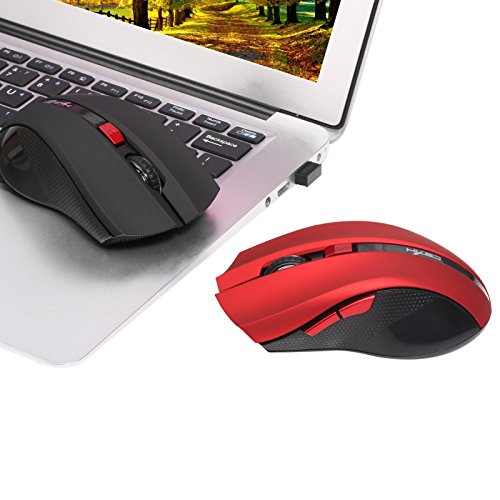
Image 4.2: The HXSJ X50 mouse in use with a laptop.
5. Одржавање
5.1 Чишћење
To clean the mouse, gently wipe its surface with a soft, dry cloth. For stubborn dirt, slightly dampИсперите крпу водом. Избегавајте употребу јаких хемикалија или абразивних средстава за чишћење.
5.2 Складиштење
When not in use, store the mouse and USB receiver in a dry, cool place, away from direct sunlight and extreme temperatures. If storing for an extended period, it is recommended to remove the battery.
КСНУМКС. Решавање проблема
- Миш не реагује:
Ensure the mouse is powered on. Check if the USB receiver is securely plugged into a working USB port. Replace the battery if it is low or depleted. - Неправилно кретање курсора:
Clean the optical sensor on the underside of the mouse. Ensure the surface you are using the mouse on is clean and non-reflective. - Проблеми са везом:
Try plugging the USB receiver into a different USB port. Move the mouse closer to the receiver to rule out interference. - Side buttons not working:
Ensure your operating system and applications support the forward/backward functions. Some software may require specific drivers or settings.
7. Спецификације
| Феатуре | Детаљ |
|---|---|
| Бранд | ХКССЈ |
| Модел | Кс50 |
| Повезивање | Бежични (УСБ пријемник) |
| Домет | До 10-15 метара |
| Откривање покрета | Оптицал |
| ДПИ подешавања | 1000, 1200, 1600, 2400 (Подесиво) |
| Број дугмади | 6 (лево, десно, точкић за скроловање, DPI, напред, назад) |
| Извор напајања | Батерија (1x AA, није укључена) |
| Трајање батерије (просечно) | 6 месеци |
| Оријентација руке | Амбидектроус |
| Материјал | Пластика |
| Тежина артикла | 80 г |
| Компатибилан ОС | Windows 98/ME/2000/XP/Vista/7/8, Linux |
8. Гаранција и подршка
For warranty information or technical support, please refer to the documentation provided with your purchase or contact the retailer/manufacturer directly. Keep your proof of purchase for warranty claims.


