Увод
Thank you for choosing the Varmilo MA Series V2 Summit R2 Mechanical Keyboard. This manual provides essential information for setting up, operating, maintaining, and troubleshooting your new keyboard. Please read this manual thoroughly to ensure optimal performance and longevity of your device.
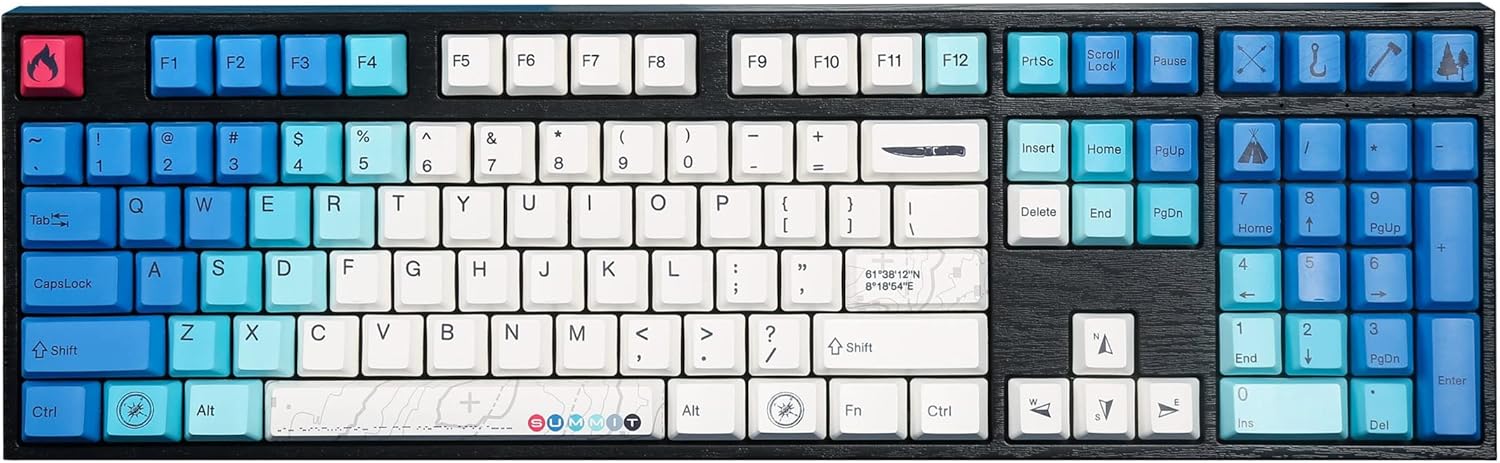
Image: The Varmilo MA Series V2 Summit R2 Mechanical Keyboard, showcasing its full layout and unique keycap design.
Сетуп
1. Отпакирање
Carefully remove the keyboard and all accessories from the packaging. Ensure the following items are present:
- Varmilo MA Series V2 Summit R2 Mechanical Keyboard
- УСБ-Ц кабл
- Извлачење капица за тастере (ако је укључено)
- Кориснички приручник (овај документ)
2. Повезивање тастатуре
- Locate the USB-C port on the back of the keyboard.
- Повежите један крај приложеног USB-C кабла са тастатуром.
- Повежите други крај USB-C кабла са доступним USB портом на рачунару.
- Тастатура је „plug-and-play“ и ваш оперативни систем би требало да је аутоматски препозна.
3. Подешавање угла тастатуре
The Varmilo MA Series V2 features a double-section kickstand, allowing for two different typing angles. Gently flip out the desired sections of the kickstand located on the underside of the keyboard to adjust its height and angle for ergonomic comfort.

Слика: Сајд професионалацfile of the Varmilo keyboard, illustrating the adjustable kickstand in an extended position.
Упутство за употребу
1. Основне кључне функције
The keyboard features a standard full-size (104-key) layout. All alphanumeric and standard function keys operate as expected. The Varmilo EC Ivy V2 switches provide a smooth and responsive typing experience.
2. Function (Fn) Key Combinations
The Fn key (typically located near the right Alt key) allows access to secondary functions printed on certain keycaps. Hold down the Fn key and press the desired function key simultaneously.
- Fn + F1-F12: Мултимедијалне контроле (нпр. јачина звука, репродукција/пауза, стоп).
- Fn + тастери са стрелицама: LED brightness or effect control (refer to specific keycap legends).
- Фн + Вин: Закључај/откључај Windows тастер.

Слика: Крупни план view of the right side of the Varmilo keyboard, highlighting the special function keys and their legends.
3. LED Backlighting Control
The keyboard features White LED backlighting. Use the Fn key combinations to adjust the brightness and switch between various lighting effects. Specific key legends will indicate the corresponding functions for LED control.
Одржавање
1. Чишћење тастатуре
Да бисте одржали изглед и функционалност тастатуре:
- Искључите тастатуру из рачунара пре чишћења.
- Користите меку крпу која не оставља длачицеampводом или благим раствором за чишћење да бисте обрисали капице тастера и цasing.
- За прашину и прљавштину између тастера користите компримовани ваздух.
- Avoid using harsh chemicals, abrasives, or solvents, as these can damage the PBT keycaps and finish.
2. Уклањање и замена капице тастера
The keyboard features durable Dye Sub PBT keycaps. If you need to remove keycaps for deep cleaning or customization:
- Use the provided keycap puller (if applicable) or a similar tool.
- Gently attach the keycap puller to the keycap and pull straight up to remove it. Avoid twisting or excessive force.
- To replace, align the keycap with the switch stem and press down firmly until it clicks into place.

Image: A collection of individual Varmilo keycaps, including special design keycaps, demonstrating their PBT material and dye-sublimated legends.
Решавање проблема
If you encounter issues with your Varmilo keyboard, please refer to the following common solutions:
- Тастатура не реагује:
- Уверите се да је USB-C кабл безбедно повезан и са тастатуром и са рачунаром.
- Покушајте да повежете тастатуру са другим УСБ портом на рачунару.
- Тестирајте тастатуру на другом рачунару да бисте искључили проблеме специфичне за систем.
- Поново покрените рачунар.
- LEDs Not Working or Incorrect:
- Ensure the LED brightness is not set to the lowest level using Fn key combinations.
- Check if any specific lighting modes are active that might turn off certain LEDs.
- Кључеви се не региструју:
- Remove the keycap and inspect the switch for any obstructions.
- Clean around the switch stem with compressed air.
Фацтори Ресет
If issues persist, a factory reset may resolve them. Consult the Varmilo official website or support for specific reset procedures for your model, as these can vary.
Спецификације
The following are the technical specifications for the Varmilo MA Series V2 Summit R2 Mechanical Keyboard:
| Феатуре | Детаљ |
|---|---|
| Бранд | Вармило |
| Модел | MA Series V2 Summit R2 |
| Лаиоут | Full-size (104 + 4 keys) |
| Тип прекидача | Varmilo EC Ivy V2 Mechanical Switches |
| Кеицап Материал | Dye Sub PBT |
| Повезивање | УСБ-Ц |
| Позадинско осветљење | Бела ЛЕД |
| Материјал | Polybutylene Terephthalate, Silicone |
| Извор напајања | УСБ Поверед |
| Компатибилни уређаји | Рачунар (преко УСБ-Ц) |
Гаранција и подршка
Varmilo products are manufactured to high-quality standards. For information regarding warranty coverage, technical support, or service inquiries, please visit the official Varmilo webсајт или директно контактирајте њихову корисничку подршку. Сачувајте рачун као доказ о куповини за потребе гаранције.
Official Varmilo Store: Varmilo Store on Amazon


