1. Увод
The NETUM NT-2050 is a high-performance 2D/QR omnidirectional barcode scanner designed for efficient and accurate data capture. This device can read various 1D and 2D barcodes from labels, paper, and digital displays such as mobile phones or computer screens. Its plug-and-play design ensures easy integration into existing systems, making it suitable for retail, inventory management, and other applications requiring fast and reliable barcode scanning.

Фронт view of the NETUM NT-2050 2D/QR Omnidirectional Barcode Scanner, showing its compact design and scanning window.
2. Компоненте производа
Familiarize yourself with the main components of your NT-2050 scanner:

A detailed diagram of the NETUM NT-2050 barcode scanner, highlighting its key components such as the indicator light, scanning window, button, brand logo, USB interface, and buzzer, along with its physical dimensions (145mm height, 85mm width, 105mm depth).
- Светло индикатора: Provides status feedback (e.g., power, scan successful).
- Прозор за скенирање: Area where barcodes are read.
- Дугме: For specific functions or manual trigger (if applicable).
- Brand Logo: NETUM branding.
- УСБ интерфејс: За повезивање са хост уређајем.
- Зујалица: Provides audible feedback for scanning actions.
3. Подешавање и повезивање
The NT-2050 scanner is designed for simple plug-and-play operation.
3.1. Повезивање скенера
- Locate an available USB port on your computer (Windows, Linux, Mac).
- Insert the scanner's USB cable into the USB port.
- The scanner will automatically install necessary drivers (no manual driver installation required).
- The scanner is ready for use once the indicator light confirms power and readiness.
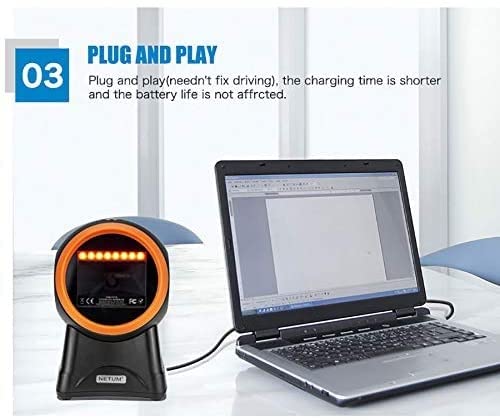
The NETUM NT-2050 barcode scanner connected to a laptop, illustrating its plug-and-play functionality via a USB port, requiring no additional driver installation.
3.2. Компатибилност система
The NT-2050 is compatible with various operating systems:
- Windows (7, 8, 10)
- Линук
- Мац ОС

An image illustrating the NETUM NT-2050 barcode scanner's compatibility with different operating systems, including Windows 7, Windows 8, Windows 10, and Mac OS.
4. Операција
The NT-2050 scanner offers efficient and versatile scanning capabilities.
4.1. Основно скенирање
Поставите баркод унутар поља скенера view. The omnidirectional design allows for scanning from various angles without precise alignment. A successful scan is typically indicated by an audible beep and/or a change in the indicator light.

An illustration showing the NETUM NT-2050 scanner's strong recognition ability and fast decoding speed across a variety of 1D and 2D barcode types, including those found on products and labels.
4.2. Multi-Function Scanning
The NT-2050 supports scanning from various sources, including:
- Physical labels on products and packaging.
- Documents such as courier receipts and express lists.
- Digital displays, including smartphone screens, even in low backlight conditions.
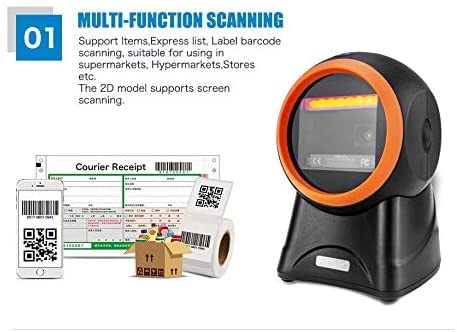
The NETUM NT-2050 scanner shown in a multi-function scanning scenario, capable of reading barcodes from items, express lists, labels, and smartphone screens, suitable for various retail and inventory environments.
4.3. Language and Sound Settings
The scanner supports automatic recognition of various keyboard languages (e.g., UK, US, French, German, Italian, Japanese, Spanish, Russian, Turkish). It also allows for beep volume adjustment and setting of prefixes or suffixes to scanned data. Refer to the included configuration guide (if separate) for specific barcode commands to modify these settings.
5. Barcode Symbologies
The NETUM NT-2050 scanner is capable of decoding a wide range of 1D and 2D barcode symbologies:
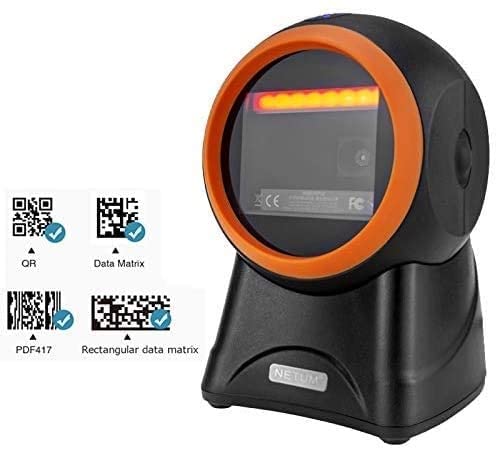
The NETUM NT-2050 barcode scanner positioned next to examples of QR Code, Data Matrix, and PDF417 barcodes, indicating its ability to read these formats.
5.1. 1D Barcodes
- UPC, EAN, JAN, UPC-A, UPC-E, EAN-8, EAN-13, JAN-8, JAN-13
- ISBN, ISSN
- Code 39 (with full ASCII)
- Codabar (NW7)
- Code 128, EAN 128, Code 93
- Interleaved 2 of 5 (ITF), Addendum 2 of 5
- IATA Code, MSI/Plessy
- China Postal Code, Code 32 (Italian Pharmacode)
- RSS 14, RSS Limited, RSS Expanded
5.2. 2D Barcodes
- Дата Матрик
- QR Code, Micro QR Code
- Азтец Цоде
- МакиЦоде
6. Одржавање
To ensure optimal performance and longevity of your NETUM NT-2050 scanner, follow these maintenance guidelines:
- Чишћење: Regularly clean the scanning window with a soft, lint-free cloth. For stubborn dirt, use a mild glass cleaner applied to the cloth (not directly to the scanner).
- Складиштење: Чувајте скенер на хладном и сувом месту, даље од директне сунчеве светлости и екстремних температура.
- Руковање: Избегавајте испуштање скенера или његово излагање јаким ударцима.
- Нега каблова: Немојте прекомерно савијати или увијати USB кабл.
КСНУМКС. Решавање проблема
If you encounter issues with your NT-2050 scanner, consider the following common solutions:
- Скенер не реагује: Ensure the USB cable is securely connected to both the scanner and the computer. Try a different USB port.
- Нема излаза скенирања: Verify that the scanner is powered on (check indicator light). Ensure the barcode is clean, undamaged, and within the scanning window.
- Нетачан излаз података: Check the keyboard language settings on your computer and ensure they match the scanner's configuration.
- Споро скенирање: Ensure the scanning window is clean. Try scanning in different lighting conditions.
- Уређај није препознат: Restart your computer. If the issue persists, try connecting the scanner to another computer to rule out a computer-specific problem.
For persistent issues, refer to the support section or contact customer service.
8. Техничке спецификације
| Феатуре | Спецификација |
|---|---|
| Бранд | НЕТУМ |
| Модел | NETUM 2050 |
| Димензије производа | 20 к 10 к 5 цм |
| Тежина артикла | 300 г |
| Компатибилност оперативног система | Linux, Mac, Windows |
| Компатибилни уређаји | Персонал Цомпутер |
| Извор напајања | Цордед Елецтриц |
| Тип конектора | УСБ |
| Технологија детекције покрета | Оптицал |
| Decode Capability (1D) | UPC, EAN, JAN, Code 39, Codabar, Code 128, Code 93, Interleaved 2 of 5, RSS, etc. |
| Decode Capability (2D) | Data Matrix, QR Code, Micro QR Code, Aztec Code, MaxiCode |
9. Гаранција и подршка
9.1. Информације о гаранцији
Овај производ долази са а ГАРАНЦИЈА 3 МЕСЕЦИ од датума куповине. Молимо вас да сачувате доказ о куповини за потребе гаранције.
9.2. Корисничка подршка
For technical assistance, troubleshooting, or warranty inquiries, please contact Megaa Electronics:
- Емаил: мегааелецтроницс@гмаил.цом
- Емаил: Support@megaaelectronics.com