1. Производ је готовview
The Point Wired Mini Keyboard Pt-350 is a compact and versatile keyboard designed for both gaming and general typing. It features a high-quality build and a modern design, adhering to industry standards for reliable performance. This keyboard is an ideal choice for users seeking a durable and efficient input device.
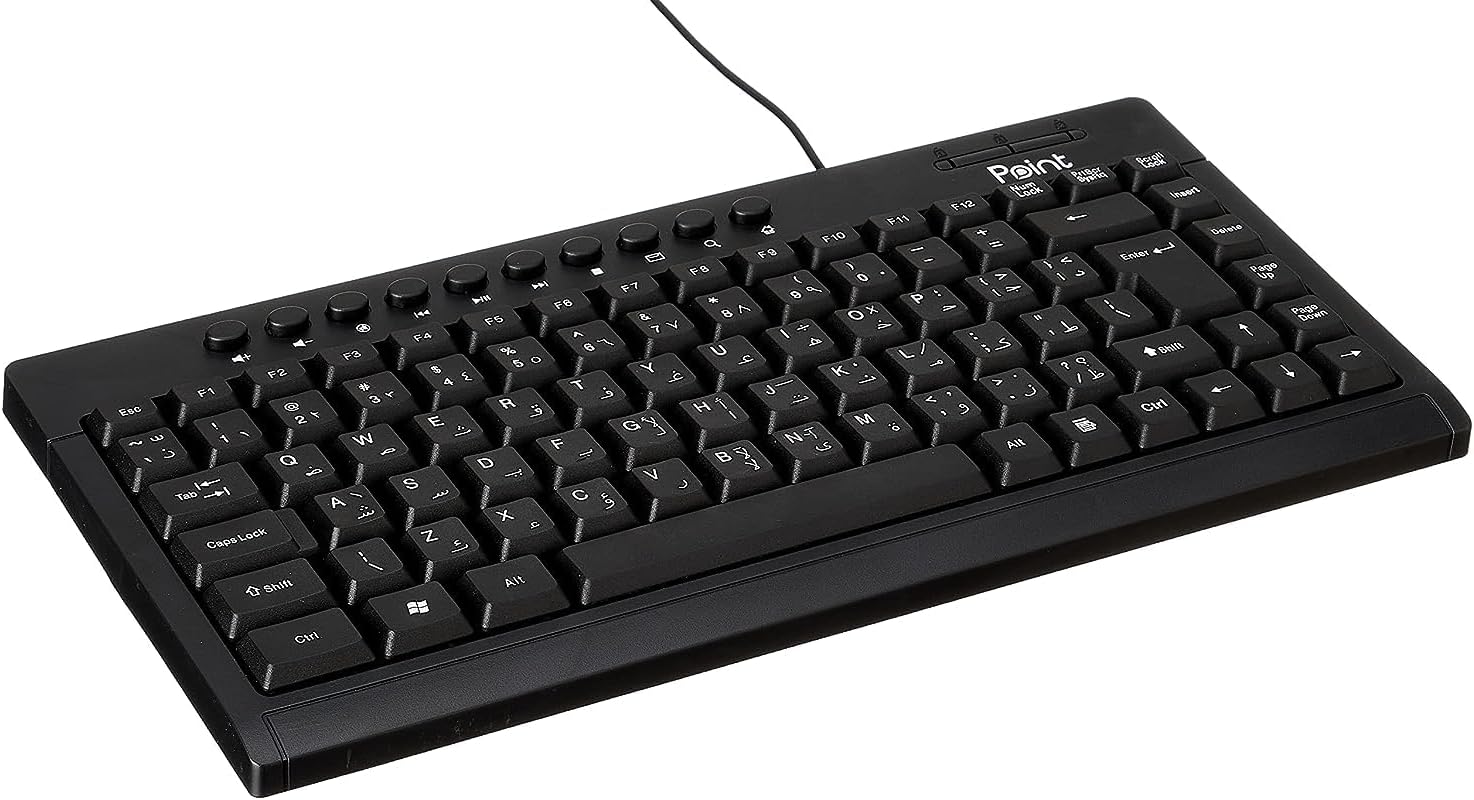
Слика 1.1: Под углом view of the Point Wired Mini Keyboard Pt-350, showcasinг његов компактан дизајн и распоред тастера.
Кључне карактеристике:
- Wired connectivity for stable performance.
- Compact design suitable for various setups.
- Durable construction from high-quality plastic materials.
- Designed for both gaming and typing applications.
2. Садржај пакета
Пажљиво проверите пакет како бисте били сигурни да су сви састојци присутни:
- Point Wired Mini Keyboard Pt-350
- Кориснички приручник (овај документ)
3. Подешавање
Follow these steps to set up your Point Wired Mini Keyboard Pt-350:
- Распакујте тастатуру: Пажљиво извадите тастатуру из паковања.
- Identify the USB Connector: The keyboard comes with an integrated USB cable.
- Повежите се са рачунаром: Locate an available USB port on your computer (desktop PC, laptop, etc.). Insert the keyboard's USB connector firmly into the USB port.
- Инсталација драјвера (Plug & Play): The keyboard is plug-and-play compatible. Your operating system (Windows, macOS, Linux) should automatically detect and install the necessary drivers. This process usually takes a few seconds.
- Проверите функционалност: Once connected, open a text editor or any application that accepts text input and test the keys to ensure proper operation.

Слика 3.1: Одозго надоле view of the keyboard, illustrating the key layout and integrated cable for connection.
4. Упутство за употребу
The Point Wired Mini Keyboard Pt-350 operates like a standard computer keyboard. Below are general instructions and tips for use:
Basic Typing:
- Simply press the desired keys to input characters, numbers, and symbols into your active application.
- Користите Схифт key for uppercase letters and alternative symbols on keys.
- Тхе Цапс Лоцк key toggles permanent uppercase typing.
- Тхе Бацкспаце key deletes characters to the left of the cursor.
- Тхе Ентер key confirms input or moves to the next line.
Функцијски тастери (F1-F12):
The function keys (F1 through F12) perform various tasks depending on the active program or operating system. Some common uses include:
- Ф1: Often opens help for the active program.
- Ф2: Renames a selected item.
- Ф5: Освежава а web page or document.
- Ф11: Toggles full-screen mode in many browsers.
Мултимедијални тастери:
The keyboard may include dedicated multimedia keys or secondary functions on the F-keys (accessed via the Fn key, if present). These typically control:
- Volume control (Mute, Volume Up, Volume Down)
- Media playback (Play/Pause, Stop, Previous Track, Next Track)
5. Одржавање
Правилно одржавање осигурава дуготрајност и оптималне перформансе ваше тастатуре:
- Чишћење: Regularly clean the keyboard to prevent dust and debris buildup. Use a soft, lint-free cloth slightly dampИсперите водом или благим раствором за чишћење. Избегавајте јаке хемикалије или абразивне материјале.
- Уклањање прашине: Use compressed air to blow out dust and crumbs from between the keys.
- Избегавајте изливање: Држите течности даље од тастатуре како бисте спречили оштећење унутрашњих компоненти. У случају просипања, одмах искључите тастатуру и оставите је да се потпуно осуши пре него што је поново повежете.
- Складиштење: Када се не користи, чувајте тастатуру на чистом и сувом месту, даље од екстремних температура.
КСНУМКС. Решавање проблема
If you encounter issues with your Point Wired Mini Keyboard Pt-350, refer to the following common problems and solutions:
Тастатура не реагује:
- Проверите УСБ везу: Уверите се да је USB кабл безбедно прикључен у исправан USB порт на рачунару. Покушајте са другим USB портом.
- Поново покрените рачунар: Једноставно поновно покретање често може решити проблеме са повезивањем.
- Тестирајте на другом рачунару: Connect the keyboard to another computer to determine if the issue is with the keyboard or your computer's setup.
- Проверите Управитељ уређаја (Windows): In Windows, go to Device Manager and check if the keyboard is listed under 'Keyboards' and if there are any error symbols. You might need to update or reinstall the driver.
Тастери не раде или су лепљиви:
- Чисти тастери: Dust, crumbs, or liquid residue can cause keys to stick or malfunction. Refer to the Maintenance section for cleaning instructions.
- физичка оштећења: Inspect the keys for any visible physical damage.
Incorrect Character Output:
- Проверите подешавања језика: Ensure your operating system's keyboard language settings match the physical layout of your keyboard.
- Driver Issue: Reinstalling the keyboard driver might resolve this.
Ако проблем и даље постоји након што сте испробали ове кораке, обратите се корисничкој подршци.
7. Спецификације
Technical specifications for the Point Wired Mini Keyboard Pt-350:

Слика 7.1: Страна view of the keyboard, highlighting its profile and compact form factor.
| Феатуре | Детаљ |
|---|---|
| Бранд Наме | Тачка |
| Модел | Пт-350 |
| Технологија повезивања | Виред |
| Компатибилни уређаји | Рачунар |
| Опис тастатуре | Мултифункционални |
| Препоручена употреба | ПЦ Гаминг |
| Посебне карактеристике | Гаминг |
| Боја | Црно |
| Стиле | Модерна |
| Материјал | Пластика |
| Димензије испоруке | 34.5 к 26.4 к 3 цм |
| Тежина | 800 грама |
| Први доступан датум | 4. септембра 2022. године |
| ASIN | B0BD2DM9ZJ |
8. Гаранција и подршка
This product is covered by a standard manufacturer's warranty. Please refer to the warranty card included with your purchase for specific terms and conditions, including the warranty period and coverage details.
For technical support, troubleshooting assistance, or warranty claims, please contact Point customer service through the contact information provided on the product packaging or the official Point website. When contacting support, please have your product model (Pt-350) and purchase details ready.


