Увод
This manual provides comprehensive instructions for the installation, operation, and maintenance of your Hiseeu 8-Channel Wireless 5MP PTZ and Bullet Camera Security System. Please read this manual thoroughly before using the product to ensure proper setup and functionality. Keep this manual for future reference.
Садржај пакета
Verify that all items listed below are included in your package. If any items are missing or damaged, please contact Hiseeu customer support.
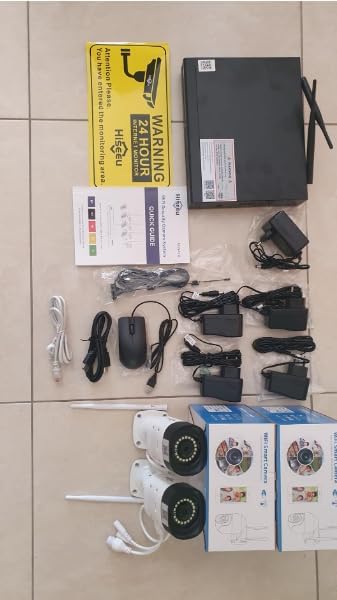
Image: All components included in the Hiseeu 8-Channel Wireless Security System package, laid out on a tiled surface. This includes the NVR unit, power adapters, USB mouse, Ethernet cables, quick guide, warning sign, and four cameras (two PTZ and two bullet cameras).
- 1x 8-Channel Network Video Recorder (NVR) with 1TB HDD pre-installed
- 2x 5MP PTZ Wireless Cameras
- 2x 5MP Bullet Wireless Cameras
- Адаптери за напајање за NVR и камере
- 1к УСБ миш
- Ethernet Cables (various lengths)
- ХДМИ кабл
- Монтажни завртњи и анкери
- Знак упозорења
- Брзи водич (овај приручник)
Производ је завршенview
The Hiseeu 8-Channel Wireless Security System provides comprehensive surveillance with a combination of PTZ (Pan-Tilt-Zoom) and bullet cameras. Key features include:
- 5MP High-Resolution Video: Captures clear and detailed images (2560x1920 pixels).
- PTZ Camera Functionality: Pan 320° horizontally, tilt 90° vertically, and 5x digital zoom for flexible monitoring.
- Двосмерни аудио: Built-in microphone and speaker on all cameras allow for real-time communication.
- Смарт Нигхт Висион: Equipped with 4 white LEDs for color night vision up to 20 meters, in addition to infrared night vision.
- IP66 водоотпорност: Cameras are designed to withstand various outdoor weather conditions.
- H.265+ видео компресија: Efficiently saves storage space and bandwidth compared to H.264.
- Хард диск од 1 ТБ: Pre-installed for continuous recording, supporting over 30 days of video for 4 cameras.
- Детекција покрета и упозорења: Receive instant alerts on your mobile device upon motion detection.
- Ремоте Viewинг: Access live feeds and recordings from compatible smartphones, tablets, and computers.

Image: A Hiseeu PTZ camera mounted on a wall, illustrating its horizontal (0-320°) and vertical (0-90°) rotation capabilities. A smartphone screen shows remote control of the camera's view.

Image: A Hiseeu bullet camera mounted outdoors, covered in raindrops, with icons indicating its IP66 waterproof rating and ability to withstand temperatures from -25°C to 50°C.
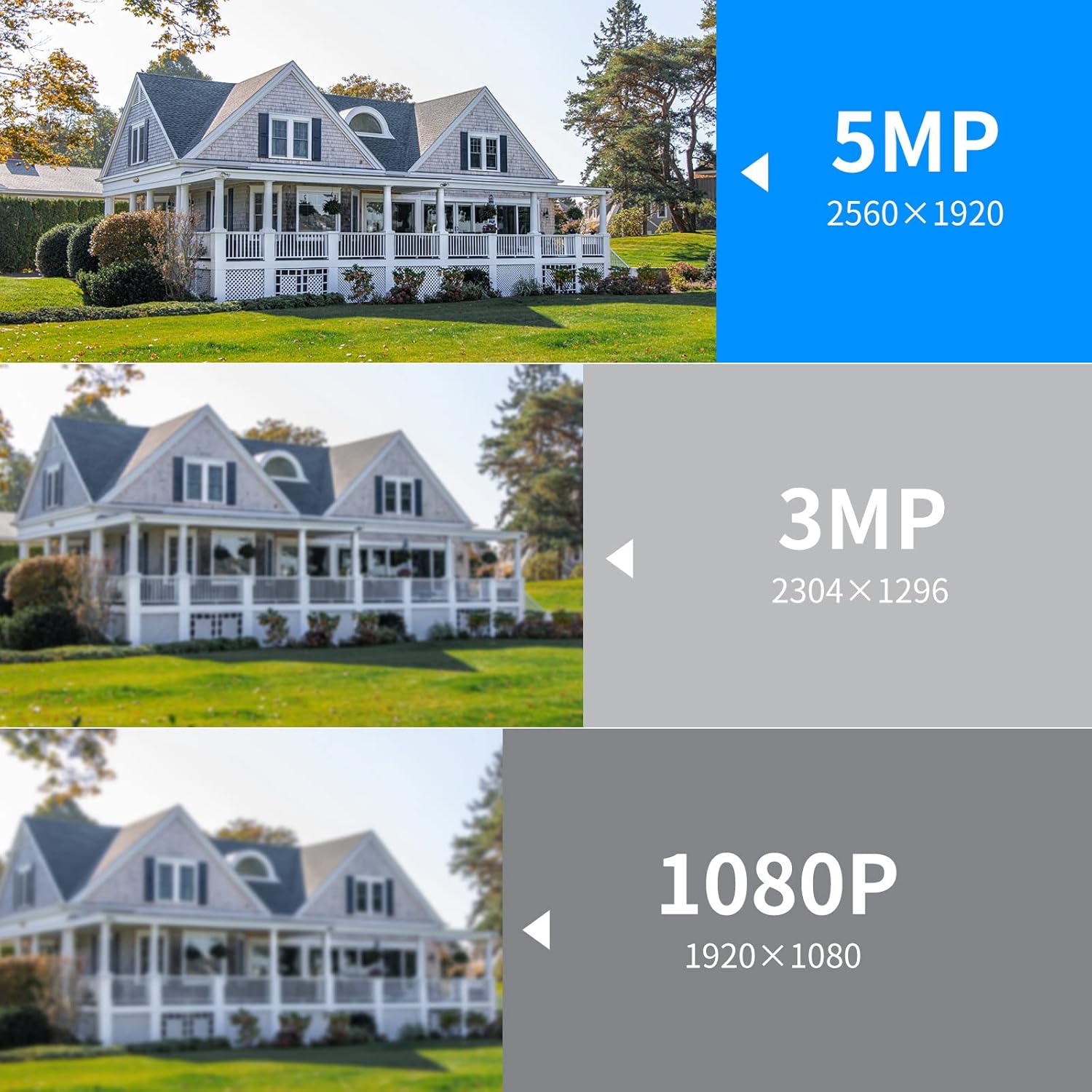
Image: A visual comparison of video resolutions, showing a house captured at 5MP (2560x1920), 3MP (2304x1296), and 1080P (1920x1080), highlighting the superior clarity of 5MP.

Image: The Hiseeu 5MP PTZ security camera system, showing the NVR connected to multiple cameras, including PTZ and bullet types. It also illustrates compatibility with additional Hiseeu 5MP wireless cameras for system expansion.
Водич за подешавање
1. Повезивање са НВР-ом
- Connect the NVR to a power source using the provided 12V/3A power adapter. Ensure the hard drive receives adequate power for normal operation.
- Connect the NVR to your router using an Ethernet cable for internet access, which is required for remote viewing and app functionality.
- Connect the NVR to a monitor or TV via the HDMI cable (or VGA, if available) to view интерфејс система.
- Plug in the USB mouse to the NVR for navigation.
2. Инсталација камере
- Choose suitable locations for your PTZ and bullet cameras, ensuring they have a clear field of view and are within range of the NVR's wireless signal.
- Mount the cameras securely using the provided screws and anchors.
- Connect each camera to its respective power adapter.
- The cameras are pre-paired with the NVR. Once powered on, they should automatically connect to the NVR and display video on the connected monitor.
3. Mobile App Setup
- Download the official Hiseeu security app from your smartphone's app store (available for iOS and Android).
- Региструјте налог и пријавите се.
- Add your NVR system to the app by scanning the QR code displayed on the NVR's monitor or by manually entering the device ID.
- Када се дода, можете view live feeds, access recordings, and control camera functions remotely.
Упутство за употребу
Уживо View и репродукцију
- На монитору: Use the USB mouse to navigate the NVR interface. Double-click a camera feed to view it in full screen. Right-click to access the main menu for playback, settings, and other functions.
- У апликацији за мобилне уређаје: Open the app to see live feeds from all connected cameras. Tap on a camera to view it individually. Use the playback feature to review снимљено фооtage.
Контрола ПТЗ камере
For PTZ cameras, you can remotely adjust the camera's direction and zoom:
Image: A Hiseeu PTZ camera mounted on a wall, illustrating its horizontal (0-320°) and vertical (0-90°) rotation capabilities. A smartphone screen shows remote control of the camera's view.
- Пан/Тилт: Use the directional controls in the NVR interface or mobile app to rotate the camera horizontally (320°) and vertically (90°).
- Дигитални зум: Use the zoom controls in the interface or app to digitally zoom in on specific areas.
Двосмерни аудио
All cameras support two-way audio, allowing you to listen and speak through the camera:

Image: A woman speaking into a smartphone, with a speech bubble "Ok, please by the doorway". Below, a Hiseeu camera is shown with a waterproof speaker icon, and a delivery person is at a door, with a speech bubble "Hi, you have got a package". This illustrates the two-way audio feature.
- Activate the microphone icon in the NVR interface or mobile app to listen to audio from the camera's location.
- Activate the speaker icon and speak into your device to transmit your voice through the camera's speaker.
Детекција покрета и упозорења
- Configure motion detection zones and sensitivity settings through the NVR menu or mobile app.
- When motion is detected, the system will automatically record and send an instant alert notification to your linked mobile device.
Управљање снимањем
- The 1TB HDD supports continuous 24/7 recording.
- Приступ снимљен фооtage via the NVR's playback menu or the mobile app's playback function.
- Recordings are stored locally on the HDD. Cloud storage options may be available through the app.
Одржавање
Управљање чврстим диском
The system utilizes H.265+ video compression, which significantly reduces file sizes, allowing for more storage time on the 1TB hard drive. This means approximately 30 days of continuous recording for 4 cameras.

Image: A diagram illustrating the efficiency of H.265+ compression compared to H.264. It shows that 1TB with H.265+ provides the same storage capacity as 2TB with H.264, effectively saving 50% storage space for the same video duration.
- The NVR is configured to overwrite the oldest footage automatically once the hard drive is full.
- Редовно правите резервне копије важних датотекаtagна екстерни уређај за складиштење података ако је потребно.
- Ensure the NVR receives a stable 12V/3A power supply for optimal hard drive performance.
Чишћење камере
- Периодично чистите сочива камере меком крпомamp тканину како би се осигурао јасан квалитет слике.
- Избегавајте употребу јаких хемикалија или абразивних материјала који могу оштетити сочиво или кућиште.
Решавање проблема
- No video displayed on monitor:
- Check if the NVR and monitor are powered on and properly connected via HDMI/VGA.
- Уверите се да је на вашем монитору изабран исправан улазни извор.
- Cameras not connecting to NVR:
- Verify that cameras are powered on and within wireless range of the NVR.
- If cameras were purchased separately, they may need to be manually paired with the NVR. Refer to the NVR's on-screen menu for pairing instructions.
- Ремоте viewing not working:
- Ensure the NVR is connected to the internet via an Ethernet cable to your router.
- Проверите интернет везу вашег мобилног уређаја.
- Verify that the NVR is correctly added to the mobile app.
- Лош квалитет слике:
- Очистите сочиво камере.
- Уверите се да нема препрека у видном пољу камере view.
- Check the camera's resolution settings in the NVR menu.
- Motion detection alerts not received:
- Verify motion detection settings are enabled and configured correctly in the NVR and mobile app.
- Проверите подешавања обавештења апликација на свом паметном телефону.
Спецификације
| Феатуре | Детаљ |
|---|---|
| Димензије производа (Д к Ш к В) | 32.5 к 28.4 к 26 цм; 4.63 килограма |
| Произвођач | Хисееу |
| Број модела ставке | 8WK-4HBC25-1T-UK |
| Бранд | Хисееу |
| Технологија повезивања | Бежични |
| Резолуција снимања видео записа | 5 мегапиксела |
| Број канала | 8 |
| Капацитет меморије | 1 ТБ |
| Извор напајања | ДЦ/АЦ |
| Компатибилни уређаји | Laptops, Personal Computers, Smartphones, TV, Tablets |
| Фраме Рате | 30 или 60 кадрова у секунди |
| Укупно УСБ портова | 1 |
| Формат сигнала | Дигитал |
| Технологија оптичког сензора | ЦМОС |
| Хардверски интерфејс | 802.11 б/г/н |
| View Угао | 360 степени (PTZ могућност) |
| Бок Цонтентс | Security Camera System (NVR, PTZ cameras, Bullet cameras, accessories) |
Гаранција и подршка
Hiseeu provides lifetime technical support for all customers. If you encounter any issues or have questions regarding your security system, please do not hesitate to contact us. Our support team aims to respond and assist within 24 hours.
For an extended power cable, please search for ASIN: B08NTBFWG7.


