1. Увод
This user manual provides comprehensive instructions for the installation, operation, and maintenance of your Weiser SmartCode Keypad Electronic Deadbolt. This advanced keyless entry system offers enhanced security and convenience for your home.
The SmartCode deadbolt features a sleek design, a backlit keypad for visibility, and the ability to store up to 50 user codes. It operates on 4 AA batteries and includes SmartKey re-key technology for added security and flexibility.
2. Безбедносне информације
Please read and understand all instructions before installing and using this product. Keep this manual for future reference.
- Do not attempt to disassemble or modify the lock. This may cause damage to the product and void the warranty.
- Користите само наведени тип батерија (4 АА алкалне батерије). Не мешајте старе и нове батерије или различите типове батерија.
- Ensure proper polarity when inserting batteries.
- Чувајте све кључеве и корисничке кодове на сигурном месту.
- Avoid exposing the lock to extreme temperatures or direct moisture.
- Regularly check the lock's functionality and battery level.
3. Садржај пакета
Пре почетка инсталације проверите да ли су све компоненте присутне:

Image: Complete package contents of the Weiser SmartCode Keypad Electronic Deadbolt.
- Electronic Deadbolt (Exterior Keypad Assembly)
- Electronic Deadbolt (Interior Battery Unit)
- Латцх
- Стрике Плате
- Монтажна плоча
- Опрема за инсталацију (шрафови)
- 2 Кеис
- СмартКеи Тоол
- Упутство за инсталацију (овај документ)
Note: 4 AA batteries are required and not included in the package.
4. Подешавање и инсталација
The Weiser SmartCode deadbolt is designed for easy installation. For a seamless setup experience, it is highly recommended to use the free BILT app, which provides step-by-step interactive 3D instructions with voice and video guidance.
4.1 Компатибилност врата
This lock is designed to fit standard doors 1-3/8" to 1-3/4" (35 mm - 44 mm) thick with an adjustable backset (2-3/8" or 2-3/4"). It is ideal for most exterior and interior residential doors.
4.2 Кораци инсталације (прекоview)
- Припремите врата: Ensure your door is properly drilled and aligned for a deadbolt installation.
- Инсталирајте браву: Insert the latch into the door edge, ensuring the correct backset is selected.
- Инсталирајте спољни склоп: Place the exterior keypad assembly onto the door, feeding the cable through the cross bore.
- Инсталирајте монтажну плочу: Причврстите монтажну плочу на врата помоћу приложених вијака, водећи рачуна да кабл прође кроз плочу.
- Connect the Cable and Install Interior Assembly: Connect the cable from the exterior assembly to the interior battery unit. Mount the interior unit to the mounting plate.
- Инсталирајте батерије: Insert 4 AA alkaline batteries into the interior unit, observing polarity.
- Извршите процес руковања вратима: This crucial step teaches the lock the orientation of your door. Follow the specific instructions in the full manual or BILT app.
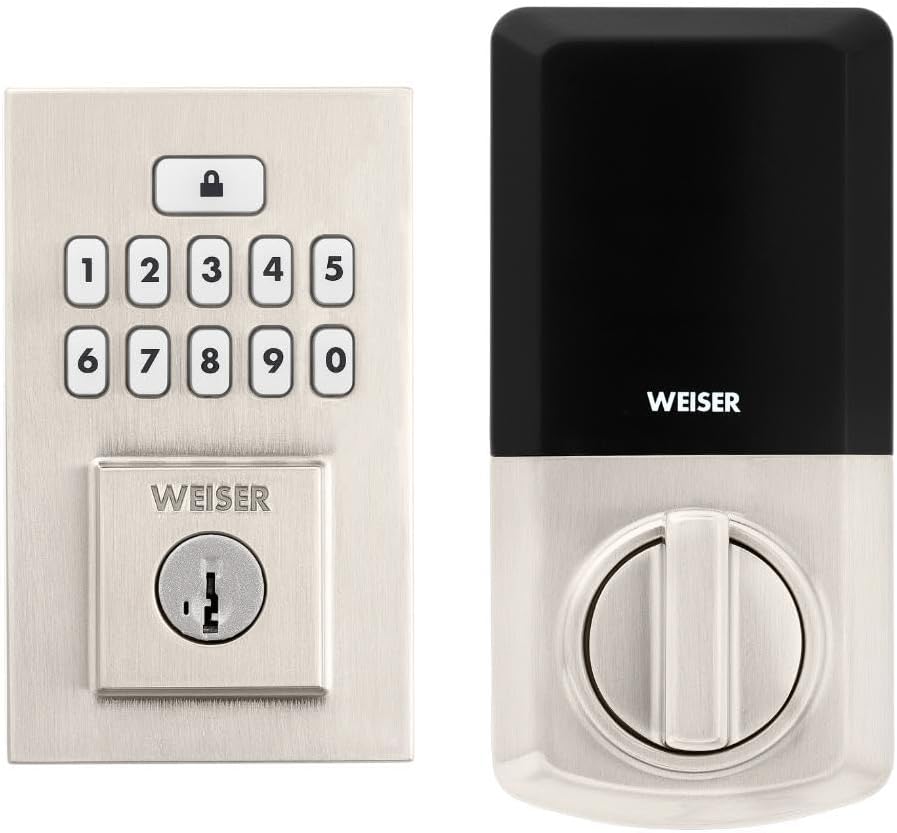
Image: Assembled Weiser SmartCode Keypad Electronic Deadbolt, showing both exterior and interior components.

Image: Close-up of the exterior keypad, featuring the backlit numeric buttons and keyhole.
5. Упутство за употребу
5.1 Закључавање врата
- Закључавање једним додиром: Press the Lock button (top button with padlock icon) on the keypad. The deadbolt will extend.
- Функција аутоматског закључавања: If enabled, the deadbolt will automatically extend after a set period (e.g., 30 seconds) once unlocked.
5.2 Откључавање врата
- Коришћење корисничког кода: Enter your personalized 4-8 digit user code on the keypad. The deadbolt will retract.
- Коришћење кључа: Уметните физички кључ у кључаоницу и окрените га да бисте откључали.
5.3 Програмирање корисничких кодова
The lock supports up to 50 user codes and 1 master code. Refer to the detailed programming instructions in the full manual for adding, deleting, or modifying codes.
- Мастер код: The master code is used to add and delete user codes. It does not unlock the door.
- Кориснички кодови: These codes are used to unlock the door.


Image: Icons illustrating user management, programming, and auto-lock features.
5.4 SmartKey Re-key Technology
The SmartKey re-key technology allows you to re-key your lock in seconds, maintaining key control and protecting against lost, stolen, or unauthorized keys without removing the lock from your door. Use the provided SmartKey tool and follow the instructions carefully.

Image: SmartKey Security feature, demonstrating how to re-key the lock.
6. Одржавање
6.1 Замена батерије
The lock operates on 4 AA alkaline batteries. When the batteries are low, the lock will provide an audible and/or visual low battery warning. Replace all four batteries simultaneously to ensure optimal performance.
- Уклоните поклопац батерије на унутрашњој јединици.
- Уклоните старе батерије и правилно их одложите.
- Уметните нове алкалне батерије типа АА, водећи рачуна о исправном поларитету (+/-).
- Вратите поклопац батерије.
Note: Battery life can vary based on usage frequency and environmental conditions. If the auto-lock feature is frequently used, battery life may be shorter.
6.2 Чишћење
Очистите браву меком крпомamp крпа. Избегавајте употребу абразивних средстава за чишћење, растварача или хемијских спрејева, јер они могу оштетити завршну обраду и електронске компоненте.
КСНУМКС. Решавање проблема
| Проблем | Могући узрок | Решење |
|---|---|---|
| Lock does not respond or keypad is not lit. | Истрошене батерије. | Замените све четири АА батерије. |
| Lock beeps 3 times during programming or code entry. | Incorrect code, programming error, or lock not handed correctly. | Verify the code. Re-attempt programming steps carefully. Perform the door handing process again. If issues persist, reset the unit to factory settings (refer to full manual). |
| Deadbolt extends when door is open (Auto-lock issue). | The lock does not have a sensor to detect if the door is open or closed. Auto-lock activates after the set time regardless of door position. | This is normal operation. Ensure the door is closed before the auto-lock time expires, or disable the auto-lock feature if it causes inconvenience. |
| Keypad is difficult to see at night. | Backlight not active. | The keypad is backlit and stays lit for 30 seconds after inactivity. Ensure there is enough battery power. |
| Lock is not operating smoothly. | Misalignment of door or strike plate, or internal mechanism issue. | Check door and frame alignment. Ensure the strike plate is correctly installed. If the issue persists, contact customer support. |
8. Спецификације
| Феатуре | Детаљ |
|---|---|
| Број модела | 9ГЕД92600-003 |
| Димензије производа | КСНУМКС к КСНУМКС к КСНУМКС цм (КСНУМКС к КСНУМКС к КСНУМКС инча) |
| Тежина артикла | 454 г (1 лб) |
| Боја | Сатин Ницкел |
| Стиле | Савремени |
| Заврши | Брусхед |
| Материјал | Метал |
| Тип закључавања | Затвор, електронски |
| Тастатура | 10-Button, Backlit |
| Кориснички кодови | Up to 50 user codes, 1 master code |
| Извор напајања | 4 АА батерија (нису укључене) |
| Компатибилност дебљине врата | 1-3/8" to 1-3/4" (35 mm - 44 mm) |
| Бацксет | Подесиво 2-3/8" или 2-3/4" |
| Посебне карактеристике | Weather Resistant, Anti-Bump, Auto-Lock, One-Touch Lock, Back-Lit Keypad, SmartKey Security |
| ANSI разред | Оцена 2 |
| Земља порекла | Кина |
9. Гаранција и подршка
9.1 Информације о гаранцији
The Weiser SmartCode Keypad Electronic Deadbolt comes with a 1 година гаранције од датума куповине. Ова гаранција покрива недостатке у материјалу и изради при нормалној употреби. Молимо вас да сачувате доказ о куповини за потребе подношења захтева за гаранцију.
For full warranty details and limitations, please refer to the official Weiser webсајту или контактирајте корисничку подршку.
9.2 Корисничка подршка
For technical assistance, troubleshooting, or warranty inquiries, please contact Weiser customer support:
- Подршка на мрежи: Visit the official Weiser website for FAQs, video tutorials, and contact forms.
- Телефонска подршка: Refer to the contact information provided on the Weiser packaging or webсајт за радно време телефонске подршке.
- BILT App: Utilize the BILT app for interactive 3D installation and programming guidance.
When contacting support, please have your product model number (9GED92600-003) and purchase date available.


