Увод
Thank you for choosing the Havit Gaming Mouse MS955. This optical gaming mouse features a USB interface, adjustable DPI settings, and RGB backlighting, designed to enhance your gaming experience. This manual provides essential information for setting up, operating, and maintaining your mouse.
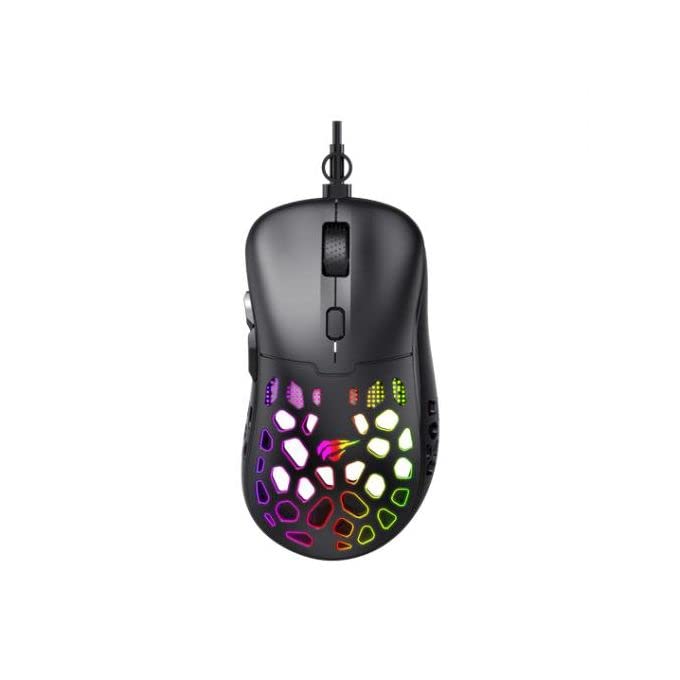
Слика: Одозго надоле view of the Havit Gaming Mouse MS955, showcasing its ergonomic design and vibrant RGB lighting through the honeycomb shell.
Сетуп
- Распакујте миш: Carefully remove the Havit Gaming Mouse MS955 from its packaging.
- Повежите се са рачунаром: Locate an available USB port on your computer. Insert the USB connector of the mouse into the USB port.
- Инсталација драјвера: The mouse is plug-and-play. Your operating system (Windows XP, Windows 7, Linux, etc.) will automatically detect and install the necessary drivers. No additional software installation is typically required for basic functionality.
- Тест функционалност: Once connected, move the mouse and click the buttons to ensure it is working correctly.
Упутство за употребу
The Havit Gaming Mouse MS955 features 6 programmable buttons and adjustable DPI settings for precise control.

Слика: Са стране view of the Havit Gaming Mouse MS955, highlighting the left-side buttons and scroll wheel.
- Леви клик: Primary button for selection and interaction.
- Десни клик: Secondary button for context menus and alternative actions.
- Точак за померање: Користи се за листање кроз документе и web pages. It also functions as a clickable middle button.
- Дугме за подешавање DPI-ја: Located behind the scroll wheel. Press this button to cycle through different DPI sensitivity levels (800-1200-2400-3200 DPI). Each press changes the sensitivity, allowing you to adapt to various gaming or work scenarios.
- Бочна дугмад: Two buttons are located on the left side of the mouse. These are typically used for 'forward' and 'backward' navigation in web browsers or can be programmed for in-game actions.
РГБ осветљење
The Havit Gaming Mouse MS955 features an integrated RGB backlight system. The lighting effects are typically automatic and may change with DPI settings or cycle through various colors. There are no dedicated buttons for controlling the RGB lighting directly on the mouse.
Одржавање
- Чишћење: To clean the mouse, disconnect it from your computer. Use a soft, dry cloth to wipe the surface. For stubborn dirt, a slightly damp cloth can be used, ensuring no liquid enters the mouse. Do not use harsh chemicals or abrasive cleaners.
- Складиштење: Чувајте миш на чистом, сувом месту, даље од екстремних температура и директне сунчеве светлости.
- Нега каблова: Избегавајте прекомерно савијање или увијање USB кабла како бисте спречили оштећења.
Решавање проблема
- Миш не реагује:
- Уверите се да је USB кабл безбедно прикључен у исправан USB порт на рачунару.
- Покушајте да прикључите миш на други УСБ порт.
- Поново покрените рачунар.
- DPI се не мења:
- Press the DPI button firmly. Ensure you are pressing the correct button.
- The mouse cycles through fixed DPI settings; there is no visual indicator other than cursor speed change.
- РГБ светла не раде:
- Verify the mouse is properly connected to your computer.
- The RGB lighting is automatic; if the mouse is functioning otherwise, the lighting should also be active.
Спецификације
| Феатуре | Детаљ |
|---|---|
| Бранд | Хавит |
| Модел | МС955 |
| Тип интерфејса | УСБ |
| Димензије | 115.2 к 63 к 37.6 мм |
| Број кључева | 6 |
| Чипсет | НСТ5311 |
| ДПИ резолуција | 800-1200-2400-3200 ДПИ |
| Оператинг Волtage | 5V |
| Животни век кључа | 3,000,000 клика |
| Цабле Ленгтх | 1.5 м |
| Откривање покрета | Оптицал |
| Оријентација руке | Тачно |
| Препоручена употреба | Гаминг |
| Оперативни системи | Линукс, Виндоус 7, Виндоус XP |
| Боја | Црно |
Гаранција и подршка
For warranty information or technical support, please refer to the documentation included with your purchase or visit the official Havit webсајт. Сачувајте доказ о куповини за потребе гаранције.


