1. Увод
Thank you for choosing the SPC Magnes 3 WiFi Surveillance Camera. This manual provides essential information for the proper installation, operation, and maintenance of your device. Please read this manual thoroughly before using the product to ensure optimal performance and safety.
The SPC Magnes 3 is a versatile security camera designed for both indoor and outdoor use, featuring a long-lasting rechargeable battery, high-definition video, night vision, motion detection, and two-way audio communication.
2. Производ је готовview
The SPC Magnes 3 camera is designed for ease of use and robust performance. Below are key components and features.
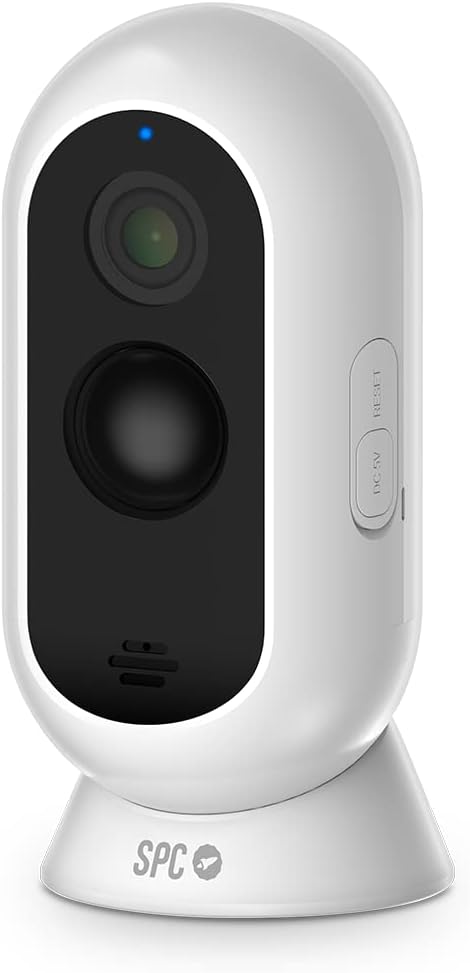
Слика 2.1: Фронт view of the SPC Magnes 3 camera, showing the lens, infrared sensors, and microphone. A blue indicator light is visible at the top.

Слика 2.2: Назад view of the SPC Magnes 3 camera, highlighting the speaker grille and the DC 5V charging port, along with the reset button.

Слика 2.3: The SPC Magnes 3 camera positioned next to a smartphone, illustrating the live view and control options available through the SPC IoT mobile application.

Слика 2.4: The SPC Magnes 3 camera being attached to its magnetic wall mount, demonstrating the ease of installation and removal.
Укључене компоненте:
- SPC Magnes 3 Camera
- Валл Моунт
- Магнетски држач
- Брзи водич
- УСБ кабл
3. Подешавање
3.1 Пуњење камере
Before initial use, fully charge the SPC Magnes 3 camera. Connect the provided USB cable to the DC 5V port on the camera and plug the other end into a compatible USB power adapter (not included). The indicator light will show charging status.
3.2 Installing the SPC IoT App
- Преузмите SPC IoT application from the Google Play Store (for Android) or the Apple App Store (for iOS).
- Инсталирајте апликацију на паметном телефону или таблету.
- Отворите апликацију и направите налог или се пријавите ако га већ имате.
3.3 Упаривање камере са апликацијом
- Ensure your camera is charged and powered on.
- In the SPC IoT app, tap on 'Add Device' or the '+' icon.
- Select 'Security Camera' or the appropriate device type.
- Follow the on-screen instructions to connect the camera to your 2.4GHz Wi-Fi network. You may need to scan a QR code displayed on your phone with the camera lens.
- Када се повеже, камера ће се појавити на листи уређаја у апликацији.
3.4 Монтирање камере
The SPC Magnes 3 can be placed on a flat surface using its magnetic base or mounted to a wall or ceiling.
- Положај стола: Simply place the camera on any stable, flat surface. The magnetic base provides stability.
- Монтажа на зид/плафон:
- Choose a suitable location, ensuring good Wi-Fi signal strength.
- Use the provided wall mount as a template to mark drill holes.
- Избушите рупе и по потреби уметните анкере у зид.
- Secure the wall mount to the surface using screws.
- Attach the camera to the magnetic holder on the wall mount. Adjust the camera angle as needed.
The camera is IP65 waterproof, making it suitable for outdoor installation where it may be exposed to rain.
4. Операција
4.1 Уживо View
Open the SPC IoT app and select your SPC Magnes 3 camera from the device list to access the live video feed. You can view у реалном времену фооtagе са било ког места са интернет везом.
4.2 Двосмерни аудио
The camera features a built-in microphone and speaker for two-way audio communication. In the live view, tap the microphone icon to speak through the camera and the speaker icon to listen to audio from the camera's location.
4.3 Детекција покрета и обавештења
The SPC Magnes 3 is equipped with motion detection. When motion is detected, the camera will automatically record and send an instant notification to your smartphone via the SPC IoT app. You can adjust motion sensitivity settings within the app.
4.4 Ноћни вид
The camera automatically switches to infrared (IR) night vision in low-light conditions, providing clear black-and-white video up to 10 meters away. This ensures continuous monitoring even in complete darkness.
4.5 Снимање и складиштење
The camera supports local storage via a microSD card (not included) for continuous recording or event-triggered recordings. Cloud storage options may also be available through the SPC IoT app (subscription may be required).
5. Одржавање
5.1 Управљање батеријом
The 9600 mAh rechargeable battery provides up to 3 months of operation, depending on usage frequency and Wi-Fi signal quality. When the battery level is low, the app will notify you. To recharge, detach the camera from its mount and connect it to a USB power source using the provided cable.
5.2 Чишћење
To maintain optimal image quality, regularly clean the camera lens with a soft, dry, lint-free cloth. Do not use harsh chemicals or abrasive materials.
5.3 Ажурирања фирмвера
Periodically check the SPC IoT app for available firmware updates. Keeping your camera's firmware updated ensures the latest features, security enhancements, and bug fixes.
КСНУМКС. Решавање проблема
| Проблем | Могући узрок | Решење |
|---|---|---|
| Камера се не повезује на Ви-Фи | Incorrect Wi-Fi password; Camera too far from router; Only 5GHz Wi-Fi available. | Verify password; Move camera closer to router; Ensure you are connecting to a 2.4GHz Wi-Fi network. |
| Лош квалитет слике | Dirty lens; Insufficient lighting; Poor Wi-Fi signal. | Clean the lens; Ensure adequate lighting or rely on night vision; Improve Wi-Fi signal. |
| Батерија се брзо празни | Frequent motion detection events; Weak Wi-Fi signal; Continuous live view. | Adjust motion sensitivity; Improve Wi-Fi signal; Minimize continuous live viewинг. |
| No motion detection notifications | Motion detection disabled; App notifications blocked; Incorrect sensitivity. | Enable motion detection in app; Check phone notification settings; Adjust sensitivity. |
| Двосмерни звук не ради | Microphone/speaker muted in app; Volume too low. | Unmute microphone/speaker in app; Increase volume. |
7. Спецификације
| Број модела | 6309Б |
| Произвођач | СПЦ |
| Димензије (Д к Ш к В) | 50 к 50 к 28 цм |
| Тежина | 225 грама |
| Боја | Бела |
| Материјал | Пластика |
| Извор напајања | Напајање батеријом (потребна је 1 литијум-јонска батерија) |
| Капацитет батерије | 9600 мАх |
| Посебне карактеристике | Night vision, IP65 Waterproof, Rechargeable battery, Motion detection, Two-way audio |
| Поље оф View | 130° |
| Ноћни вид | До 10 метара |
| Метод инсталације | Screw-in (Wall Mount) / Table Mount |
| Земља порекла | Кина |
8. Гаранција и подршка
For warranty information and technical support, please refer to the official SPC webсајт или контактирајте њихову корисничку службу. Сачувајте рачун као доказ о куповини за потребе гаранције.
Информације о доступности резервних делова тренутно нису доступне.


