
1. Увод
Thank you for choosing the FLEXISPOT EF1 Basic Plus Electric Height-Adjustable Desk. This manual provides essential information for the safe and efficient assembly, operation, and maintenance of your new desk. Please read these instructions thoroughly before use and retain them for future reference.
Безбедносна упозорења
- Always follow the assembly instructions carefully to prevent accidents and ensure proper function.
- Do not exceed the maximum load capacity of 70 kg (154 lbs) on the desktop. Overloading can compromise stability and cause damage.
- To prevent tipping, especially when the desk is at its maximum height (121 cm), ensure the desk is anchored correctly to a stable wall.
- Keep children and pets away from the desk during operation to avoid injury from moving parts.
- Уверите се да нема препрека на путањи стола током подешавања висине.
- Не седите или стојте на столу.
- Искључите напајање пре чишћења или било каквог одржавања.
2. Подешавање и монтажа
The FLEXISPOT EF1 Basic Plus desk requires assembly. Please ensure all components are present before beginning. Refer to the included assembly guide for detailed step-by-step instructions.
Распакивање и провера компоненти
Carefully unpack all parts and lay them out on a soft, clean surface to prevent scratches. Verify that all components listed in the packing list are present.
Скупштина завршенаview
- Attach the lifting columns to the desk feet.
- Connect the crossbar to the lifting columns.
- Secure the desktop to the assembled frame.
- Install the control panel and cable management tray (if included).
- Connect all motor and control cables according to the wiring diagram.
- Укључите кабл за напајање у уземљену утичницу.

Слика 1: The FLEXISPOT EF1 Basic Plus Electric Height-Adjustable Desk with a black tabletop and white frame, set up in a home office environment.

Слика 2: This image illustrates the smooth, single-piece desktop construction of the FlexiSpot desk, contrasting it with typical multi-piece desktops that may have uneven surfaces.

Слика 3: An illustrative diagram detailing various desktop size and color options, along with key specifications for the desk frame, including adjustable height range, static and dynamic load capacities, and lifting noise levels.
3. Упутство за употребу
Контролна табла је завршенаview

Слика 4: Детаљно view of the desk's Smart Control Panel, highlighting the LED display, the up and down adjustment buttons, and four numbered buttons for memory presets.
The desk is equipped with an advanced all-in-one keypad for easy height adjustment and memory functions.
- ЛЕД дисплеј: Shows the current desk height in centimeters.
- Up/Down Buttons (⌃ / ⌄): Press and hold to manually adjust the desk height upwards or downwards. Release the button to stop at the desired height.
- Пресет меморије (1, 2, 3, 4): Four programmable buttons to save and recall your preferred sitting and standing heights.
Подешавање пресета меморије
- Подесите сто на жељену висину помоћу дугмади горе/доле.
- Press the "M" or "SET" button (if available, otherwise proceed to step 3) to activate memory mode.
- Press one of the numbered preset buttons (1, 2, 3, or 4) within 3 seconds. The LED display will show "S-1", "S-2", etc., indicating the height has been saved to that preset.
Recalling Memory Presets
Simply press the desired numbered preset button (1, 2, 3, or 4). The desk will automatically move to the saved height.
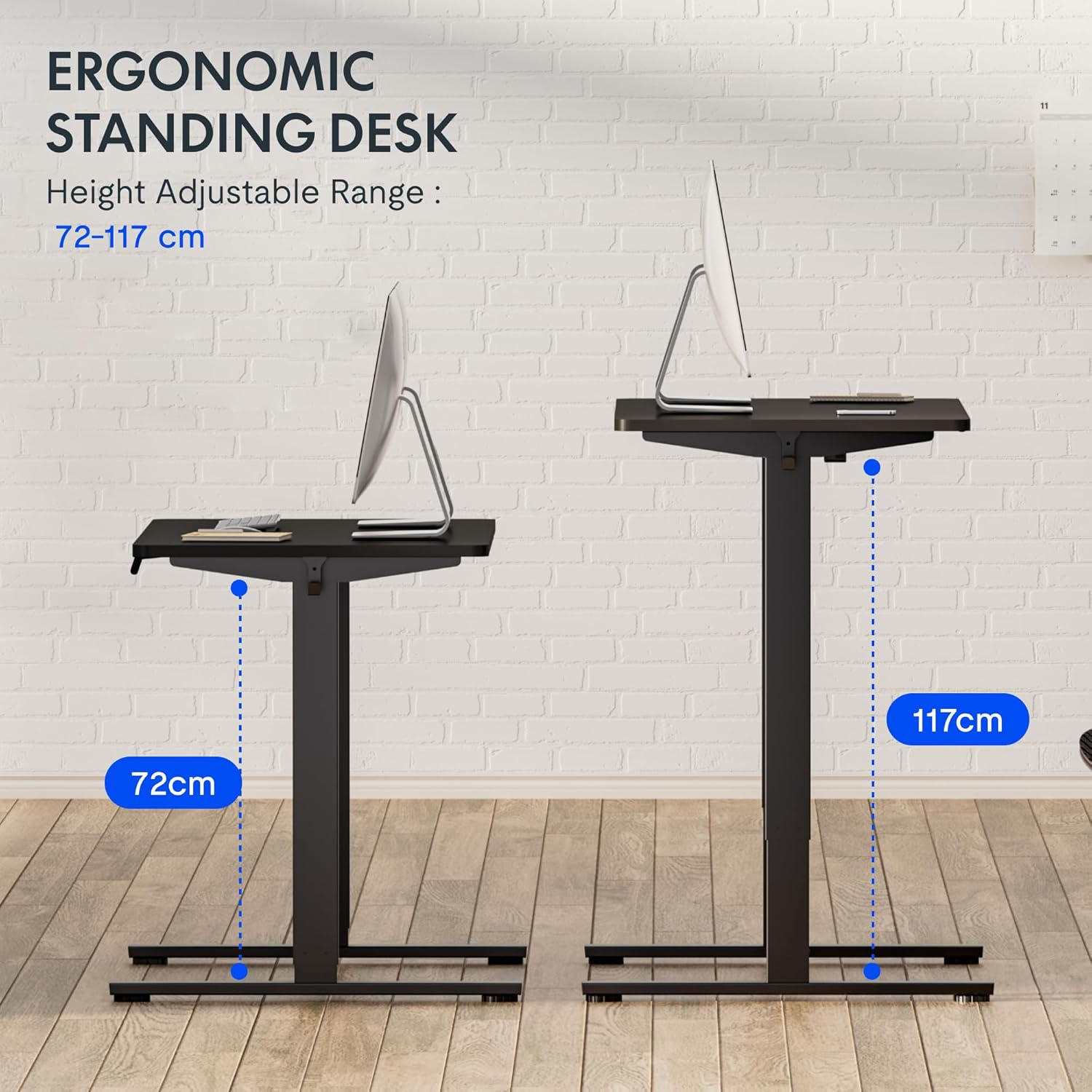
Слика 5: This image demonstrates the height adjustment capabilities of the desk, showing a range from 72 cm (sitting height) to 117 cm (standing height). Note that the full adjustable range for this model is 71 cm to 121 cm.
4. Одржавање
Regular maintenance ensures the longevity and optimal performance of your FLEXISPOT desk.
- Чишћење: Обришите радну површину и оквир меком крпомamp крпом. Избегавајте абразивна средства за чишћење или јаке хемикалије које би могле оштетити завршну обраду.
- Управљање кабловима: Periodically check and organize cables to prevent tangles and ensure smooth operation.
- инспекција: Regularly inspect all screws and bolts to ensure they are tight. Retighten if necessary.
- подмазивање: The lifting columns are generally maintenance-free. Do not attempt to lubricate internal components unless specifically instructed by customer support.
КСНУМКС. Решавање проблема
If you encounter any issues with your desk, refer to the following common problems and solutions.
| Проблем | Могући узрок | Решење |
|---|---|---|
| Радни сто се не помера. |
|
|
| Сто се помера неравномерно или производи необичне звуке. |
|
|
| Error code displayed on LED. |
|
|
Поступак ресетовања
If the desk is not functioning correctly, a reset may resolve the issue.
- Press and hold the "Down" button until the desk reaches its lowest position and slightly retracts, then releases.
- If this does not initiate a reset, unplug the desk from the power outlet for at least 10 seconds, then plug it back in.
- Repeat step 1. The desk should now be reset.
6. Спецификације
| Бранд | ФЛЕКСИСПОТ |
| Број модела | ХУ-КСИ-201 |
| Desktop Dimensions (L x W x Thickness) | 120 к 80 к 2.5 цм |
| Adjustable Height Range (without tabletop) | 71 цм - 121 цм |
| Max Lifting Speed | 2.5 цм/с |
| Максимални капацитет оптерећења | 70 кг (154 лбс) |
| Lifting Noise Level | <50 дБ |
| Материјал за радну површину | Engineered Wood (MDF) with High-Pressure Laminate |
| Материјал оквира | Челик обложен прахом |
| Боја | Black tabletop + White frame |
| Карактеристике | Electric height adjustment, 4 memory presets |
7. Гаранција и подршка
Информације о гаранцији
FLEXISPOT stands behind the quality of its products. Your EF1 Basic Plus desk comes with the following warranty:
- 3-годишња гаранција: Covers controllers and motors.
- 5-годишња гаранција: Covers the desk frame.
Молимо вас да сачувате доказ о куповини за потребе гаранције. Гаранција покрива производне недостатке при нормалној употреби. Не покрива штету насталу услед злоупотребе, незгода, неовлашћених модификација или непоштовања упутстава из овог упутства.

Слика 6: An image outlining the warranty coverage for FlexiSpot desks, specifically mentioning a 3-year warranty for controllers and motors, and a 5-year warranty for the desk frame.
Корисничка подршка
For technical assistance, warranty claims, or any questions regarding your FLEXISPOT EF1 Basic Plus desk, please contact FLEXISPOT customer support.
Webсајт: ввв.флекиспот.цом (или регионални еквивалент)
Емаил: Refer to your purchase documentation or the official FlexiSpot webсајт за контакт имејл.
Телефон: Refer to your purchase documentation or the official FlexiSpot webсајт за контакт телефон.